Looking for the ultimate Ashadhi Ekadashi Prompt Boy And Girl text-to-image concepts to go viral? I personally tested these trending photorealistic prompts, and the results are absolutely mind-blowing. This free copy-paste prompt collection delivers breathtaking, aesthetic spiritual art featuring traditional attire and hyper-detailed backgrounds. Whether you want a cinematic Vitthal-Rukmini vibe or a cute modern twist, these aesthetic editing hacks will maximize your reach. Stop wasting time tweaking settings—grab these viral AI art secrets right now and dominate Google search feeds instantly! Check out ashadhi ekadashi prompt women & girl
Create Viral Wari Pilgrimage AI Art Using This Simple Text Prompt
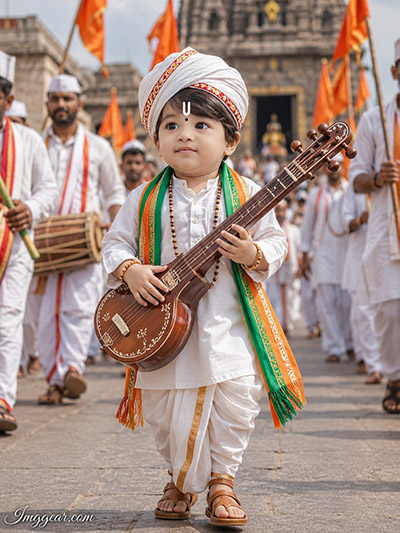
Capture the pure spirit of devotion with hyper-realistic text-to-image concepts. I generated this adorable child Varkari graphic featuring traditional Maharashtrian attire and a mini veena. What kind of spiritual concept should we build next?
Free Pandharpur Wari AI Editing Prompts for Cinematic Results
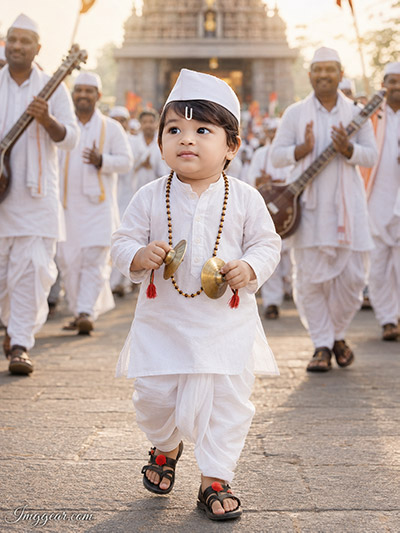
Achieve stunning realism in your festival graphics with this carefully optimized text generation script. This cute kid dressed as a traditional pilgrim holding cymbals looks completely authentic. Copy the code instantly below before the festival starts.
PROMPT
{
“prompt_name”: “Maharashtrian_Warkari_Baby_Boy_Ashadhi_Ekadashi_Portrait”,
“version”: “1.0”,
“category”: “Photorealistic Character Portrait”,
“reference_image”: {
“required”: true,
“identity_preservation”: {
“enabled”: true,
“strength”: 1.0,
“instructions”: [
“Face must remain 100% identical to the reference image.”,
“No face replacement.”,
“No identity alteration.”,
“No reshaping or morphing of facial structure.”,
“No beautification or stylization of facial features.”,
“Preserve original facial proportions, contours, expression, skin texture, eyes, eyebrows, nose, lips, ears, jawline, forehead, hairline, and overall likeness.”,
“Maintain the exact face angle, facial perspective, and expression from the uploaded reference image.”,
“Modify only clothing, pose, accessories, environment, and lighting while keeping the facial identity completely unchanged.”
]
}
},
“scene”: {
“subject”: {
“age”: “2-3 years”,
“gender”: “Male”,
“ethnicity”: “Indian”,
“pose”: “Full-body portrait”,
“action”: “Joyfully walking toward the camera”,
“expression”: “Looking upward with an innocent natural smile”,
“face_angle”: “Exactly as in the uploaded reference image”,
“hands”: {
“object”: “Highly detailed polished brass traditional hand cymbals (Taal)”,
“material”: “Brass”,
“finish”: “Polished reflective metal”,
“realism”: “Ultra-realistic”
}
},
“clothing”: {
“theme”: “Traditional Maharashtrian Warkari”,
“garments”: [
“Pure white cotton kurta”,
“Pure white cotton dhoti”,
“Traditional white Gandhi cap”
],
“accessories”: [
“Tulsi mala”,
“White Vaishnav tilak”,
“Black traditional Kolhapuri sandals with red pom-poms”
]
},
“location”: {
“event”: “Ashadhi Ekadashi Wari”,
“place”: “Pandharpur, Maharashtra, India”,
“background”: [
“Traditional Warkari devotees dressed in white”,
“Devotees carrying tanpuras”,
“Clapping devotees in devotional procession”,
“Softly blurred Shri Vitthal Temple”,
“Authentic pilgrimage atmosphere”
]
}
},
“photography”: {
“style”: [
“Ultra-realistic”,
“Photorealistic”,
“Cinematic”,
“Masterpiece”,
“Professional DSLR”
],
“camera”: “Canon EOS R5”,
“lens”: “85mm Prime”,
“composition”: “Vertical full-body portrait”,
“camera_angle”: “Eye level”,
“lighting”: {
“type”: “Warm golden sunrise”,
“quality”: “Soft natural morning light”,
“hdr”: true
},
“focus”: {
“subject”: “Extremely sharp”,
“background”: “Creamy cinematic bokeh”,
“depth_of_field”: “Shallow”
},
“render_quality”: {
“resolution_quality”: “12K”,
“detail_level”: “Extremely detailed”,
“skin_texture”: “Natural realistic skin texture”,
“dynamic_range”: “HDR”,
“output_style”: “4K DSLR realism with 8K-level detail”
}
},
“image_settings”: {
“aspect_ratio”: “3:4”,
“resolution”: {
“width”: 3000,
“height”: 4000
},
“orientation”: “Portrait”
},
“watermark”: {
“enabled”: true,
“text”: “Imggear.com”,
“position”: “Bottom-left”,
“font”: {
“family”: “Petit Formal Script”,
“style”: “Thin elegant cursive”
},
“appearance”: {
“color”: “#FFFFFF”,
“opacity”: “Slight transparency”,
“letter_spacing”: “1px”,
“background”: “None”,
“blend_mode”: “Seamlessly blended”,
“look”: “Minimal premium handwritten signature”
}
},
“negative_prompt”: [
“Different face”,
“Identity change”,
“Face morphing”,
“Face beautification”,
“Stylized face”,
“Cartoon”,
“Anime”,
“Painting”,
“CGI”,
“3D render”,
“Plastic skin”,
“Low quality”,
“Low resolution”,
“Blur”,
“Noise”,
“Out of focus”,
“Overexposed”,
“Oversaturated”,
“Incorrect facial angle”,
“Wrong expression”,
“Adult body proportions”,
“Extra fingers”,
“Missing fingers”,
“Deformed hands”,
“Duplicate limbs”,
“Incorrect clothing”,
“Incorrect footwear”,
“Text”,
“Logo”,
“Watermark other than Imggear.com”,
“Cropped body”,
“Out of frame”
]
}
Generating Vitthal Rukmini Traditional AI Images With Custom Prompts
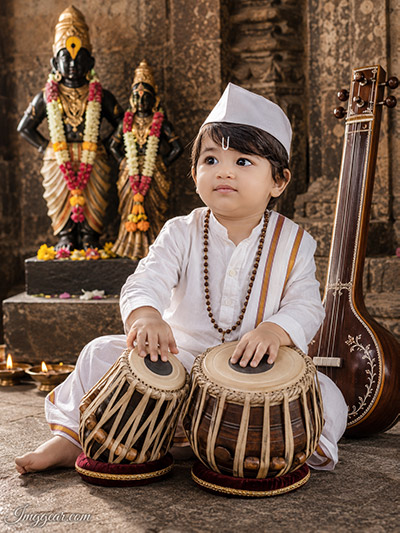
Discover how to render highly detailed temple settings and cultural elements with modern text-to-image generators. This template flawlessly crafts a young boy playing the tabla in front of deities. Drop your thoughts below if you want the full configuration.
Designing Indian Festival AI Art of Cute Varkari Children
Looking to create realistic cultural designs? This unique text generation approach perfectly balances detailed jewelry, traditional clothing, and stone temple backdrops for a flawless look. Try generating this exact composition today.
Elevate Your Spiritual AI Graphic Design Projects Instantly
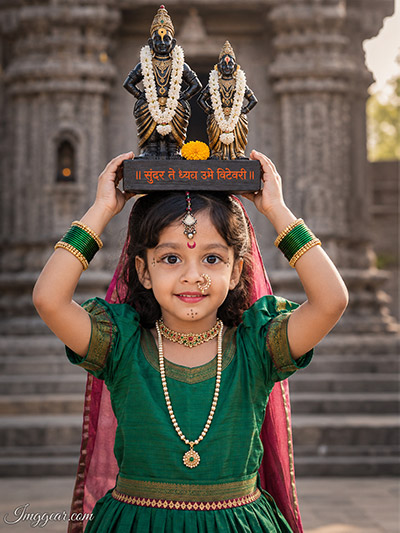
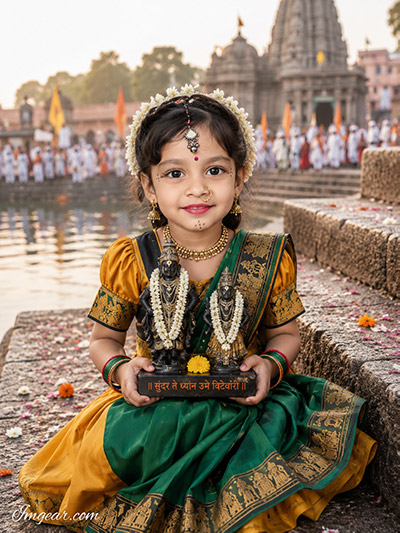
Learn the secret to rendering crisp riverside textures, elaborate ethnic jewelry, and stunning temple crowds in your neural network art. This setup beautifully illustrates a young girl holding Vitthal idols. Curious to see the complete parameters?
PROMPT
{
“prompt_name”: “Ashadhi_Ekadashi_Wari_Baby_Girl_With_Vitthal_Rukmini_Idol”,
“version”: “1.0”,
“category”: “Ultra-Photorealistic Cultural Festival Portrait”,
“output”: {
“aspect_ratio”: “3:4”,
“resolution”: {
“width”: 3000,
“height”: 4000
},
“quality”: “12K”,
“orientation”: “Portrait”,
“style”: “Ultra-Realistic DSLR Photography”
},
“reference_images”: {
“face_reference”: {
“required”: true,
“purpose”: “Identity Preservation”,
“instructions”: [
“Face must remain 100% identical to the uploaded reference image.”,
“No face replacement.”,
“No identity alteration.”,
“No reshaping or morphing.”,
“No beautification or stylization.”,
“Preserve original facial proportions, contours, expression, skin texture, pores, eyes, eyebrows, eyelashes, nose, lips, ears, jawline, forehead, hairline, and overall likeness.”,
“Maintain the exact face angle and facial perspective from the uploaded reference image.”,
“Only modify clothing, pose, accessories, lighting, and environment.”,
“Ultra-realistic facial rendering with natural skin details.”
]
},
“idol_reference”: {
“required”: true,
“purpose”: “Prop Matching”,
“instructions”: [
“Use the second uploaded image as the exact reference for the Vitthal-Rukmini idol.”,
“Preserve the idol’s shape, proportions, carving details, facial features, posture, ornaments, and base without modification.”
]
}
},
“scene”: {
“subject”: {
“description”: “Adorable Indian baby girl”,
“age”: “2–4 years”,
“gender”: “Female”,
“ethnicity”: “Indian”,
“pose”: “Sitting naturally on riverside stone steps”,
“expression”: “Simple happy smile”,
“gaze”: “Looking gently toward the camera”,
“hands”: “Holding the uploaded black stone Vitthal-Rukmini idol securely with both hands”,
“face”: “Exactly identical to the uploaded face reference”
},
“clothing”: {
“theme”: “Traditional Maharashtrian Festival Attire”,
“outfit”: {
“davani”: {
“color”: “Forest Green”,
“material”: “Silk”,
“details”: “Pleated with traditional temple-border embroidery in gold and black”
},
“blouse”: {
“color”: “Mustard Yellow”,
“material”: “Silk”,
“details”: “Embroidered sleeves”
},
“pavadai”: {
“color”: “Mustard Yellow”,
“material”: “Flowing silk”
}
},
“accessories”: [
“Antique gold jimikka earrings”,
“Traditional gold choker necklace”,
“Red and green glass bangles on both wrists”,
“Small pearl Maharashtrian nath (moti nath)”,
“Fresh jasmine gajra around hair buns”,
“Tiny traditional bindi”
]
},
“idol”: {
“material”: “Black stone”,
“reference”: “Second uploaded image”,
“placement”: “Held carefully in both hands”,
“description”: {
“figures”: [
“Lord Vitthal”,
“Goddess Rukmini”
],
“pose”: “Standing side-by-side with hands on hips”,
“garland”: “Delicate white flower garland”,
“size”: “Small handheld devotional idol”
}
},
“environment”: {
“event”: “Ashadhi Ekadashi Wari”,
“location”: “Pandharpur, Maharashtra”,
“foreground”: [
“Ancient riverside stone staircase”,
“Scattered fresh flower petals”
],
“background”: [
“Shri Vitthal Temple”,
“Softly blurred temple palkhi procession”,
“Warkari devotees in traditional attire”,
“Authentic cultural festival atmosphere”
]
}
},
“photography”: {
“camera”: “Professional Full-Frame DSLR”,
“lens”: “85mm Prime”,
“composition”: “Award-winning cinematic portrait”,
“framing”: “Full-body vertical portrait”,
“camera_angle”: “Eye level”,
“lighting”: {
“type”: “Natural daylight”,
“quality”: “Soft diffused sunlight”,
“hdr”: true
},
“focus”: {
“subject”: “Ultra sharp”,
“background”: “Creamy cinematic bokeh”,
“depth_of_field”: “Shallow”
},
“rendering”: {
“skin”: “Highly detailed natural skin texture”,
“fabric”: “Realistic silk texture with embroidery”,
“stone”: “Detailed black stone carving”,
“jewelry”: “Authentic antique gold reflections”,
“quality”: [
“Ultra-realistic”,
“Photorealistic”,
“Masterpiece”,
“HDR”,
“Professional DSLR photography”,
“8K detail”,
“12K master quality”
]
}
},
“watermark”: {
“enabled”: true,
“text”: “Imggear.com”,
“position”: “Bottom-left”,
“font”: {
“family”: “Petit Formal Script”,
“style”: “Thin elegant cursive”
},
“appearance”: {
“color”: “#FFFFFF”,
“opacity”: 0.45,
“letter_spacing”: “1px”,
“background”: “None”,
“blend_mode”: “Seamlessly blended”,
“look”: “Minimal premium handwritten-signature appearance”
}
},
“negative_prompt”: [
“Different face”,
“Identity change”,
“Face swap”,
“Face morphing”,
“Beautified face”,
“Stylized face”,
“Anime”,
“Cartoon”,
“Painting”,
“Illustration”,
“CGI”,
“3D render”,
“Plastic skin”,
“Low quality”,
“Low resolution”,
“Blur”,
“Noise”,
“Out of focus”,
“Overexposed”,
“Oversaturated”,
“Extra fingers”,
“Missing fingers”,
“Deformed hands”,
“Incorrect anatomy”,
“Incorrect idol”,
“Modified idol design”,
“Missing flower garland”,
“Floating idol”,
“Modern clothing”,
“Modern jewelry”,
“Modern background”,
“Additional people in foreground”,
“Cropped body”,
“Out of frame”,
“Text”,
“Logo”,
“Watermark other than Imggear.com”
]
}
Crafting Devotional Festival Art Using Varkari Couple AI Prompts
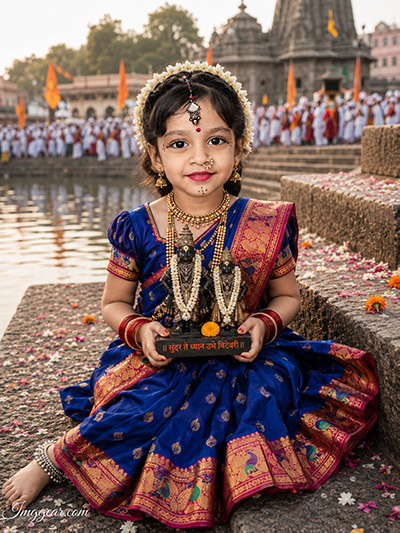
You can easily render rich blue traditional attire and realistic stone ghat environments with this creative text layout. This graphic showcases a young girl cradling sacred deities by the river. Unlock the formula right away to upgrade your edits.
PROMPT
{
“prompt_name”: “Ashadhi_Ekadashi_Wari_Baby_Girl_Royal_Blue_Paithani_Portrait”,
“version”: “1.0”,
“category”: “Ultra-Photorealistic Cultural Festival Portrait”,“output”: {
“aspect_ratio”: “3:4”,
“resolution”: {
“width”: 3000,
“height”: 4000
},
“quality”: “12K”,
“orientation”: “Portrait”,
“style”: “Ultra-Realistic DSLR Photography”
},“reference_images”: {
“face_reference”: {
“required”: true,
“purpose”: “Identity Preservation”,
“identity_preservation”: {
“enabled”: true,
“strength”: 1.0,
“instructions”: [
“Face must remain 100% identical to the uploaded reference image.”,
“No face replacement.”,
“No identity alteration.”,
“No reshaping, morphing, beautification, or stylization.”,
“Preserve original facial proportions, contours, skin texture, pores, eyes, eyebrows, eyelashes, nose, lips, ears, jawline, forehead, hairline, expression, and overall likeness.”,
“Maintain the exact facial angle, perspective, head position, and natural expression from the uploaded reference image.”,
“Apply modifications only to clothing, accessories, pose, props, lighting, and environment.”,
“Maintain ultra-realistic natural skin tones and DSLR-quality facial rendering.”
]
}
},“idol_reference”: {
“required”: true,
“purpose”: “Prop Matching”,
“instructions”: [
“Use the second uploaded image as the exact reference for the idol.”,
“Preserve the idol’s original carving, proportions, facial features, ornaments, texture, posture, and base.”,
“Do not redesign, stylize, or modify any details of the uploaded idol.”
]
}
},“scene”: {
“event”: “Ashadhi Ekadashi Wari”,
“location”: “Pandharpur, Maharashtra, India”,“subject”: {
“description”: “Adorable Maharashtrian baby girl”,
“age”: “2-4 years”,
“gender”: “Female”,
“ethnicity”: “Indian”,
“pose”: “Sitting naturally on riverside stone steps”,
“expression”: “Simple joyful smile”,
“gaze”: “Looking gently toward the camera”,
“face”: “Exactly identical to the uploaded reference image”,
“hands”: “Holding the uploaded small black stone Vitthal-Rukmini idol with both hands”
},“wardrobe”: {
“outfit”: {
“garment”: “Traditional Royal Blue Paithani Nauwari Saree”,
“primary_color”: “Royal Blue”,
“border”: “Rich Pink with intricate Golden Paithani weaving”,
“fabric”: “Luxurious silk”,
“drape_style”: “Traditional Maharashtrian Nauwari”
},“accessories”: [
“Traditional Maharashtrian gold jewelry”,
“Multiple layered gold necklaces”,
“Traditional red glass bangles”,
“Silver anklets”,
“Elegant small pearl Maharashtrian nath (moti nath)”,
“Fresh jasmine gajra around hair buns”,
“Tiny traditional red bindi”
]
},“idol”: {
“reference”: “Second uploaded image”,
“material”: “Black stone”,
“size”: “Small handheld idol”,
“held_with”: “Both hands”,
“description”: [
“Lord Vitthal”,
“Goddess Rukmini”,
“Original carving preserved exactly as uploaded”
]
},“environment”: {
“foreground”: [
“Ancient riverside stone staircase”,
“Fresh flower petals scattered across the steps”
],“background”: [
“Shri Vitthal Temple, Pandharpur”,
“Softly blurred temple palkhi procession”,
“Traditional Warkari devotees”,
“Authentic Ashadhi Ekadashi pilgrimage atmosphere”
],“mood”: [
“Sacred”,
“Peaceful”,
“Traditional”,
“Devotional”,
“Cultural heritage”
]
}
},“photography”: {
“camera”: “Professional Full-Frame DSLR”,
“lens”: “85mm Prime”,
“composition”: “Award-winning cinematic portrait”,
“framing”: “Full-body vertical portrait”,
“camera_angle”: “Eye level”,“lighting”: {
“type”: “Natural daylight”,
“quality”: “Soft diffused sunlight”,
“hdr”: true
},“focus”: {
“subject”: “Extremely sharp”,
“background”: “Creamy cinematic bokeh”,
“depth_of_field”: “Shallow”
},“rendering”: {
“skin”: “Highly detailed natural skin texture”,
“fabric”: “Luxury Paithani silk with realistic woven texture”,
“jewelry”: “Authentic gold reflections with intricate craftsmanship”,
“stone”: “Highly detailed black stone idol texture”,
“color_palette”: “Rich, vibrant, natural colors”,“quality”: [
“Ultra-realistic”,
“Photorealistic”,
“HDR”,
“Masterpiece”,
“Professional DSLR photography”,
“8K detail”,
“12K master render”
]
}
},“watermark”: {
“enabled”: true,
“text”: “Imggear.com”,
“position”: “Bottom-left”,“font”: {
“family”: “Petit Formal Script”,
“style”: “Thin elegant cursive”
},“appearance”: {
“color”: “#FFFFFF”,
“opacity”: 0.45,
“letter_spacing”: “1px”,
“background”: “None”,
“blend_mode”: “Seamlessly blended”,
“style”: “Minimal premium handwritten-signature appearance”
}
},“negative_prompt”: [
“Different face”,
“Identity change”,
“Face replacement”,
“Face swap”,
“Face morphing”,
“Beautified face”,
“Stylized face”,
“Anime”,
“Cartoon”,
“Illustration”,
“Painting”,
“CGI”,
“3D render”,
“Plastic skin”,
“Artificial facial features”,
“Low quality”,
“Low resolution”,
“Blur”,
“Noise”,
“Out of focus”,
“Overexposed”,
“Oversaturated colors”,
“Extra fingers”,
“Missing fingers”,
“Deformed hands”,
“Incorrect anatomy”,
“Duplicate limbs”,
“Modified idol”,
“Incorrect idol proportions”,
“Floating idol”,
“Modern clothing”,
“Western outfit”,
“Modern accessories”,
“Empty background”,
“Modern architecture”,
“Additional foreground people”,
“Cropped body”,
“Out of frame”,
“Text”,
“Logo”,
“Watermark other than Imggear.com”
]
}
💡 AI Photo Editing Pro Tips for Perfect Results
Keep Faces Consistent: If the AI changes the face, add this exact phrase to the very beginning of your prompt: “Preserve facial identity 100%, do not alter facial features or proportions.”
Reroll for Perfection: Run every prompt 2–3 times! The second or third generation is almost always sharper and packed with better details.
Get the DSLR Look: Want that beautiful, blurred background? Just add “f/1.8 shallow depth of field” to your prompt.
Control the Camera Shot: Tell the AI exactly what frame you want by adding terms like “Close-up portrait,” “Full-body shot,” or “Wide-angle view.”
Set the Vibe with Lighting: Lighting makes or breaks an AI image. Add “Cinematic lighting,” “Golden hour sunset,” or “Soft studio lighting” for a professional touch.
📐 Best Aspect Ratio: Use 3:4 Vertical for stunning, ready-to-post results on Instagram and Pinterest.