Want to create breathtaking AI art this festive season? Finding the perfect Ashadhi Ekadashi Prompt For Girl can be frustrating when the AI doesn’t get the traditional Marathi attire, Warkari details, or devotion just right. But don’t worry! In this guide, I’ll share the exact copy-and-paste 3D AI image prompts you need. You’ll generate stunning visuals of a young devotee carrying a Tulsi Vrindavan in seconds. Let’s dive right in and create magic!
Craft a Devotional Vibe with this Ashadhi Ekadashi Prompt For Girl
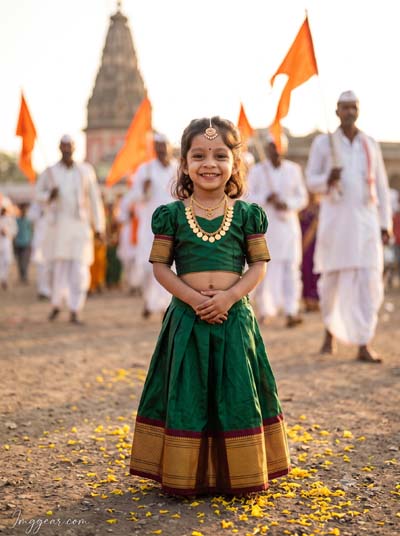
I’ve finally perfected a prompt for this exact yatra devotional portrait AI art, capturing a young girl in Marathi green dress amidst a busy procession. The warm lighting and temple backdrop are super detailed. The facial expression is remarkably life-like for generative AI. Think you can make an even better version?
PROMPT
{
“image_label”: “Imggear.com_1”,
“version”: “3.5”,
“aspect_ratio”: “3:4”,
“prompt”: “An ultra-realistic, photorealistic premium masterpiece, preserving the exact identity, facial proportions, bone structure, eye depth, sharp jawline, authentic facial characteristics, and skin micro-textures (visible pores, fine lines) of the subject in the uploaded personal reference photo without alteration. The facial lighting must seamlessly fuse with the ambient scene highlights and cast realistic shadows, allowing the subject to naturally integrate with the environment’s lighting, shadows, depth, atmospheric perspective, and optical characteristics while preserving the subject’s true identity without alteration, seamlessly integrating the subject into this dramatic portrait, while maintaining complete identity consistency throughout the image. A female child, approximately 3 years old, petite child build, smiling joyfully, hands clasped together at her waist. She wears a deep green silk crop blouse with puffed sleeves and gold borders, and a matching green pleated long skirt with a broad gold and maroon border. She is adorned with a gold coin necklace and a forehead ornament. The setting is an outdoor dusty path covered in yellow flower petals during a festival procession in Pandharpur, with blurred pilgrims in traditional white attire carrying saffron flags and an ancient temple shikhara in the warm golden hour background. Captured using a full-frame professional mirrorless camera with an 85mm f/1.4 prime lens in RAW format, featuring natural optical rendering, premium creamy bokeh, realistic lens compression, true-to-life color science, filmic dynamic range, and authentic professional camera realism. Watermark: \”Imggear.com\” in the bottom-left corner, Petit Formal Script, thin, elegant cursive stroke, soft white color with slight transparency.”
}
Perfect your Ashadhi Wari Devotional Portrait for Girl AI Prompt
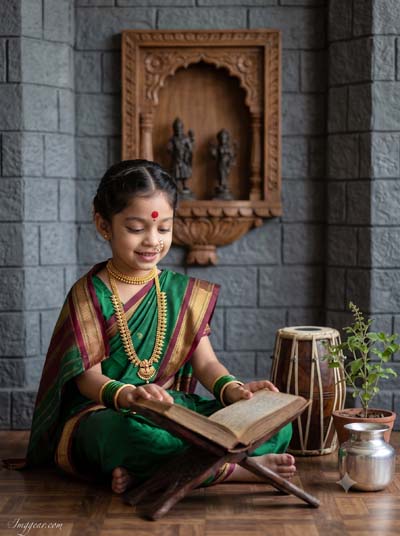
We are absolutely blown away by how this AI image prompt handles the textures of the green saree and the traditional wooden book stand. This isn’t just a simple portrait; it’s a detailed devotional scene with an authentic atmosphere. Have you ever tried generating detailed cultural textures like this?
PROMPT
{
“image_label”: “Imggear.com_2”,
“version”: “3.5”,
“aspect_ratio”: “3:4”,
“prompt”: “An ultra-realistic, photorealistic premium masterpiece, preserving the exact identity, facial proportions, bone structure, eye depth, sharp jawline, authentic facial characteristics, and skin micro-textures (visible pores, fine lines) of the subject in the uploaded personal reference photo without alteration. The facial lighting must seamlessly fuse with the ambient scene highlights and cast realistic shadows, allowing the subject to naturally integrate with the environment’s lighting, shadows, depth, atmospheric perspective, and optical characteristics while preserving the subject’s true identity without alteration, seamlessly integrating the subject into this dramatic portrait, while maintaining complete identity consistency throughout the image. A female child, approximately 7 years old, slender child build, sitting cross-legged on the floor, smiling softly as she reads an open book on a wooden stand. She is draped in a traditional green silk Nauvari saree with gold and maroon borders. Adorned with a gold choker, long gold temple necklace, green glass bangles, a traditional gold pearl nose ring, and a red forehead bindi. The backdrop is an indoor set representing a grey stone miniature Maratha fort with a central wooden niche housing two small dark statues. A traditional dholki drum, miniature tulsi pot, and a silver pot are placed nearby on the floor. Captured using a full-frame professional mirrorless camera with an 85mm f/1.4 prime lens in RAW format, featuring natural optical rendering, premium creamy bokeh, realistic lens compression, true-to-life color science, filmic dynamic range, and authentic professional camera realism. Watermark: \”Imggear.com\” in the bottom-left corner, Petit Formal Script, thin, elegant cursive stroke, soft white color with slight transparency.”
}
Create Divine Riverbank Art with this Pandharpur Wari Girl Photo Prompt
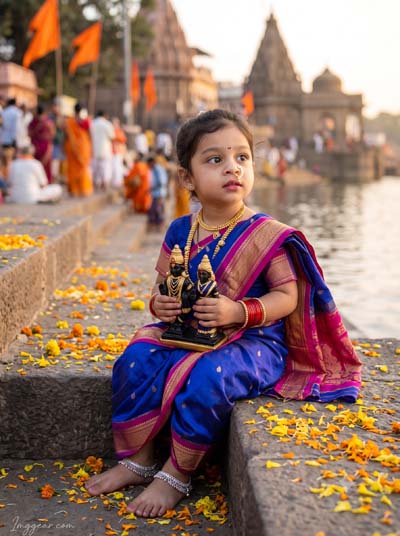
This AI generator prompt recreates an adorable girl in a blue saree holding Vitthal idols on temple ghat steps. The realistic water reflections and marigold details turn out amazing. Grab the text below and try it today!
PROMPT
{
“image_label”: “Imggear.com_3”,
“version”: “3.5”,
“aspect_ratio”: “3:4”,
“prompt”: “An ultra-realistic, photorealistic premium masterpiece, preserving the exact identity, facial proportions, bone structure, eye depth, sharp jawline, authentic facial characteristics, and skin micro-textures (visible pores, fine lines) of the subject in the uploaded personal reference photo without alteration. The facial lighting must seamlessly fuse with the ambient scene highlights and cast realistic shadows, allowing the subject to naturally integrate with the environment’s lighting, shadows, depth, atmospheric perspective, and optical characteristics while preserving the subject’s true identity without alteration, seamlessly integrating the subject into this dramatic portrait, while maintaining complete identity consistency throughout the image. A female toddler, approximately 2 years old, chubby child build, sitting on stone steps near water, looking up and to the side with a curious expression. She is holding a small black and gold double statue in both hands. Draped in a royal blue silk Nauvari saree with rich magenta-pink borders and gold zari work, adorned with a gold necklace, pearl nose ring, silver anklets, and red bangles. Set on outdoor stone river ghats with scattered flower petals; the background shows blurred pilgrims, orange flags, and ancient temples across the water. Captured using a full-frame professional mirrorless camera with an 85mm f/1.4 prime lens in RAW format, featuring natural optical rendering, premium creamy bokeh, realistic lens compression, true-to-life color science, filmic dynamic range, and authentic professional camera realism. Watermark: \”Imggear.com\” in the bottom-left corner, Petit Formal Script, thin, elegant cursive stroke, soft white color with slight transparency.”
}
Generate Traditional Fort Heritage Edits Using This Warkari Girl AI Prompt
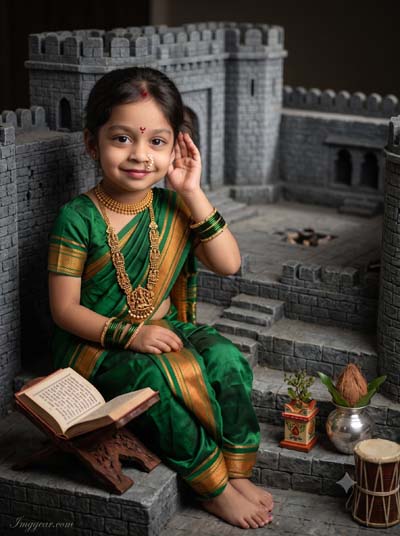
This custom generation renders incredible stone fort architecture along with authentic Maharashtrian jewelry and nauvari saree folds. It brings out a charming heritage look for festival posts. Copy the exact prompt below to test it yourself!
PROMPT
{
“image_label”: “Imggear.com_4”,
“version”: “3.5”,
“aspect_ratio”: “3:4”,
“prompt”: “An ultra-realistic, photorealistic premium masterpiece, preserving the exact identity, facial proportions, bone structure, eye depth, sharp jawline, authentic facial characteristics, and skin micro-textures (visible pores, fine lines) of the subject in the uploaded personal reference photo without alteration. The facial lighting must seamlessly fuse with the ambient scene highlights and cast realistic shadows, allowing the subject to naturally integrate with the environment’s lighting, shadows, depth, atmospheric perspective, and optical characteristics while preserving the subject’s true identity without alteration, seamlessly integrating the subject into this dramatic portrait, while maintaining complete identity consistency throughout the image. A female child, approximately 7 years old, slender child build, sitting on the steps of a miniature gray stone fort, with one hand gently raised toward her ear, smiling softly. She is draped in a green silk Nauvari saree with gold-orange stripes and borders, adorned with a gold choker, long temple necklace, green bangles, a pearl nose ring, and a red bindi. The indoor setting features a miniature fort backdrop, an open scripture on a wooden stand, a miniature tulsi pot, a silver kalash, and a traditional dholki drum. Captured using a full-frame professional mirrorless camera with an 85mm f/1.4 prime lens in RAW format, featuring natural optical rendering, premium creamy bokeh, realistic lens compression, true-to-life color science, filmic dynamic range, and authentic professional camera realism. Watermark: \”Imggear.com\” in the bottom-left corner, Petit Formal Script, thin, elegant cursive stroke, soft white color with slight transparency.”
}
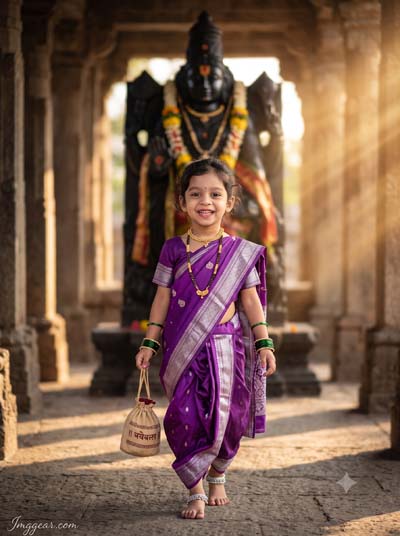
Purple Saree Devotional Style: Ashadhi Ekadashi AI Prompt For Girl
Notice how the golden volumetric sunlight accentuates the deep purple saree in this temple corridor scene. Generating the Vitthal statue in the background while keeping the young girl sharp works surprisingly well. Which color saree will you try rendering first?
PROMPT
{
“image_label”: “Imggear.com_5”,
“version”: “3.5”,
“aspect_ratio”: “3:4”,
“prompt”: “An ultra-realistic, photorealistic premium masterpiece, preserving the exact identity, facial proportions, bone structure, eye depth, sharp jawline, authentic facial characteristics, and skin micro-textures (visible pores, fine lines) of the subject in the uploaded personal reference photo without alteration. The facial lighting must seamlessly fuse with the ambient scene highlights and cast realistic shadows, allowing the subject to naturally integrate with the environment’s lighting, shadows, depth, atmospheric perspective, and optical characteristics while preserving the subject’s true identity without alteration, seamlessly integrating the subject into this cinematic scene, while maintaining complete identity consistency throughout the image. A female child, approximately 3 years old, petite child build, walking forward happily, smiling broadly. She holds a small beige drawstring bag with Devanagari text on it. Draped in a purple silk Nauvari saree with a broad silver zari border and traditional motifs, adorned with a gold necklace, black-and-gold bead necklace, green glass bangles, and silver anklets. Located in an outdoor ancient stone temple corridor, with a giant black stone deity statue decorated with garlands in the blurred background under warm, cinematic sun rays. Captured using a full-frame professional mirrorless camera with an 85mm f/1.4 prime lens in RAW format, featuring natural optical rendering, premium creamy bokeh, realistic lens compression, true-to-life color science, filmic dynamic range, and authentic professional camera realism. Watermark: \”Imggear.com\” in the bottom-left corner, Petit Formal Script, thin, elegant cursive stroke, soft white color with slight transparency.”
}
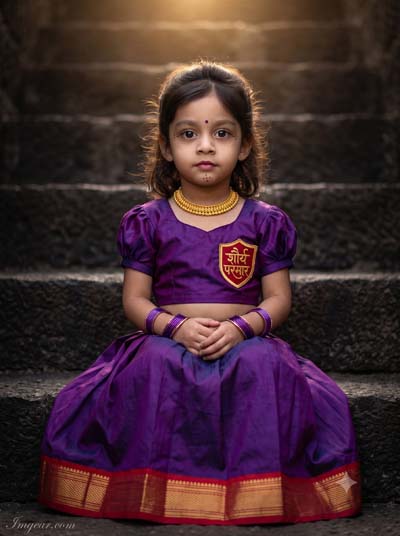
Capture Moody Heritage Lighting With This Ashadhi Ekadashi Girl Prompt
Check out the subtle backlighting highlighting her hair against those dark stone steps. Getting AI to render personalized name patches on traditional silk dresses usually takes tweaking, but this setup nailed it. Transform your festive photo edits today!
PROMPT
{
“image_label”: “Imggear.com_6”,
“version”: “3.5”,
“aspect_ratio”: “3:4”,
“prompt”: “An ultra-realistic, photorealistic premium masterpiece, preserving the exact identity, facial proportions, bone structure, eye depth, sharp jawline, authentic facial characteristics, and skin micro-textures (visible pores, fine lines) of the subject in the uploaded personal reference photo without alteration. The facial lighting must seamlessly fuse with the ambient scene highlights and cast realistic shadows, allowing the subject to naturally integrate with the environment’s lighting, shadows, depth, atmospheric perspective, and optical characteristics while preserving the subject’s true identity without alteration, seamlessly integrating the subject into this dramatic portrait, while maintaining complete identity consistency throughout the image. A female toddler, approximately 2 years old, chubby child build, sitting on dark textured stone steps, looking forward with a calm and curious expression, hands clasped in her lap. She wears a deep purple silk crop blouse with puffed sleeves, featuring a gold shield patch with red details and Devanagari script, paired with a matching voluminous pleated purple skirt with a thick red and gold border. She is adorned with a thick gold choker and purple glass bangles. The setting is dark stone steps illuminated by warm overhead light creating dramatic rim highlights. Captured using a full-frame professional mirrorless camera with an 85mm f/1.4 prime lens in RAW format, featuring natural optical rendering, premium creamy bokeh, realistic lens compression, true-to-life color science, filmic dynamic range, and authentic professional camera realism. Watermark: \”Imggear.com\” in the bottom-left corner, Petit Formal Script, thin, elegant cursive stroke, soft white color with slight transparency.”
}
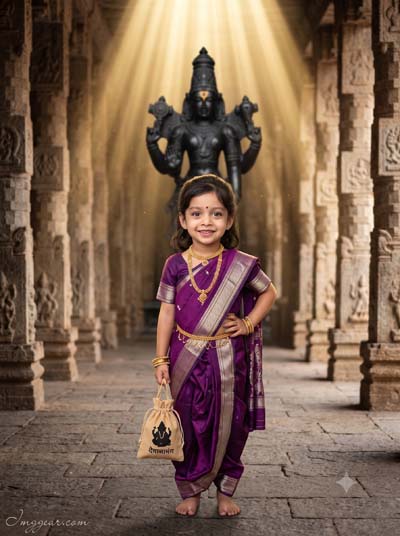
How to Create Sunlit Sacred Portraits With an Ashadhi Ekadashi Girl Prompt
Dramatic overhead sunbeams illuminate this majestic temple shot of a child in classic purple saree. Getting generative prompts to cast realistic god rays along ancient stone pillars while retaining crisp subject focus is tricky. Ready to recreate these golden rays?
PROMPT
{
“image_label”: “Imggear.com_7”,
“version”: “3.5”,
“aspect_ratio”: “3:4”,
“prompt”: “An ultra-realistic, photorealistic premium masterpiece, preserving the exact identity, facial proportions, bone structure, eye depth, sharp jawline, authentic facial characteristics, and skin micro-textures (visible pores, fine lines) of the subject in the uploaded personal reference photo without alteration. The facial lighting must seamlessly fuse with the ambient scene highlights and cast realistic shadows, allowing the subject to naturally integrate with the environment’s lighting, shadows, depth, atmospheric perspective, and optical characteristics while preserving the subject’s true identity without alteration, seamlessly integrating the subject into this cinematic scene, while maintaining complete identity consistency throughout the image. A female child, approximately 3 years old, petite child build, standing barefoot on a stone-paved pathway, smiling happily, with one hand resting on her hip. She holds a small beige drawstring bag featuring a black deity silhouette and Devanagari text. Draped in a purple silk Nauvari saree with silver-gold borders and a matching blouse, adorned with a gold necklace set, gold waist chain, and gold bangles. Set in a grand ancient stone temple corridor flanked by carved stone pillars, with a monumental black statue in the center background under dramatic golden sun rays beaming down. Captured using a full-frame professional mirrorless camera with an 85mm f/1.4 prime lens in RAW format, featuring natural optical rendering, premium creamy bokeh, realistic lens compression, true-to-life color science, filmic dynamic range, and authentic professional camera realism. Watermark: \”Imggear.com\” in the bottom-left corner, Petit Formal Script, thin, elegant cursive stroke, soft white color with slight transparency.”
}
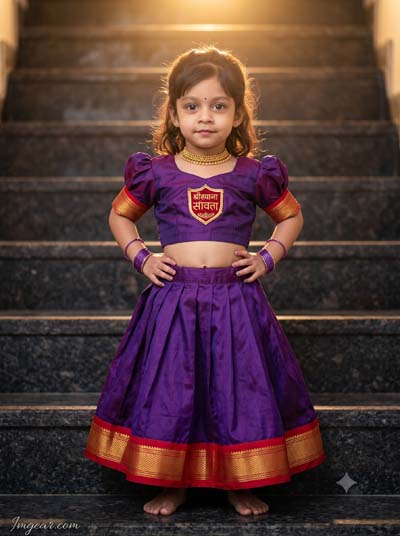
Authentic Parkar Polka Vibe: Ashadhi Ekadashi Girl AI Prompt
Styling a two-piece purple silk dress on marble stairs gives this festive child portrait such a lively personality. The prompt balances soft hair backlighting with clean text details on the chest badge. Give this setup a spin and share your results with us!
PROMPT
{
“image_label”: “Imggear.com_8”,
“version”: “3.5”,
“aspect_ratio”: “3:4”,
“prompt”: “An ultra-realistic, photorealistic premium masterpiece, preserving the exact identity, facial proportions, bone structure, eye depth, sharp jawline, authentic facial characteristics, and skin micro-textures (visible pores, fine lines) of the subject in the uploaded personal reference photo without alteration. The facial lighting must seamlessly fuse with the ambient scene highlights and cast realistic shadows, allowing the subject to naturally integrate with the environment’s lighting, shadows, depth, atmospheric perspective, and optical characteristics while preserving the subject’s true identity without alteration, seamlessly integrating the subject into this dramatic portrait, while maintaining complete identity consistency throughout the image. A female toddler, approximately 2 years old, chubby child build, standing barefoot on dark textured stone steps, looking forward with a confident, sassy expression and both hands placed on her hips. She wears a deep purple silk crop blouse with puffed sleeves, decorated with a gold shield patch with red details and Devanagari script, and a matching voluminous pleated purple skirt with a thick red and gold border. She is adorned with a gold choker and purple glass bangles. Set on textured stone steps under warm golden overhead backlighting. Captured using a full-frame professional mirrorless camera with an 85mm f/1.4 prime lens in RAW format, featuring natural optical rendering, premium creamy bokeh, realistic lens compression, true-to-life color science, filmic dynamic range, and authentic professional camera realism. Watermark: \”Imggear.com\” in the bottom-left corner, Petit Formal Script, thin, elegant cursive stroke, soft white color with slight transparency.”
}
💡 AI Photo Editing Pro Tips for Perfect Results
Keep Faces Consistent: If the AI changes the face, add this exact phrase to the very beginning of your prompt: “Preserve facial identity 100%, do not alter facial features or proportions.”
Reroll for Perfection: Run every prompt 2–3 times! The second or third generation is almost always sharper and packed with better details.
Get the DSLR Look: Want that beautiful, blurred background? Just add “f/1.8 shallow depth of field” to your prompt.
Control the Camera Shot: Tell the AI exactly what frame you want by adding terms like “Close-up portrait,” “Full-body shot,” or “Wide-angle view.”
Set the Vibe with Lighting: Lighting makes or breaks an AI image. Add “Cinematic lighting,” “Golden hour sunset,” or “Soft studio lighting” for a professional touch.
📐 Best Aspect Ratio: Use 3:4 Vertical for stunning, ready-to-post results on Instagram and Pinterest.