Want your social media to go viral this Independence Day? Finding the best 15 August AI photo editing prompts 2026 to create realistic 3D photos with your name can be frustrating when most prompts give low-quality results. Don’t worry—we’ve tested and curated the top copy-and-paste Gemini AI and ChatGPT prompts for 2026. Read on to copy these trending prompts and generate stunning, high-definition Indian flag photos in under 10 seconds!
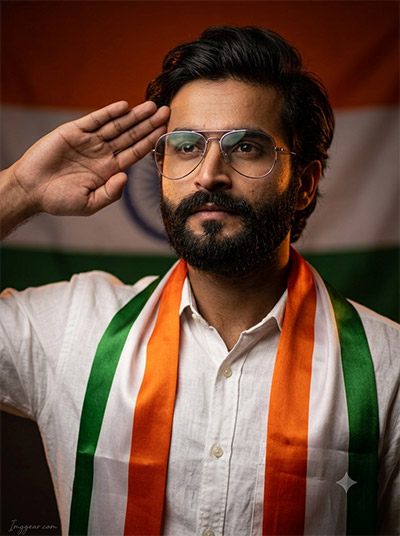
Create Patriotic Independence Day Portraits With 15 August AI Photo Editing Prompts 2026
Design stunning patriotic realistic portraits featuring the Indian flag for Independence Day using this easy prompt idea. Copy this exact text to craft your own custom picture today.
PROMPT
{
“image_label”: “Imggear.com_1”,
“version”: “3.5”,
“aspect_ratio”: “3:4”,
“prompt”: “An ultra-realistic, photorealistic premium masterpiece, preserving the exact identity, facial proportions, bone structure, eye depth, sharp jawline, authentic facial characteristics, and skin micro-textures (visible pores, fine lines) of the subject in the uploaded personal reference photo without alteration. The facial lighting must seamlessly fuse with the ambient scene highlights and cast realistic shadows, allowing the subject to naturally integrate with the environment’s lighting, shadows, depth, atmospheric perspective, and optical characteristics while preserving the subject’s true identity without alteration, seamlessly integrating the subject into this dramatic portrait, while maintaining complete identity consistency throughout the image. The subject is a male, apparent age 35, with an athletic build and broad shoulders. He is saluting with his right hand at his temple, looking slightly upward and to the side with a proud, solemn expression. He wears a white long-sleeve button-up linen shirt and a tricolor saffron, white, and green scarf draped over his shoulders, with thin-rimmed metal aviator prescription glasses on his face. Set in a warm studio environment with an Indian flag softly blurred in the background. Captured using a full-frame professional mirrorless camera with an 85mm f/1.4 prime lens in RAW format, delivering hyper-detailed edge sharpness, extreme high-definition micro-details on skin and fabric, natural optical rendering, and premium creamy bokeh. Low-key dramatic studio lighting with warm saffron rim light and soft key light casting realistic facial shadows. Minimal elegant watermark \”Imggear.com\” in bottom-left corner in thin, elegant cursive Petit Formal Script, soft white (#ffffff) with slight transparency.”,
“negative_prompt”: “(plastic skin, waxy skin, CGI rendering, AI beauty filter look, porcelain skin, over-smoothed skin, airbrushed skin, synthetic textures, doll-like face, uncanny valley, artificial symmetry), (deformed face, distorted facial features, asymmetrical eyes, bad anatomy, bad proportions, extra limbs, extra fingers, missing fingers, malformed hands, mutated hands), (unnatural lighting, flat lighting, harsh direct sunlight, blown-out highlights, crushed shadows, oversaturated colors, neon colors, unrealistic color grading, HDR look, overexposed, underexposed), (blurry, out of focus, low resolution, pixelated, jpeg artifacts, grainy noise, motion blur, soft focus), (dry land, dusty ground, indoor background, wrong environment, mismatched background), (clothing logos, brand marks, trademarked patterns, text overlays, random watermark placement, duplicate watermark, extra signature), (cartoon style, illustration, painting, 3D render, anime, stylized art, digital art look), (identity mismatch, face swap artifacts, inconsistent facial features, altered bone structure, changed eye color, different face shape), (casual wear, sportswear, hats, helmets, outdoor bright sun, black and white, female features, jewelry, modern gadgets)”
}
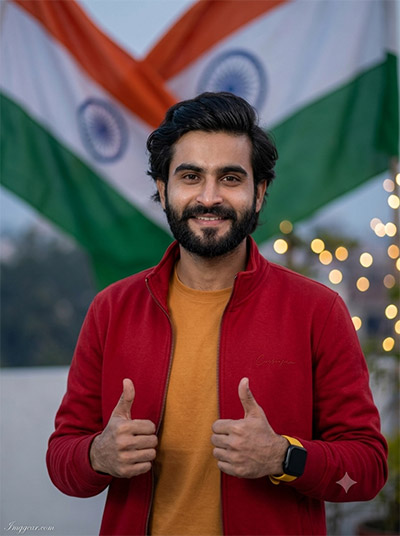
15 August AI Photo Editing Prompts 2026 for Casual Indian Celebrations
Capture a cheerful outdoor vibe featuring glowing lights and national flags using our modern photo concept. Curious to see how your version turns out?
PROMPT
{
“image_label”: “Imggear.com_2”,
“version”: “3.5”,
“aspect_ratio”: “3:4”,
“prompt”: “An ultra-realistic, photorealistic premium masterpiece, preserving the exact identity, facial proportions, bone structure, eye depth, sharp jawline, authentic facial characteristics, and skin micro-textures (visible pores, fine lines) of the subject in the uploaded personal reference photo without alteration. The facial lighting must seamlessly fuse with the ambient scene highlights and cast realistic shadows, allowing the subject to naturally integrate with the environment’s lighting, shadows, depth, atmospheric perspective, and optical characteristics while preserving the subject’s true identity without alteration, seamlessly integrating the subject into this cinematic scene, while maintaining complete identity consistency throughout the image. The subject is a male, apparent age 25, with a slim athletic build and medium shoulders. He is smiling warmly, looking directly at the camera, posing with a double thumbs-up gesture with both hands. He wears a premium custom luxury zippered red jacket with subtle clean cursive embroidery on the chest over a solid golden-orange crew-neck t-shirt, and a black smartwatch with a yellow band on his wrist. Set outdoors at twilight with a large Indian flag draped diagonally in soft focus in the background and warm bokeh lights. Captured using a full-frame professional mirrorless camera with an 85mm f/1.4 prime lens in RAW format, delivering hyper-detailed edge sharpness, extreme high-definition micro-details on skin and fabric, natural optical rendering, and premium creamy bokeh. Soft natural daylight lighting. Minimal elegant watermark \”Imggear.com\” in bottom-left corner in thin, elegant cursive Petit Formal Script, soft white (#ffffff) with slight transparency.”,
“negative_prompt”: “(plastic skin, waxy skin, CGI rendering, AI beauty filter look, porcelain skin, over-smoothed skin, airbrushed skin, synthetic textures, doll-like face, uncanny valley, artificial symmetry), (deformed face, distorted facial features, asymmetrical eyes, bad anatomy, bad proportions, extra limbs, extra fingers, missing fingers, malformed hands, mutated hands), (unnatural lighting, flat lighting, harsh direct sunlight, blown-out highlights, crushed shadows, oversaturated colors, neon colors, unrealistic color grading, HDR look, overexposed, underexposed), (blurry, out of focus, low resolution, pixelated, jpeg artifacts, grainy noise, motion blur, soft focus), (dry land, dusty ground, indoor background, wrong environment, mismatched background), (clothing logos, brand marks, trademarked patterns, text overlays, random watermark placement, duplicate watermark, extra signature), (cartoon style, illustration, painting, 3D render, anime, stylized art, digital art look), (identity mismatch, face swap artifacts, inconsistent facial features, altered bone structure, changed eye color, different face shape), (studio backdrop, dark low-key lighting, formal wear, suit, tie, female features, glasses, indoor furniture)”
}
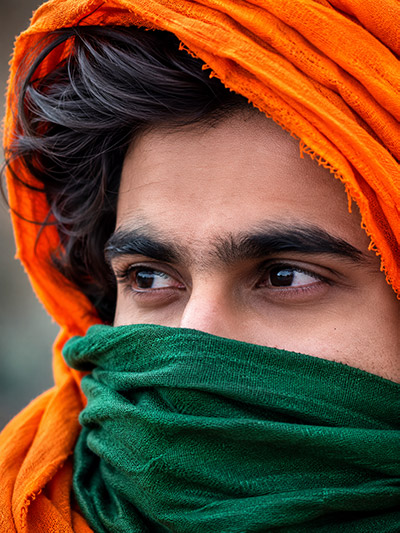
Indian Independence Day AI Photo Prompts 2026 for Saffron Turban Closeups
Generate intense close-up traditional portraits wrapped in saffron and green fabrics using fresh prompt recipes. Try generating yours right now!
PROMPT
{
“image_label”: “Imggear.com_3”,
“version”: “3.5”,
“aspect_ratio”: “3:4”,
“prompt”: “An ultra-realistic, photorealistic premium masterpiece, preserving the exact identity, facial proportions, bone structure, eye depth, sharp jawline, authentic facial characteristics, and skin micro-textures (visible pores, fine lines) of the subject in the uploaded personal reference photo without alteration. The facial lighting must seamlessly fuse with the ambient scene highlights and cast realistic shadows, allowing the subject to naturally integrate with the environment’s lighting, shadows, depth, atmospheric perspective, and optical characteristics while preserving the subject’s true identity without alteration, seamlessly integrating the subject into this cinematic scene, while maintaining complete identity consistency throughout the image. The subject is apparent age 20, with an delicate bone structure. This is an extreme close-up macro portrait focusing on the right eye, looking off-camera to the left with an intense, deep gaze. The forehead is covered by draped bright saffron orange fabric, and the lower face from the nose down is covered by an emerald green textile mask. Captured with a professional mirrorless camera and an 85mm f/1.4 prime lens in RAW format with macro capabilities, ensuring hyper-detailed edge sharpness, extreme high-definition micro-details on skin and fabric, natural optical rendering, and premium creamy bokeh. Illuminated by soft, diffused front lighting highlighting iris details, long eyelashes, and fine skin pores. Minimal elegant watermark \”Imggear.com\” in bottom-left corner in thin, elegant cursive Petit Formal Script, soft white (#ffffff) with slight transparency.”,
“negative_prompt”: “(plastic skin, waxy skin, CGI rendering, AI beauty filter look, porcelain skin, over-smoothed skin, airbrushed skin, synthetic textures, doll-like face, uncanny valley, artificial symmetry), (deformed face, distorted facial features, asymmetrical eyes, bad anatomy, bad proportions, extra limbs, extra fingers, missing fingers, malformed hands, mutated hands), (unnatural lighting, flat lighting, harsh direct sunlight, blown-out highlights, crushed shadows, oversaturated colors, neon colors, unrealistic color grading, HDR look, overexposed, underexposed), (blurry, out of focus, low resolution, pixelated, jpeg artifacts, grainy noise, motion blur, soft focus), (dry land, dusty ground, indoor background, wrong environment, mismatched background), (clothing logos, brand marks, trademarked patterns, text overlays, random watermark placement, duplicate watermark, extra signature), (cartoon style, illustration, painting, 3D render, anime, stylized art, digital art look), (identity mismatch, face swap artifacts, inconsistent facial features, altered bone structure, changed eye color, different face shape), (full body shot, distant view, hands, feet, multiple people, glasses, smile, open mouth, teeth, urban landscape, outdoor sky)”
}
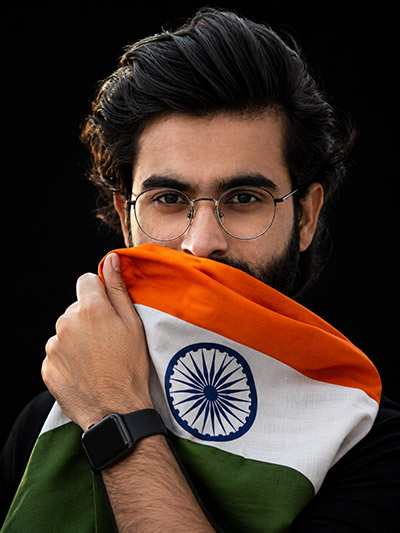
Studio Headshot Editing With 15 August AI Photo Editing Prompts 2026
Craft dramatic studio-style portraits holding the tricolor flag against dark backgrounds with our prompt template. Drop your thoughts in the comments below!
PROMPT
{
“image_label”: “Imggear.com_4”,
“version”: “3.5”,
“aspect_ratio”: “3:4”,
“prompt”: “An ultra-realistic, photorealistic premium masterpiece, preserving the exact identity, facial proportions, bone structure, eye depth, sharp jawline, authentic facial characteristics, and skin micro-textures (visible pores, fine lines) of the subject in the uploaded personal reference photo without alteration. The facial lighting must seamlessly fuse with the ambient scene highlights and cast realistic shadows, allowing the subject to naturally integrate with the environment’s lighting, shadows, depth, atmospheric perspective, and optical characteristics while preserving the subject’s true identity without alteration, seamlessly integrating the subject into this dramatic portrait, while maintaining complete identity consistency throughout the image. The subject is a male, apparent age 28, with a strong athletic build and medium-broad shoulders. He gazes directly at the camera with an intense, focused expression, holding a draped Indian flag with his right hand to partially cover his lower face. The flag showcases the blue Ashoka Chakra wheel clearly. He wears thin-frame round metallic glasses and a black rectangular smartwatch on his wrist. Set against a solid black, minimalist background. Captured using a full-frame professional mirrorless camera with an 85mm f/1.4 prime lens in RAW format, delivering hyper-detailed edge sharpness, extreme high-definition micro-details on skin and fabric, natural optical rendering, and premium creamy bokeh. High-contrast dramatic studio key lighting and side rim lighting. Minimal elegant watermark \”Imggear.com\” in bottom-left corner in thin, elegant cursive Petit Formal Script, soft white (#ffffff) with slight transparency.”,
“negative_prompt”: “(plastic skin, waxy skin, CGI rendering, AI beauty filter look, porcelain skin, over-smoothed skin, airbrushed skin, synthetic textures, doll-like face, uncanny valley, artificial symmetry), (deformed face, distorted facial features, asymmetrical eyes, bad anatomy, bad proportions, extra limbs, extra fingers, missing fingers, malformed hands, mutated hands), (unnatural lighting, flat lighting, harsh direct sunlight, blown-out highlights, crushed shadows, oversaturated colors, neon colors, unrealistic color grading, HDR look, overexposed, underexposed), (blurry, out of focus, low resolution, pixelated, jpeg artifacts, grainy noise, motion blur, soft focus), (dry land, dusty ground, indoor background, wrong environment, mismatched background), (clothing logos, brand marks, trademarked patterns, text overlays, random watermark placement, duplicate watermark, extra signature), (cartoon style, illustration, painting, 3D render, anime, stylized art, digital art look), (identity mismatch, face swap artifacts, inconsistent facial features, altered bone structure, changed eye color, different face shape), (bright colors, white backdrop, outdoor sun, smile, female features, jewelry, outdoor nature, trees, sky)”
}
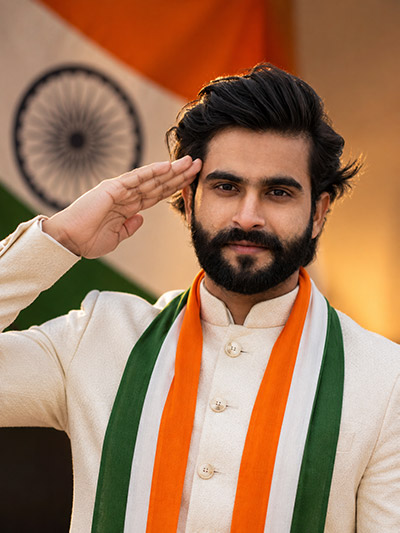
Golden Hour Saluting Shots via 15 August AI Photo Editing Prompts 2026
Recreate this elegant portrait in traditional cream ethnic attire and tricolor sash against a warm sunset backdrop using simple text instructions. Grab the full prompt now to level up your social media profile!
PROMPT
{
“image_label”: “Imggear.com_5”,
“version”: “3.5”,
“aspect_ratio”: “3:4”,
“prompt”: “An ultra-realistic, photorealistic premium masterpiece, preserving the exact identity, facial proportions, bone structure, eye depth, sharp jawline, authentic facial characteristics, and skin micro-textures (visible pores, fine lines) of the subject in the uploaded personal reference photo without alteration. The facial lighting must seamlessly fuse with the ambient scene highlights and cast realistic shadows, allowing the subject to naturally integrate with the environment’s lighting, shadows, depth, atmospheric perspective, and optical characteristics while preserving the subject’s true identity without alteration, seamlessly integrating the subject into this patriotic studio portrait, while maintaining complete identity consistency throughout the image. The subject is a male, apparent age 32, with a strong athletic build and broad shoulders. He is saluting with his right hand at his temple, smiling warmly at the camera. He wears an off-white linen bandhgala kurta with a buttoned mandarin collar and a tricolor saffron, white, and green scarf draped straight down his chest. Set in a warm studio environment with an Indian flag softly blurred in the background. Captured using a full-frame professional mirrorless camera with an 85mm f/1.4 prime lens in RAW format, delivering hyper-detailed edge sharpness, extreme high-definition micro-details on skin and fabric, natural optical rendering, and premium creamy bokeh. Warm studio key lighting casting soft facial highlights. Minimal elegant watermark \”Imggear.com\” in bottom-left corner in thin, elegant cursive Petit Formal Script, soft white (#ffffff) with slight transparency.”,
“negative_prompt”: “(plastic skin, waxy skin, CGI rendering, AI beauty filter look, porcelain skin, over-smoothed skin, airbrushed skin, synthetic textures, doll-like face, uncanny valley, artificial symmetry), (deformed face, distorted facial features, asymmetrical eyes, bad anatomy, bad proportions, extra limbs, extra fingers, missing fingers, malformed hands, mutated hands), (unnatural lighting, flat lighting, harsh direct sunlight, blown-out highlights, crushed shadows, oversaturated colors, neon colors, unrealistic color grading, HDR look, overexposed, underexposed), (blurry, out of focus, low resolution, pixelated, jpeg artifacts, grainy noise, motion blur, soft focus), (dry land, dusty ground, indoor background, wrong environment, mismatched background), (clothing logos, brand marks, trademarked patterns, text overlays, random watermark placement, duplicate watermark, extra signature), (cartoon style, illustration, painting, 3D render, anime, stylized art, digital art look), (identity mismatch, face swap artifacts, inconsistent facial features, altered bone structure, changed eye color, different face shape), (glasses, serious expression, dark low-key lighting, casual t-shirt, female features, urban landscape, outdoor sky)”
}
💡 AI Photo Editing Pro Tips for Perfect Results
Keep Faces Consistent: If the AI changes the face, add this exact phrase to the very beginning of your prompt: “Preserve facial identity 100%, do not alter facial features or proportions.”
Reroll for Perfection: Run every prompt 2–3 times! The second or third generation is almost always sharper and packed with better details.
Get the DSLR Look: Want that beautiful, blurred background? Just add “f/1.8 shallow depth of field” to your prompt.
Control the Camera Shot: Tell the AI exactly what frame you want by adding terms like “Close-up portrait,” “Full-body shot,” or “Wide-angle view.”
Set the Vibe with Lighting: Lighting makes or breaks an AI image. Add “Cinematic lighting,” “Golden hour sunset,” or “Soft studio lighting” for a professional touch.
📐 Best Aspect Ratio: Use 3:4 Vertical for stunning, ready-to-post results on Instagram and Pinterest.