Are you struggling to create captivating, realistic images using a Guru Purnima AI Photo Editing Prompt? Generating authentic spiritual art or personalized 3D photos shouldn’t take hours of trial and error. By pairing optimized prompts with Gemini AI or ChatGPT, you can instantly render high-resolution, photorealistic graphics complete with custom names and devotional details. Below, we provide ready-to-copy prompts that guaranteed stunning visual results for your Guru Purnima social media posts, greetings, and banners.
Create Devotional Spiritual Art with Guru Purnima AI Photo Editing Prompts
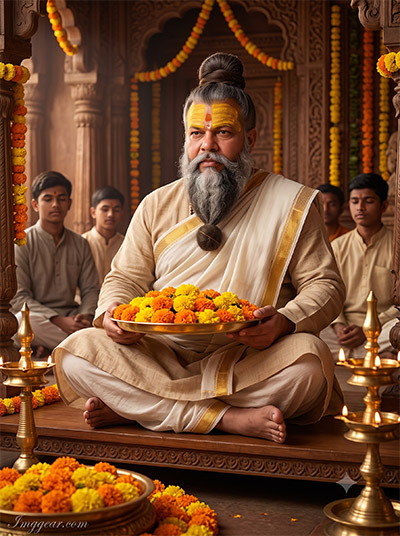
Capture serene ashram vibes featuring a revered Guru surrounded by disciples, marigold flowers, and traditional oil lamps. Grab the free copy-paste prompt below and design your own realistic festival graphics today.
PROMPT
{
“image_label”: “Imggear.com_1”,
“version”: “3.5”,
“aspect_ratio”: “3:4”,
“prompt”: “An ultra-realistic, photorealistic premium masterpiece, preserving the exact identity, facial proportions, bone structure, eye depth, sharp jawline, authentic facial characteristics, and skin micro-textures (visible pores, fine lines) of the subject in the uploaded personal reference photo without alteration. The facial lighting must seamlessly fuse with the ambient scene highlights and cast realistic shadows, allowing the subject to naturally integrate with the environment’s lighting, shadows, depth, atmospheric perspective, and optical characteristics while preserving the subject’s true identity without alteration, seamlessly integrating the subject into this dramatic portrait, while maintaining complete identity consistency throughout the image. The AI dynamically auto-detects a male subject, approximate age 55, possessing a strong, robust, broad-shouldered physical build denoting authority. He is dressed in an incredibly intricate, historically accurate traditional Maharashtrian ceremonial ensemble, featuring a heavy, layered, pure natural beige cotton Sadra (traditional long-sleeved loose kurta), overlaid with a thick, beautifully textured, elegantly draped pure white and gold-bordered Uparna (shoulder cloth). He is seated gracefully in a cross-legged position atop a raised wooden dais, his hands gently holding a highly polished brass tray completely overflowing with vibrant, detailed, freshly plucked orange and yellow marigold flowers. Captured using a full-frame professional mirrorless camera with an 85mm f/1.4 prime lens in RAW format. The prompt demands hyper-detailed edge sharpness, extreme high-definition micro-details on skin and fabric, natural optical rendering, and premium creamy bokeh. The environment is the deeply sacred, highly atmospheric interior of an ancient, elaborately carved wooden Maharashtrian temple sanctum, festooned with thick hanging garlands of marigolds. Volumetric, warm, glowing light from tall, multi-tiered brass oil lamps placed strategically in the foreground illuminates the scene, casting rich deep punchy shadows and providing bright clean highlights. In the softly blurred background, several younger devotees in muted traditional cotton kurtas sit with hands clasped in profound reverence. The overall image requires premium editorial-grade color grading, enhancing micro-contrast and delivering natural skin tones and a cinematic tone mapping. Imggear.com watermark located in the bottom-left corner in Petit Formal Script, Thin, Elegant Cursive Strokes, colored in Soft White (#ffffff) with Slight Transparency, maintaining a minimal, premium handwritten signature appearance seamlessly blended with no background. Version: 3.5.”,
“negative_prompt”: “(plastic skin, waxy skin, CGI rendering, AI beauty filter look, porcelain skin, over-smoothed skin, airbrushed skin, synthetic textures, doll-like face, uncanny valley, artificial symmetry), (deformed face, distorted facial features, asymmetrical eyes, bad anatomy, bad proportions, extra limbs, extra fingers, missing fingers, malformed hands, mutated hands), (unnatural lighting, flat lighting, harsh direct sunlight, blown-out highlights, crushed shadows, oversaturated colors, neon colors, unrealistic color grading, HDR look, overexposed, underexposed), (blurry, out of focus, low resolution, pixelated, jpeg artifacts, grainy noise, motion blur, soft focus), (dry land, dusty ground, indoor background, wrong environment, mismatched background), (clothing logos, brand marks, trademarked patterns, text overlays, random watermark placement, duplicate watermark, extra signature), (cartoon style, illustration, painting, 3D render, anime, stylized art, digital art look), (identity mismatch, face swap artifacts, inconsistent facial features, altered bone structure, changed eye color, different face shape), (modern western clothing, tailored business suit, necktie, casual printed t-shirt, stitched modern trousers, synthetic polyester fabrics, wristwatches, modern jewelry).”
}
Photorealistic Indian Guru Blessing Photo Prompts for AI Image Editing
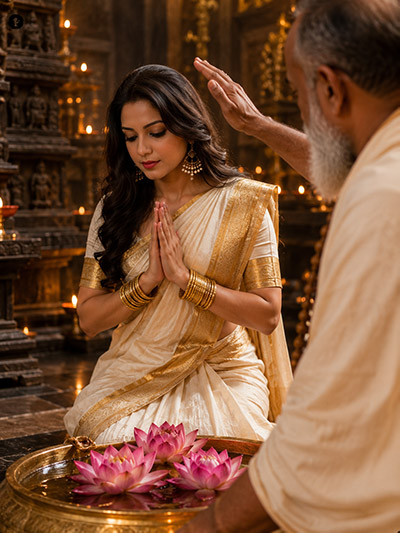
A young woman prays reverently in an ornate temple as an elder bestows his blessings, lit by warm oil lamps and pink lotus blooms. Want to recreate this exact aesthetic? Tap here to test out this prompt now.
PROMPT
{
“image_label”: “Imggear.com_2”,
“version”: “3.5”,
“aspect_ratio”: “3:4”,
“prompt”: “An ultra-realistic, photorealistic premium masterpiece, preserving the exact identity, facial proportions, bone structure, eye depth, sharp jawline, authentic facial characteristics, and skin micro-textures (visible pores, fine lines) of the subject in the uploaded personal reference photo without alteration. The facial lighting must seamlessly fuse with the ambient scene highlights and cast realistic shadows, allowing the subject to naturally integrate with the environment’s lighting, shadows, depth, atmospheric perspective, and optical characteristics while preserving the subject’s true identity without alteration, seamlessly integrating the subject into this cinematic scene, while maintaining complete identity consistency throughout the image. The AI dynamically auto-detects a female subject, approximate age 25, possessing a deeply graceful, highly athletic, and lithe physical build. She is captured perfectly mid-motion, kneeling in profound reverence with her hands pressed firmly together in a traditional Anjali Mudra (prayer posture) directly in front of her chest. She is meticulously draped in a remarkably authentic, extremely high-quality traditional cream-colored silk Nauvari saree, featuring a profoundly rich, heavy gold zari border completely indicative of high status. She wears a tightly fitted, matching short-sleeved Choli blouse. Her arms are adorned with thick stacks of heavy, authentic gold bangles, and her ears feature traditional dangling pearl earrings. Captured using a full-frame professional mirrorless camera with an 85mm f/1.4 prime lens in RAW format. The prompt demands hyper-detailed edge sharpness, extreme high-definition micro-details on skin and fabric, natural optical rendering, and premium creamy bokeh. The environment is the profoundly intimate, meticulously carved inner sanctum of an ancient Maharashtrian temple, deeply shrouded in warm, glowing atmosphere. Directly in the immediate foreground, exquisitely detailed, highly vibrant pink lotus flowers float serenely in a shallow, polished brass water bowl. An older male figure draped in a thick cream Uparna with a prominent rudraksha mala extends a hand in blessing over her. The scene features breathtaking cinematic global illumination, driven by dozens of warm, flickering oil lamps in the beautifully blurred background, creating deeply rich mid-tones, vividly natural skin tones, and extreme tonal contrast. Imggear.com watermark located in the bottom-left corner in Petit Formal Script, Thin, Elegant Cursive Strokes, colored in Soft White (#ffffff) with Slight Transparency, maintaining a minimal, premium handwritten signature appearance seamlessly blended with no background. Version: 3.5.”,
“negative_prompt”: “(plastic skin, waxy skin, CGI rendering, AI beauty filter look, porcelain skin, over-smoothed skin, airbrushed skin, synthetic textures, doll-like face, uncanny valley, artificial symmetry), (deformed face, distorted facial features, asymmetrical eyes, bad anatomy, bad proportions, extra limbs, extra fingers, missing fingers, malformed hands, mutated hands), (unnatural lighting, flat lighting, harsh direct sunlight, blown-out highlights, crushed shadows, oversaturated colors, neon colors, unrealistic color grading, HDR look, overexposed, underexposed), (blurry, out of focus, low resolution, pixelated, jpeg artifacts, grainy noise, motion blur, soft focus), (dry land, dusty ground, indoor background, wrong environment, mismatched background), (clothing logos, brand marks, trademarked patterns, text overlays, random watermark placement, duplicate watermark, extra signature), (cartoon style, illustration, painting, 3D render, anime, stylized art, digital art look), (identity mismatch, face swap artifacts, inconsistent facial features, altered bone structure, changed eye color, different face shape), (modern western dress, denim jeans, synthetic modern gown, inappropriate casual clothing, heavy modern makeup, plastic jewelry, missing bindi, standing upright).”
}
3D Guru Purnima Photo Editing Prompts for Cinematic Festival Art
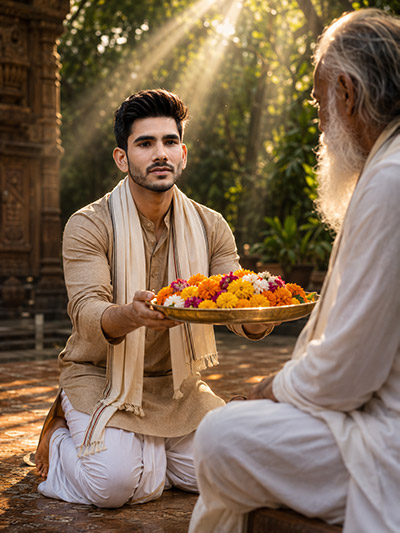
Golden sunlight filters through trees as a young disciple offers a thali of fresh marigolds to his teacher outdoors. Curious how to render these lifelike lighting effects yourself? Explore the full text template inside!
PROMPT
{
“image_label”: “Imggear.com_3”,
“version”: “3.5”,
“aspect_ratio”: “3:4”,
“prompt”: “An ultra-realistic, photorealistic premium masterpiece, preserving the exact identity, facial proportions, bone structure, eye depth, sharp jawline, authentic facial characteristics, and skin micro-textures (visible pores, fine lines) of the subject in the uploaded personal reference photo without alteration. The facial lighting must seamlessly fuse with the ambient scene highlights and cast realistic shadows, allowing the subject to naturally integrate with the environment’s lighting, shadows, depth, atmospheric perspective, and optical characteristics while preserving the subject’s true identity without alteration, seamlessly integrating the subject into this dramatic portrait, while maintaining complete identity consistency throughout the image. The AI dynamically auto-detects a male subject, approximate age 30, possessing a highly athletic, lean, and intensely focused physical build. He is kneeling respectfully on a beautifully textured stone floor, actively extending a highly polished, ornate brass plate completely filled with intensely vibrant, freshly plucked, multicolored marigold and chrysanthemum blossoms. He is attired impeccably in an authentic, deeply traditional, earth-toned beige Sadra (loose kurta), beautifully paired with flawlessly crisp white Dhotar pants, and a matching thick cotton Uparna cloth draped elegantly around his neck. Captured using a full-frame professional mirrorless camera with an 85mm f/1.4 prime lens in RAW format. The prompt requires hyper-detailed edge sharpness, extreme high-definition micro-details on skin and fabric, natural optical rendering, and premium creamy bokeh. The deeply atmospheric environment is a breathtaking, expansive sunlit stone courtyard belonging to a highly ornate, massive traditional Indian ashram structure. The cinematic lighting heavily features spectacular, thick volumetric light rays cutting sharply through the lush, dense green foliage perfectly visible in the beautifully blurred background, striking the subject to create immense, glowing rim lighting, completely pure and natural skin tones, deeply saturated color rendering, and profoundly punchy, dramatic shadows. An older male figure in flowing white garments sits elevated on the right, receiving the offering. Imggear.com watermark located in the bottom-left corner in Petit Formal Script, Thin, Elegant Cursive Strokes, colored in Soft White (#ffffff) with Slight Transparency, maintaining a minimal, premium handwritten signature appearance seamlessly blended with no background. Version: 3.5.”,
“negative_prompt”: “(plastic skin, waxy skin, CGI rendering, AI beauty filter look, porcelain skin, over-smoothed skin, airbrushed skin, synthetic textures, doll-like face, uncanny valley, artificial symmetry), (deformed face, distorted facial features, asymmetrical eyes, bad anatomy, bad proportions, extra limbs, extra fingers, missing fingers, malformed hands, mutated hands), (unnatural lighting, flat lighting, harsh direct sunlight, blown-out highlights, crushed shadows, oversaturated colors, neon colors, unrealistic color grading, HDR look, overexposed, underexposed), (blurry, out of focus, low resolution, pixelated, jpeg artifacts, grainy noise, motion blur, soft focus), (dry land, dusty ground, indoor background, wrong environment, mismatched background), (clothing logos, brand marks, trademarked patterns, text overlays, random watermark placement, duplicate watermark, extra signature), (cartoon style, illustration, painting, 3D render, anime, stylized art, digital art look), (identity mismatch, face swap artifacts, inconsistent facial features, altered bone structure, changed eye color, different face shape), (modern wristwatch, modern tailored suit, sports shoes, synthetic jacket, aggressive expression, urban city background, fluorescent lighting).”
}
Traditional Indian Spiritual Portrait Generation Using Custom AI Prompts
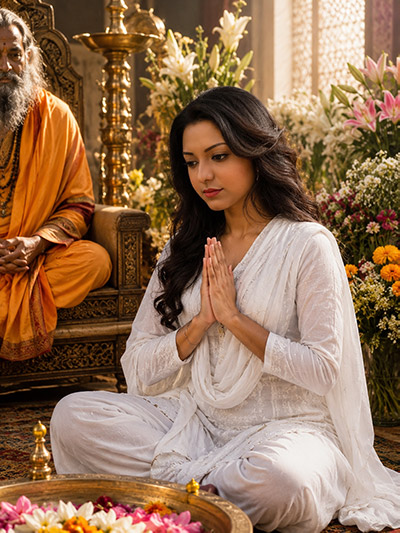
A devotee clad in pure white sits peacefully with folded hands beside an elder master amidst vibrant floral decorations and brass accents. Ready to try this aesthetic? Copy the setup instructions and start creating immediately!
PROMPT
{
“image_label”: “Imggear.com_4”,
“version”: “3.5”,
“aspect_ratio”: “3:4”,
“prompt”: “An ultra-realistic, photorealistic premium masterpiece, preserving the exact identity, facial proportions, bone structure, eye depth, sharp jawline, authentic facial characteristics, and skin micro-textures (visible pores, fine lines) of the subject in the uploaded personal reference photo without alteration. The facial lighting must seamlessly fuse with the ambient scene highlights and cast realistic shadows, allowing the subject to naturally integrate with the environment’s lighting, shadows, depth, atmospheric perspective, and optical characteristics while preserving the subject’s true identity without alteration, seamlessly integrating the subject into this cinematic scene, while maintaining complete identity consistency throughout the image. The AI dynamically auto-detects a female subject, approximate age 25, possessing a delicate, highly graceful, and slim physical build. She is seated comfortably on the floor in a profoundly reverent cross-legged position, her hands brought perfectly together in front of her chest in a highly serene Anjali Mudra (prayer pose). She is beautifully attired in a pristine, pure white, heavily textured traditional cotton Salwar Kameez ensemble, featuring a meticulously draped matching white dupatta (scarf) over her shoulders, showcasing extraordinary, ultra-high-definition fabric grain and soft, organic wrinkling. Captured using a full-frame professional mirrorless camera with an 85mm f/1.4 prime lens in RAW format. The prompt demands hyper-detailed edge sharpness, extreme high-definition micro-details on skin and fabric, natural optical rendering, and premium creamy bokeh. The environment is the profoundly richly decorated interior hall of an absolutely majestic, grand ashram complex, completely filled with highly detailed blooming flower arrangements and incredibly ornate carved brass fixtures. Soft, beautifully diffused, incredibly warm daylight streams gently through massive windows in the deeply blurred background, creating an impeccable, editorial-grade cinematic global illumination setup. This lighting ensures wildly vivid yet completely natural color saturation, profoundly rich, nuanced mid-tones, beautifully bright clean highlights, and deeply punchy, dramatic shadows across her face. An older male figure in deeply vibrant saffron robes sits elevated to the left. Imggear.com watermark located in the bottom-left corner in Petit Formal Script, Thin, Elegant Cursive Strokes, colored in Soft White (#ffffff) with Slight Transparency, maintaining a minimal, premium handwritten signature appearance seamlessly blended with no background. Version: 3.5.”,
“negative_prompt”: “(plastic skin, waxy skin, CGI rendering, AI beauty filter look, porcelain skin, over-smoothed skin, airbrushed skin, synthetic textures, doll-like face, uncanny valley, artificial symmetry), (deformed face, distorted facial features, asymmetrical eyes, bad anatomy, bad proportions, extra limbs, extra fingers, missing fingers, malformed hands, mutated hands), (unnatural lighting, flat lighting, harsh direct sunlight, blown-out highlights, crushed shadows, oversaturated colors, neon colors, unrealistic color grading, HDR look, overexposed, underexposed), (blurry, out of focus, low resolution, pixelated, jpeg artifacts, grainy noise, motion blur, soft focus), (dry land, dusty ground, indoor background, wrong environment, mismatched background), (clothing logos, brand marks, trademarked patterns, text overlays, random watermark placement, duplicate watermark, extra signature), (cartoon style, illustration, painting, 3D render, anime, stylized art, digital art look), (identity mismatch, face swap artifacts, inconsistent facial features, altered bone structure, changed eye color, different face shape), (modern western wear, business attire, winter coat, harsh artificial studio lighting, blank white background, standing up, casual t-shirt).”
}
Indian Sage Sunset Portrait Ideas for AI Photo Generation
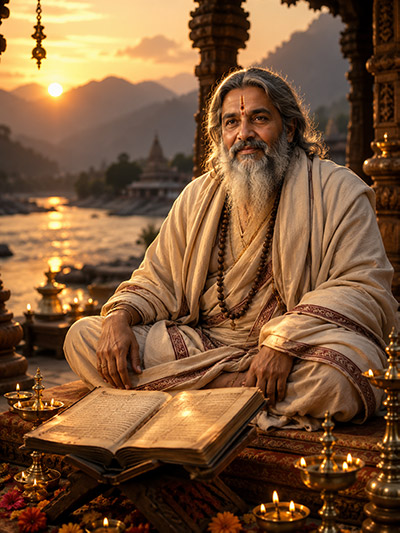
A serene spiritual master sits cross-legged reading ancient scriptures along a riverbank during golden hour glowing sunset. Wondering how to craft this realistic scenery yourself? Check out the complete prompt breakdown inside!
PROMPT
{
“image_label”: “Imggear.com_5”,
“version”: “3.5”,
“aspect_ratio”: “3:4”,
“prompt”: “An ultra-realistic, photorealistic premium masterpiece, preserving the exact identity, facial proportions, bone structure, eye depth, sharp jawline, authentic facial characteristics, and skin micro-textures (visible pores, fine lines) of the subject in the uploaded personal reference photo without alteration. The facial lighting must seamlessly fuse with the ambient scene highlights and cast realistic shadows, allowing the subject to naturally integrate with the environment’s lighting, shadows, depth, atmospheric perspective, and optical characteristics while preserving the subject’s true identity without alteration, seamlessly integrating the subject into this dramatic portrait, while maintaining complete identity consistency throughout the image. The AI dynamically auto-detects a male subject, approximate age 65, possessing a deeply powerful, broad-shouldered, and thoroughly relaxed, authoritative physical build. He is seated heavily and comfortably cross-legged on a highly elevated, beautifully cushioned wooden dais. He is draped immaculately in voluminous, massively layered, unstitched beige and pristine cream traditional cotton textiles, meticulously wrapped around his torso and broad shoulders, allowing extraordinary, high-fidelity fabric folds, deep physical shadows, and distinct fabric micro-textures to be profoundly visible. Captured using a full-frame professional mirrorless camera with an 85mm f/1.4 prime lens in RAW format. The prompt strictly requires hyper-detailed edge sharpness, extreme high-definition micro-details on skin and fabric, natural optical rendering, and premium creamy bokeh. The environment is an absolutely breathtaking open-air stone and wooden pavilion. In the immediate foreground rests an open, ancient sacred text on a carved wooden stand, surrounded entirely by intensely glowing brass oil lamps. The background features an incredibly spectacular, deeply cinematic sunset over a gently flowing river and towering, majestic mountains. The lighting setup is an absolute masterpiece of natural hour lighting, casting immense, glowing golden rim light directly across the subject’s profile, generating incredibly warm, rich skin tones, fiercely vivid color saturation, and deeply profound, punchy editorial shadows. Imggear.com watermark located in the bottom-left corner in Petit Formal Script, Thin, Elegant Cursive Strokes, colored in Soft White (#ffffff) with Slight Transparency, maintaining a minimal, premium handwritten signature appearance seamlessly blended with no background. Version: 3.5.”,
“negative_prompt”: “(plastic skin, waxy skin, CGI rendering, AI beauty filter look, porcelain skin, over-smoothed skin, airbrushed skin, synthetic textures, doll-like face, uncanny valley, artificial symmetry), (deformed face, distorted facial features, asymmetrical eyes, bad anatomy, bad proportions, extra limbs, extra fingers, missing fingers, malformed hands, mutated hands), (unnatural lighting, flat lighting, harsh direct sunlight, blown-out highlights, crushed shadows, oversaturated colors, neon colors, unrealistic color grading, HDR look, overexposed, underexposed), (blurry, out of focus, low resolution, pixelated, jpeg artifacts, grainy noise, motion blur, soft focus), (dry land, dusty ground, indoor background, wrong environment, mismatched background), (clothing logos, brand marks, trademarked patterns, text overlays, random watermark placement, duplicate watermark, extra signature), (cartoon style, illustration, painting, 3D render, anime, stylized art, digital art look), (identity mismatch, face swap artifacts, inconsistent facial features, altered bone structure, changed eye color, different face shape), (tailored suit, necktie, modern jacket, tight clothing, wristwatch, indoor artificial lighting, modern office background, sunglasses).”
}
💡 AI Photo Editing Pro Tips for Perfect Results
Keep Faces Consistent: If the AI changes the face, add this exact phrase to the very beginning of your prompt: “Preserve facial identity 100%, do not alter facial features or proportions.”
Reroll for Perfection: Run every prompt 2–3 times! The second or third generation is almost always sharper and packed with better details.
Get the DSLR Look: Want that beautiful, blurred background? Just add “f/1.8 shallow depth of field” to your prompt.
Control the Camera Shot: Tell the AI exactly what frame you want by adding terms like “Close-up portrait,” “Full-body shot,” or “Wide-angle view.”
Set the Vibe with Lighting: Lighting makes or breaks an AI image. Add “Cinematic lighting,” “Golden hour sunset,” or “Soft studio lighting” for a professional touch.
📐 Best Aspect Ratio: Use 3:4 Vertical for stunning, ready-to-post results on Instagram and Pinterest.