Struggling to get your social media portraits to trend? You are not alone—most image prompts produce washed-out textures or robotic facial features. If you want your male model edits to command attention, mastering the 6 Moste Viral Photo Editing Prompts For Boys Gemini AI 2026 guide will change your workflow completely. In this quick breakdown, we reveal the exact copy-paste prompts designed inside Gemini AI to deliver cinematic lighting, natural skin tones, and viral aesthetic styles instantly.
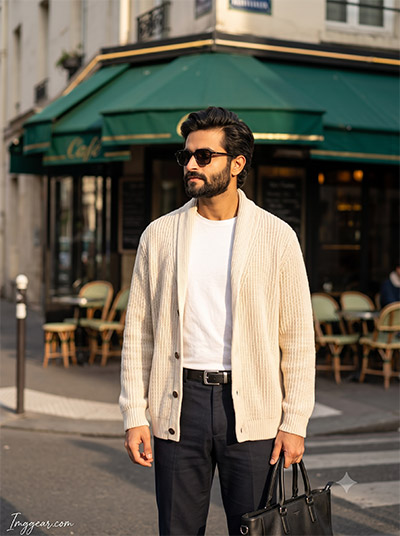
Upgrade Your European Cafe Look Using Stylish Photo Editing Prompts
Recreate this effortlessly classy Parisian street style aesthetic for your own outfit photos using smart photo editing prompts. Learn how to balance warm golden hour light with sharp cream cardigan textures. Ready to level up your social media feed?
PROMPT
{
“image_label”: “Imggear.com_1”,
“version”: “3.5”,
“aspect_ratio”: “3:4”,
“prompt”: “An ultra-realistic, photorealistic premium masterpiece, preserving the exact identity, facial proportions, bone structure, eye depth, sharp jawline, authentic facial characteristics, and skin micro-textures (visible pores, fine lines) of the subject in the uploaded personal reference photo without alteration. The facial lighting must seamlessly fuse with the ambient scene highlights and cast realistic shadows, allowing the subject to naturally integrate with the environment’s lighting, shadows, depth, atmospheric perspective, and optical characteristics while preserving the subject’s true identity without alteration, seamlessly integrating the subject into this cinematic scene, while maintaining complete identity consistency throughout the image. The subject is a young adult male, slender build, narrow shoulders. Render the subject with premium true-to-life human skin using PBR, preserving authentic skin pores, fine skin grain, natural melanin transitions, facial micro-contrast, subtle oil diffusion, organic facial imperfections, and realistic skin translucency. Standing outdoors, looking left with a neutral expression. Wearing a generic luxury cream heavy-knit open cardigan, white t-shirt, dark trousers, silver buckle belt, dark square sunglasses, and carrying a black leather tote bag. The environment is a Parisian street corner, green cafe awning, outdoor seating, and a crosswalk. Captured using a full-frame professional mirrorless camera with an 85mm f/1.4 prime lens in RAW format, featuring hyper-detailed edge sharpness, extreme high-definition micro-details on skin and fabric, natural optical rendering, and premium creamy bokeh. Direct golden hour sunlight creating harsh shadows and bright highlights, elevated with vivid yet natural color saturation, deep punchy shadows, bright clean highlights, and strong tonal contrast. Apply premium editorial-grade color grading with warm highlights, rich mid-tones, natural skin tones, and enhanced micro-contrast. Watermark: \”Imggear.com\” positioned in the bottom-left corner, featuring Petit Formal Script, Thin, Elegant Cursive Strokes, in Soft White (#ffffff) with Slight Transparency, maintaining a minimal, premium handwritten signature appearance seamlessly blended with no background.”,
“negative_prompt”: “(plastic skin, waxy skin, CGI rendering, AI beauty filter look, porcelain skin, over-smoothed skin, airbrushed skin, synthetic textures, doll-like face, uncanny valley, artificial symmetry), (deformed face, distorted facial features, asymmetrical eyes, bad anatomy, bad proportions, extra limbs, extra fingers, missing fingers, malformed hands, mutated hands), (unnatural lighting, flat lighting, harsh direct sunlight, blown-out highlights, crushed shadows, oversaturated colors, neon colors, unrealistic color grading, HDR look, overexposed, underexposed), (blurry, out of focus, low resolution, pixelated, jpeg artifacts, grainy noise, motion blur, soft focus), (dry land, dusty ground, indoor background, wrong environment, mismatched background), (clothing logos, brand marks, trademarked patterns, text overlays, random watermark placement, duplicate watermark, extra signature), (cartoon style, illustration, painting, 3D render, anime, stylized art, digital art look), (identity mismatch, face swap artifacts, inconsistent facial features, altered bone structure, changed eye color, different face shape), rainy weather, overcast sky, empty streets, modern architecture, indoor studio.”
}
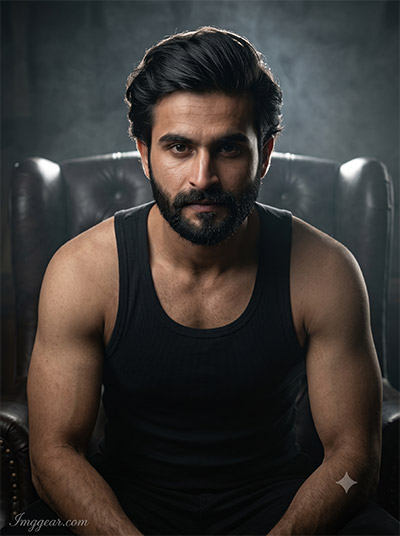
Dramatic Studio Portrait Editing Prompts for Intense Male Edits
Capture bold lighting and atmospheric studio contrast with simple portrait generation prompts. This guide breaks down the shadow depth and backdrop focus used for intense masculine photos. Drop your thoughts in the comments below!
PROMPT
{
“image_label”: “Imggear.com_2”,
“version”: “3.5”,
“aspect_ratio”: “3:4”,
“prompt”: “An ultra-realistic, photorealistic premium masterpiece, preserving the exact identity, facial proportions, bone structure, eye depth, sharp jawline, authentic facial characteristics, and skin micro-textures (visible pores, fine lines) of the subject in the uploaded personal reference photo without alteration. The facial lighting must seamlessly fuse with the ambient scene highlights and cast realistic shadows, allowing the subject to naturally integrate with the environment’s lighting, shadows, depth, atmospheric perspective, and optical characteristics while preserving the subject’s true identity without alteration, seamlessly integrating the subject into this dramatic portrait, while maintaining complete identity consistency throughout the image. The subject is a young adult male, muscular build, broad shoulders. Render the subject with premium true-to-life human skin using PBR, preserving authentic skin pores, fine skin grain, natural melanin transitions, facial micro-contrast, subtle oil diffusion, organic facial imperfections, and realistic skin translucency. Seated in a dark leather tufted armchair, leaning forward, intense direct eye contact. Wearing a generic luxury fitted ribbed black tank top. The environment is a dimly lit, moody interior heavily obscured by shadow. Captured using a full-frame professional mirrorless camera with an 85mm f/1.4 prime lens in RAW format, featuring hyper-detailed edge sharpness, extreme high-definition micro-details on skin and fabric, natural optical rendering, and premium creamy bokeh. Dramatic cinematic lighting with a strong rim light from behind illuminating the silhouette, coupled with soft volumetric haze, elevated with vivid yet natural color saturation, deep punchy shadows, bright clean highlights, and strong tonal contrast. Apply premium editorial-grade color grading with warm highlights, rich mid-tones, natural skin tones, and enhanced micro-contrast. Watermark: \”Imggear.com\” positioned in the bottom-left corner, featuring Petit Formal Script, Thin, Elegant Cursive Strokes, in Soft White (#ffffff) with Slight Transparency, maintaining a minimal, premium handwritten signature appearance seamlessly blended with no background.”,
“negative_prompt”: “(plastic skin, waxy skin, CGI rendering, AI beauty filter look, porcelain skin, over-smoothed skin, airbrushed skin, synthetic textures, doll-like face, uncanny valley, artificial symmetry), (deformed face, distorted facial features, asymmetrical eyes, bad anatomy, bad proportions, extra limbs, extra fingers, missing fingers, malformed hands, mutated hands), (unnatural lighting, flat lighting, harsh direct sunlight, blown-out highlights, crushed shadows, oversaturated colors, neon colors, unrealistic color grading, HDR look, overexposed, underexposed), (blurry, out of focus, low resolution, pixelated, jpeg artifacts, grainy noise, motion blur, soft focus), (dry land, dusty ground, indoor background, wrong environment, mismatched background), (clothing logos, brand marks, trademarked patterns, text overlays, random watermark placement, duplicate watermark, extra signature), (cartoon style, illustration, painting, 3D render, anime, stylized art, digital art look), (identity mismatch, face swap artifacts, inconsistent facial features, altered bone structure, changed eye color, different face shape), bright daylight, outdoor setting, casual posture, high-key lighting.”
}
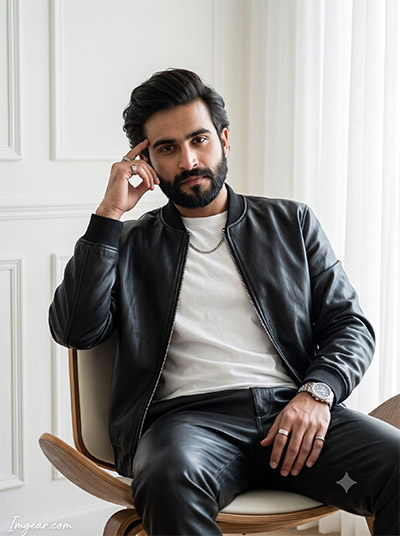
Master Modern Leather Jacket Look with Clever Image Creation Prompts
Elevate your casual indoor portraits using bright window lighting and sleek monochromatic style details. Discover the exact visual formulas used to render clean white interiors with sharp leather textures. Try copying this template today!
PROMPT
{
“image_label”: “Imggear.com_3”,
“version”: “3.5”,
“aspect_ratio”: “3:4”,
“prompt”: “An ultra-realistic, photorealistic premium masterpiece, preserving the exact identity, facial proportions, bone structure, eye depth, sharp jawline, authentic facial characteristics, and skin micro-textures (visible pores, fine lines) of the subject in the uploaded personal reference photo without alteration. The facial lighting must seamlessly fuse with the ambient scene highlights and cast realistic shadows, allowing the subject to naturally integrate with the environment’s lighting, shadows, depth, atmospheric perspective, and optical characteristics while preserving the subject’s true identity without alteration, seamlessly integrating the subject into this cinematic scene, while maintaining complete identity consistency throughout the image. The subject is a young adult male, athletic build, medium shoulders. Render the subject with premium true-to-life human skin using PBR, preserving authentic skin pores, fine skin grain, natural melanin transitions, facial micro-contrast, subtle oil diffusion, organic facial imperfections, and realistic skin translucency. Seated in a modern wooden chair, leaning back, right hand near temple, looking directly at the camera. Wearing a generic luxury black leather bomber jacket, white crewneck t-shirt, black leather trousers, silver chain, watch, and rings. The environment is a bright, minimalist interior with white molded walls and sheer curtains. Captured using a full-frame professional mirrorless camera with an 85mm f/1.4 prime lens in RAW format, featuring hyper-detailed edge sharpness, extreme high-definition micro-details on skin and fabric, natural optical rendering, and premium creamy bokeh. Soft, diffused natural daylight from the right creating smooth gradients, elevated with vivid yet natural color saturation, deep punchy shadows, bright clean highlights, and strong tonal contrast. Apply premium editorial-grade color grading with warm highlights, rich mid-tones, natural skin tones, and enhanced micro-contrast. Watermark: \”Imggear.com\” positioned in the bottom-left corner, featuring Petit Formal Script, Thin, Elegant Cursive Strokes, in Soft White (#ffffff) with Slight Transparency, maintaining a minimal, premium handwritten signature appearance seamlessly blended with no background.”,
“negative_prompt”: “(plastic skin, waxy skin, CGI rendering, AI beauty filter look, porcelain skin, over-smoothed skin, airbrushed skin, synthetic textures, doll-like face, uncanny valley, artificial symmetry), (deformed face, distorted facial features, asymmetrical eyes, bad anatomy, bad proportions, extra limbs, extra fingers, missing fingers, malformed hands, mutated hands), (unnatural lighting, flat lighting, harsh direct sunlight, blown-out highlights, crushed shadows, oversaturated colors, neon colors, unrealistic color grading, HDR look, overexposed, underexposed), (blurry, out of focus, low resolution, pixelated, jpeg artifacts, grainy noise, motion blur, soft focus), (dry land, dusty ground, indoor background, wrong environment, mismatched background), (clothing logos, brand marks, trademarked patterns, text overlays, random watermark placement, duplicate watermark, extra signature), (cartoon style, illustration, painting, 3D render, anime, stylized art, digital art look), (identity mismatch, face swap artifacts, inconsistent facial features, altered bone structure, changed eye color, different face shape), dark moody lighting, outdoor environment, standing posture.”
}
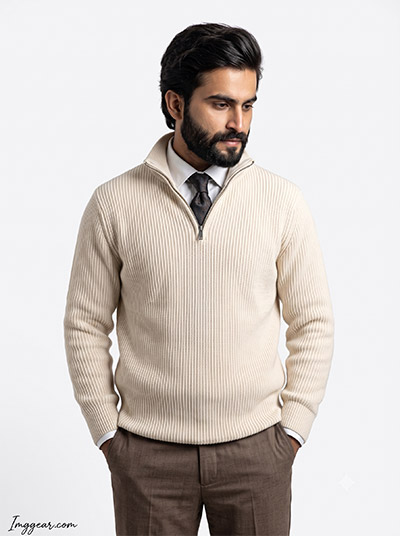
Professional Men Fashion Studio Portrait Prompts for Clean Looks
Generating crisp studio portraits with seamless white backdrops and detailed knitwear textures has never been easier using targeted image commands. Perfect for minimalist wardrobe showcases and smart casual concepts. Which clothing style should we test next?
PROMPT
{
“image_label”: “Imggear.com_4”,
“version”: “3.5”,
“aspect_ratio”: “3:4”,
“prompt”: “An ultra-realistic, photorealistic premium masterpiece, preserving the exact identity, facial proportions, bone structure, eye depth, sharp jawline, authentic facial characteristics, and skin micro-textures (visible pores, fine lines) of the subject in the uploaded personal reference photo without alteration. The facial lighting must seamlessly fuse with the ambient scene highlights and cast realistic shadows, allowing the subject to naturally integrate with the environment’s lighting, shadows, depth, atmospheric perspective, and optical characteristics while preserving the subject’s true identity without alteration, seamlessly integrating the subject into this dramatic portrait, while maintaining complete identity consistency throughout the image. The subject is a young adult male, average build, medium shoulders. Render the subject with premium true-to-life human skin using PBR, preserving authentic skin pores, fine skin grain, natural melanin transitions, facial micro-contrast, subtle oil diffusion, organic facial imperfections, and realistic skin translucency. Standing with hands in pockets, looking down and right with a contemplative expression. Wearing a generic luxury cream heavy ribbed quarter-zip sweater, white collared shirt, dark patterned silk tie, and brown tailored trousers. The environment is a stark, seamless white studio background. Captured using a full-frame professional mirrorless camera with an 85mm f/1.4 prime lens in RAW format, featuring hyper-detailed edge sharpness, extreme high-definition micro-details on skin and fabric, natural optical rendering, and premium creamy bokeh. Clean, even studio lighting with soft wrap-around fill, elevated with vivid yet natural color saturation, deep punchy shadows, bright clean highlights, and strong tonal contrast. Apply premium editorial-grade color grading with warm highlights, rich mid-tones, natural skin tones, and enhanced micro-contrast. Watermark: \”Imggear.com\” positioned in the bottom-left corner, featuring Petit Formal Script, Thin, Elegant Cursive Strokes, in Soft White (#ffffff) with Slight Transparency, maintaining a minimal, premium handwritten signature appearance seamlessly blended with no background.”,
“negative_prompt”: “(plastic skin, waxy skin, CGI rendering, AI beauty filter look, porcelain skin, over-smoothed skin, airbrushed skin, synthetic textures, doll-like face, uncanny valley, artificial symmetry), (deformed face, distorted facial features, asymmetrical eyes, bad anatomy, bad proportions, extra limbs, extra fingers, missing fingers, malformed hands, mutated hands), (unnatural lighting, flat lighting, harsh direct sunlight, blown-out highlights, crushed shadows, oversaturated colors, neon colors, unrealistic color grading, HDR look, overexposed, underexposed), (blurry, out of focus, low resolution, pixelated, jpeg artifacts, grainy noise, motion blur, soft focus), (dry land, dusty ground, indoor background, wrong environment, mismatched background), (clothing logos, brand marks, trademarked patterns, text overlays, random watermark placement, duplicate watermark, extra signature), (cartoon style, illustration, painting, 3D render, anime, stylized art, digital art look), (identity mismatch, face swap artifacts, inconsistent facial features, altered bone structure, changed eye color, different face shape), cluttered environment, dark lighting, making eye contact, sitting down.”
}
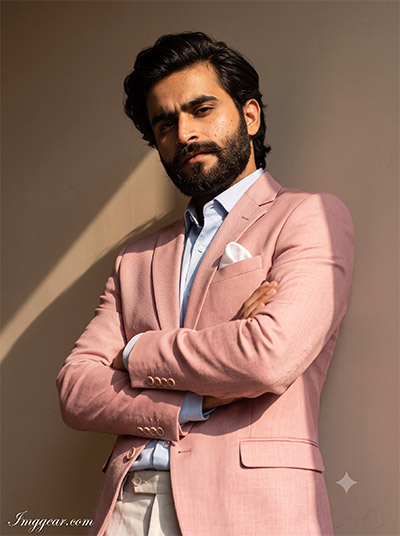
Warm Sunlight Pastel Blazer Prompts for Formal Male Portraits
Master realistic direct sunlight shadows and textured blush suit aesthetics through tailored image generation instructions. Perfect for creating refined, fashion-forward editorial shots with soft indoor wall backgrounds. Don’t wait—grab the full prompt now!
PROMPT
{
“image_label”: “Imggear.com_5”,
“version”: “3.5”,
“aspect_ratio”: “3:4”,
“prompt”: “An ultra-realistic, photorealistic premium masterpiece, preserving the exact identity, facial proportions, bone structure, eye depth, sharp jawline, authentic facial characteristics, and skin micro-textures (visible pores, fine lines) of the subject in the uploaded personal reference photo without alteration. The facial lighting must seamlessly fuse with the ambient scene highlights and cast realistic shadows, allowing the subject to naturally integrate with the environment’s lighting, shadows, depth, atmospheric perspective, and optical characteristics while preserving the subject’s true identity without alteration, seamlessly integrating the subject into this dramatic portrait, while maintaining complete identity consistency throughout the image. The subject is a young adult male, slender build, medium shoulders. Render the subject with premium true-to-life human skin using PBR, preserving authentic skin pores, fine skin grain, natural melanin transitions, facial micro-contrast, subtle oil diffusion, organic facial imperfections, and realistic skin translucency. Standing, leaning back against a wall, arms crossed, looking down at the camera with an intense expression in a low-angle shot. Wearing a generic luxury textured light pink tailored suit jacket, light blue collared shirt, light pocket square, and light trousers. The environment is an interior with smooth, plain warm neutral walls. Captured using a full-frame professional mirrorless camera with an 85mm f/1.4 prime lens in RAW format, featuring hyper-detailed edge sharpness, extreme high-definition micro-details on skin and fabric, natural optical rendering, and premium creamy bokeh. High-contrast studio lighting simulating late afternoon sun, casting sharp diagonal shadows, elevated with vivid yet natural color saturation, deep punchy shadows, bright clean highlights, and strong tonal contrast. Apply premium editorial-grade color grading with warm highlights, rich mid-tones, natural skin tones, and enhanced micro-contrast. Watermark: \”Imggear.com\” positioned in the bottom-left corner, featuring Petit Formal Script, Thin, Elegant Cursive Strokes, in Soft White (#ffffff) with Slight Transparency, maintaining a minimal, premium handwritten signature appearance seamlessly blended with no background.”,
“negative_prompt”: “(plastic skin, waxy skin, CGI rendering, AI beauty filter look, porcelain skin, over-smoothed skin, airbrushed skin, synthetic textures, doll-like face, uncanny valley, artificial symmetry), (deformed face, distorted facial features, asymmetrical eyes, bad anatomy, bad proportions, extra limbs, extra fingers, missing fingers, malformed hands, mutated hands), (unnatural lighting, flat lighting, harsh direct sunlight, blown-out highlights, crushed shadows, oversaturated colors, neon colors, unrealistic color grading, HDR look, overexposed, underexposed), (blurry, out of focus, low resolution, pixelated, jpeg artifacts, grainy noise, motion blur, soft focus), (dry land, dusty ground, indoor background, wrong environment, mismatched background), (clothing logos, brand marks, trademarked patterns, text overlays, random watermark placement, duplicate watermark, extra signature), (cartoon style, illustration, painting, 3D render, anime, stylized art, digital art look), (identity mismatch, face swap artifacts, inconsistent facial features, altered bone structure, changed eye color, different face shape), flat lighting, soft shadows, outdoor setting, eye-level angle, casual clothing.”
}
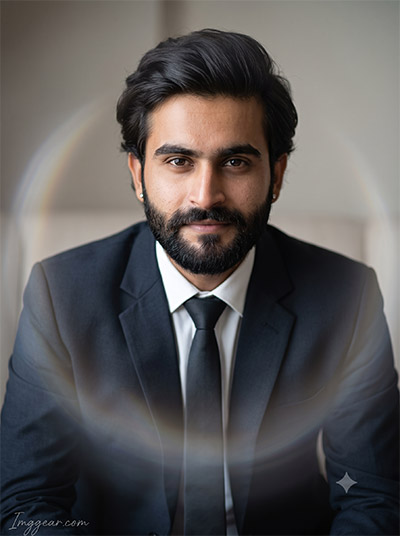
Corporate Headshot Lens Flare Prompts for Professional Edits
Blend formal suit styling with soft rainbow lens reflections using these detailed image generation prompts. Perfect for crafting a sharp yet warm corporate headshot that stands out online. Want to try this look for your own profile pic?
PROMPT
{
“image_label”: “Imggear.com_6”,
“version”: “3.5”,
“aspect_ratio”: “3:4”,
“prompt”: “An ultra-realistic, photorealistic premium masterpiece, preserving the exact identity, facial proportions, bone structure, eye depth, sharp jawline, authentic facial characteristics, and skin micro-textures (visible pores, fine lines) of the subject in the uploaded personal reference photo without alteration. The facial lighting must seamlessly fuse with the ambient scene highlights and cast realistic shadows, allowing the subject to naturally integrate with the environment’s lighting, shadows, depth, atmospheric perspective, and optical characteristics while preserving the subject’s true identity without alteration, seamlessly integrating the subject into this cinematic scene, while maintaining complete identity consistency throughout the image. The subject is an adult male, average build, broad shoulders. Render the subject with premium true-to-life human skin using PBR, preserving authentic skin pores, fine skin grain, natural melanin transitions, facial micro-contrast, subtle oil diffusion, organic facial imperfections, and realistic skin translucency. Sitting, looking softly at the camera with a relaxed, confident expression. Wearing a generic luxury dark tailored suit jacket, crisp white collared shirt, dark tie, and small stud earrings. The environment is a soft, neutral interior setting, mostly obscured by a shallow depth of field, featuring a prominent, heavily blurred circular optical artifact in the foreground. Captured using a full-frame professional mirrorless camera with an 85mm f/1.4 prime lens in RAW format, featuring hyper-detailed edge sharpness, extreme high-definition micro-details on skin and fabric, natural optical rendering, and premium creamy bokeh. Soft, flattering diffused portrait lighting with gentle wrapping highlights, elevated with vivid yet natural color saturation, deep punchy shadows, bright clean highlights, and strong tonal contrast. Apply premium editorial-grade color grading with warm highlights, rich mid-tones, natural skin tones, and enhanced micro-contrast. Watermark: \”Imggear.com\” positioned in the bottom-left corner, featuring Petit Formal Script, Thin, Elegant Cursive Strokes, in Soft White (#ffffff) with Slight Transparency, maintaining a minimal, premium handwritten signature appearance seamlessly blended with no background.”,
“negative_prompt”: “(plastic skin, waxy skin, CGI rendering, AI beauty filter look, porcelain skin, over-smoothed skin, airbrushed skin, synthetic textures, doll-like face, uncanny valley, artificial symmetry), (deformed face, distorted facial features, asymmetrical eyes, bad anatomy, bad proportions, extra limbs, extra fingers, missing fingers, malformed hands, mutated hands), (unnatural lighting, flat lighting, harsh direct sunlight, blown-out highlights, crushed shadows, oversaturated colors, neon colors, unrealistic color grading, HDR look, overexposed, underexposed), (blurry, out of focus, low resolution, pixelated, jpeg artifacts, grainy noise, motion blur, soft focus), (dry land, dusty ground, indoor background, wrong environment, mismatched background), (clothing logos, brand marks, trademarked patterns, text overlays, random watermark placement, duplicate watermark, extra signature), (cartoon style, illustration, painting, 3D render, anime, stylized art, digital art look), (identity mismatch, face swap artifacts, inconsistent facial features, altered bone structure, changed eye color, different face shape), sharp foreground, harsh directional lighting, outdoor setting, casual attire.”
}
💡 AI Photo Editing Pro Tips for Perfect Results
Keep Faces Consistent: If the AI changes the face, add this exact phrase to the very beginning of your prompt: “Preserve facial identity 100%, do not alter facial features or proportions.”
Reroll for Perfection: Run every prompt 2–3 times! The second or third generation is almost always sharper and packed with better details.
Get the DSLR Look: Want that beautiful, blurred background? Just add “f/1.8 shallow depth of field” to your prompt.
Control the Camera Shot: Tell the AI exactly what frame you want by adding terms like “Close-up portrait,” “Full-body shot,” or “Wide-angle view.”
Set the Vibe with Lighting: Lighting makes or breaks an AI image. Add “Cinematic lighting,” “Golden hour sunset,” or “Soft studio lighting” for a professional touch.
📐 Best Aspect Ratio: Use 3:4 Vertical for stunning, ready-to-post results on Instagram and Pinterest.