Struggling to create ultra-realistic, viral social media portraits using AI? You are not alone—getting the lighting, style, and facial details right can feel impossible without exact copy-paste scripts. Finding effective ChatGPT photo editing prompts trending boy aesthetics is the ultimate shortcut to transforming plain photos into eye-catching masterpieces. By using tailored prompts optimized for both ChatGPT and Gemini AI, you can instantly generate cinematic, high-definition boy portraits that dominate feeds. Below, we reveal the top viral prompts you can use right now!
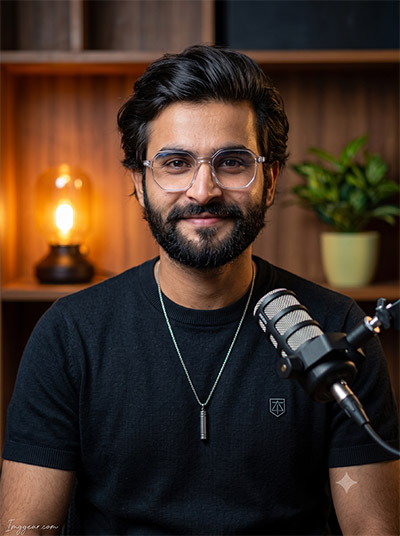
Create Modern Podcast Studio Portraits with ChatGPT Photo Editing Prompts
Transform your casual shots into a sharp studio podcast host visual using ChatGPT photo editing concepts. Perfect for creators looking to upgrade their personal brand aesthetic with warm background bokeh and dynamic studio gear. Ready to test this prompt on your next portrait?
PROMPT
{
“image_label”: “Imggear.com_1”,
“version”: “3.5”,
“aspect_ratio”: “3:4”,
“prompt”: “An ultra-realistic, photorealistic premium masterpiece, preserving the exact identity, facial proportions, bone structure, eye depth, sharp jawline, authentic facial characteristics, and skin micro-textures (visible pores, fine lines) of the subject in the uploaded personal reference photo without alteration. The facial lighting must seamlessly fuse with the ambient scene highlights and cast realistic shadows, allowing the subject to naturally integrate with the environment’s lighting, shadows, depth, atmospheric perspective, and optical characteristics while preserving the subject’s true identity without alteration, seamlessly integrating the subject into this cinematic studio broadcast scene, while maintaining complete identity consistency throughout the image. The scene depicts a male in his early 30s of average athletic build with broad shoulders. He is wearing a dark knit short-sleeve shirt with a geometric insignia, a silver chain with a cylindrical pendant, and clear hexagonal eyeglasses. He faces forward, looking directly at the camera with a gentle smile. The environment is a professional podcast studio featuring a broadcast microphone on a stand in the foreground, with soft-focus wooden shelving, a glowing amber desk lamp, and a green plant in the background. Captured using a full-frame professional mirrorless camera with an 85mm f/1.4 prime lens in RAW format, featuring hyper-detailed edge sharpness, extreme high-definition micro-details on skin and fabric, natural optical rendering, and premium creamy bokeh. The lighting mirrors a cinematic dual-tone setup with warm amber rim lighting, a soft front fill light, deep punchy shadows, bright clean highlights, and strong tonal contrast. Apply premium editorial-grade color grading—warm highlights, rich mid-tones, natural skin tones—with enhanced micro-contrast and clarity. A minimal, premium handwritten signature watermark reading \”Imggear.com\” is seamlessly rendered in the bottom-left corner in a thin, elegant, soft white (#ffffff) with slight transparency, using a Petit Formal Script cursive style.”,
“negative_prompt”: “(plastic skin, waxy skin, CGI rendering, AI beauty filter look, porcelain skin, over-smoothed skin, airbrushed skin, synthetic textures, doll-like face, uncanny valley, artificial symmetry), (deformed face, distorted facial features, asymmetrical eyes, bad anatomy, bad proportions, extra limbs, extra fingers, missing fingers, malformed hands, mutated hands), (unnatural lighting, flat lighting, harsh direct sunlight, blown-out highlights, crushed shadows, oversaturated colors, neon colors, unrealistic color grading, HDR look, overexposed, underexposed), (blurry, out of focus, low resolution, pixelated, jpeg artifacts, grainy noise, motion blur, soft focus), (dry land, dusty ground, indoor background, wrong environment, mismatched background), (clothing logos, brand marks, trademarked patterns, text overlays, random watermark placement, duplicate watermark, extra signature), (cartoon style, illustration, painting, 3D render, anime, stylized art, digital art look), (identity mismatch, face swap artifacts, inconsistent facial features, altered bone structure, changed eye color, different face shape), (unrealistic microphone, distorted glasses frames, asymmetrical lenses, flat bokeh, floating objects, disconnected microphone stand).”
}
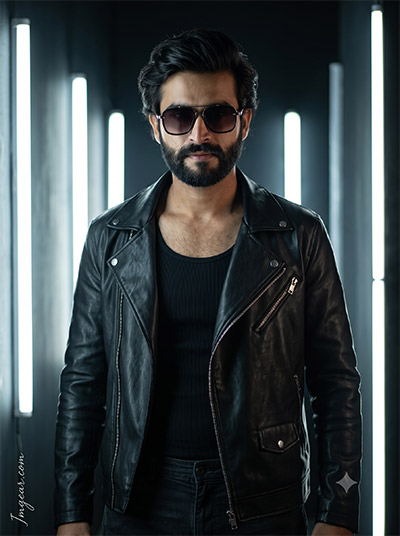
Edgy Neon Leather Jacket Look using ChatGPT Photo Editing Prompts
Give your profile pictures a sleek, cyberpunk edge with cool vertical lighting and leather apparel. By applying this simple ChatGPT prompt recipe, you get cinematic depth and high-contrast shadow effects instantly. Grab this copy-paste text below and transform your photos tonight.
PROMPT
{
“image_label”: “Imggear.com_2”,
“version”: “3.5”,
“aspect_ratio”: “3:4”,
“prompt”: “An ultra-realistic, photorealistic premium masterpiece, preserving the exact identity, facial proportions, bone structure, eye depth, sharp jawline, authentic facial characteristics, and skin micro-textures (visible pores, fine lines) of the subject in the uploaded personal reference photo without alteration. The facial lighting must seamlessly fuse with the ambient scene highlights and cast realistic shadows, allowing the subject to naturally integrate with the environment’s lighting, shadows, depth, atmospheric perspective, and optical characteristics while preserving the subject’s true identity without alteration, seamlessly integrating the subject into this moody cyberpunk cinematic scene, while maintaining complete identity consistency throughout the image. The scene depicts a male in his late 20s to early 30s of lean, athletic build with broad shoulders. He is wearing a black ribbed tank top beneath an unzipped premium custom black leather asymmetrical biker jacket, dark trousers with a drawstring waist, and dark tinted sunglasses with metallic accents. He stands angled slightly, one hand resting near his waist, looking forward with a confident expression. The environment is a dark interior characterized by glowing vertical LED light tubes in the background. Captured using a full-frame professional mirrorless camera with an 85mm f/1.4 prime lens in RAW format, featuring hyper-detailed edge sharpness, extreme high-definition micro-details on skin and fabric, natural optical rendering, and premium creamy bokeh. The lighting mirrors a dramatic chiaroscuro setup with intense, bright vertical rim lighting from the light tubes, deep punchy shadows, bright clean highlights, and strong tonal contrast. Apply premium editorial-grade color grading—warm highlights, rich mid-tones, natural skin tones—with enhanced micro-contrast and clarity. A minimal, premium handwritten signature watermark reading \”Imggear.com\” is seamlessly rendered in the bottom-left corner in a thin, elegant, soft white (#ffffff) with slight transparency, using a Petit Formal Script cursive style.”,
“negative_prompt”: “(plastic skin, waxy skin, CGI rendering, AI beauty filter look, porcelain skin, over-smoothed skin, airbrushed skin, synthetic textures, doll-like face, uncanny valley, artificial symmetry), (deformed face, distorted facial features, asymmetrical eyes, bad anatomy, bad proportions, extra limbs, extra fingers, missing fingers, malformed hands, mutated hands), (unnatural lighting, flat lighting, harsh direct sunlight, blown-out highlights, crushed shadows, oversaturated colors, neon colors, unrealistic color grading, HDR look, overexposed, underexposed), (blurry, out of focus, low resolution, pixelated, jpeg artifacts, grainy noise, motion blur, soft focus), (dry land, dusty ground, indoor background, wrong environment, mismatched background), (clothing logos, brand marks, trademarked patterns, text overlays, random watermark placement, duplicate watermark, extra signature), (cartoon style, illustration, painting, 3D render, anime, stylized art, digital art look), (identity mismatch, face swap artifacts, inconsistent facial features, altered bone structure, changed eye color, different face shape), (distorted sunglasses, asymmetrical sunglasses, broken leather texture, warped light tubes, flat contrast, missing drawstrings, floating clothing elements, uneven lighting strips, synthetic leather look).”
}
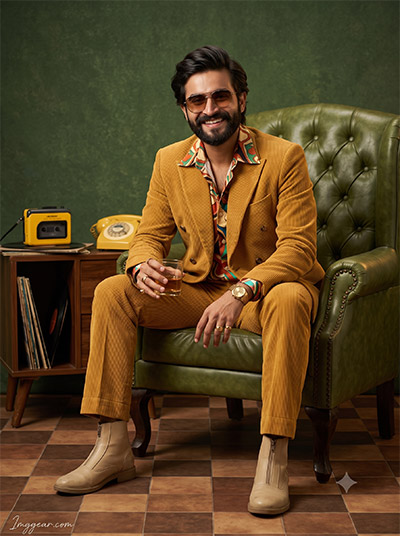
Retro 70s Style Boy Portraits via ChatGPT Photo Editing Prompts
Recreate iconic seventies fashion looks featuring mustard corduroy suits and vintage room decor using customized ChatGPT prompts. Achieve warm analog colors and authentic textured studio aesthetics with zero effort. Which retro era should we cover in our next prompt guide?
PROMPT
{
“image_label”: “Imggear.com_3”,
“version”: “3.5”,
“aspect_ratio”: “3:4”,
“prompt”: “An ultra-realistic, photorealistic premium masterpiece, preserving the exact identity, facial proportions, bone structure, eye depth, sharp jawline, authentic facial characteristics, and skin micro-textures (visible pores, fine lines) of the subject in the uploaded personal reference photo without alteration. The facial lighting must seamlessly fuse with the ambient scene highlights and cast realistic shadows, allowing the subject to naturally integrate with the environment’s lighting, shadows, depth, atmospheric perspective, and optical characteristics while preserving the subject’s true identity without alteration, seamlessly integrating the subject into this 1970s retro editorial portrait, while maintaining complete identity consistency throughout the image. The scene depicts a male in his late 20s of average build. He is wearing a mustard-yellow corduroy double-breasted suit with flared trousers, a colorful retro-patterned silk shirt, beige zip-up boots, a gold watch, gold rings, and tinted vintage sunglasses. He is seated in a vintage green tufted leather armchair, hands clasped holding a glass of amber liquid, smiling broadly. The environment is a stylized retro studio featuring a textured dark green wall, a brown and tan checkered tile floor, and a wooden side table displaying a yellow vintage portable audio cassette player, vinyl records, and a yellow rotary telephone handset. Captured using a full-frame professional mirrorless camera with an 85mm f/1.4 prime lens in RAW format, featuring hyper-detailed edge sharpness, extreme high-definition micro-details on skin and fabric, natural optical rendering, and premium creamy bokeh. The lighting mirrors a warm, slightly desaturated editorial setup with soft diffused studio lights, deep punchy shadows, bright clean highlights, and strong tonal contrast. Apply premium editorial-grade color grading—warm highlights, rich mid-tones, natural skin tones—with enhanced micro-contrast and clarity. A minimal, premium handwritten signature watermark reading \”Imggear.com\” is seamlessly rendered in the bottom-left corner in a thin, elegant, soft white (#ffffff) with slight transparency, using a Petit Formal Script cursive style.”,
“negative_prompt”: “(plastic skin, waxy skin, CGI rendering, AI beauty filter look, porcelain skin, over-smoothed skin, airbrushed skin, synthetic textures, doll-like face, uncanny valley, artificial symmetry), (deformed face, distorted facial features, asymmetrical eyes, bad anatomy, bad proportions, extra limbs, extra fingers, missing fingers, malformed hands, mutated hands), (unnatural lighting, flat lighting, harsh direct sunlight, blown-out highlights, crushed shadows, oversaturated colors, neon colors, unrealistic color grading, HDR look, overexposed, underexposed), (blurry, out of focus, low resolution, pixelated, jpeg artifacts, grainy noise, motion blur, soft focus), (dry land, dusty ground, indoor background, wrong environment, mismatched background), (clothing logos, brand marks, trademarked patterns, text overlays, random watermark placement, duplicate watermark, extra signature), (cartoon style, illustration, painting, 3D render, anime, stylized art, digital art look), (identity mismatch, face swap artifacts, inconsistent facial features, altered bone structure, changed eye color, different face shape), (modern furniture, distorted audio player, broken rotary phone, mismatched floor tiles, inaccurate corduroy texture, asymmetrical sunglasses, floating glass, distorted hands holding glass, incorrect fabric wales).”
}
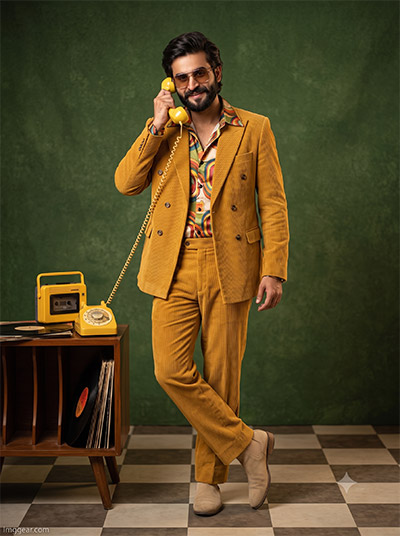
ChatGPT Prompts for Vintage Standing Boy Photography Aesthetics
Capture full-length vintage style with a retro yellow suit, rotary phone, and tiled floor. Generating this classic mid-century look takes seconds when using optimized ChatGPT keywords. Check out the step-by-step prompt breakdown to upgrade your portfolio!
PROMPT
{
“image_label”: “Imggear.com_4”,
“version”: “3.5”,
“aspect_ratio”: “3:4”,
“prompt”: “An ultra-realistic, photorealistic premium masterpiece, preserving the exact identity, facial proportions, bone structure, eye depth, sharp jawline, authentic facial characteristics, and skin micro-textures (visible pores, fine lines) of the subject in the uploaded personal reference photo without alteration. The facial lighting must seamlessly fuse with the ambient scene highlights and cast realistic shadows, allowing the subject to naturally integrate with the environment’s lighting, shadows, depth, atmospheric perspective, and optical characteristics while preserving the subject’s true identity without alteration, seamlessly integrating the subject into this 1970s retro editorial portrait, while maintaining complete identity consistency throughout the image. The scene depicts a male in his late 20s of average build. He is wearing a mustard-yellow corduroy double-breasted suit, a colorful retro-patterned silk shirt, beige boots, and tinted vintage sunglasses. He is standing with a slight backward lean, holding a yellow rotary telephone handset to his ear, looking at the camera with a confident smirk. The environment is a stylized retro studio featuring a textured dark green wall, a brown and tan checkered tile floor, and a wooden side table displaying a yellow vintage portable audio cassette player and vinyl records. Captured using a full-frame professional mirrorless camera with an 85mm f/1.4 prime lens in RAW format, featuring hyper-detailed edge sharpness, extreme high-definition micro-details on skin and fabric, natural optical rendering, and premium creamy bokeh. The lighting mirrors a warm, slightly desaturated editorial setup with soft diffused studio lights, deep punchy shadows, bright clean highlights, and strong tonal contrast. Apply premium editorial-grade color grading—warm highlights, rich mid-tones, natural skin tones—with enhanced micro-contrast and clarity. A minimal, premium handwritten signature watermark reading \”Imggear.com\” is seamlessly rendered in the bottom-left corner in a thin, elegant, soft white (#ffffff) with slight transparency, using a Petit Formal Script cursive style.”,
“negative_prompt”: “(plastic skin, waxy skin, CGI rendering, AI beauty filter look, porcelain skin, over-smoothed skin, airbrushed skin, synthetic textures, doll-like face, uncanny valley, artificial symmetry), (deformed face, distorted facial features, asymmetrical eyes, bad anatomy, bad proportions, extra limbs, extra fingers, missing fingers, malformed hands, mutated hands), (unnatural lighting, flat lighting, harsh direct sunlight, blown-out highlights, crushed shadows, oversaturated colors, neon colors, unrealistic color grading, HDR look, overexposed, underexposed), (blurry, out of focus, low resolution, pixelated, jpeg artifacts, grainy noise, motion blur, soft focus), (dry land, dusty ground, indoor background, wrong environment, mismatched background), (clothing logos, brand marks, trademarked patterns, text overlays, random watermark placement, duplicate watermark, extra signature), (cartoon style, illustration, painting, 3D render, anime, stylized art, digital art look), (identity mismatch, face swap artifacts, inconsistent facial features, altered bone structure, changed eye color, different face shape), (floating telephone wire, broken telephone handset, distorted audio player buttons, flat lighting, missing corduroy ribs, modern elements, mismatched tiles, warped wall texture).”
}
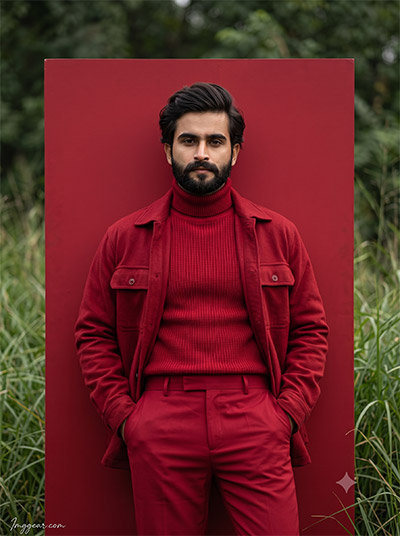
Bold Crimson Editorial Portraits using ChatGPT Photo Editing Prompts
Make your feed pop with an intense all-red monochrome portrait set against lush green nature. Crafting high-contrast editorial fashion shots becomes effortless when using targeted ChatGPT phrasing. Uncover the secret formula to recreate this vibrant contrast today.
PROMPT
{
“image_label”: “Imggear.com_5”,
“version”: “3.5”,
“aspect_ratio”: “3:4”,
“prompt”: “An ultra-realistic, photorealistic premium masterpiece, preserving the exact identity, facial proportions, bone structure, eye depth, sharp jawline, authentic facial characteristics, and skin micro-textures (visible pores, fine lines) of the subject in the uploaded personal reference photo without alteration. The facial lighting must seamlessly fuse with the ambient scene highlights and cast realistic shadows, allowing the subject to naturally integrate with the environment’s lighting, shadows, depth, atmospheric perspective, and optical characteristics while preserving the subject’s true identity without alteration, seamlessly integrating the subject into this avant-garde monochromatic outdoor portrait, while maintaining complete identity consistency throughout the image. The scene depicts a male in his early to mid-30s of athletic, lean build. He is wearing a highly textured crimson red high-neck turtleneck sweater, tailored crimson red trousers, and a heavy crimson red cotton-blend overshirt. He is leaning back casually with his hands in his pockets against a solid crimson red rectangular architectural backdrop board. He is looking directly at the camera with an intense expression. The environment is an outdoor setting, with the red board placed amidst tall green natural grass and blurred foliage in the background. Captured using a full-frame professional mirrorless camera with an 85mm f/1.4 prime lens in RAW format, featuring hyper-detailed edge sharpness, extreme high-definition micro-details on skin and fabric, natural optical rendering, and premium creamy bokeh. The lighting mirrors soft, diffused natural overcast daylight with deep punchy shadows mapping the facial contours, bright clean highlights, and strong tonal contrast. Apply premium editorial-grade color grading—warm highlights, rich mid-tones, natural skin tones—with enhanced micro-contrast and clarity. A minimal, premium handwritten signature watermark reading \”Imggear.com\” is seamlessly rendered in the bottom-left corner in a thin, elegant, soft white (#ffffff) with slight transparency, using a Petit Formal Script cursive style.”,
“negative_prompt”: “(plastic skin, waxy skin, CGI rendering, AI beauty filter look, porcelain skin, over-smoothed skin, airbrushed skin, synthetic textures, doll-like face, uncanny valley, artificial symmetry), (deformed face, distorted facial features, asymmetrical eyes, bad anatomy, bad proportions, extra limbs, extra fingers, missing fingers, malformed hands, mutated hands), (unnatural lighting, flat lighting, harsh direct sunlight, blown-out highlights, crushed shadows, oversaturated colors, neon colors, unrealistic color grading, HDR look, overexposed, underexposed), (blurry, out of focus, low resolution, pixelated, jpeg artifacts, grainy noise, motion blur, soft focus), (dry land, dusty ground, indoor background, wrong environment, mismatched background), (clothing logos, brand marks, trademarked patterns, text overlays, random watermark placement, duplicate watermark, extra signature), (cartoon style, illustration, painting, 3D render, anime, stylized art, digital art look), (identity mismatch, face swap artifacts, inconsistent facial features, altered bone structure, changed eye color, different face shape), (warped backdrop, unnatural grass rendering, mismatched red tones, flat outdoor lighting, poorly rendered fabric folds, floating structure, unnatural plant growth, missing pocket lines).”
}
💡 AI Photo Editing Pro Tips for Perfect Results
Keep Faces Consistent: If the AI changes the face, add this exact phrase to the very beginning of your prompt: “Preserve facial identity 100%, do not alter facial features or proportions.”
Reroll for Perfection: Run every prompt 2–3 times! The second or third generation is almost always sharper and packed with better details.
Get the DSLR Look: Want that beautiful, blurred background? Just add “f/1.8 shallow depth of field” to your prompt.
Control the Camera Shot: Tell the AI exactly what frame you want by adding terms like “Close-up portrait,” “Full-body shot,” or “Wide-angle view.”
Set the Vibe with Lighting: Lighting makes or breaks an AI image. Add “Cinematic lighting,” “Golden hour sunset,” or “Soft studio lighting” for a professional touch.
📐 Best Aspect Ratio: Use 3:4 Vertical for stunning, ready-to-post results on Instagram and Pinterest.