Want to transform your little princess’s everyday photo into a charming, divine portrait of Little Radha? Finding the exact Radha Krishna prompt for baby girl images can be tricky when AI generators struggle with realistic baby features, clothing textures, or facial preservation. Whether you use Gemini AI or ChatGPT, this guide provides ready-to-use, ultra-realistic prompts that capture soft traditional lehengas, delicate floral jewelry, and innocent smiles without distorting your child’s original face.
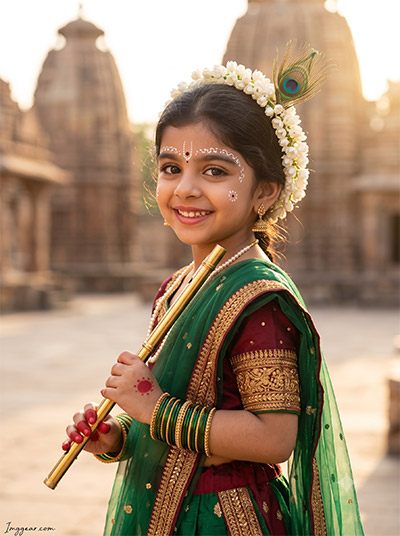
Create Divine Little Radha Krishna AI Portraits for Little Girls
Transform your photos into adorable traditional Krishna edits with peacock feathers, bamboo flutes, and ancient temple backdrops. Copy the exact text prompt now to generate your own realistic festival artwork instantly!
PROMPT
{
“image_label”: “Imggear.com_1”,
“version”: “3.5”,
“aspect_ratio”: “3:4”,
“prompt”: “An ultra-realistic, photorealistic premium masterpiece, preserving the exact identity, facial proportions, bone structure, eye depth, sharp jawline, authentic facial characteristics, and skin micro-textures (visible pores, fine lines) of the subject in the uploaded personal reference photo without alteration. The facial lighting must seamlessly fuse with the ambient scene highlights and cast realistic shadows, allowing the subject to naturally integrate with the environment’s lighting, shadows, depth, atmospheric perspective, and optical characteristics while preserving the subject’s true identity without alteration, seamlessly integrating the subject into this dramatic portrait, while maintaining complete identity consistency throughout the image. The model is a young Indian girl, approximately 3 to 4 years old, with a delicate child build, captured in a graceful over-the-shoulder posing angle. She is looking back toward the camera with a beautiful, wide smile. She wears a traditional premium green and deep maroon dupion silk lehenga choli decorated with heavy golden zari embroidery and micro-sequins, with a sheer green dupatta draped across her shoulder. She is holding a polished golden bansuri with visible finger holes. Her hands are decorated with traditional red alta circles on the palms, and she wears stacked green and gold glass bangles on her wrists, a delicate pearl necklace, and hanging gold earrings. An ornate white bindi pattern is painted in elegant arches over her eyebrows and on her cheeks. A single real peacock feather is tucked into a fresh white jasmine garland resting on her head. The background features a sunlit courtyard of an ancient Indian temple, with towering sandstone shikhara structures softly blurred. Captured using a full-frame professional mirrorless camera with an 85mm f/1.4 prime lens in RAW format, delivering hyper-detailed edge sharpness, extreme high-definition micro-details on skin and fabric, natural optical rendering, and premium creamy bokeh. The scene is illuminated by warm golden hour sunlight, with physically accurate material rendering, cinematic global illumination, natural lens rendering, true optical sharpness, professional RAW camera image fidelity, realistic sensor characteristics, natural filmic tone mapping, realistic skin pores, fine skin grain, sub-surface scattering (SSS), realistic micro skin displacement, and pore-level facial detail, with a minimal, premium handwritten signature watermark reading \”Imggear.com\” elegantly placed in the bottom-left corner, styled in a thin, elegant Petit Formal Script with cursive strokes in soft white (#ffffff) with slight transparency, seamlessly blending with the background.”,
“negative_prompt”: “(plastic skin, waxy skin, CGI rendering, AI beauty filter look, porcelain skin, over-smoothed skin, airbrushed skin, synthetic textures, doll-like face, uncanny valley, artificial symmetry), (deformed face, distorted facial features, asymmetrical eyes, bad anatomy, bad proportions, extra limbs, extra fingers, missing fingers, malformed hands, mutated hands), (unnatural lighting, flat lighting, harsh direct sunlight, blown-out highlights, crushed shadows, oversaturated colors, neon colors, unrealistic color grading, HDR look, overexposed, underexposed), (blurry, out of focus, low resolution, pixelated, jpeg artifacts, grainy noise, motion blur, soft focus), (dry land, dusty ground, indoor background, wrong environment, mismatched background), (clothing logos, brand marks, trademarked patterns, text overlays, random watermark placement, duplicate watermark, extra signature), (cartoon style, illustration, painting, 3D render, anime, stylized art, digital art look), (identity mismatch, face swap artifacts, inconsistent facial features, altered bone structure, changed eye color, different face shape), (modern buildings, concrete towers, high-rise apartments, streetlights, asphalt, wristwatches, plastic jewelry, modern makeup, adult proportions, dark moody shadows).”
}
How to Design Cute Little Radha AI Photography for Kids
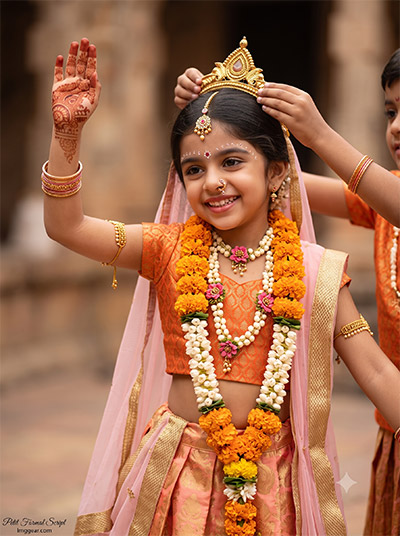
Recreate this stunning festive look using vibrant marigold garlands, golden crowns, and elegant ethnic wear on your child portraits. Which prompt variation will you try first?
PROMPT
{
“image_label”: “Imggear.com_2”,
“version”: “3.5”,
“aspect_ratio”: “3:4”,
“prompt”: “An ultra-realistic, photorealistic premium masterpiece, preserving the exact identity, facial proportions, bone structure, eye depth, sharp jawline, authentic facial characteristics, and skin micro-textures (visible pores, fine lines) of the subject in the uploaded personal reference photo without alteration. The facial lighting must seamlessly fuse with the ambient scene highlights and cast realistic shadows, allowing the subject to naturally integrate with the environment’s lighting, shadows, depth, atmospheric perspective, and optical characteristics while preserving the subject’s true identity without alteration, seamlessly integrating the subject into this cinematic scene, while maintaining complete identity consistency throughout the image. The model is a young Indian girl, approximately 3 to 4 years old, with a delicate physical build, captured mid-pose during a traditional dance. Her head is tilted, and she is smiling radiantly with a joyful, teeth-showing expression. Her left arm is gracefully raised, showcasing detailed henna designs on her palms. Out-of-focus hands of another child are visible behind her, gently adjusting a golden mukut on her head. She is dressed in an orange brocade choli crop top, a voluminous silk lehenga skirt in shades of peach and gold, and a light pink dupatta with a gold zari border. She is heavily adorned with fresh marigold and white jasmine flower garlands wrapped around her head and hanging as long necklaces, along with a pink and yellow floral bead necklace, golden armlets, matching bangles, a gold maang tika, and a nose ring. Delicate white bindi patterns are painted above her eyebrows. The background is a beautifully blurred, warm-toned stone courtyard of a historic temple. Captured using a full-frame professional mirrorless camera with an 85mm f/1.4 prime lens in RAW format, delivering hyper-detailed edge sharpness, extreme high-definition micro-details on skin and fabric, natural optical rendering, and premium creamy bokeh. The scene is lit by soft, warm ambient light, with physically accurate material rendering, cinematic global illumination, natural lens rendering, true optical sharpness, professional RAW camera image fidelity, realistic sensor characteristics, natural filmic tone mapping, realistic skin pores, fine skin grain, sub-surface scattering (SSS), realistic micro skin displacement, and pore-level facial detail, with a minimal, premium handwritten signature watermark reading \”Imggear.com\” elegantly placed in the bottom-left corner, styled in a thin, elegant Petit Formal Script with cursive strokes in soft white (#ffffff) with slight transparency, seamlessly blending with the background.”,
“negative_prompt”: “(plastic skin, waxy skin, CGI rendering, AI beauty filter look, porcelain skin, over-smoothed skin, airbrushed skin, synthetic textures, doll-like face, uncanny valley, artificial symmetry), (deformed face, distorted facial features, asymmetrical eyes, bad anatomy, bad proportions, extra limbs, extra fingers, missing fingers, malformed hands, mutated hands), (unnatural lighting, flat lighting, harsh direct sunlight, blown-out highlights, crushed shadows, oversaturated colors, neon colors, unrealistic color grading, HDR look, overexposed, underexposed), (blurry, out of focus, low resolution, pixelated, jpeg artifacts, grainy noise, motion blur, soft focus), (dry land, dusty ground, indoor background, wrong environment, mismatched background), (clothing logos, brand marks, trademarked patterns, text overlays, random watermark placement, duplicate watermark, extra signature), (cartoon style, illustration, painting, 3D render, anime, stylized art, digital art look), (identity mismatch, face swap artifacts, inconsistent facial features, altered bone structure, changed eye color, different face shape), (contemporary studio backdrops, studio softboxes, modern hand jewelry, plastic crowns, modern wristwatches, jeans, modern footwear).”
}
Baby Girl Radha Krishna AI Photo Editing Ideas and Prompts
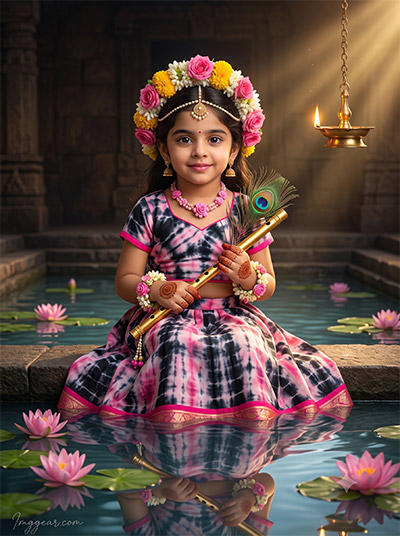
Capture cinematic lighting and serene water reflections with this unique floral tiara and flute setup. Explore the full breakdown to master this divine aesthetic today!
PROMPT
{
“image_label”: “Imggear.com_3”,
“version”: “3.5”,
“aspect_ratio”: “3:4”,
“prompt”: “An ultra-realistic, photorealistic premium masterpiece, preserving the exact identity, facial proportions, bone structure, eye depth, sharp jawline, authentic facial characteristics, and skin micro-textures (visible pores, fine lines) of the subject in the uploaded personal reference photo without alteration. The facial lighting must seamlessly fuse with the ambient scene highlights and cast realistic shadows, allowing the subject to naturally integrate with the environment’s lighting, shadows, depth, atmospheric perspective, and optical characteristics while preserving the subject’s true identity without alteration, seamlessly integrating the subject into this cinematic scene, while maintaining complete identity consistency throughout the image. The model is a young Indian girl, approximately 3 to 4 years old, with a delicate child build, sitting peacefully on the stone steps of a ritual temple pond or stepwell. She has a sweet, gentle smile, looking directly at the camera. She holds a polished golden flute and a real peacock feather in her hands, which are decorated with intricate circular henna designs. She wears a unique tie-dye patterned lehenga choli in shades of black, pink, and white, with bright pink borders. She is crowned with a thick, vibrant garland of fresh pink roses, yellow marigolds, and white jasmine flowers resting on her head. She wears a delicate pearl maang tika, a pink floral bead necklace, and matching wristband garlands. The water of the stepwell is clear and highly reflective, showing her soft mirrored reflection, with blooming pink lotus flowers and green lily pads floating on the surface around her. In the upper-right background, a warm burning brass oil lamp hangs from a chain, casting volumetric light rays and a golden glow across the dark, ancient stone temple walls. Captured using a full-frame professional mirrorless camera with an 85mm f/1.4 prime lens in RAW format, delivering hyper-detailed edge sharpness, extreme high-definition micro-details on skin and fabric, natural optical rendering, and premium creamy bokeh. With physically accurate material rendering, cinematic global illumination, natural lens rendering, true optical sharpness, professional RAW camera image fidelity, realistic sensor characteristics, natural filmic tone mapping, realistic skin pores, fine skin grain, sub-surface scattering (SSS), realistic micro skin displacement, and pore-level facial detail, with a minimal, premium handwritten signature watermark reading \”Imggear.com\” elegantly placed in the bottom-left corner, styled in a thin, elegant Petit Formal Script with cursive strokes in soft white (#ffffff) with slight transparency, seamlessly blending with the background.”,
“negative_prompt”: “(plastic skin, waxy skin, CGI rendering, AI beauty filter look, porcelain skin, over-smoothed skin, airbrushed skin, synthetic textures, doll-like face, uncanny valley, artificial symmetry), (deformed face, distorted facial features, asymmetrical eyes, bad anatomy, bad proportions, extra limbs, extra fingers, missing fingers, malformed hands, mutated hands), (unnatural lighting, flat lighting, harsh direct sunlight, blown-out highlights, crushed shadows, oversaturated colors, neon colors, unrealistic color grading, HDR look, overexposed, underexposed), (blurry, out of focus, low resolution, pixelated, jpeg artifacts, grainy noise, motion blur, soft focus), (dry land, dusty ground, indoor background, wrong environment, mismatched background), (clothing logos, brand marks, trademarked patterns, text overlays, random watermark placement, duplicate watermark, extra signature), (cartoon style, illustration, painting, 3D render, anime, stylized art, digital art look), (identity mismatch, face swap artifacts, inconsistent facial features, altered bone structure, changed eye color, different face shape), (chlorine pool, modern tiles, blue water paint, swimming pool filters, plastic lotuses, electric lamps, modern lighting fixtures, swimsuits).”
}
Traditional Baby Radha AI Portrait Prompts for Janmashtami
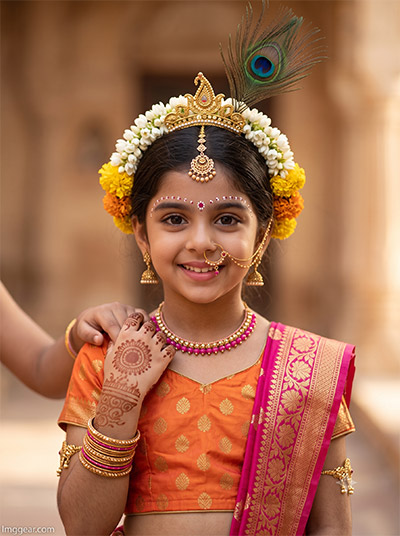
Learn how to generate close-up mythological portraits featuring intricate golden jewelry, intricate henna, and vibrant festive drapes. Tap here to copy the free prompt text!
PROMPT
{
“image_label”: “Imggear.com_4”,
“version”: “3.5”,
“aspect_ratio”: “3:4”,
“prompt”: “An ultra-realistic, photorealistic premium masterpiece, preserving the exact identity, facial proportions, bone structure, eye depth, sharp jawline, authentic facial characteristics, and skin micro-textures (visible pores, fine lines) of the subject in the uploaded personal reference photo without alteration. The facial lighting must seamlessly fuse with the ambient scene highlights and cast realistic shadows, allowing the subject to naturally integrate with the environment’s lighting, shadows, depth, atmospheric perspective, and optical characteristics while preserving the subject’s true identity without alteration, seamlessly integrating the subject into this dramatic portrait, while maintaining complete identity consistency throughout the image. The model is a young Indian girl, approximately 3 to 4 years old, with a delicate physical build, in a tight front-facing close-up portrait. She is smiling sweetly at the camera. A child’s out-of-focus hand from behind is gently touching her hand. She wears a traditional orange silk choli crop top with small woven gold patterns, and a light pink dupatta with thick golden brocade borders draped across her chest. She is adorned with a classic golden maang tika, a delicate gold nose ring (nath) with a thin chain connecting to her ear, stacked gold bangles, armlets, and a pink-and-gold beaded necklace. Intricate henna patterns cover her hands, and elaborate white bindi dots are painted in precise lines above her eyebrows. A floral crown of white jasmine and yellow marigolds sits on her head, adorned with a golden crown piece and a tall peacock feather rising up. The background is a highly blurred, warm sandstone heritage courtyard. Captured using a full-frame professional mirrorless camera with an 85mm f/1.4 prime lens in RAW format, delivering hyper-detailed edge sharpness, extreme high-definition micro-details on skin and fabric, natural optical rendering, and premium creamy bokeh. Warm volumetric light glows from the side, with physically accurate material rendering, cinematic global illumination, natural lens rendering, true optical sharpness, professional RAW camera image fidelity, realistic sensor characteristics, natural filmic tone mapping, realistic skin pores, fine skin grain, sub-surface scattering (SSS), realistic micro skin displacement, and pore-level facial detail, with a minimal, premium handwritten signature watermark reading \”Imggear.com\” elegantly placed in the bottom-left corner, styled in a thin, elegant Petit Formal Script with cursive strokes in soft white (#ffffff) with slight transparency, seamlessly blending with the background.”,
“negative_prompt”: “(plastic skin, waxy skin, CGI rendering, AI beauty filter look, porcelain skin, over-smoothed skin, airbrushed skin, synthetic textures, doll-like face, uncanny valley, artificial symmetry), (deformed face, distorted facial features, asymmetrical eyes, bad anatomy, bad proportions, extra limbs, extra fingers, missing fingers, malformed hands, mutated hands), (unnatural lighting, flat lighting, harsh direct sunlight, blown-out highlights, crushed shadows, oversaturated colors, neon colors, unrealistic color grading, HDR look, overexposed, underexposed), (blurry, out of focus, low resolution, pixelated, jpeg artifacts, grainy noise, motion blur, soft focus), (dry land, dusty ground, indoor background, wrong environment, mismatched background), (clothing logos, brand marks, trademarked patterns, text overlays, random watermark placement, duplicate watermark, extra signature), (cartoon style, illustration, painting, 3D render, anime, stylized art, digital art look), (identity mismatch, face swap artifacts, inconsistent facial features, altered bone structure, changed eye color, different face shape), (modern nose studs, plastic jewelry, modern makeup, casual clothes, denim, t-shirts, modern studio backdrop).”
}
Little Girl Radha Krishna Photo AI Generator Prompts
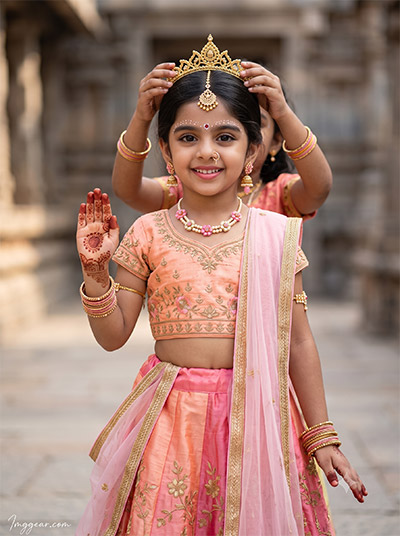
Designed around peach pink embroidered lehengas, ornate crowns, and gentle outdoor lighting, this setup brings instant grace to digital portraits. Grab the text prompt inside to create yours!
PROMPT
{
“image_label”: “Imggear.com_5”,
“version”: “3.5”,
“aspect_ratio”: “3:4”,
“prompt”: “An ultra-realistic, photorealistic premium masterpiece, preserving the exact identity, facial proportions, bone structure, eye depth, sharp jawline, authentic facial characteristics, and skin micro-textures (visible pores, fine lines) of the subject in the uploaded personal reference photo without alteration. The facial lighting must seamlessly fuse with the ambient scene highlights and cast realistic shadows, allowing the subject to naturally integrate with the environment’s lighting, shadows, depth, atmospheric perspective, and optical characteristics while preserving the subject’s true identity without alteration, seamlessly integrating the subject into this cinematic scene, while maintaining complete identity consistency throughout the image. The model is a young Indian girl, approximately 3 to 4 years old, with a delicate physical build, standing in a graceful traditional dance posture. She has a bright, beautiful smile, looking slightly off-camera. Her right hand is raised with palm-facing-forward henna designs, while another child’s hands are out-of-focus behind her, adjusting a golden crown on her head. She is dressed in an embroidered peach-colored choli crop top, a flowing peach and pink silk lehenga skirt adorned with elaborate gold floral embroidery, and a light pink dupatta with a gold border. Her traditional ornaments include a gold maang tika, dangling gold and pink stone earrings, a floral bead necklace, stacked gold and pink bangles, armlets, and a delicate nose ring. Precise white bindi paint designs are decorated above her eyebrows. The background is a softly blurred stone courtyard of a historic temple complex. Captured using a full-frame professional mirrorless camera with an 85mm f/1.4 prime lens in RAW format, delivering hyper-detailed edge sharpness, extreme high-definition micro-details on skin and fabric, natural optical rendering, and premium creamy bokeh. The illumination is soft and natural, emphasizing the rich silk textures and golden borders, with physically accurate material rendering, cinematic global illumination, natural lens rendering, true optical sharpness, professional RAW camera image fidelity, realistic sensor characteristics, natural filmic tone mapping, realistic skin pores, fine skin grain, sub-surface scattering (SSS), realistic micro skin displacement, and pore-level facial detail, with a minimal, premium handwritten signature watermark reading \”Imggear.com\” elegantly placed in the bottom-left corner, styled in a thin, elegant Petit Formal Script with cursive strokes in soft white (#ffffff) with slight transparency, seamlessly blending with the background.”,
“negative_prompt”: “(plastic skin, waxy skin, CGI rendering, AI beauty filter look, porcelain skin, over-smoothed skin, airbrushed skin, synthetic textures, doll-like face, uncanny valley, artificial symmetry), (deformed face, distorted facial features, asymmetrical eyes, bad anatomy, bad proportions, extra limbs, extra fingers, missing fingers, malformed hands, mutated hands), (unnatural lighting, flat lighting, harsh direct sunlight, blown-out highlights, crushed shadows, oversaturated colors, neon colors, unrealistic color grading, HDR look, overexposed, underexposed), (blurry, out of focus, low resolution, pixelated, jpeg artifacts, grainy noise, motion blur, soft focus), (dry land, dusty ground, indoor background, wrong environment, mismatched background), (clothing logos, brand marks, trademarked patterns, text overlays, random watermark placement, duplicate watermark, extra signature), (cartoon style, illustration, painting, 3D render, anime, stylized art, digital art look), (identity mismatch, face swap artifacts, inconsistent facial features, altered bone structure, changed eye color, different face shape), (contemporary dance studio, wooden floors, modern background, modern metal bangles, western wear, zippers, sneakers).”
}
💡 AI Photo Editing Pro Tips for Perfect Results
Keep Faces Consistent: If the AI changes the face, add this exact phrase to the very beginning of your prompt: “Preserve facial identity 100%, do not alter facial features or proportions.”
Reroll for Perfection: Run every prompt 2–3 times! The second or third generation is almost always sharper and packed with better details.
Get the DSLR Look: Want that beautiful, blurred background? Just add “f/1.8 shallow depth of field” to your prompt.
Control the Camera Shot: Tell the AI exactly what frame you want by adding terms like “Close-up portrait,” “Full-body shot,” or “Wide-angle view.”
Set the Vibe with Lighting: Lighting makes or breaks an AI image. Add “Cinematic lighting,” “Golden hour sunset,” or “Soft studio lighting” for a professional touch.
📐 Best Aspect Ratio: Use 3:4 Vertical for stunning, ready-to-post results on Instagram and Pinterest.