Generating hyper-realistic and aesthetically pleasing divine images can feel tricky when your AI output lacks detail. If you are struggling to write the perfect Baby Krishna prompt for Gemini AI or ChatGPT, you are not alone. In this guide, we reveal the exact copy-paste prompts designed to generate adorable 3D photorealistic Little Krishna artwork in seconds. Simply input these tested prompts into your preferred generator to transform simple ideas into breathtaking digital masterpieces today.
Create Cute Janmashtami Portraits with This Baby Krishna Prompt for Gemini AI
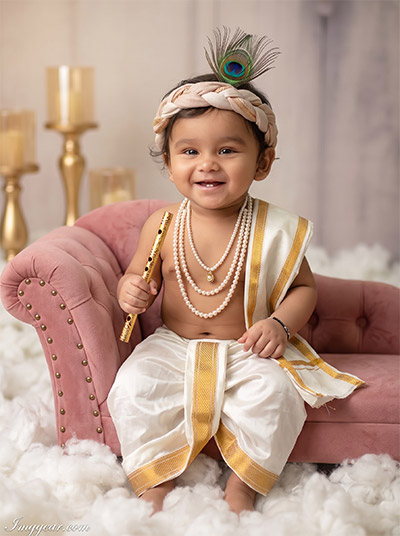
Turn simple baby pictures into a adorable studio photo with traditional festive wear, a peacock feather, and golden flute. Copy this exact prompt inside Gemini AI to make your own festive portrait today.
PROMPT
{
“image_label”: “Imggear.com_1”,
“version”: “3.5”,
“aspect_ratio”: “3:4”,
“prompt”: “An ultra-realistic, photorealistic premium masterpiece, preserving the exact identity, facial proportions, bone structure, eye depth, sharp jawline, authentic facial characteristics, and skin micro-textures (visible pores, fine lines) of the subject in the uploaded personal reference photo without alteration. The facial lighting must seamlessly fuse with the ambient scene highlights and cast realistic shadows, allowing the subject to naturally integrate with the environment’s lighting, shadows, depth, atmospheric perspective, and optical characteristics while preserving the subject’s true identity without alteration, seamlessly integrating the subject into this cinematic scene, while maintaining complete identity consistency throughout the image. Male infant, 8-12 months, soft build. Seated on tufted pink chaise lounge. Wearing white silk dhoti with gold borders, pearl necklaces, fabric headpiece with peacock feather, holding gold flute in right hand. Fluffy cotton base, soft-focus background with gold candle holders. Captured using a full-frame professional mirrorless camera with an 85mm f/1.4 prime lens in RAW format, hyper-detailed edge sharpness, extreme high-definition micro-details on skin and fabric, natural optical rendering, and premium creamy bokeh. Cinematic soft diffused studio lighting, volumetric light, warm highlights, rich mid-tones, natural skin tones, deep punchy shadows, enhanced micro-contrast. Text \”Imggear.com\” positioned bottom-left, Petit Formal Script, thin elegant cursive strokes, soft white (#ffffff) slight transparency, minimal premium handwritten signature seamlessly blended.”,
“negative_prompt”: “(plastic skin, waxy skin, CGI rendering, AI beauty filter look, porcelain skin, over-smoothed skin, airbrushed skin, synthetic textures, doll-like face, uncanny valley, artificial symmetry), (deformed face, distorted facial features, asymmetrical eyes, bad anatomy, bad proportions, extra limbs, extra fingers, missing fingers, malformed hands, mutated hands), (unnatural lighting, flat lighting, harsh direct sunlight, blown-out highlights, crushed shadows, oversaturated colors, neon colors, unrealistic color grading, HDR look, overexposed, underexposed), (blurry, out of focus, low resolution, pixelated, jpeg artifacts, grainy noise, motion blur, soft focus), (dry land, dusty ground, indoor background, wrong environment, mismatched background), (clothing logos, brand marks, trademarked patterns, text overlays, random watermark placement, duplicate watermark, extra signature), (cartoon style, illustration, painting, 3D render, anime, stylized art, digital art look), (identity mismatch, face swap artifacts, inconsistent facial features, altered bone structure, changed eye color, different face shape), adult proportions, standing, modern clothing, harsh shadows.”
}
Gemini AI Prompt to Design Playful Little Kanha Photography Edits
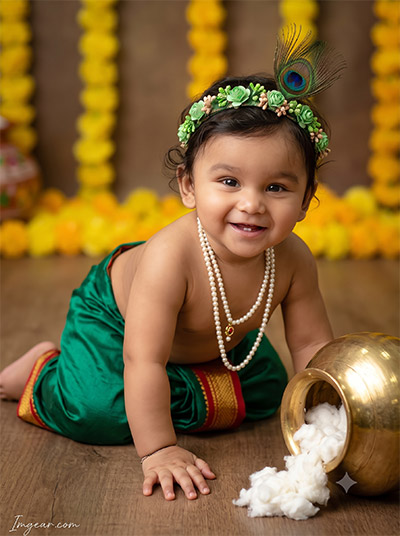
Capture authentic holiday joy by generating a crawling infant dressed in vibrant silk attire beside an overturned butter pot. Learn how easily Gemini AI renders soft studio lighting and floral accents in your next festive session. Drop your thoughts below!
PROMPT
{
“image_label”: “Imggear.com_2”,
“version”: “3.5”,
“aspect_ratio”: “3:4”,
“prompt”: “An ultra-realistic, photorealistic premium masterpiece, preserving the exact identity, facial proportions, bone structure, eye depth, sharp jawline, authentic facial characteristics, and skin micro-textures (visible pores, fine lines) of the subject in the uploaded personal reference photo without alteration. The facial lighting must seamlessly fuse with the ambient scene highlights and cast realistic shadows, allowing the subject to naturally integrate with the environment’s lighting, shadows, depth, atmospheric perspective, and optical characteristics while preserving the subject’s true identity without alteration, seamlessly integrating the subject into this dramatic portrait, while maintaining complete identity consistency throughout the image. Male infant, 6-10 months, soft build. Crawling posture on matte wooden floor. Emerald green silk dhoti, red/gold borders, pearl necklaces, floral green headpiece with peacock feather. Beside an overturned golden pot with cotton butter. Blurred wooden background with yellow marigolds. Captured using a full-frame professional mirrorless camera with an 85mm f/1.4 prime lens in RAW format, hyper-detailed edge sharpness, extreme high-definition micro-details on skin and fabric, natural optical rendering, and premium creamy bokeh. Cinematic soft diffused studio lighting, warm earthy undertones, deep punchy shadows, smooth rim highlights. Text \”Imggear.com\” positioned bottom-left, Petit Formal Script, thin elegant cursive strokes, soft white (#ffffff) slight transparency, minimal premium handwritten signature seamlessly blended.”,
“negative_prompt”: “(plastic skin, waxy skin, CGI rendering, AI beauty filter look, porcelain skin, over-smoothed skin, airbrushed skin, synthetic textures, doll-like face, uncanny valley, artificial symmetry), (deformed face, distorted facial features, asymmetrical eyes, bad anatomy, bad proportions, extra limbs, extra fingers, missing fingers, malformed hands, mutated hands), (unnatural lighting, flat lighting, harsh direct sunlight, blown-out highlights, crushed shadows, oversaturated colors, neon colors, unrealistic color grading, HDR look, overexposed, underexposed), (blurry, out of focus, low resolution, pixelated, jpeg artifacts, grainy noise, motion blur, soft focus), (dry land, dusty ground, indoor background, wrong environment, mismatched background), (clothing logos, brand marks, trademarked patterns, text overlays, random watermark placement, duplicate watermark, extra signature), (cartoon style, illustration, painting, 3D render, anime, stylized art, digital art look), (identity mismatch, face swap artifacts, inconsistent facial features, altered bone structure, changed eye color, different face shape), walking, standing upright, modern clothing, bright outdoor sunlight.”
}
Realistic Outdoor Vrindavan Theme Baby Krishna Prompt For Gemini AI
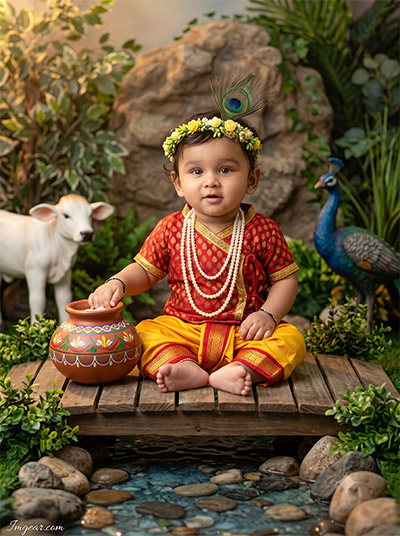
Place your toddler in a mythical garden scene surrounded by a calf and peacock with this custom setup. Gemini AI renders incredible outdoor textures like wooden bridges and lush greenery effortlessly. Try this fresh prompt right away!
PROMPT
{
“image_label”: “Imggear.com_3”,
“version”: “3.5”,
“aspect_ratio”: “3:4”,
“prompt”: “An ultra-realistic, photorealistic premium masterpiece, preserving the exact identity, facial proportions, bone structure, eye depth, sharp jawline, authentic facial characteristics, and skin micro-textures (visible pores, fine lines) of the subject in the uploaded personal reference photo without alteration. The facial lighting must seamlessly fuse with the ambient scene highlights and cast realistic shadows, allowing the subject to naturally integrate with the environment’s lighting, shadows, depth, atmospheric perspective, and optical characteristics while preserving the subject’s true identity without alteration, seamlessly integrating the subject into this cinematic scene, while maintaining complete identity consistency throughout the image. Male infant, 8-12 months, proportional build. Sitting cross-legged on small wooden bridge over simulated shallow stream. Red/gold top, yellow/red silk dhoti, cascading pearl necklaces, yellow/green floral headpiece with peacock feather. Hand touching painted earthen pot. Background features lush artificial foliage, rock formation, white calf figurine, peacock statue. Captured using a full-frame professional mirrorless camera with an 85mm f/1.4 prime lens in RAW format, hyper-detailed edge sharpness, extreme high-definition micro-details on skin and fabric, natural optical rendering, and premium creamy bokeh. Cinematic vibrant studio lighting, warm golden-hour highlights, bright clean highlights, deep punchy shadows. Text \”Imggear.com\” positioned bottom-left, Petit Formal Script, thin elegant cursive strokes, soft white (#ffffff) slight transparency, minimal premium handwritten signature seamlessly blended.”,
“negative_prompt”: “(plastic skin, waxy skin, CGI rendering, AI beauty filter look, porcelain skin, over-smoothed skin, airbrushed skin, synthetic textures, doll-like face, uncanny valley, artificial symmetry), (deformed face, distorted facial features, asymmetrical eyes, bad anatomy, bad proportions, extra limbs, extra fingers, missing fingers, malformed hands, mutated hands), (unnatural lighting, flat lighting, harsh direct sunlight, blown-out highlights, crushed shadows, oversaturated colors, neon colors, unrealistic color grading, HDR look, overexposed, underexposed), (blurry, out of focus, low resolution, pixelated, jpeg artifacts, grainy noise, motion blur, soft focus), (dry land, dusty ground, indoor background, wrong environment, mismatched background), (clothing logos, brand marks, trademarked patterns, text overlays, random watermark placement, duplicate watermark, extra signature), (cartoon style, illustration, painting, 3D render, anime, stylized art, digital art look), (identity mismatch, face swap artifacts, inconsistent facial features, altered bone structure, changed eye color, different face shape), dangerous animals, deep rushing water, modern bridge, gloomy weather.”
}
How to Generate Charming Studio Photos with a Baby Krishna Prompt for Gemini AI
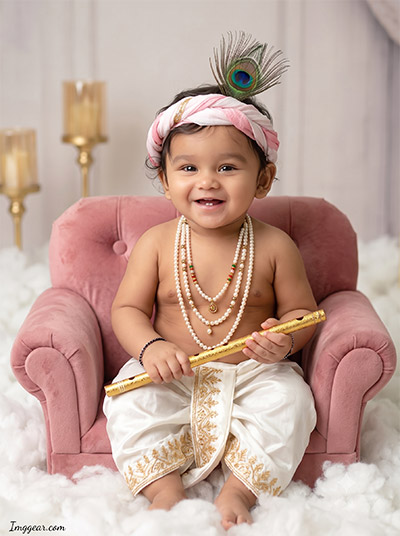
Transform simple infant pictures into elegant high-end portraits using a pink plush armchair backdrop and traditional pearl accessories. Gemini AI creates realistic studio lighting and soft texture seamlessly. Wondering how it works? Read the full post.
PROMPT
{
“image_label”: “Imggear.com_4”,
“version”: “3.5”,
“aspect_ratio”: “3:4”,
“prompt”: “An ultra-realistic, photorealistic premium masterpiece, preserving the exact identity, facial proportions, bone structure, eye depth, sharp jawline, authentic facial characteristics, and skin micro-textures (visible pores, fine lines) of the subject in the uploaded personal reference photo without alteration. The facial lighting must seamlessly fuse with the ambient scene highlights and cast realistic shadows, allowing the subject to naturally integrate with the environment’s lighting, shadows, depth, atmospheric perspective, and optical characteristics while preserving the subject’s true identity without alteration, seamlessly integrating the subject into this dramatic portrait, while maintaining complete identity consistency throughout the image. Male infant, 8-12 months, soft build. Seated on pink tufted velvet armchair. White silk dhoti, gold embroidery, layered pearl necklaces, pink/white fabric headpiece with peacock feather. Holding gold flute with both hands resting in lap. Fluffy cotton base, soft-focus background with gold candle holders. Captured using a full-frame professional mirrorless camera with an 85mm f/1.4 prime lens in RAW format, hyper-detailed edge sharpness, extreme high-definition micro-details on skin and fabric, natural optical rendering, and premium creamy bokeh. Cinematic soft diffused studio lighting, volumetric light, warm highlights, rich mid-tones, natural skin tones, deep punchy shadows, enhanced micro-contrast. Text \”Imggear.com\” positioned bottom-left, Petit Formal Script, thin elegant cursive strokes, soft white (#ffffff) slight transparency, minimal premium handwritten signature seamlessly blended.”,
“negative_prompt”: “(plastic skin, waxy skin, CGI rendering, AI beauty filter look, porcelain skin, over-smoothed skin, airbrushed skin, synthetic textures, doll-like face, uncanny valley, artificial symmetry), (deformed face, distorted facial features, asymmetrical eyes, bad anatomy, bad proportions, extra limbs, extra fingers, missing fingers, malformed hands, mutated hands), (unnatural lighting, flat lighting, harsh direct sunlight, blown-out highlights, crushed shadows, oversaturated colors, neon colors, unrealistic color grading, HDR look, overexposed, underexposed), (blurry, out of focus, low resolution, pixelated, jpeg artifacts, grainy noise, motion blur, soft focus), (dry land, dusty ground, indoor background, wrong environment, mismatched background), (clothing logos, brand marks, trademarked patterns, text overlays, random watermark placement, duplicate watermark, extra signature), (cartoon style, illustration, painting, 3D render, anime, stylized art, digital art look), (identity mismatch, face swap artifacts, inconsistent facial features, altered bone structure, changed eye color, different face shape), crying expression, modern furniture, harsh outdoor environment, heavy shadows on face.”
}
Festive Swing Concept Baby Krishna Prompt For Gemini AI
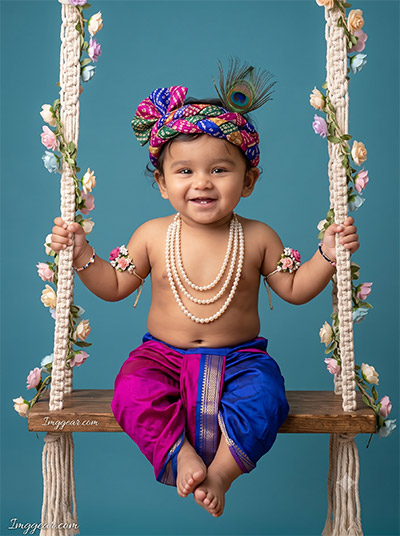
Place a smiling infant on a floral macrame jhula with colorful bandhani headwear using smart AI editing tricks. Prompts in Gemini AI capture vivid tones and realistic expressions with ease. Give this template a try!
PROMPT
{
“image_label”: “Imggear.com_5”,
“version”: “3.5”,
“aspect_ratio”: “3:4”,
“prompt”: “An ultra-realistic, photorealistic premium masterpiece, preserving the exact identity, facial proportions, bone structure, eye depth, sharp jawline, authentic facial characteristics, and skin micro-textures (visible pores, fine lines) of the subject in the uploaded personal reference photo without alteration. The facial lighting must seamlessly fuse with the ambient scene highlights and cast realistic shadows, allowing the subject to naturally integrate with the environment’s lighting, shadows, depth, atmospheric perspective, and optical characteristics while preserving the subject’s true identity without alteration, seamlessly integrating the subject into this cinematic scene, while maintaining complete identity consistency throughout the image. Male infant, 10-14 months, standard build. Seated on rustic wooden plank swing, thick macrame ropes intertwined with pastel floral vines. Magenta/royal blue silk dhoti, layered pearl necklaces, floral armbands, multi-patterned headpiece with peacock feather. Seamless matte teal-blue studio backdrop. Captured using a full-frame professional mirrorless camera with an 85mm f/1.4 prime lens in RAW format, hyper-detailed edge sharpness, extreme high-definition micro-details on skin and fabric, natural optical rendering, and premium creamy bokeh. Cinematic flat studio lighting, broad diffused softboxes, gentle specular highlights, vivid natural color saturation, rich mid-tones, flawless natural skin tones. Text \”Imggear.com\” positioned bottom-left, Petit Formal Script, thin elegant cursive strokes, soft white (#ffffff) slight transparency, minimal premium handwritten signature seamlessly blended.”,
“negative_prompt”: “(plastic skin, waxy skin, CGI rendering, AI beauty filter look, porcelain skin, over-smoothed skin, airbrushed skin, synthetic textures, doll-like face, uncanny valley, artificial symmetry), (deformed face, distorted facial features, asymmetrical eyes, bad anatomy, bad proportions, extra limbs, extra fingers, missing fingers, malformed hands, mutated hands), (unnatural lighting, flat lighting, harsh direct sunlight, blown-out highlights, crushed shadows, oversaturated colors, neon colors, unrealistic color grading, HDR look, overexposed, underexposed), (blurry, out of focus, low resolution, pixelated, jpeg artifacts, grainy noise, motion blur, soft focus), (dry land, dusty ground, indoor background, wrong environment, mismatched background), (clothing logos, brand marks, trademarked patterns, text overlays, random watermark placement, duplicate watermark, extra signature), (cartoon style, illustration, painting, 3D render, anime, stylized art, digital art look), (identity mismatch, face swap artifacts, inconsistent facial features, altered bone structure, changed eye color, different face shape), standing on swing, falling off, outdoor background, cluttered background, textured wall, modern clothes.”
}
💡 AI Photo Editing Pro Tips for Perfect Results
Keep Faces Consistent: If the AI changes the face, add this exact phrase to the very beginning of your prompt: “Preserve facial identity 100%, do not alter facial features or proportions.”
Reroll for Perfection: Run every prompt 2–3 times! The second or third generation is almost always sharper and packed with better details.
Get the DSLR Look: Want that beautiful, blurred background? Just add “f/1.8 shallow depth of field” to your prompt.
Control the Camera Shot: Tell the AI exactly what frame you want by adding terms like “Close-up portrait,” “Full-body shot,” or “Wide-angle view.”
Set the Vibe with Lighting: Lighting makes or breaks an AI image. Add “Cinematic lighting,” “Golden hour sunset,” or “Soft studio lighting” for a professional touch.
📐 Best Aspect Ratio: Use 3:4 Vertical for stunning, ready-to-post results on Instagram and Pinterest.