Struggling to generate realistic festive art that keeps your real face and authentic temple vibes intact? Using the right ChatGPTGanpati Bappa Prompt makes all the difference between plastic-looking renders and cinematic 4K festive masterpieces. Whether you are creating personalized devotional portraits or viral Instagram posts, pairing your workflow with Gemini AI ensures exact facial preservation, vivid lighting, and detailed mandap backdrops. Read on to copy our top-performing, high-converting prompts designed to boost your festive reach instantly.
Use this ChatGPT Ganpati Bappa Prompt for Divine AI Photos
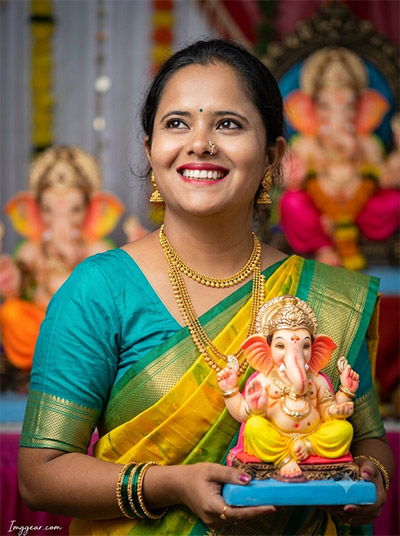
Get professional Ganesh Chaturthi portraits using my custom ChatGPT Ganpati Bappa Prompt. I achieved this specific lighting and traditional attire style with a simple AI text generation. Why wait? Start crafting amazing spiritual images instantly.
PROMPT
{
“image_label”: “Imggear.com_1”,
“version”: “3.5”,
“aspect_ratio”: “3:4”,
“prompt”: “An ultra-realistic, photorealistic premium masterpiece, preserving the exact identity, facial proportions, bone structure, eye depth, sharp jawline, authentic facial characteristics, and skin micro-textures (visible pores, fine lines) of the subject in the uploaded personal reference photo without alteration. The facial lighting must seamlessly fuse with the ambient scene highlights and cast realistic shadows, allowing the subject to naturally integrate with the environment’s lighting, shadows, depth, atmospheric perspective, and optical characteristics while preserving the subject’s true identity without alteration, seamlessly integrating the subject into this dramatic cinematic portrait scene, while maintaining complete identity consistency throughout the image. The subject is a young woman in her mid-20s with an average build, looking upwards and slightly to her left with a joyful, broad smile, holding a brightly colored Ganesha idol with both hands. She wears a vibrant teal short-sleeved blouse and a yellow and green silk saree with gold borders, accessorized with traditional gold jewelry including layered necklaces, earrings, bangles, and a nose ring, and a small bindi. The environment is a blurred workshop or pandol background filled with other out-of-focus Ganesha idols and festive decorations. The image has a photorealistic quality captured with a full-frame mirrorless camera and an 85mm f/1.4 lens, featuring cinematic global illumination, realistic skin rendering with sub-surface scattering, true optical sharpness, and a shallow depth of field with creamy bokeh. A minimal, premium handwritten-style watermark \”Imggear.com\” in soft white Petit Formal Script is in the bottom-left corner.”,
“negative_prompt”: “(plastic skin, waxy skin, CGI rendering, AI beauty filter look, porcelain skin, over-smoothed skin, airbrushed skin, synthetic textures, doll-like face, uncanny valley, artificial symmetry), (deformed face, distorted facial features, asymmetrical eyes, bad anatomy, bad proportions, extra limbs, extra fingers, missing fingers, malformed hands, mutated hands), (unnatural lighting, flat lighting, harsh direct sunlight, blown-out highlights, crushed shadows, oversaturated colors, neon colors, unrealistic color grading, HDR look, overexposed, underexposed), (blurry, out of focus, low resolution, pixelated, jpeg artifacts, grainy noise, motion blur, soft focus), (dry land, dusty ground, indoor background, wrong environment, mismatched background), (clothing logos, brand marks, trademarked patterns, text overlays, random watermark placement, duplicate watermark, extra signature), (cartoon style, illustration, painting, 3D render, anime, stylized art, digital art look), (identity mismatch, face swap artifacts, inconsistent facial features, altered bone structure, changed eye color, different face shape), hair description, curly hair, short hair, beard style.”
}
Create Traditional Festive Portraits With ChatGPT Ganpati Bappa Prompt
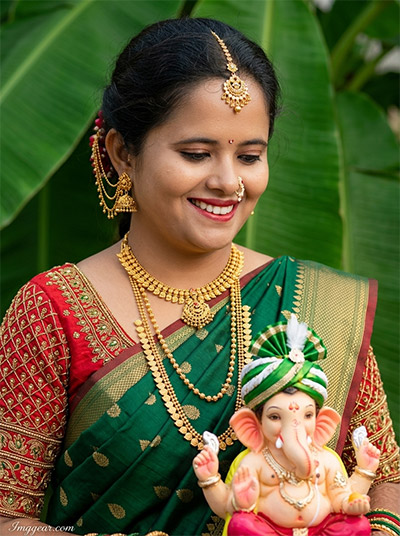
Capture rich festive aesthetics using our ChatGPT Ganpati Bappa Prompt to render detailed saree textures and sacred idol setups. Recreate this stunning green saree photo style today to see how your festive pictures turn out.
PROMPT
{
“image_label”: “Imggear.com_2”,
“version”: “3.5”,
“aspect_ratio”: “3:4”,
“prompt”: “An ultra-realistic, photorealistic premium masterpiece, preserving the exact identity, facial proportions, bone structure, eye depth, sharp jawline, authentic facial characteristics, and skin micro-textures (visible pores, fine lines) of the subject in the uploaded personal reference photo without alteration. The facial lighting must seamlessly fuse with the ambient scene highlights and cast realistic shadows, allowing the subject to naturally integrate with the environment’s lighting, shadows, depth, atmospheric perspective, and optical characteristics while preserving the subject’s true identity without alteration, seamlessly integrating the subject into this intimate cinematic scene, while maintaining complete identity consistency throughout the image. The subject is a young woman in her mid-20s with an average build, looking down with a gentle, joyful smile, holding a small Ganesha idol adorned with a green and white turban and gold details. She wears a deep green silk saree with gold butta work and a heavily embroidered red choli blouse, with extensive traditional gold jewelry, including layered necklaces, large earrings with hair chains, a nose ring, and a maang tikka. The setting is an outdoor space with large, dark green banana leaves providing a lush, blurred background. The image has a photorealistic quality captured with a full-frame mirrorless camera and an 85mm f/1.4 lens, featuring soft, natural light, realistic skin rendering with sub-surface scattering, true optical sharpness, and creamy bokeh. A minimal, premium handwritten-style watermark \”Imggear.com\” in soft white Petit Formal Script is in the bottom-left corner.”,
“negative_prompt”: “(plastic skin, waxy skin, CGI rendering, AI beauty filter look, porcelain skin, over-smoothed skin, airbrushed skin, synthetic textures, doll-like face, uncanny valley, artificial symmetry), (deformed face, distorted facial features, asymmetrical eyes, bad anatomy, bad proportions, extra limbs, extra fingers, missing fingers, malformed hands, mutated hands), (unnatural lighting, flat lighting, harsh direct sunlight, blown-out highlights, crushed shadows, oversaturated colors, neon colors, unrealistic color grading, HDR look, overexposed, underexposed), (blurry, out of focus, low resolution, pixelated, jpeg artifacts, grainy noise, motion blur, soft focus), (dry land, dusty ground, indoor background, wrong environment, mismatched background), (clothing logos, brand marks, trademarked patterns, text overlays, random watermark placement, duplicate watermark, extra signature), (cartoon style, illustration, painting, 3D render, anime, stylized art, digital art look), (identity mismatch, face swap artifacts, inconsistent facial features, altered bone structure, changed eye color, different face shape), hair description, curly hair, short hair, beard style, studio background.”
}
Vibrant Festive Edits Made Simple With ChatGPT Ganpati Bappa Prompt
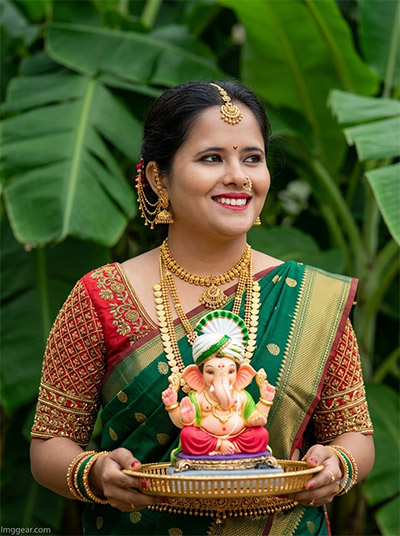
Bring outdoor botanical backdrops and detailed traditional jewellery to life in your AI art. Using this exact ChatGPT Ganpati Bappa Prompt, you can copy the soft natural sunlight and festive vibe. Have you tried generating spiritual portraits yet?
PROMPT
{
“image_label”: “Imggear.com_4”,
“version”: “3.5”,
“aspect_ratio”: “3:4”,
“prompt”: “An ultra-realistic, photorealistic premium masterpiece, preserving the exact identity, facial proportions, bone structure, eye depth, sharp jawline, authentic facial characteristics, and skin micro-textures (visible pores, fine lines) of the subject in the uploaded personal reference photo without alteration. The facial lighting must seamlessly fuse with the ambient scene highlights and cast realistic shadows, allowing the subject to naturally integrate with the environment’s lighting, shadows, depth, atmospheric perspective, and optical characteristics while preserving the subject’s true identity without alteration, seamlessly integrating the subject into this dramatic cinematic scene, while maintaining complete identity consistency throughout the image. The subject is a young woman in her mid-20s with an average build, looking towards the right with a bright, joyful smile, holding a small Ganesha idol in a white and green turban on a decorative gold tray with both hands. She wears a deep green silk saree with gold butta work and a heavily embroidered red choli blouse, accessorized with extensive traditional gold jewelry, including layered necklaces, large earrings with hair chains, a nose ring, and a maang tikka. The setting is a dense lush outdoor environment with large, deep green banana leaves providing a blurred natural background. The image has a photorealistic quality captured with a full-frame mirrorless camera and an 85mm f/1.4 lens, featuring soft natural lighting, realistic skin rendering with sub-surface scattering, true optical sharpness, and creamy bokeh. A minimal, premium handwritten-style watermark \”Imggear.com\” in soft white Petit Formal Script is in the bottom-left corner.”,
“negative_prompt”: “(plastic skin, waxy skin, CGI rendering, AI beauty filter look, porcelain skin, over-smoothed skin, airbrushed skin, synthetic textures, doll-like face, uncanny valley, artificial symmetry), (deformed face, distorted facial features, asymmetrical eyes, bad anatomy, bad proportions, extra limbs, extra fingers, missing fingers, malformed hands, mutated hands), (unnatural lighting, flat lighting, harsh direct sunlight, blown-out highlights, crushed shadows, oversaturated colors, neon colors, unrealistic color grading, HDR look, overexposed, underexposed), (blurry, out of focus, low resolution, pixelated, jpeg artifacts, grainy noise, motion blur, soft focus), (dry land, dusty ground, indoor background, wrong environment, mismatched background), (clothing logos, brand marks, trademarked patterns, text overlays, random watermark placement, duplicate watermark, extra signature), (cartoon style, illustration, painting, 3D render, anime, stylized art, digital art look), (identity mismatch, face swap artifacts, inconsistent facial features, altered bone structure, changed eye color, different face shape), hair description, curly hair, short hair, beard style, workshop background.”
}
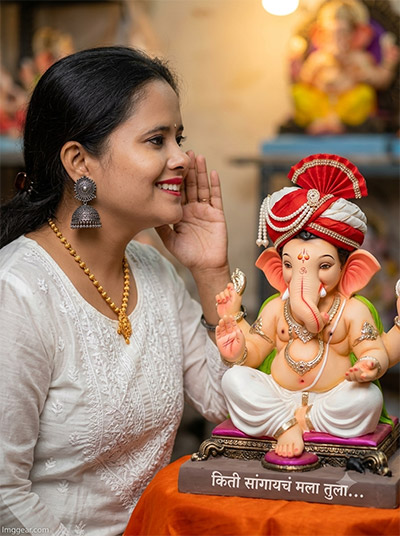
Recreate this intimate storytelling moment featuring a woman in white ethnic wear sharing a secret with Lord Ganesha. Our ChatGPT Ganpati Bappa Prompt replicates the soft indoor glow and fine details smoothly. Tap to unlock the exact code and try it now.
PROMPT
{
“image_label”: “Imggear.com_5”,
“version”: “3.5”,
“aspect_ratio”: “3:4”,
“prompt”: “An ultra-realistic, photorealistic premium masterpiece, preserving the exact identity, facial proportions, bone structure, eye depth, sharp jawline, authentic facial characteristics, and skin micro-textures (visible pores, fine lines) of the subject in the uploaded personal reference photo without alteration. The facial lighting must seamlessly fuse with the ambient scene highlights and cast realistic shadows, allowing the subject to naturally integrate with the environment’s lighting, shadows, depth, atmospheric perspective, and optical characteristics while preserving the subject’s true identity without alteration, seamlessly integrating the subject into this intimate cinematic scene, while maintaining complete identity consistency throughout the image. The subject is a young woman in her mid-20s with an average build, shown in a sweet profile view looking left, smiling as she holds her hand to her ear, appearing to whisper. She is wearing a white embroidered chanderi silk kurta or blouse and large silver or oxidized traditional jhumka earrings. A highly detailed Ganesha idol in a red and white turban with pearl accents sits on an orange cloth-covered platform, with generic Marathi text on its base: \”किती सांगायचं मला तुला…\” (\”Kiti sangaych mala tula…\”). The background is a blurred workshop with other idols and decorations. The image has a photorealistic quality captured with a full-frame mirrorless camera and an 85mm f/1.4 lens, featuring warm, soft lighting, realistic skin rendering with sub-surface scattering, true optical sharpness, and creamy bokeh. A minimal, premium handwritten-style watermark \”Imggear.com\” in soft white Petit Formal Script is in the bottom-left corner.”,
“negative_prompt”: “(plastic skin, waxy skin, CGI rendering, AI beauty filter look, porcelain skin, over-smoothed skin, airbrushed skin, synthetic textures, doll-like face, uncanny valley, artificial symmetry), (deformed face, distorted facial features, asymmetrical eyes, bad anatomy, bad proportions, extra limbs, extra fingers, missing fingers, malformed hands, mutated hands), (unnatural lighting, flat lighting, harsh direct sunlight, blown-out highlights, crushed shadows, oversaturated colors, neon colors, unrealistic color grading, HDR look, overexposed, underexposed), (blurry, out of focus, low resolution, pixelated, jpeg artifacts, grainy noise, motion blur, soft focus), (dry land, dusty ground, indoor background, wrong environment, mismatched background), (clothing logos, brand marks, trademarked patterns, text overlays, random watermark placement, duplicate watermark, extra signature), (cartoon style, illustration, painting, 3D render, anime, stylized art, digital art look), (identity mismatch, face swap artifacts, inconsistent facial features, altered bone structure, changed eye color, different face shape), hair description, curly hair, short hair, beard style, outdoor background.”
}
💡 AI Photo Editing Pro Tips for Perfect Results
Keep Faces Consistent: If the AI changes the face, add this exact phrase to the very beginning of your prompt: “Preserve facial identity 100%, do not alter facial features or proportions.”
Reroll for Perfection: Run every prompt 2–3 times! The second or third generation is almost always sharper and packed with better details.
Get the DSLR Look: Want that beautiful, blurred background? Just add “f/1.8 shallow depth of field” to your prompt.
Control the Camera Shot: Tell the AI exactly what frame you want by adding terms like “Close-up portrait,” “Full-body shot,” or “Wide-angle view.”
Set the Vibe with Lighting: Lighting makes or breaks an AI image. Add “Cinematic lighting,” “Golden hour sunset,” or “Soft studio lighting” for a professional touch.
📐 Best Aspect Ratio: Use 3:4 Vertical for stunning, ready-to-post results on Instagram and Pinterest.