Struggling to generate photorealistic Ganesh Chaturthi portraits without ruining your real face features? Finding a working Ganpati Bappa Prompt can be frustrating when most AI tools produce unnatural, plastic-looking renders. By using Gemini AI or ChatGPT, you can easily preserve exact facial features while generating stunning 4K mandap backgrounds, marigold garlands, and majestic golden lighting. Below, we break down copy-paste prompts designed to get you viral festive photos instantly.
Craft Festive Photos with this Realistic Ganpati Bappa Prompt
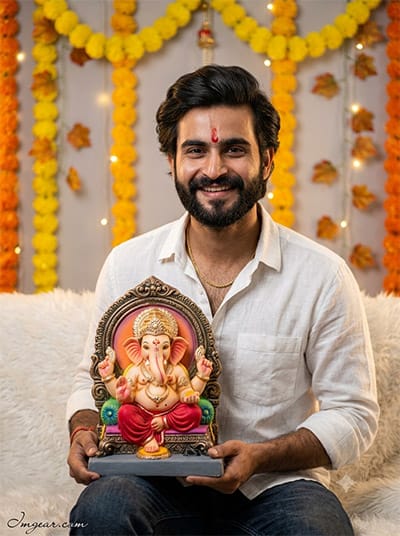
Capture the joy of Ganesh Chaturthi by rendering warm, realistic festive portraits holding Lord Ganesha statues using simple text prompts. Give this creative idea a try today!
PROMPT
{
“image_label”: “Imggear.com_1”,
“version”: “3.5”,
“aspect_ratio”: “3:4”,
“prompt”: “An ultra-realistic, photorealistic premium masterpiece, preserving the exact identity, facial proportions, bone structure, eye depth, sharp jawline, authentic facial characteristics, and skin micro-textures (visible pores, fine lines) of the subject in the uploaded personal reference photo without alteration. The facial lighting must seamlessly fuse with the ambient scene highlights and cast realistic shadows, allowing the subject to naturally integrate with the environment’s lighting, shadows, depth, atmospheric perspective, and optical characteristics while preserving the subject’s true identity without alteration, seamlessly integrating the subject into this traditional festive scene, while maintaining complete identity consistency throughout the image. This 3:4 portrait, captured on a full-frame mirrorless camera with an 85mm f/1.4 lens (RAW format), shows the young man from image_0.png, with his distinctive wide smile and red tilak mark. His physical build, gender, and apparent age are accurately preserved. He wears the same white linen shirt, gold chain, and dark jeans. He sits holding the detailed Lord Ganesha idol under its decorative arch on a fluffy white surface. The background is a detailed recreation of the bokeh-rich environment from image_0.png, featuring blurred yellow and orange marigold garlands, hanging artificial leaves, and warm fairy lights on a light grey wall. The scene is illuminated by the warm, volumetric ambient light and sharp rim lighting, optimized for PBR rendering with high-fidelity skin grain, sub-surface scattering, and micro-displacement. The image boasts hyper-detailed edge sharpness and premium creamy bokeh. An elegant, thin cursive watermark, \”Imggear.com\”, in soft white, is placed subtly in the bottom-left corner, resembling a signature.”,
“negative_prompt”: “(plastic skin, waxy skin, CGI rendering, AI beauty filter look, porcelain skin, over-smoothed skin, airbrushed skin, synthetic textures, doll-like face, uncanny valley, artificial symmetry), (deformed face, distorted facial features, asymmetrical eyes, bad anatomy, bad proportions, extra limbs, extra fingers, missing fingers, malformed hands, mutated hands), (unnatural lighting, flat lighting, harsh direct sunlight, blown-out highlights, crushed shadows, oversaturated colors, neon colors, unrealistic color grading, HDR look, overexposed, underexposed), (blurry, out of focus, low resolution, pixelated, jpeg artifacts, grainy noise, motion blur, soft focus), (dry land, dusty ground, indoor background, wrong environment, mismatched background), (clothing logos, brand marks, trademarked patterns, text overlays, random watermark placement, duplicate watermark, extra signature, Brothers Photography logo), (cartoon style, illustration, painting, 3D render, anime, stylized art, digital art look), (identity mismatch, face swap artifacts, inconsistent facial features, altered bone structure, changed eye color, different face shape)”
}
How to Create Sacred Festival Edits with Lord Ganesha AI Prompts
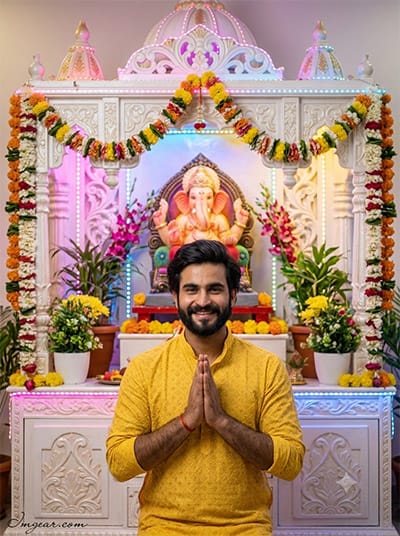
Designed a vibrant home mandir setup featuring warm colorful lighting and traditional floral garlands around the shrine. Learn how to generate this devotional aesthetic for your own holiday photos in minutes. Are you ready to test this look yourself?
PROMPT
{
“image_label”: “Imggear.com_2”,
“version”: “3.5”,
“aspect_ratio”: “3:4”,
“prompt”: “An ultra-realistic, photorealistic premium masterpiece, preserving the exact identity, facial proportions, bone structure, eye depth, sharp jawline, authentic facial characteristics, and skin micro-textures (visible pores, fine lines) of the subject in the uploaded personal reference photo without alteration. The facial lighting must seamlessly fuse with the ambient scene highlights and cast realistic shadows, allowing the subject to naturally integrate with the environment’s lighting, shadows, depth, atmospheric perspective, and optical characteristics while preserving the subject’s true identity without alteration, seamlessly integrating the subject into this elaborate devotional scene, while maintaining complete identity consistency throughout the image. This 3:4 photograph, taken with an 85mm f/1.4 lens on a professional mirrorless camera (RAW), features the man from image_1.png, preserving his specific smile and facial features. He is in a prayer pose, hands clasped (namaste), looking at the camera. He wears the detailed yellow patterned kurta from image_1.png. He stands before the ornate, multi-tiered white mandap from image_1.png, which is decorated with intricate carvings, a central Ganesha idol, extensive fresh flower garlands, potted plants, and colorful integrated LED lights (pink, blue, yellow) creating a vibrant backdrop. The scene is complex and detailed, reflecting the depth and structure of image_1.png. The lighting is bright and multi-faceted, fusing with the colorful ambient glow. Optimized for PBR rendering with realistic skin textures. The image has true optical sharpness and premium creamy bokeh. An elegant cursive watermark \”Imggear.com\” in soft white is placed in the bottom-left corner.”,
“negative_prompt”: “(plastic skin, waxy skin, CGI rendering, AI beauty filter look, porcelain skin, over-smoothed skin, airbrushed skin, synthetic textures, doll-like face, uncanny valley, artificial symmetry), (deformed face, distorted facial features, asymmetrical eyes, bad anatomy, bad proportions, extra limbs, extra fingers, missing fingers, malformed hands, mutated hands), (unnatural lighting, flat lighting, harsh direct sunlight, blown-out highlights, crushed shadows, oversaturated colors, neon colors, unrealistic color grading, HDR look, overexposed, underexposed), (blurry, out of focus, low resolution, pixelated, jpeg artifacts, grainy noise, motion blur, soft focus), (dry land, dusty ground, indoor background, wrong environment, mismatched background), (clothing logos, brand marks, trademarked patterns, text overlays, random watermark placement, duplicate watermark, extra signature), (cartoon style, illustration, painting, 3D render, anime, stylized art, digital art look), (identity mismatch, face swap artifacts, inconsistent facial features, altered bone structure, changed eye color, different face shape)”
}
Creative Ganesh Utsav Photo Prompts for Stunning Festive Visuals
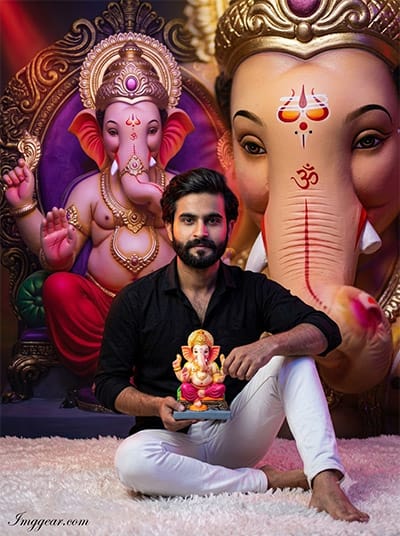
Produce high-impact festive portraits featuring cinematic lighting, rich purple backdrop hues, and intricate idol details using simple image generation techniques. Grab the full text prompt below to upgrade your creative workflow!
PROMPT
{
“image_label”: “Imggear.com_3”,
“version”: “3.5”,
“aspect_ratio”: “3:4”,
“prompt”: “An ultra-realistic, photorealistic premium masterpiece, preserving the exact identity, facial proportions, bone structure, eye depth, sharp jawline, authentic facial characteristics, and skin micro-textures (visible pores, fine lines) of the subject in the uploaded personal reference photo without alteration. The facial lighting must seamlessly fuse with the ambient scene highlights and cast realistic shadows, allowing the subject to naturally integrate with the environment’s lighting, shadows, depth, atmospheric perspective, and optical characteristics while preserving the subject’s true identity without alteration, seamlessly integrating the subject into this highly stylized, multi-layered dramatic backdrop, while maintaining complete identity consistency throughout the image. This 3:4 cinematic photograph, taken with an 85mm f/1.4 lens on a professional mirrorless camera (RAW), features the man from image_2.png, maintaining his exact face and expression. He is seated on a plush white shag rug, identical to the setting in image_2.png, holding the colorful miniature Ganesha idol. His pose, wearing the black button-down shirt and white jeans, is precisely replicated. The background is a complex, artistic composite of massive Ganesha imagery: the central purple and gold Ganesha backdrop and the dominant, large-scale, close-up Ganesha face with the tripundra mark from image_2.png, with soft, dramatic multi-colored spotlights (red, gold, purple) creating a surreal, rich environment. The lighting on his face is dramatic and multi-colored, matching the backdrop, optimized for PBR rendering with realistic skin pores and grain. High-definition micro-details. An elegant cursive \”Imggear.com\” watermark in soft white is in the bottom-left.”,
“negative_prompt”: “(plastic skin, waxy skin, CGI rendering, AI beauty filter look, porcelain skin, over-smoothed skin, airbrushed skin, synthetic textures, doll-like face, uncanny valley, artificial symmetry), (deformed face, distorted facial features, asymmetrical eyes, bad anatomy, bad proportions, extra limbs, extra fingers, missing fingers, malformed hands, mutated hands), (unnatural lighting, flat lighting, harsh direct sunlight, blown-out highlights, crushed shadows, oversaturated colors, neon colors, unrealistic color grading, HDR look, overexposed, underexposed), (blurry, out of focus, low resolution, pixelated, jpeg artifacts, grainy noise, motion blur, soft focus), (dry land, dusty ground, indoor background, wrong environment, mismatched background), (clothing logos, brand marks, trademarked patterns, text overlays, random watermark placement, duplicate watermark, extra signature, ‘R’ logo), (cartoon style, illustration, painting, 3D render, anime, stylized art, digital art look), (identity mismatch, face swap artifacts, inconsistent facial features, altered bone structure, changed eye color, different face shape)”
}
Realistic Sculptor Workshop Image Prompt for Ganesh Festival
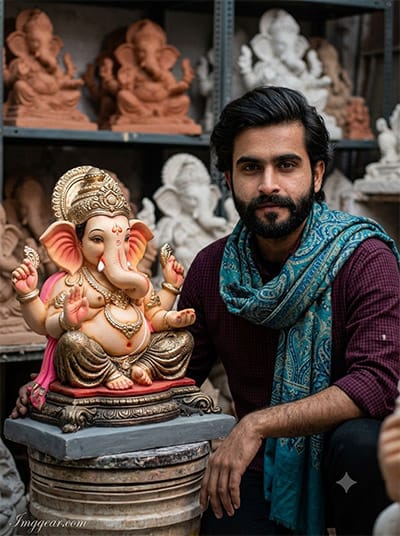
Recreate an authentic artisan environment filled with clay idols and raw workshop textures. This guide breaks down the exact generation text to build convincing cultural photography. Copy the code into your generator and post your results!
PROMPT
{
“image_label”: “Imggear.com_4”,
“version”: “3.5”,
“aspect_ratio”: “3:4”,
“prompt”: “An ultra-realistic, photorealistic premium masterpiece, preserving the exact identity, facial proportions, bone structure, eye depth, sharp jawline, authentic facial characteristics, and skin micro-textures (visible pores, fine lines) of the subject in the uploaded personal reference photo without alteration. The facial lighting must seamlessly fuse with the ambient scene highlights and cast realistic shadows, allowing the subject to naturally integrate with the environment’s lighting, shadows, depth, atmospheric perspective, and optical characteristics while preserving the subject’s true identity without alteration, seamlessly integrating the subject into this detailed workshop environment, while maintaining complete identity consistency throughout the image. This 3:4 photograph, captured on a full-frame mirrorless camera with an 85mm f/1.4 lens (RAW), shows the man from image_3.png, preserving his exact face and expression. He is close-up, kneeling beside the large, intricately decorated Ganesha idol from image_3.png, resting on its stacked plinth. His pose, wearing the detailed teal and blue patterned scarf over the dark red checked shirt, is identical. His arm, with the wrist threads, rests near the idol’s base. The background is a detailed, slightly chaotic reconstruction of the artisan workshop from image_3.png, with shelves filled with unfinished terracotta and plaster Ganesha forms in various sizes, blurred by creamy bokeh. The lighting is focused and directional, mirroring the warm, slightly harsh light on his face and the idol, optimized for PBR rendering with realistic skin pores and micro-displacement. The image boasts hyper-detailed edge sharpness. An elegant, thin cursive \”Imggear.com\” watermark in soft white is in the bottom-left.”,
“negative_prompt”: “(plastic skin, waxy skin, CGI rendering, AI beauty filter look, porcelain skin, over-smoothed skin, airbrushed skin, synthetic textures, doll-like face, uncanny valley, artificial symmetry), (deformed face, distorted facial features, asymmetrical eyes, bad anatomy, bad proportions, extra limbs, extra fingers, missing fingers, malformed hands, mutated hands), (unnatural lighting, flat lighting, harsh direct sunlight, blown-out highlights, crushed shadows, oversaturated colors, neon colors, unrealistic color grading, HDR look, overexposed, underexposed), (blurry, out of focus, low resolution, pixelated, jpeg artifacts, grainy noise, motion blur, soft focus), (dry land, dusty ground, indoor background, wrong environment, mismatched background), (clothing logos, brand marks, trademarked patterns, text overlays, random watermark placement, duplicate watermark, extra signature, Spotlight Photography watermark), (cartoon style, illustration, painting, 3D render, anime, stylized art, digital art look), (identity mismatch, face swap artifacts, inconsistent facial features, altered bone structure, changed eye color, different face shape)”
}
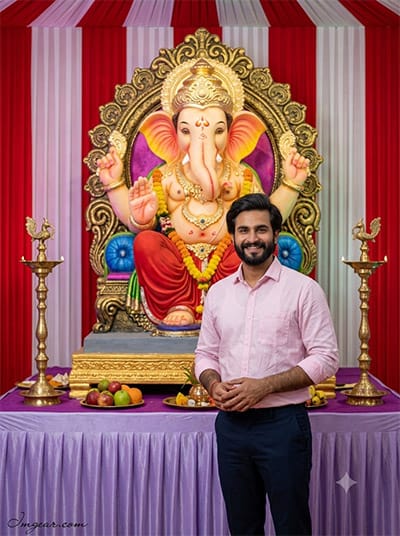
Vibrant Pandal Style Photos via Ganesha Festival AI Prompts
Transform simple portraits into grand pandal celebrations complete with brass oil lamps, red striped backdrops, and majestic idol setups. Explore the complete formula to replicate this traditional look today!
PROMPT
{
“image_label”: “Imggear.com_5”,
“version”: “3.5”,
“aspect_ratio”: “3:4”,
“prompt”: “An ultra-realistic, photorealistic premium masterpiece, preserving the exact identity, facial proportions, bone structure, eye depth, sharp jawline, authentic facial characteristics, and skin micro-textures (visible pores, fine lines) of the subject in the uploaded personal reference photo without alteration. The facial lighting must seamlessly fuse with the ambient scene highlights and cast realistic shadows, allowing the subject to naturally integrate with the environment’s lighting, shadows, depth, atmospheric perspective, and optical characteristics while preserving the subject’s true identity without alteration, seamlessly integrating the subject into this formal festive hall, while maintaining complete identity consistency throughout the image. This 3:4 full-length photograph, taken with an 85mm f/1.4 lens on a professional mirrorless camera (RAW), captures the smiling man from image_4.png. He stands before the colossal, elaborately detailed Ganesha idol on its gold throne and plinth from image_4.png. He is dressed in the light pink button-down shirt and dark navy trousers from image_4.png. His hands are loosely clasped in front of him. The detailed background of red and white vertically striped drapes from image_4.png is present, along with the two ornate brass oil lamps and the offerings of fruit (bananas) on the purple cloth-covered table. The environment is complex, featuring the full structure from image_4.png. The scene is illuminated by the bright, even interior lighting, fusing with the colorful ambient glow. Optimized for PBR rendering with realistic skin textures and micro-grain. True optical sharpness. An elegant cursive \”Imggear.com\” watermark in soft white is in the bottom-left.”,
“negative_prompt”: “(plastic skin, waxy skin, CGI rendering, AI beauty filter look, porcelain skin, over-smoothed skin, airbrushed skin, synthetic textures, doll-like face, uncanny valley, artificial symmetry), (deformed face, distorted facial features, asymmetrical eyes, bad anatomy, bad proportions, extra limbs, extra fingers, missing fingers, malformed hands, mutated hands), (unnatural lighting, flat lighting, harsh direct sunlight, blown-out highlights, crushed shadows, oversaturated colors, neon colors, unrealistic color grading, HDR look, overexposed, underexposed), (blurry, out of focus, low resolution, pixelated, jpeg artifacts, grainy noise, motion blur, soft focus), (dry land, dusty ground, indoor background, wrong environment, mismatched background), (clothing logos, brand marks, trademarked patterns, text overlays, random watermark placement, duplicate watermark, extra signature), (cartoon style, illustration, painting, 3D render, anime, stylized art, digital art look), (identity mismatch, face swap artifacts, inconsistent facial features, altered bone structure, changed eye color, different face shape)”
}
💡 AI Photo Editing Pro Tips for Perfect Results
Keep Faces Consistent: If the AI changes the face, add this exact phrase to the very beginning of your prompt: “Preserve facial identity 100%, do not alter facial features or proportions.”
Reroll for Perfection: Run every prompt 2–3 times! The second or third generation is almost always sharper and packed with better details.
Get the DSLR Look: Want that beautiful, blurred background? Just add “f/1.8 shallow depth of field” to your prompt.
Control the Camera Shot: Tell the AI exactly what frame you want by adding terms like “Close-up portrait,” “Full-body shot,” or “Wide-angle view.”
Set the Vibe with Lighting: Lighting makes or breaks an AI image. Add “Cinematic lighting,” “Golden hour sunset,” or “Soft studio lighting” for a professional touch.
📐 Best Aspect Ratio: Use 3:4 Vertical for stunning, ready-to-post results on Instagram and Pinterest.