Mastering AI photo editing Ganesh prompts often feels frustrating when your favorite tools subtly distort your face, smooth out natural skin textures, or ruin the intricate details of the Lord Ganesha idol. You want a high-converting, photorealistic festival portrait that perfectly preserves your facial identity while immersing you in a stunning pandal setup. In this guide, you will discover battle-tested prompt workflows for Gemini AI and ChatGPT engineered to lock your features completely, deliver cinematic golden-hour lighting, and create viral-ready Ganeshotsav posts in seconds.
Create Stunning AI Photo Editing Ganesh Prompts for Festival Portraits
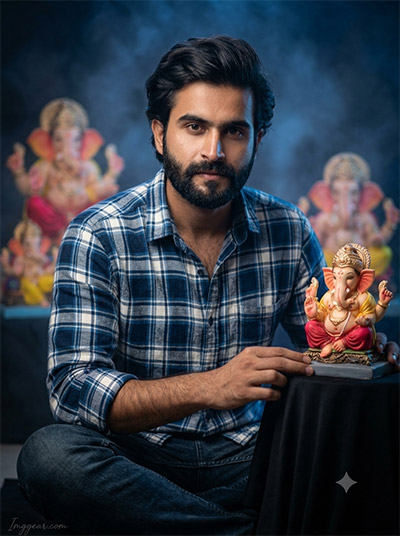
Transform your festive portraits with custom prompts using AI Photo Editing Ganesh techniques to capture cinematic lighting and detailed idol craftsmanship. Copy the exact prompt now to recreate this portrait for your next blog post.
PROMPT
{
“image_label”: “Imggear.com_1”,
“version”: “3.5”,
“aspect_ratio”: “3:4”,
“prompt”: “An ultra-realistic, photorealistic premium masterpiece, preserving the exact identity, facial proportions, bone structure, eye depth, sharp jawline, authentic facial characteristics, and skin micro-textures (visible pores, fine lines) of the subject in the uploaded personal reference photo without alteration. The facial lighting must seamlessly fuse with the ambient scene highlights and cast realistic shadows, allowing the subject to naturally integrate with the environment’s lighting, shadows, depth, atmospheric perspective, and optical characteristics while preserving the subject’s true identity without alteration, seamlessly integrating the subject into this cinematic scene, while maintaining complete identity consistency throughout the image. The subject, a young man with a slight build and medium shoulders, sits cross-legged on a dark surface, gazing intently. He wears a premium blue and white custom plaid shirt and dark blue denim jeans. His right hand rests near a beautifully detailed Ganesha idol on a black-draped stand. The background features blurred, large Ganesha imagery under a dramatic light blue and dark fog with volumetric light. Shot on a full-frame mirrorless camera with an 85mm f/1.4 lens, featuring hyper-detailed edge sharpness, extreme high-definition micro-details on skin and fabric, natural optical rendering, and premium creamy bokeh. The lighting uses soft volumetric background light and natural key light, with a polished editorial color grade. A subtle watermark \”Imggear.com\” in Petit Formal Script, soft white (#ffffff), with transparency, is in the bottom-left.”,
“negative_prompt”: “(plastic skin, waxy skin, CGI rendering, AI beauty filter look, porcelain skin, over-smoothed skin, airbrushed skin, synthetic textures, doll-like face, uncanny valley, artificial symmetry), (deformed face, distorted facial features, asymmetrical eyes, bad anatomy, bad proportions, extra limbs, extra fingers, missing fingers, malformed hands, mutated hands), (unnatural lighting, flat lighting, harsh direct sunlight, blown-out highlights, crushed shadows, oversaturated colors, neon colors, unrealistic color grading, HDR look, overexposed, underexposed), (blurry, out of focus, low resolution, pixelated, jpeg artifacts, grainy noise, motion blur, soft focus), (dry land, dusty ground, indoor background, wrong environment, mismatched background), (clothing logos, brand marks, trademarked patterns, text overlays, random watermark placement, duplicate watermark, extra signature), (cartoon style, illustration, painting, 3D render, anime, stylized art, digital art look), (identity mismatch, face swap artifacts, inconsistent facial features, altered bone structure, changed eye color, different face shape), (female gender), (bright outdoor setting), (wrong idol type), (modern background).”
}
Master Traditional Festive Portraits with AI Photo Editing Ganesh Promptsv
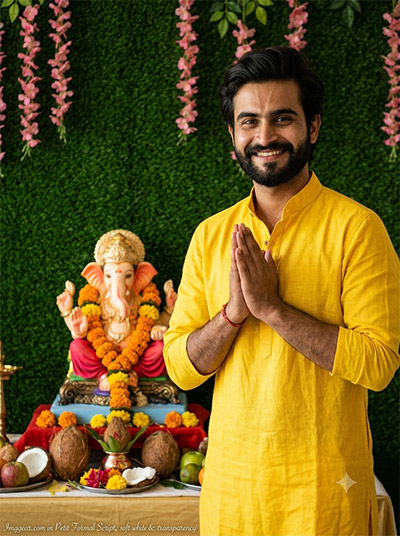
Elevate your cultural celebration photos effortlessly using precise AI Photo Editing Ganesh text prompts to build vibrant floral backdrops and authentic attire. Curious how to style yours? Give this prompt a try today.
PROMPT
{
“image_label”: “Imggear.com_2”,
“version”: “3.5”,
“aspect_ratio”: “3:4”,
“prompt”: “An ultra-realistic, photorealistic premium masterpiece, preserving the exact identity, facial proportions, bone structure, eye depth, sharp jawline, authentic facial characteristics, and skin micro-textures (visible pores, fine lines) of the subject in the uploaded personal reference photo without alteration. The facial lighting must seamlessly fuse with the ambient scene highlights and cast realistic shadows, allowing the subject to naturally integrate with the environment’s lighting, shadows, depth, atmospheric perspective, and optical characteristics while preserving the subject’s true identity without alteration, seamlessly integrating the subject into this devotional scene, while maintaining complete identity consistency throughout the image. The subject, an adult man with a broad build, stands with hands folded in a respectful Anjali Mudra, a joyful smile showing a beard. He is dressed in a vibrant yellow custom linen kurta. He stands before a Ganesha idol adorned with marigolds on a well-arranged altar with coconuts, fruits, and flowers. The background is a dense green faux-grass wall with pink floral hangings. Captured with a full-frame mirrorless camera and 85mm f/1.4 lens, delivering hyper-detailed edge sharpness, extreme high-definition micro-details on skin and fabric, natural optical rendering, and premium creamy bokeh. Natural, diffused studio lighting creates deep shadows and punchy, warm highlights. Editorial color grading ensures rich, warm tones. A subtle watermark \”Imggear.com\” in Petit Formal Script, soft white (#ffffff), with transparency, is in the bottom-left.”,
“negative_prompt”: “(plastic skin, waxy skin, CGI rendering, AI beauty filter look, porcelain skin, over-smoothed skin, airbrushed skin, synthetic textures, doll-like face, uncanny valley, artificial symmetry), (deformed face, distorted facial features, asymmetrical eyes, bad anatomy, bad proportions, extra limbs, extra fingers, missing fingers, malformed hands, mutated hands), (unnatural lighting, flat lighting, harsh direct sunlight, blown-out highlights, crushed shadows, oversaturated colors, neon colors, unrealistic color grading, HDR look, overexposed, underexposed), (blurry, out of focus, low resolution, pixelated, jpeg artifacts, grainy noise, motion blur, soft focus), (dry land, dusty ground, indoor background, wrong environment, mismatched background), (clothing logos, brand marks, trademarked patterns, text overlays, random watermark placement, duplicate watermark, extra signature), (cartoon style, illustration, painting, 3D render, anime, stylized art, digital art look), (identity mismatch, face swap artifacts, inconsistent facial features, altered bone structure, changed eye color, different face shape), (female gender), (non-smiling), (casual shirt), (outdoor setting), (no beard).”
}
Futuristic Devotional Concepts using AI Photo Editing Ganesh Prompts
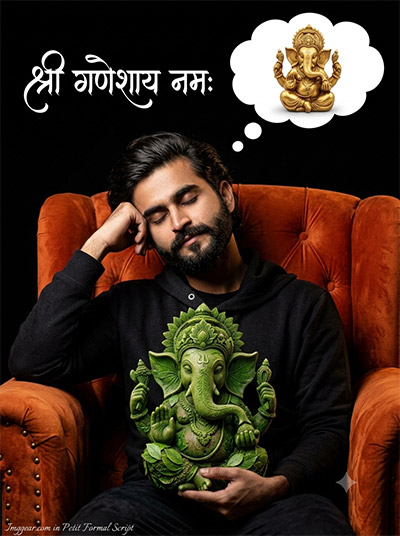
Craft imaginative sleeping portrait visuals with clever AI Photo Editing Ganesh prompts that mix eco-friendly leaf sculptures, thought bubbles, and bold typography. Tap into this viral concept and share your results with us below.
PROMPT
{
“image_label”: “Imggear.com_3”,
“version”: “3.5”,
“aspect_ratio”: “3:4”,
“prompt”: “An ultra-realistic, photorealistic premium masterpiece, preserving the exact identity, facial proportions, bone structure, eye depth, sharp jawline, authentic facial characteristics, and skin micro-textures (visible pores, fine lines) of the subject in the uploaded personal reference photo without alteration. The facial lighting must seamlessly fuse with the ambient scene highlights and cast realistic shadows, allowing the subject to naturally integrate with the environment’s lighting, shadows, depth, atmospheric perspective, and optical characteristics while preserving the subject’s true identity without alteration, seamlessly integrating the subject into this dramatic scene, while maintaining complete identity consistency throughout the image. The subject, an adult man with a strong build, rests with eyes closed, hand on head, in a deep orange custom-tufted armchair. He holds a unique green-leafed Ganesha sculpture. In a thought bubble above him is a miniature of a detailed golden Ganesha statue. Against a deep black void, white elegant cursive Devanagari script is placed. Captured using a full-frame mirrorless camera with an 85mm f/1.4 lens in RAW format, the image features hyper-detailed edge sharpness, extreme high-definition micro-details on skin and fabric, natural optical rendering, and premium creamy bokeh. Dynamic studio lighting provides bright highlights and deep, punchy shadows with high tonal contrast. Editorial color grading enhances warmth and clarity. A subtle watermark \”Imggear.com\” in Petit Formal Script, soft white (#ffffff), with transparency, is in the bottom-left.”,
“negative_prompt”: “(plastic skin, waxy skin, CGI rendering, AI beauty filter look, porcelain skin, over-smoothed skin, airbrushed skin, synthetic textures, doll-like face, uncanny valley, artificial symmetry), (deformed face, distorted facial features, asymmetrical eyes, bad anatomy, bad proportions, extra limbs, extra fingers, missing fingers, malformed hands, mutated hands), (unnatural lighting, flat lighting, harsh direct sunlight, blown-out highlights, crushed shadows, oversaturated colors, neon colors, unrealistic color grading, HDR look, overexposed, underexposed), (blurry, out of focus, low resolution, pixelated, jpeg artifacts, grainy noise, motion blur, soft focus), (dry land, dusty ground, indoor background, wrong environment, mismatched background), (clothing logos, brand marks, trademarked patterns, text overlays, random watermark placement, duplicate watermark, extra signature), (cartoon style, illustration, painting, 3D render, anime, stylized art, digital art look), (identity mismatch, face swap artifacts, inconsistent facial features, altered bone structure, changed eye color, different face shape), (female gender), (awake expression), (incorrect text), (different chair), (no thought bubble).”
}
Moody Outdoor AI Photo Editing Ganesh Edits to Try Right Now
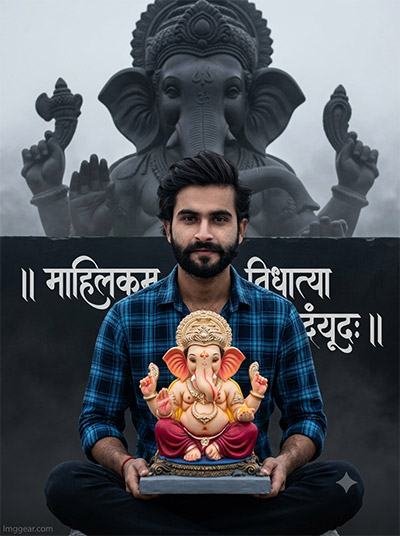
Bring dramatic depth to your festive edits with clever AI Photo Editing Ganesh prompts featuring monochrome stone statues and sharp typography. Grab the prompt setup immediately to design your own epic portrait.
PROMPT
{
“image_label”: “Imggear.com_5”,
“version”: “3.5”,
“aspect_ratio”: “3:4”,
“prompt”: “An ultra-realistic, photorealistic premium masterpiece, preserving the exact identity, facial proportions, bone structure, eye depth, sharp jawline, authentic facial characteristics, and skin micro-textures (visible pores, fine lines) of the subject in the uploaded personal reference photo without alteration. The facial lighting must seamlessly fuse with the ambient scene highlights and cast realistic shadows, allowing the subject to naturally integrate with the environment’s lighting, shadows, depth, atmospheric perspective, and optical characteristics while preserving the subject’s true identity without alteration, seamlessly integrating the subject into this dark atmospheric scene, while maintaining complete identity consistency throughout the image. The subject, an adult man with a moderate build and medium shoulders, sits cross-legged on a dark surface. He is dressed in a blue and black custom plaid cotton shirt and black trousers. He gently holds a ornate Ganesha idol on a blue base. White ornate cursive Devanagari script is on the black right side. A massive, looming dark stone Ganesha statue is in the deep-fog background with gothic architectural details. Full-frame mirrorless camera, 85mm f/1.4 lens, RAW, hyper-detailed edge sharpness, extreme high-definition micro-details on skin and fabric, natural optical rendering, premium creamy bokeh. Lighting uses a directional front key with soft deep-background light for high contrast. Editorial color grading adds polish and rich tones. A subtle watermark \”Imggear.com\” in Petit Formal Script, soft white (#ffffff), with transparency, is in the bottom-left.”,
“negative_prompt”: “(plastic skin, waxy skin, CGI rendering, AI beauty filter look, porcelain skin, over-smoothed skin, airbrushed skin, synthetic textures, doll-like face, uncanny valley, artificial symmetry), (deformed face, distorted facial features, asymmetrical eyes, bad anatomy, bad proportions, extra limbs, extra fingers, missing fingers, malformed hands, mutated hands), (unnatural lighting, flat lighting, harsh direct sunlight, blown-out highlights, crushed shadows, oversaturated colors, neon colors, unrealistic color grading, HDR look, overexposed, underexposed), (blurry, out of focus, low resolution, pixelated, jpeg artifacts, grainy noise, motion blur, soft focus), (dry land, dusty ground, indoor background, wrong environment, mismatched background), (clothing logos, brand marks, trademarked patterns, text overlays, random watermark placement, duplicate watermark, extra signature), (cartoon style, illustration, painting, 3D render, anime, stylized art, digital art look), (identity mismatch, face swap artifacts, inconsistent facial features, altered bone structure, changed eye color, different face shape), (female gender), (standing pose), (casual t-shirt), (bright setting), (wrong background).”
}
💡 AI Photo Editing Pro Tips for Perfect Results
Keep Faces Consistent: If the AI changes the face, add this exact phrase to the very beginning of your prompt: “Preserve facial identity 100%, do not alter facial features or proportions.”
Reroll for Perfection: Run every prompt 2–3 times! The second or third generation is almost always sharper and packed with better details.
Get the DSLR Look: Want that beautiful, blurred background? Just add “f/1.8 shallow depth of field” to your prompt.
Control the Camera Shot: Tell the AI exactly what frame you want by adding terms like “Close-up portrait,” “Full-body shot,” or “Wide-angle view.”
Set the Vibe with Lighting: Lighting makes or breaks an AI image. Add “Cinematic lighting,” “Golden hour sunset,” or “Soft studio lighting” for a professional touch.
📐 Best Aspect Ratio: Use 3:4 Vertical for stunning, ready-to-post results on Instagram and Pinterest.