Finding the perfect Prompt For Ganesh Chaturthi Photo to create vibrant, realistic festive visuals often leads to dull, blurry, or distorted AI outputs. Generating photorealistic Lord Ganesha images or personalized festive portraits shouldn’t be frustrating. With optimized prompts tailored specifically for Gemini AI and ChatGPT, you can instantly turn simple text into breathtaking 8K festival artwork. Below, you’ll find copy-paste prompts designed to deliver flawless, high-resolution results every single time.
Create Festive Visuals Using This Prompt For Ganesh Chaturthi Photo
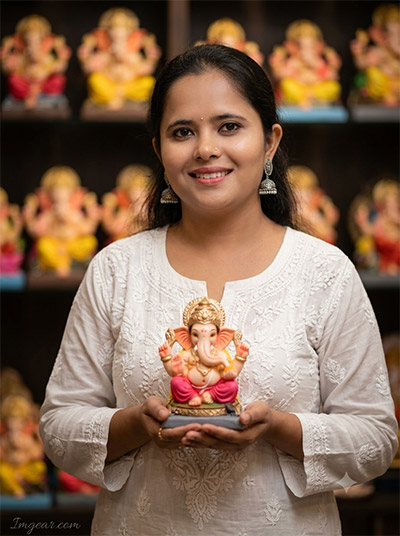
Capture the serene spirit of festival preparations with an authentic portrait featuring intricate idol details and soft lighting. Copy this exact prompt for Ganesh Chaturthi photo generation to elevate your festive social feeds. Try this prompt now and share your edits.
PROMPT
{
“image_label”: “Imggear.com_1”,
“version”: “3.5”,
“aspect_ratio”: “3:4”,
“prompt”: “An ultra-realistic, photorealistic premium masterpiece, preserving the exact identity, facial proportions, bone structure, eye depth, sharp jawline, authentic facial characteristics, and skin micro-textures (visible pores, fine lines) of the subject in the uploaded personal reference photo without alteration. The facial lighting must seamlessly fuse with the ambient scene highlights and cast realistic shadows, allowing the subject to naturally integrate with the environment’s lighting, shadows, depth, atmospheric perspective, and optical characteristics while preserving the subject’s true identity without alteration, seamlessly integrating the subject into this dramatic portrait, while maintaining complete identity consistency throughout the image. The subject, a woman with a slim build and average shoulders, is depicted in her late teens or early 20s, smiling gently as she carefully holds a small Ganesha idol with both hands. She wears a traditional white Chikankari long kurta with delicate white thread embroidery and small button details, paired with silver-colored Jhumka earrings. The scene is set indoors, within a dimly lit shop or display area, with a soft-focus background of colorful religious items and other blurred idols on shelves, creating shallow depth and a warm, atmospheric bokeh. Captured using a full-frame professional mirrorless camera with an 85mm f/1.4 prime lens in RAW format, the image features hyper-detailed edge sharpness, extreme high-definition micro-details on skin and fabric, natural optical rendering, and premium creamy bokeh. The lighting is soft and diffused, mirroring the warm indoor light, elevated with rich color saturation and punchy shadows for an editorial-grade finish. The original watermark \”Photos by Ganesh Mohite\” is removed, and a new one is placed. The watermark, which reads \”Imggear.com\”, is located in the bottom-left corner, featuring a soft white (#ffffff) color with slight transparency and a minimal, premium handwritten signature appearance in Petit Formal Script.”,
“negative_prompt”: “(plastic skin, waxy skin, CGI rendering, AI beauty filter look, porcelain skin, over-smoothed skin, airbrushed skin, synthetic textures, doll-like face, uncanny valley, artificial symmetry), (deformed face, distorted facial features, asymmetrical eyes, bad anatomy, bad proportions, extra limbs, extra fingers, missing fingers, malformed hands, mutated hands), (unnatural lighting, flat lighting, harsh direct sunlight, blown-out highlights, crushed shadows, oversaturated colors, neon colors, unrealistic color grading, HDR look, overexposed, underexposed), (blurry, out of focus, low resolution, pixelated, jpeg artifacts, grainy noise, motion blur, soft focus), (dry land, dusty ground, indoor background, wrong environment, mismatched background), (clothing logos, brand marks, trademarked patterns, text overlays, random watermark placement, duplicate watermark, extra signature), (cartoon style, illustration, painting, 3D render, anime, stylized art, digital art look), (identity mismatch, face swap artifacts, inconsistent facial features, altered bone structure, changed eye color, different face shape), (visible \”Photos by Ganesh Mohite\” watermark, cluttered shop details, distracting background elements, harsh flash photography), (incorrect clothing type, non-traditional kurta, lack of Chikankari embroidery), (altered Ganesha idol size or details).”
}
Festive Outdoor Prompt Ideas For Ganesh Chaturthi Photo Generation
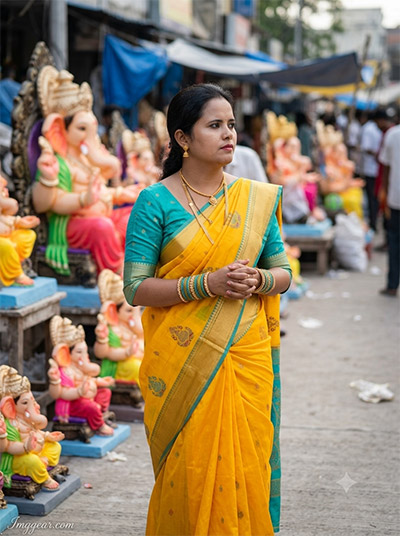
Crafting authentic festival portraits is effortless when you combine traditional yellow saree tones with dynamic street backdrop depth. Grab this simple Ganesh Chaturthi image editing prompt to transform your festival photos instantly. Wondering how it works on your shots?
PROMPT
{
“image_label”: “Imggear.com_2”,
“version”: “3.5”,
“aspect_ratio”: “3:4”,
“prompt”: “An ultra-realistic, photorealistic premium masterpiece, preserving the exact identity, facial proportions, bone structure, eye depth, sharp jawline, authentic facial characteristics, and skin micro-textures (visible pores, fine lines) of the subject in the uploaded personal reference photo without alteration. The facial lighting must seamlessly fuse with the ambient scene highlights and cast realistic shadows, allowing the subject to naturally integrate with the environment’s lighting, shadows, depth, atmospheric perspective, and optical characteristics while preserving the subject’s true identity without alteration, seamlessly integrating the subject into this dramatic scene, while maintaining complete identity consistency throughout the image. The subject, a woman in her mid-20s, with a more robust build and average shoulders, is standing outdoors in a crowded street market during the daytime. She is looking to the right side, hands clasped, in a reflective or focused expression. She is dressed in a vibrant yellow saree with a gold border and small traditional motifs, contrasting with a turquoise/teal blouse featuring three-quarter sleeves, adorned with gold necklaces and numerous bangles. The background is a busy market scene filled with dozens of other large and small Ganesha statues, tarps, blurred figures, and a concrete pavement, all creating shallow depth and natural daylight bokeh. Captured using a full-frame professional mirrorless camera with an 85mm f/1.4 prime lens in RAW format, the image features hyper-detailed edge sharpness, extreme high-definition micro-details on skin and fabric, natural optical rendering, and premium creamy bokeh. The lighting is natural daylight, mirroring the original scene, and elevated with enhanced micro-contrast and deep punchy shadows. The watermark, which reads \”Imggear.com\”, is located in the bottom-left corner, featuring a soft white (#ffffff) color with slight transparency and a minimal, premium handwritten signature appearance in Petit Formal Script.”,
“negative_prompt”: “(plastic skin, waxy skin, CGI rendering, AI beauty filter look, porcelain skin, over-smoothed skin, airbrushed skin, synthetic textures, doll-like face, uncanny valley, artificial symmetry), (deformed face, distorted facial features, asymmetrical eyes, bad anatomy, bad proportions, extra limbs, extra fingers, missing fingers, malformed hands, mutated hands), (unnatural lighting, flat lighting, harsh direct sunlight, blown-out highlights, crushed shadows, oversaturated colors, neon colors, unrealistic color grading, HDR look, overexposed, underexposed), (blurry, out of focus, low resolution, pixelated, jpeg artifacts, grainy noise, motion blur, soft focus), (dry land, dusty ground, indoor background, wrong environment, mismatched background), (clothing logos, brand marks, trademarked patterns, text overlays, random watermark placement, duplicate watermark, extra signature), (cartoon style, illustration, painting, 3D render, anime, stylized art, digital art look), (identity mismatch, face swap artifacts, inconsistent facial features, altered bone structure, changed eye color, different face shape), (uncluttered market, empty background, different lighting conditions, non-traditional clothes, lack of gold jewelry), (incorrect saree pattern or color).”
}
Devotional Portrait Style Using Prompt For Ganesh Chaturthi Photo
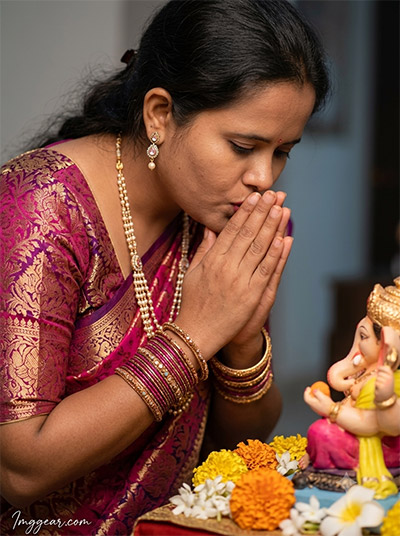
Warm indoor lighting mixed with rich magenta attire creates a deeply emotional prayer scene. Master this intimate prompt for Ganesh Chaturthi photo creation to bring reverent beauty to your digital artwork. Download the exact text template today!
PROMPT
{
“image_label”: “Imggear.com_3”,
“version”: “3.5”,
“aspect_ratio”: “3:4”,
“prompt”: “An ultra-realistic, photorealistic premium masterpiece, preserving the exact identity, facial proportions, bone structure, eye depth, sharp jawline, authentic facial characteristics, and skin micro-textures (visible pores, fine lines) of the subject in the uploaded personal reference photo without alteration. The facial lighting must seamlessly fuse with the ambient scene highlights and cast realistic shadows, allowing the subject to naturally integrate with the environment’s lighting, shadows, depth, atmospheric perspective, and optical characteristics while preserving the subject’s true identity without alteration, seamlessly integrating the subject into this cinematic scene, while maintaining complete identity consistency throughout the image. The subject, a woman in her early to mid-20s with a slim build and average shoulders, is depicted in a close-up shot leaning slightly forward, bringing her hands together in Anjali Mudra just in front of her face, with a gentle expression as if kissing the top of her hands near a Ganesha idol. She is looking down. She wears a rich, patterned Indian saree in pink and purple brocade with elaborate gold work and detailed traditional jewelry, including a long beaded necklace, drop earrings, and numerous bangles. The scene is set indoors, in a home or temple setup, with a Ganesha idol placed on an altar covered in marigold and jasmine flowers. The lighting is soft and directional, mirroring the original indoor lamp light, and elevated with enhanced micro-contrast and clarity. The watermark, which reads \”Imggear.com\”, is located in the bottom-left corner, featuring a soft white (#ffffff) color with slight transparency and a minimal, premium handwritten signature appearance in Petit Formal Script.”,
“negative_prompt”: “(plastic skin, waxy skin, CGI rendering, AI beauty filter look, porcelain skin, over-smoothed skin, airbrushed skin, synthetic textures, doll-like face, uncanny valley, artificial symmetry), (deformed face, distorted facial features, asymmetrical eyes, bad anatomy, bad proportions, extra limbs, extra fingers, missing fingers, malformed hands, mutated hands), (unnatural lighting, flat lighting, harsh direct sunlight, blown-out highlights, crushed shadows, oversaturated colors, neon colors, unrealistic color grading, HDR look, overexposed, underexposed), (blurry, out of focus, low resolution, pixelated, jpeg artifacts, grainy noise, motion blur, soft focus), (dry land, dusty ground, indoor background, wrong environment, mismatched background), (clothing logos, brand marks, trademarked patterns, text overlays, random watermark placement, duplicate watermark, extra signature), (cartoon style, illustration, painting, 3D render, anime, stylized art, digital art look), (identity mismatch, face swap artifacts, inconsistent facial features, altered bone structure, changed eye color, different face shape), (visible \”Photos by Ganesh Mohite\” watermark, different pose, smiling broadly, different jewelry details, outdoor background, incorrect saree pattern).”
}
Vibrant Temple Outdoor Prompt For Ganesh Chaturthi Photo Creation
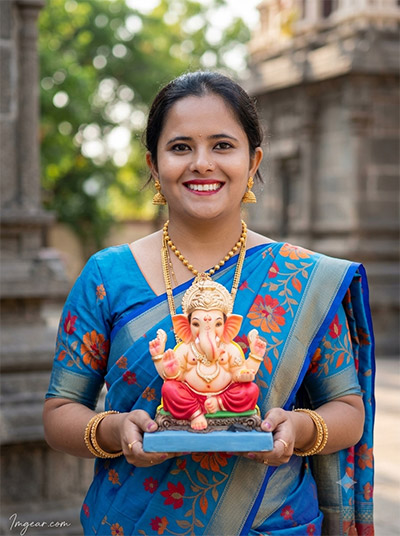
Bright blue ethnic saree attire combined with ancient stone architecture backdrop delivers striking contrast. Use this custom prompt for Ganesh Chaturthi photo art to craft sunlit celebration portraits. Which color scheme will you try first?
PROMPT
{
“image_label”: “Imggear.com_4”,
“version”: “3.5”,
“aspect_ratio”: “3:4”,
“prompt”: “An ultra-realistic, photorealistic premium masterpiece, preserving the exact identity, facial proportions, bone structure, eye depth, sharp jawline, authentic facial characteristics, and skin micro-textures (visible pores, fine lines) of the subject in the uploaded personal reference photo without alteration. The facial lighting must seamlessly fuse with the ambient scene highlights and cast realistic shadows, allowing the subject to naturally integrate with the environment’s lighting, shadows, depth, atmospheric perspective, and optical characteristics while preserving the subject’s true identity without alteration, seamlessly integrating the subject into this cinematic scene, while maintaining complete identity consistency throughout the image. The subject, a woman in her early 20s with a slim build and average shoulders, is smiling broadly and genuinely, looking directly at the camera, while holding a small Ganesha idol on a blue tray with both hands. She is outdoors, near a traditional stone building or temple structure, with a soft-focus background of greenery and distant architecture. She wears a vibrant blue silk saree with complex orange and red floral patterns, adorned with gold necklaces, bangles, and flower details in her hair (though the hair itself is not described, just the flowers and earrings). Captured using a full-frame professional mirrorless camera with an 85mm f/1.4 prime lens in RAW format, the image features hyper-detailed edge sharpness, extreme high-definition micro-details on skin and fabric, natural optical rendering, and premium creamy bokeh. The lighting is soft natural daylight, mirroring the original scene, and elevated with enhanced color saturation and clarity. The original logo \”AJINKYA LIBE STORIES\” is removed, and a new watermark is placed. The watermark, which reads \”Imggear.com\”, is located in the bottom-left corner, featuring a soft white (#ffffff) color with slight transparency and a minimal, premium handwritten signature appearance in Petit Formal Script.”,
“negative_prompt”: “(plastic skin, waxy skin, CGI rendering, AI beauty filter look, porcelain skin, over-smoothed skin, airbrushed skin, synthetic textures, doll-like face, uncanny valley, artificial symmetry), (deformed face, distorted facial features, asymmetrical eyes, bad anatomy, bad proportions, extra limbs, extra fingers, missing fingers, malformed hands, mutated hands), (unnatural lighting, flat lighting, harsh direct sunlight, blown-out highlights, crushed shadows, oversaturated colors, neon colors, unrealistic color grading, HDR look, overexposed, underexposed), (blurry, out of focus, low resolution, pixelated, jpeg artifacts, grainy noise, motion blur, soft focus), (dry land, dusty ground, indoor background, wrong environment, mismatched background), (clothing logos, brand marks, trademarked patterns, text overlays, random watermark placement, duplicate watermark, extra signature), (cartoon style, illustration, painting, 3D render, anime, stylized art, digital art look), (identity mismatch, face swap artifacts, inconsistent facial features, altered bone structure, changed eye color, different face shape), (visible \”AJINKYA LIBE STORIES\” watermark, different pose, serious expression, different jewelry details, indoor background, incorrect saree pattern, lack of Ganesha idol).”
}
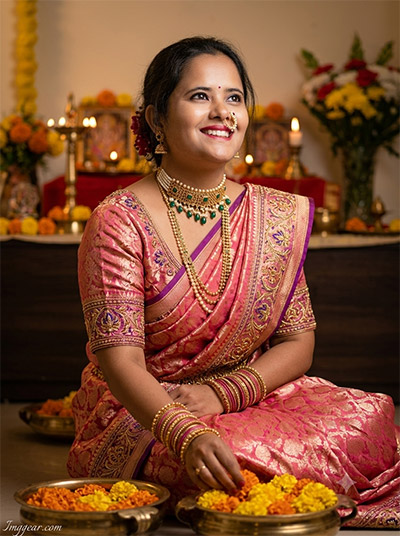
How To Use A Prompt For Ganesh Chaturthi Photo Indoor Setup
Bring warm candlelight glow and rich floral decor into your festive portrait generator workflow. This easy prompt for Ganesh Chaturthi photo creation captures joyful traditional moments seamlessly. Save this guide to test it during your next session!
PROMPT
{
“image_label”: “Imggear.com_5”,
“version”: “3.5”,
“aspect_ratio”: “3:4”,
“prompt”: “An ultra-realistic, photorealistic premium masterpiece, preserving the exact identity, facial proportions, bone structure, eye depth, sharp jawline, authentic facial characteristics, and skin micro-textures (visible pores, fine lines) of the subject in the uploaded personal reference photo without alteration. The facial lighting must seamlessly fuse with the ambient scene highlights and cast realistic shadows, allowing the subject to naturally integrate with the environment’s lighting, shadows, depth, atmospheric perspective, and optical characteristics while preserving the subject’s true identity without alteration, seamlessly integrating the subject into this dynamic scene, while maintaining complete identity consistency throughout the image. The subject, a woman in her mid-20s with a slim build and average shoulders, is sitting on the floor in a festive indoor environment. She is turned in profile, looking towards the side and upward with a broad, joyful smile. She is dressed in an ornate pink or peach brocade saree with detailed gold and purple embroidery, paired with a matching blouse and heavy gold jewelry, including a chunky choker necklace with pearl and emerald-colored beads, a long matching necklace, earrings, and a traditional nose ring (nath), along with numerous bangles. She is seated, with her hands down near the foreground brass bowls filled with marigold flowers. The background is a warm, atmospheric home altar setup with candles, religious items, and more flower arrangements, creating shallow depth. Captured using a full-frame professional mirrorless camera with an 85mm f/1.4 prime lens in RAW format, the image features hyper-detailed edge sharpness, extreme high-definition micro-details on skin and fabric, natural optical rendering, and premium creamy bokeh. The lighting is warm and diffused indoor light, mirroring the original setting, and elevated with rich color saturation and punchy shadows for an editorial-grade finish. The watermark, which reads \”Imggear.com\”, is located in the bottom-left corner, featuring a soft white (#ffffff) color with slight transparency and a minimal, premium handwritten signature appearance in Petit Formal Script.”,
“negative_prompt”: “(plastic skin, waxy skin, CGI rendering, AI beauty filter look, porcelain skin, over-smoothed skin, airbrushed skin, synthetic textures, doll-like face, uncanny valley, artificial symmetry), (deformed face, distorted facial features, asymmetrical eyes, bad anatomy, bad proportions, extra limbs, extra fingers, missing fingers, malformed hands, mutated hands), (unnatural lighting, flat lighting, harsh direct sunlight, blown-out highlights, crushed shadows, oversaturated colors, neon colors, unrealistic color grading, HDR look, overexposed, underexposed), (blurry, out of focus, low resolution, pixelated, jpeg artifacts, grainy noise, motion blur, soft focus), (dry land, dusty ground, indoor background, wrong environment, mismatched background), (clothing logos, brand marks, trademarked patterns, text overlays, random watermark placement, duplicate watermark, extra signature), (cartoon style, illustration, painting, 3D render, anime, stylized art, digital art look), (identity mismatch, face swap artifacts, inconsistent facial features, altered bone structure, changed eye color, different face shape), (different pose, serious expression, different jewelry details, outdoor background, incorrect saree pattern, lack of Ganesha idol, non-traditional clothes).”
}
💡 AI Photo Editing Pro Tips for Perfect Results
Keep Faces Consistent: If the AI changes the face, add this exact phrase to the very beginning of your prompt: “Preserve facial identity 100%, do not alter facial features or proportions.”
Reroll for Perfection: Run every prompt 2–3 times! The second or third generation is almost always sharper and packed with better details.
Get the DSLR Look: Want that beautiful, blurred background? Just add “f/1.8 shallow depth of field” to your prompt.
Control the Camera Shot: Tell the AI exactly what frame you want by adding terms like “Close-up portrait,” “Full-body shot,” or “Wide-angle view.”
Set the Vibe with Lighting: Lighting makes or breaks an AI image. Add “Cinematic lighting,” “Golden hour sunset,” or “Soft studio lighting” for a professional touch.
📐 Best Aspect Ratio: Use 3:4 Vertical for stunning, ready-to-post results on Instagram and Pinterest.