Generating a photorealistic birthday prompt for baby girl photoshoots often leads to distorted facial features, odd backgrounds, or unnatural lighting. If you want studio-quality 1st birthday portraits without paying for an expensive photographer, you are in the right place. By using tailored image generation prompts in Gemini AI or ChatGPT, you can preserve exact facial features while adding pastel balloon arches, princess dresses, and realistic birthday cakes. Below, you’ll find tested, copy-paste prompts designed for ultra-realistic results.
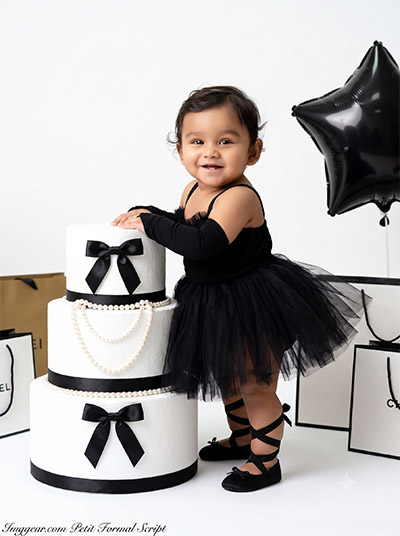
Create Elegant First Birthday Photos using a Baby Girl AI Prompt
Transform simple toddler photos into a glamorous monochrome studio portrait with tiered cake props and luxury details. Grab the exact text prompt below and start generating your own today.
PROMPT
{
“image_label”: “Imggear.com_1”,
“version”: “3.5”,
“aspect_ratio”: “3:4”,
“prompt”: “An ultra-realistic, photorealistic premium masterpiece, preserving the exact identity, facial proportions, bone structure, eye depth, sharp jawline, authentic facial characteristics, and skin micro-textures (visible pores, fine lines) of the subject in the uploaded personal reference photo without alteration. The facial lighting must seamlessly fuse with the ambient scene highlights and cast realistic shadows, allowing the subject to naturally integrate with the environment’s lighting, shadows, depth, atmospheric perspective, and optical characteristics while preserving the subject’s true identity without alteration, seamlessly integrating the subject into this cinematic scene, while maintaining complete identity consistency throughout the image. Render the subject with premium true-to-life human skin using PBR, preserving authentic skin pores, fine skin grain, natural melanin transitions, facial micro-contrast, subtle oil diffusion, organic facial imperfections, and realistic skin translucency. Female toddler, approx 1 year old, infant build, narrow shoulders, soft chubby limbs. Standing in a bright white studio, leaning against a large three-tiered white prop cake adorned with black bows and pearl necklaces. Surrounded by generic premium custom luxury shopping bags and a black star balloon. Wearing a black tulle tutu dress, black arm sleeves, and black strappy ballet shoes. Captured using a full-frame professional mirrorless camera with an 85mm f/1.4 prime lens in RAW format, featuring hyper-detailed edge sharpness, extreme high-definition micro-details on skin and fabric, natural optical rendering, and premium creamy bokeh. Bright high-key studio lighting, vivid yet natural color saturation, deep punchy shadows, bright clean highlights, and strong tonal contrast. Apply premium editorial-grade color grading, warm highlights, rich mid-tones, and natural skin tones. Watermark: ‘Imggear.com’ positioned in the bottom-left corner, styled in Petit Formal Script, thin elegant cursive strokes, soft white (#ffffff) with slight transparency, acting as a minimal, premium handwritten signature seamlessly blended with no background.”,
“negative_prompt”: “(plastic skin, waxy skin, CGI rendering, AI beauty filter look, porcelain skin, over-smoothed skin, airbrushed skin, synthetic textures, doll-like face, uncanny valley, artificial symmetry), (deformed face, distorted facial features, asymmetrical eyes, bad anatomy, bad proportions, extra limbs, extra fingers, missing fingers, malformed hands, mutated hands), (unnatural lighting, flat lighting, harsh direct sunlight, blown-out highlights, crushed shadows, oversaturated colors, neon colors, unrealistic color grading, HDR look, overexposed, underexposed), (blurry, out of focus, low resolution, pixelated, jpeg artifacts, grainy noise, motion blur, soft focus), (dry land, dusty ground, indoor background, wrong environment, mismatched background), (clothing logos, brand marks, trademarked patterns, text overlays, random watermark placement, duplicate watermark, extra signature), (cartoon style, illustration, painting, 3D render, anime, stylized art, digital art look), (identity mismatch, face swap artifacts, inconsistent facial features, altered bone structure, changed eye color, different face shape), (commercial brand names, trademarked logos, text on bags, messy background, cluttered props, unreadable banner text).”
}
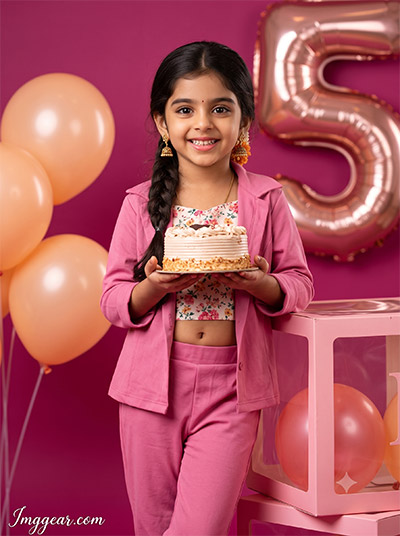
Vibrant 5th Birthday Photo Prompt for Little Girls
Recreate this stunning festive photoshoot featuring bold magenta tones, foil number balloons, and chic styling. Copy the free prompt to design your own adorable celebration concepts in seconds!
PROMPT
{
“image_label”: “Imggear.com_2”,
“version”: “3.5”,
“aspect_ratio”: “3:4”,
“prompt”: “An ultra-realistic, photorealistic premium masterpiece, preserving the exact identity, facial proportions, bone structure, eye depth, sharp jawline, authentic facial characteristics, and skin micro-textures (visible pores, fine lines) of the subject in the uploaded personal reference photo without alteration. The facial lighting must seamlessly fuse with the ambient scene highlights and cast realistic shadows, allowing the subject to naturally integrate with the environment’s lighting, shadows, depth, atmospheric perspective, and optical characteristics while preserving the subject’s true identity without alteration, seamlessly integrating the subject into this cinematic scene, while maintaining complete identity consistency throughout the image. Render the subject with premium true-to-life human skin using PBR, preserving authentic skin pores, fine skin grain, natural melanin transitions, facial micro-contrast, subtle oil diffusion, organic facial imperfections, and realistic skin translucency. Female child, approx 5 years old, slender body type, narrow shoulders. Standing in a vibrant magenta studio, leaning against a generic pink display box, holding a small frosted cake. Surrounded by peach-colored balloons and a large ‘5’ balloon. Wearing pink trousers, an open pink jacket, and a floral crop top. Captured using a full-frame professional mirrorless camera with an 85mm f/1.4 prime lens in RAW format, featuring hyper-detailed edge sharpness, extreme high-definition micro-details on skin and fabric, natural optical rendering, and premium creamy bokeh. Vibrant flat studio lighting, vivid yet natural color saturation, deep punchy shadows, bright clean highlights, and strong tonal contrast. Apply premium editorial-grade color grading, warm highlights, rich mid-tones, and natural skin tones. Watermark: ‘Imggear.com’ positioned in the bottom-left corner, styled in Petit Formal Script, thin elegant cursive strokes, soft white (#ffffff) with slight transparency, acting as a minimal, premium handwritten signature seamlessly blended with no background.”,
“negative_prompt”: “(plastic skin, waxy skin, CGI rendering, AI beauty filter look, porcelain skin, over-smoothed skin, airbrushed skin, synthetic textures, doll-like face, uncanny valley, artificial symmetry), (deformed face, distorted facial features, asymmetrical eyes, bad anatomy, bad proportions, extra limbs, extra fingers, missing fingers, malformed hands, mutated hands), (unnatural lighting, flat lighting, harsh direct sunlight, blown-out highlights, crushed shadows, oversaturated colors, neon colors, unrealistic color grading, HDR look, overexposed, underexposed), (blurry, out of focus, low resolution, pixelated, jpeg artifacts, grainy noise, motion blur, soft focus), (dry land, dusty ground, indoor background, wrong environment, mismatched background), (clothing logos, brand marks, trademarked patterns, text overlays, random watermark placement, duplicate watermark, extra signature), (cartoon style, illustration, painting, 3D render, anime, stylized art, digital art look), (identity mismatch, face swap artifacts, inconsistent facial features, altered bone structure, changed eye color, different face shape), (commercial logos, toy brand names, text on box, mismatched background colors).”
}
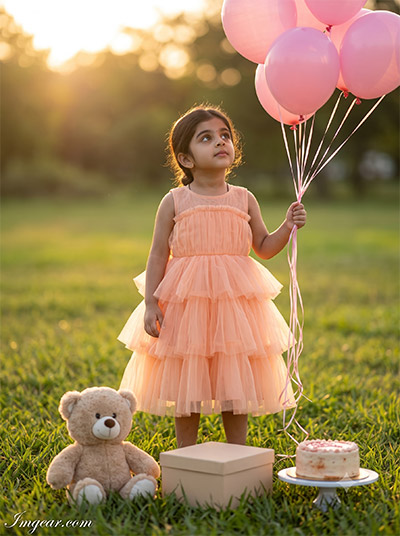
Outdoor Birthday Shoot Ideas for Little Girl Using AI Prompts
Capture golden hour magic in a lush garden setting filled with pastel balloons, a teddy bear, and cake. Which theme will you test out first for your child’s next big milestone?
PROMPT
{
“image_label”: “Imggear.com_3”,
“version”: “3.5”,
“aspect_ratio”: “3:4”,
“prompt”: “An ultra-realistic, photorealistic premium masterpiece, preserving the exact identity, facial proportions, bone structure, eye depth, sharp jawline, authentic facial characteristics, and skin micro-textures (visible pores, fine lines) of the subject in the uploaded personal reference photo without alteration. The facial lighting must seamlessly fuse with the ambient scene highlights and cast realistic shadows, allowing the subject to naturally integrate with the environment’s lighting, shadows, depth, atmospheric perspective, and optical characteristics while preserving the subject’s true identity without alteration, seamlessly integrating the subject into this cinematic scene, while maintaining complete identity consistency throughout the image. Render the subject with premium true-to-life human skin using PBR, preserving authentic skin pores, fine skin grain, natural melanin transitions, facial micro-contrast, subtle oil diffusion, organic facial imperfections, and realistic skin translucency. Female toddler, approx 2-3 years old, small stature, delicate build. Standing outdoors in a grassy field holding pink balloons, looking upward. A generic plush teddy bear, blank gift box, and small cake on a stand sit in the foreground grass. Wearing a sleeveless peach tiered tulle dress. Captured using a full-frame professional mirrorless camera with an 85mm f/1.4 prime lens in RAW format, featuring hyper-detailed edge sharpness, extreme high-definition micro-details on skin and fabric, natural optical rendering, and premium creamy bokeh. Outdoor golden hour lighting, volumetric light, soft rim lighting, vivid yet natural color saturation, deep punchy shadows, bright clean highlights, and strong tonal contrast. Apply premium editorial-grade color grading, warm highlights, rich mid-tones, and natural skin tones. Watermark: ‘Imggear.com’ positioned in the bottom-left corner, styled in Petit Formal Script, thin elegant cursive strokes, soft white (#ffffff) with slight transparency, acting as a minimal, premium handwritten signature seamlessly blended with no background.”,
“negative_prompt”: “(plastic skin, waxy skin, CGI rendering, AI beauty filter look, porcelain skin, over-smoothed skin, airbrushed skin, synthetic textures, doll-like face, uncanny valley, artificial symmetry), (deformed face, distorted facial features, asymmetrical eyes, bad anatomy, bad proportions, extra limbs, extra fingers, missing fingers, malformed hands, mutated hands), (unnatural lighting, flat lighting, harsh direct sunlight, blown-out highlights, crushed shadows, oversaturated colors, neon colors, unrealistic color grading, HDR look, overexposed, underexposed), (blurry, out of focus, low resolution, pixelated, jpeg artifacts, grainy noise, motion blur, soft focus), (dry land, dusty ground, indoor background, wrong environment, mismatched background), (clothing logos, brand marks, trademarked patterns, text overlays, random watermark placement, duplicate watermark, extra signature), (cartoon style, illustration, painting, 3D render, anime, stylized art, digital art look), (identity mismatch, face swap artifacts, inconsistent facial features, altered bone structure, changed eye color, different face shape), (studio lighting indoors, fake grass, flat ambient light).”
}
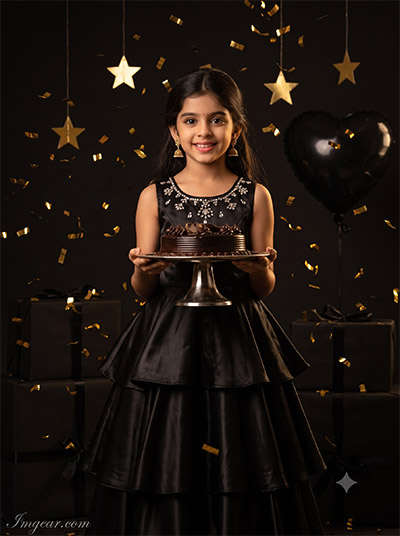
Little Girl Birthday Photography Prompt with Dark Glam Aesthetic
Style a luxury portrait with falling gold confetti, star ornaments, and a black ruffled gown. Try this unique concept to elevate your next creative generation session!
PROMPT
{
“image_label”: “Imggear.com_4”,
“version”: “3.5”,
“aspect_ratio”: “3:4”,
“prompt”: “An ultra-realistic, photorealistic premium masterpiece, preserving the exact identity, facial proportions, bone structure, eye depth, sharp jawline, authentic facial characteristics, and skin micro-textures (visible pores, fine lines) of the subject in the uploaded personal reference photo without alteration. The facial lighting must seamlessly fuse with the ambient scene highlights and cast realistic shadows, allowing the subject to naturally integrate with the environment’s lighting, shadows, depth, atmospheric perspective, and optical characteristics while preserving the subject’s true identity without alteration, seamlessly integrating the subject into this dramatic portrait, while maintaining complete identity consistency throughout the image. Render the subject with premium true-to-life human skin using PBR, preserving authentic skin pores, fine skin grain, natural melanin transitions, facial micro-contrast, subtle oil diffusion, organic facial imperfections, and realistic skin translucency. Female child, approx 4-5 years old, slender build. Standing in a dark studio holding a chocolate cake platter. Falling gold confetti, gold stars, a black heart balloon, and generic premium black gift boxes fill the background space. Wearing a black satin tiered gown with crystal embellishments on the bodice. Captured using a full-frame professional mirrorless camera with an 85mm f/1.4 prime lens in RAW format, featuring hyper-detailed edge sharpness, extreme high-definition micro-details on skin and fabric, natural optical rendering, and premium creamy bokeh. Dramatic low-key lighting, vivid yet natural color saturation, deep punchy shadows, bright clean highlights, and strong tonal contrast. Apply premium editorial-grade color grading, warm highlights, rich mid-tones, and natural skin tones. Watermark: ‘Imggear.com’ positioned in the bottom-left corner, styled in Petit Formal Script, thin elegant cursive strokes, soft white (#ffffff) with slight transparency, acting as a minimal, premium handwritten signature seamlessly blended with no background.”,
“negative_prompt”: “(plastic skin, waxy skin, CGI rendering, AI beauty filter look, porcelain skin, over-smoothed skin, airbrushed skin, synthetic textures, doll-like face, uncanny valley, artificial symmetry), (deformed face, distorted facial features, asymmetrical eyes, bad anatomy, bad proportions, extra limbs, extra fingers, missing fingers, malformed hands, mutated hands), (unnatural lighting, flat lighting, harsh direct sunlight, blown-out highlights, crushed shadows, oversaturated colors, neon colors, unrealistic color grading, HDR look, overexposed, underexposed), (blurry, out of focus, low resolution, pixelated, jpeg artifacts, grainy noise, motion blur, soft focus), (dry land, dusty ground, indoor background, wrong environment, mismatched background), (clothing logos, brand marks, trademarked patterns, text overlays, random watermark placement, duplicate watermark, extra signature), (cartoon style, illustration, painting, 3D render, anime, stylized art, digital art look), (identity mismatch, face swap artifacts, inconsistent facial features, altered bone structure, changed eye color, different face shape), (muddy shadows, lack of contrast, daylight, studio text overlay, studio watermark).”
}
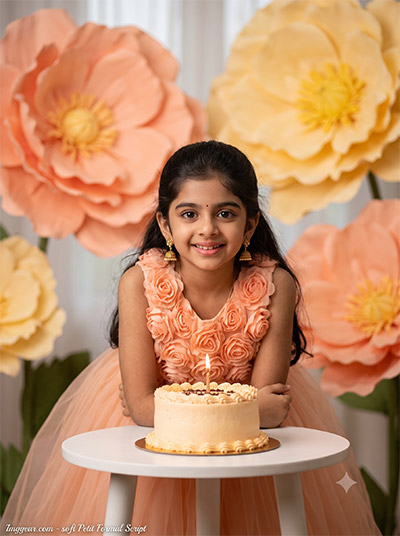
Whimsical Floral Backdrop AI Image Prompts for Girls Birthday
Generate a soft peach wonderland standard with giant paper flowers, delicate tulle, and warm candle glow. Save this template now to customize your next party portrait!
PROMPT
{
“image_label”: “Imggear.com_5”,
“version”: “3.5”,
“aspect_ratio”: “3:4”,
“prompt”: “An ultra-realistic, photorealistic premium masterpiece, preserving the exact identity, facial proportions, bone structure, eye depth, sharp jawline, authentic facial characteristics, and skin micro-textures (visible pores, fine lines) of the subject in the uploaded personal reference photo without alteration. The facial lighting must seamlessly fuse with the ambient scene highlights and cast realistic shadows, allowing the subject to naturally integrate with the environment’s lighting, shadows, depth, atmospheric perspective, and optical characteristics while preserving the subject’s true identity without alteration, seamlessly integrating the subject into this cinematic scene, while maintaining complete identity consistency throughout the image. Render the subject with premium true-to-life human skin using PBR, preserving authentic skin pores, fine skin grain, natural melanin transitions, facial micro-contrast, subtle oil diffusion, organic facial imperfections, and realistic skin translucency. Female child, approx 5-6 years old, slender build, narrow delicate shoulders. Leaning forward toward a small white table bearing a lit cake. The background features massive oversized peach and yellow floral props. Wearing a peach floral-themed dress made of fabric roses and tulle. Captured using a full-frame professional mirrorless camera with an 85mm f/1.4 prime lens in RAW format, featuring hyper-detailed edge sharpness, extreme high-definition micro-details on skin and fabric, natural optical rendering, and premium creamy bokeh. Soft diffused cinematic lighting, vivid yet natural color saturation, deep punchy shadows, bright clean highlights, and strong tonal contrast. Apply premium editorial-grade color grading, warm highlights, rich mid-tones, and natural skin tones. Watermark: ‘Imggear.com’ positioned in the bottom-left corner, styled in Petit Formal Script, thin elegant cursive strokes, soft white (#ffffff) with slight transparency, acting as a minimal, premium handwritten signature seamlessly blended with no background.”,
“negative_prompt”: “(plastic skin, waxy skin, CGI rendering, AI beauty filter look, porcelain skin, over-smoothed skin, airbrushed skin, synthetic textures, doll-like face, uncanny valley, artificial symmetry), (deformed face, distorted facial features, asymmetrical eyes, bad anatomy, bad proportions, extra limbs, extra fingers, missing fingers, malformed hands, mutated hands), (unnatural lighting, flat lighting, harsh direct sunlight, blown-out highlights, crushed shadows, oversaturated colors, neon colors, unrealistic color grading, HDR look, overexposed, underexposed), (blurry, out of focus, low resolution, pixelated, jpeg artifacts, grainy noise, motion blur, soft focus), (dry land, dusty ground, indoor background, wrong environment, mismatched background), (clothing logos, brand marks, trademarked patterns, text overlays, random watermark placement, duplicate watermark, extra signature), (cartoon style, illustration, painting, 3D render, anime, stylized art, digital art look), (identity mismatch, face swap artifacts, inconsistent facial features, altered bone structure, changed eye color, different face shape), (fake candle flame, harsh flash photography, flat depth of field).”
}
💡 AI Photo Editing Pro Tips for Perfect Results
Keep Faces Consistent: If the AI changes the face, add this exact phrase to the very beginning of your prompt: “Preserve facial identity 100%, do not alter facial features or proportions.”
Reroll for Perfection: Run every prompt 2–3 times! The second or third generation is almost always sharper and packed with better details.
Get the DSLR Look: Want that beautiful, blurred background? Just add “f/1.8 shallow depth of field” to your prompt.
Control the Camera Shot: Tell the AI exactly what frame you want by adding terms like “Close-up portrait,” “Full-body shot,” or “Wide-angle view.”
Set the Vibe with Lighting: Lighting makes or breaks an AI image. Add “Cinematic lighting,” “Golden hour sunset,” or “Soft studio lighting” for a professional touch.
📐 Best Aspect Ratio: Use 3:4 Vertical for stunning, ready-to-post results on Instagram and Pinterest.