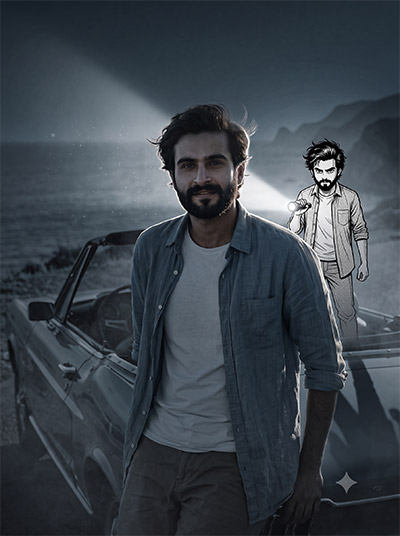
Recommended Intro Paragraph: Want to recreate the viral anime twin trend without spending hours learning complex photo editing software? Generating a stunning image with the Anime Flashlight AI Photo Editing Prompt in ChatGPT is much easier than you think. By leveraging precise prompt engineering, you can effortlessly add a miniature cel-shaded anime clone holding a realistic flashlight beam behind your photorealistic portrait—preserving your natural identity while creating dramatic, cinematic rim lighting. Below, you’ll find copy-ready prompts guaranteed to deliver high-contrast, professional-grade results instantly.
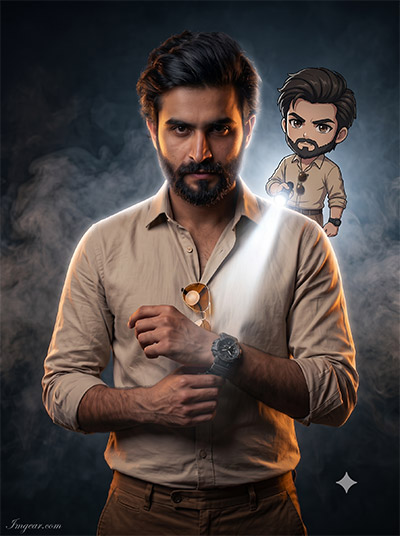
Master the Anime Flashlight AI Photo Editing Prompt Today
Discover how to transform standard portraits into dramatic scenes featuring a mini animated counterpart casting dramatic light effects. Grab the full prompt now to recreate this trending look in seconds.
PROMPT
{
“prompt_id”: “01_clean_anime_rim_light”,
“task”: “image_edit”,
“mode”: “photo_anime_fusion”,
“concept”: “A small anime version of the real subject stands directly behind them and aims a flashlight at their back, creating a dramatic rim-lit portrait.”,
“input”: {
“image”: “uploaded photo”,
“style_reference”: “match the clean modern anime aesthetic of the reference image, if provided”
},
“real_subject”: {
“treatment”: “photorealistic, unchanged”,
“preserve”: [“face”, “hairstyle”, “outfit”, “accessories”, “pose”, “body proportions”]
},
“anime_character”: {
“type”: “small full-body anime/cartoon version of the main subject”,
“match”: [“hairstyle”, “outfit”, “accessories”, “colors”, “recognizable details”],
“design”: {
“linework”: “sharp, clean”,
“proportions”: “slightly oversized head, compact body”,
“shading”: “cel shading”,
“expression”: “expressive, detailed face and eyes”
},
“placement”: “directly behind the real subject”,
“action”: “holding a flashlight aimed forward at the subject’s back”
},
“lighting”: {
“source”: “flashlight held by the anime character”,
“beam”: “intense, realistic white beam that fully illuminates the subject from behind”,
“effects”: [“bright rim light”, “glow around the subject’s outline”],
“shadows”: “natural and physically plausible”,
“ambient”: “dim the surrounding outdoor light for dramatic contrast”
},
“scene”: {
“preserve”: [“original scene”, “camera angle”, “composition”, “photographic realism”]
},
“output”: {
“look”: “clean modern anime fused with a realistic photo, sharp and high detail”,
“aspect_ratio”: “match input photo”
},
“negative_prompt”: [“altered face”, “changed outfit or hairstyle”, “changed background”, “extra limbs”, “distorted hands”, “text or watermark”, “blurry”, “flat lighting”]
}
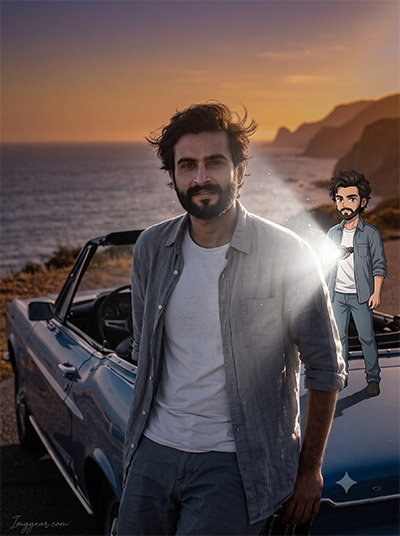
How to Create Sunset Coastal Cartoon Flashlight Photo Edits
Bring outdoor travel shots to life by pairing classic vintage cars and ocean sunsets with glowing animated avatars. Ready to try this aesthetic? Copy the free recipe and start editing.
PROMPT
{
“prompt_id”: “02_cinematic_sunset_fusion”,
“task”: “image_edit”,
“mode”: “photo_anime_fusion”,
“concept”: “Cinematic real-life and anime fusion: a small anime twin stands naturally behind the real subject and lights their back with a powerful flashlight at sunset.”,
“input”: {
“image”: “uploaded photo”
},
“real_subject”: {
“treatment”: “photorealistic, completely recognizable”,
“preserve”: [“original face”, “hairstyle”, “body proportions”, “clothing”, “accessories”, “pose”, “overall appearance”]
},
“anime_character”: {
“type”: “small full-body anime version of the same person”,
“match”: [“exact same outfit”, “hairstyle”, “colors”],
“design”: {
“style”: “polished modern anime”,
“linework”: “crisp”,
“eyes”: “expressive”,
“shading”: “subtle cel shading”,
“proportions”: “slightly exaggerated”
},
“placement”: “standing naturally behind the real subject”,
“action”: “holding a powerful flashlight directed toward the real subject’s back”,
“integration”: “accurate contact shadows and lighting interaction so the character feels naturally part of the environment”
},
“lighting”: {
“source”: “powerful flashlight held by the anime character”,
“beam”: “intense, realistic white beam with strong illumination”,
“effects”: [“soft atmospheric glow”, “bright edge lighting”, “subtle light particles”],
“shadows”: “realistic”,
“ambient”: “slightly darken the surroundings to emphasize the flashlight while keeping the original sunset/outdoor atmosphere”
},
“scene”: {
“preserve”: [“original background”, “camera perspective”, “framing”, “composition”, “photographic realism”]
},
“output”: {
“look”: “highly detailed, cinematic, realistic-looking, seamless anime-meets-photography effect”,
“aspect_ratio”: “match input photo”
},
“negative_prompt”: [“altered face”, “changed outfit or hairstyle”, “changed background or composition”, “floating character without contact shadows”, “flat lighting on the real subject”, “extra limbs”, “distorted hands”, “text or watermark”, “blurry”]
}
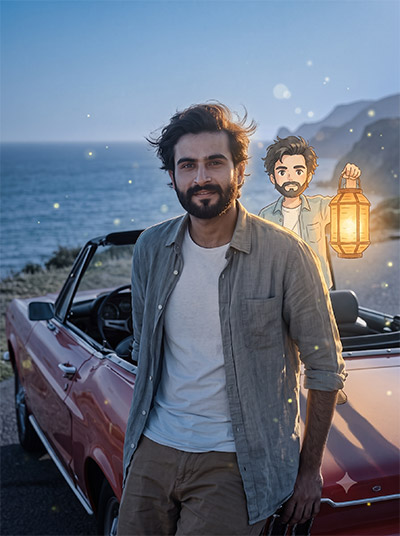
Glowing Anime Lantern Picture Generation Guide for AI Creators
Learn a creative technique to overlay a mini anime character holding a warm glowing lantern behind your coastal portraits. Which photo of yours would look best with this magical vibe?
PROMPT
{
“prompt_id”: “03_watercolor_lantern_twilight”,
“task”: “image_edit”,
“mode”: “photo_anime_fusion”,
“concept”: “A tiny hand-painted watercolor anime twin stands behind the real subject and raises a glowing lantern, wrapping them in warm light at twilight.”,
“input”: {
“image”: “uploaded photo”
},
“real_subject”: {
“treatment”: “photorealistic, unchanged”,
“preserve”: [“face”, “hairstyle”, “outfit”, “accessories”, “pose”, “body proportions”]
},
“anime_character”: {
“type”: “small full-body anime twin of the real subject”,
“match”: [“hairstyle”, “outfit”, “accessories”, “color palette”, “recognizable details”],
“design”: {
“style”: “soft hand-painted watercolor anime, Ghibli-inspired”,
“linework”: “thin, gentle, slightly imperfect pencil-like outlines”,
“shading”: “soft gouache color washes with subtle paper texture”,
“proportions”: “cute and rounded, slightly oversized head”,
“expression”: “calm, curious, warm smile”
},
“placement”: “standing close behind the real subject, slightly off-center”,
“action”: “holding up a glowing paper lantern toward the subject’s back”,
“integration”: “soft contact shadow on the ground, correct scale, warm light spilling onto the character”
},
“lighting”: {
“source”: “glowing paper lantern held by the anime character”,
“beam”: “warm amber-gold glow, soft and diffused rather than a hard beam”,
“effects”: [“gentle rim light on hair and shoulders”, “floating fireflies”, “soft bokeh sparkles”, “light haze”],
“shadows”: “soft and long, falling forward from the subject”,
“ambient”: “cool blue-hour twilight for a warm-versus-cool contrast”
},
“scene”: {
“preserve”: [“original background layout”, “camera angle”, “framing”, “composition”, “photographic realism”]
},
“output”: {
“look”: “nostalgic, dreamy, storybook warmth blended with photographic realism; painterly textures only on the anime character”,
“aspect_ratio”: “match input photo”
},
“negative_prompt”: [“altered face”, “changed outfit or hairstyle”, “harsh white beam”, “neon colors”, “3D render look”, “extra limbs”, “distorted hands”, “text or watermark”, “blurry”]
}
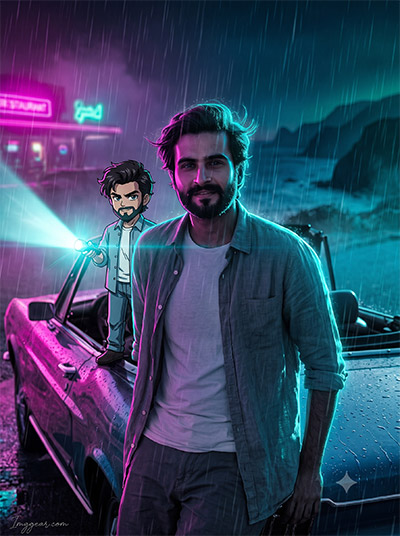
Transform rainy night portraits into moody cyberpunk scenes using glowing cyan light beams and a small cartoon companion. Want to recreate this futuristic vibe on your own pictures? Unlock the exact prompt formula now.
PROMPT
{
“prompt_id”: “04_neon_cyberpunk_retro_cel”,
“task”: “image_edit”,
“mode”: “photo_anime_fusion”,
“concept”: “A retro 90s cel-anime twin stands behind the real subject on a rain-soaked night street, aiming a handheld torch that cuts through neon mist.”,
“input”: {
“image”: “uploaded photo”
},
“real_subject”: {
“treatment”: “photorealistic, unchanged identity, relit by neon light”,
“preserve”: [“face”, “hairstyle”, “outfit”, “accessories”, “pose”, “body proportions”]
},
“anime_character”: {
“type”: “small full-body retro anime twin of the real subject”,
“match”: [“hairstyle”, “outfit”, “accessories”, “colors”, “recognizable details”],
“design”: {
“style”: “retro 1990s cel anime”,
“linework”: “bold ink outlines with slight line-weight variation”,
“shading”: “flat cel colors with hard-edged shadows and bright specular highlights”,
“texture”: “light film grain and subtle halftone dots, like a vintage anime still”,
“proportions”: “compact, slightly oversized head”,
“expression”: “confident, cool smirk”
},
“placement”: “directly behind the real subject on the wet ground”,
“action”: “aiming a handheld LED torch at the subject’s back”,
“integration”: “wet-ground reflections, contact shadow, neon color spill on the character, correct scale”
},
“lighting”: {
“source”: “handheld LED torch held by the anime character”,
“beam”: “hard cyan-white beam cutting through rain and mist”,
“effects”: [“cyan neon rim light on the subject’s outline”, “magenta neon fill from the front”, “rain streaks lit by the beam”, “wet-surface reflections”, “subtle lens flare”],
“shadows”: “crisp, high-contrast, stretching forward across the wet ground”,
“ambient”: “dark rainy night with glowing magenta and teal neon signs in the distance”
},
“scene”: {
“setting”: “adapt the original location into a rain-soaked, neon-lit night while keeping its layout”,
“preserve”: [“camera angle”, “framing”, “composition”, “main subject’s position”]
},
“output”: {
“look”: “neon-noir, high-contrast, cinematic, retro-futuristic; photoreal subject with a vintage-anime character”,
“aspect_ratio”: “match input photo”
},
“negative_prompt”: [“altered face”, “changed outfit or hairstyle”, “daytime lighting”, “muddy or dull colors”, “3D render look”, “extra limbs”, “distorted hands”, “random text or logos”, “blurry”]
}
Monochromatic Comic Flashlight Effect AI Editing Trend
Upgrade your dark ocean photos using a black-and-white manga character shining a realistic searchlight across the frame. Drop a comment below if you want to test this style.
PROMPT
{
“prompt_id”: “05_manga_ink_fog_noir”,
“task”: “image_edit”,
“mode”: “photo_anime_fusion”,
“concept”: “A black-and-white manga-ink twin steps into the real photo behind the subject and sends a stark flashlight beam through dense fog, creating a suspenseful backlit silhouette.”,
“input”: {
“image”: “uploaded photo”
},
“real_subject”: {
“treatment”: “photorealistic full color, slightly desaturated, unchanged identity”,
“preserve”: [“face”, “hairstyle”, “outfit”, “accessories”, “pose”, “body proportions”]
},
“anime_character”: {
“type”: “small full-body manga twin of the real subject”,
“match”: [“hairstyle”, “outfit”, “accessories”, “recognizable details”],
“design”: {
“style”: “black-and-white manga ink illustration”,
“linework”: “crisp, high-contrast ink lines with varied line weight”,
“shading”: “screentone dots, crosshatching in shadows, solid black fills”,
“color”: “strictly monochrome, no color on the character”,
“proportions”: “compact, slightly oversized head, intense eyes”
},
“placement”: “directly behind the real subject”,
“action”: “gripping a tactical flashlight aimed at the subject’s back”,
“integration”: “soft photographic contact shadow so the inked character sits convincingly on the ground, with fog partially wrapping its legs”
},
“lighting”: {
“source”: “tactical flashlight held by the manga character”,
“beam”: “stark, hard white beam with a clearly visible light shaft”,
“effects”: [“strong backlight silhouette with razor-thin rim light”, “volumetric light shafts through dense fog”, “floating dust and mist particles”],
“shadows”: “long, deep and dramatic, stretching toward the camera”,
“ambient”: “very dark, cool, desaturated surroundings”
},
“scene”: {
“setting”: “adapt the original location into a foggy, moody night while keeping its layout”,
“preserve”: [“camera angle”, “framing”, “composition”, “subject’s pose and position”]
},
“output”: {
“look”: “mysterious, suspenseful, cinematic thriller; full-color photo subject versus a monochrome manga character”,
“aspect_ratio”: “match input photo”
},
“negative_prompt”: [“color on the manga character”, “glossy 3D look”, “altered face”, “changed outfit or hairstyle”, “bright cheerful lighting”, “extra limbs”, “distorted hands”, “text or watermark”, “blurry”]
}
💡 AI Photo Editing Pro Tips for Perfect Results
Keep Faces Consistent: If the AI changes the face, add this exact phrase to the very beginning of your prompt: “Preserve facial identity 100%, do not alter facial features or proportions.”
Reroll for Perfection: Run every prompt 2–3 times! The second or third generation is almost always sharper and packed with better details.
Get the DSLR Look: Want that beautiful, blurred background? Just add “f/1.8 shallow depth of field” to your prompt.
Control the Camera Shot: Tell the AI exactly what frame you want by adding terms like “Close-up portrait,” “Full-body shot,” or “Wide-angle view.”
Set the Vibe with Lighting: Lighting makes or breaks an AI image. Add “Cinematic lighting,” “Golden hour sunset,” or “Soft studio lighting” for a professional touch.
📐 Best Aspect Ratio: Use 3:4 Vertical for stunning, ready-to-post results on Instagram and Pinterest.