15 August AI photo editing face lock trending images are taking social media by storm, but getting your exact face onto those viral Independence Day renders can feel impossible. Generic prompts often blur features or alter your look completely. Using advanced tools like Gemini AI & ChatGPT, you can easily preserve your real face structure while generating hyper-realistic, patriotic portraits. In this guide, you’ll discover the exact copy-paste prompts and step-by-step techniques to create high-definition, viral-ready 15 August photos instantly.
Create Patriotic Independence Day Edits Using 15 August AI Photo Prompts
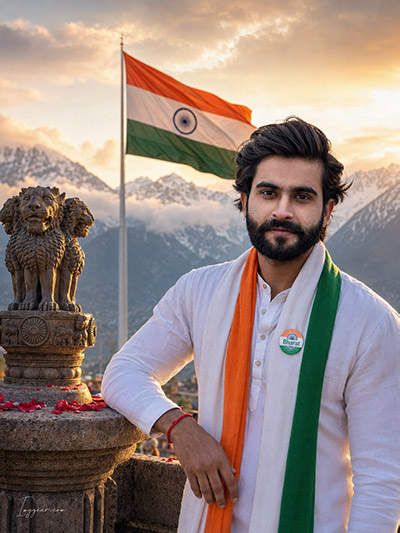
Transform your portrait into a patriotic masterpiece with face lock consistency this Independence Day. Copy this prompt to generate your custom look now.
PROMPT
{
“image_label”: “Imggear.com_1”,
“version”: “3.5”,
“aspect_ratio”: “3:4”,
“prompt”: “An ultra-realistic, photorealistic premium masterpiece, preserving the exact identity, facial proportions, bone structure, eye depth, sharp jawline, authentic facial characteristics, and skin micro-textures (visible pores, fine lines) of the subject in the uploaded personal reference photo without alteration. The facial lighting must seamlessly fuse with the ambient scene highlights and cast realistic shadows, allowing the subject to naturally integrate with the environment’s lighting, shadows, depth, atmospheric perspective, and optical characteristics while preserving the subject’s true identity without alteration, seamlessly integrating the subject into this dramatic portrait, while maintaining complete identity consistency throughout the image. The subject is depicted as a young South Asian male in his early 20s with an athletic, slim physical build and broad shoulders, leaning his left arm and shoulder comfortably on a stone railing. He has a warm, gentle, and confident smile, looking directly at the camera with clear eye contact. He is wearing a pristine, high-end white cotton long-sleeved kurta with a buttoned placket. Draped elegantly around his neck is a premium custom luxury tricolor scarf in saffron, white, and green representing the Indian national flag, featuring a small round badge pinned to his chest with the word \”Bharat\” written in clean typography on a tricolor wheel background. A simple red thread is tied around his left wrist. He stands outdoors on a scenic stone terrace next to a large, weathered stone sculpture of the Lion Capital of Ashoka placed on an ornamental pedestal, with red rose petals scattered around its base. In the background, a large Indian national flag waves dynamically on a tall flagpole, set against the majestic, snow-capped mountain peaks of the Himalayas shrouded in soft, misty clouds during a golden sunset. Captured using a full-frame professional mirrorless camera with an 85mm f/1.4 prime lens in RAW format, delivering hyper-detailed edge sharpness, extreme high-definition micro-details on skin and fabric, natural optical rendering, and premium creamy bokeh. The lighting is warm golden hour sunlight, creating soft diffused shadows, beautiful volumetric light rays, and a natural filmic tone mapping with rich tonal contrast. A minimal, premium handwritten signature \”Imggear.com\” is elegantly positioned in the bottom-left corner in a thin, soft white cursive Petit Formal Script with slight transparency.”,
“negative_prompt”: “(plastic skin, waxy skin, CGI rendering, AI beauty filter look, porcelain skin, over-smoothed skin, airbrushed skin, synthetic textures, doll-like face, uncanny valley, artificial symmetry), (deformed face, distorted facial features, asymmetrical eyes, bad anatomy, bad proportions, extra limbs, extra fingers, missing fingers, malformed hands, mutated hands), (unnatural lighting, flat lighting, harsh direct sunlight, blown-out highlights, crushed shadows, oversaturated colors, neon colors, unrealistic color grading, HDR look, overexposed, underexposed), (blurry, out of focus, low resolution, pixelated, jpeg artifacts, grainy noise, motion blur, soft focus), (dry land, dusty ground, indoor background, wrong environment, mismatched background), (clothing logos, brand marks, trademarked patterns, text overlays, random watermark placement, duplicate watermark, extra signature), (cartoon style, illustration, painting, 3D render, anime, stylized art, digital art look), (identity mismatch, face swap artifacts, inconsistent facial features, altered bone structure, changed eye color, different face shape), (modern commercial logos, police uniform, military uniform, police badges, stars on shoulders, extra badges, modern sunglasses, dark glasses, urban cityscape, sea backdrop, modern digital watch)”
}
How to Maintain Facial Swap Consistency for 15 August Flag Saluting Photos
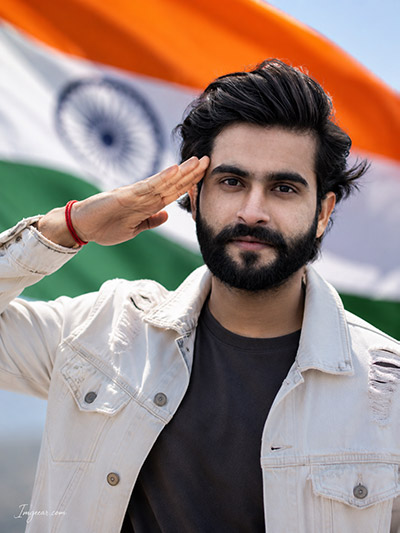
Keep your exact facial features locked while posing in front of the tricolor flag this national holiday. Curious to see how seamless your own portrait can look?
PROMPT
{
“image_label”: “Imggear.com_2”,
“version”: “3.5”,
“aspect_ratio”: “3:4”,
“prompt”: “An ultra-realistic, photorealistic premium masterpiece, preserving the exact identity, facial proportions, bone structure, eye depth, sharp jawline, authentic facial characteristics, and skin micro-textures (visible pores, fine lines) of the subject in the uploaded personal reference photo without alteration. The facial lighting must seamlessly fuse with the ambient scene highlights and cast realistic shadows, allowing the subject to naturally integrate with the environment’s lighting, shadows, depth, atmospheric perspective, and optical characteristics while preserving the subject’s true identity without alteration, seamlessly integrating the subject into this dramatic portrait, while maintaining complete identity consistency throughout the image. The subject is a young South Asian male in his early 20s with an athletic physical build and broad shoulders, captured in a close-up portrait raising his right hand in a formal, respectful, and crisp military-style salute to his temple. He displays a calm, focused, and proud expression, looking directly into the camera lens with intense, clear eye contact. He is wearing a modern, premium custom luxury off-white or cream-colored distressed denim jacket with stylized rips and silver buttons, worn open over a plain dark charcoal gray t-shirt. A simple red thread is visible on his right wrist. The background is dominated by a massive, dynamically waving Indian national flag with vibrant saffron, white, and green fields, softly blurred to create deep atmospheric depth. The sky is bright and clear, reflecting a high-key outdoor environment. Captured using a full-frame professional mirrorless camera with an 85mm f/1.4 prime lens in RAW format, delivering hyper-detailed edge sharpness, extreme high-definition micro-details on skin and denim fabric, natural optical rendering, and premium creamy bokeh. Bright, natural midday daylight illuminates his face, casting subtle soft shadows under the jaw and eyes while preserving natural skin textures and high-contrast rendering. A minimal, premium handwritten signature \”Imggear.com\” is elegantly positioned in the bottom-left corner in a thin, soft white cursive Petit Formal Script with slight transparency.”,
“negative_prompt”: “(plastic skin, waxy skin, CGI rendering, AI beauty filter look, porcelain skin, over-smoothed skin, airbrushed skin, synthetic textures, doll-like face, uncanny valley, artificial symmetry), (deformed face, distorted facial features, asymmetrical eyes, bad anatomy, bad proportions, extra limbs, extra fingers, missing fingers, malformed hands, mutated hands), (unnatural lighting, flat lighting, harsh direct sunlight, blown-out highlights, crushed shadows, oversaturated colors, neon colors, unrealistic color grading, HDR look, overexposed, underexposed), (blurry, out of focus, low resolution, pixelated, jpeg artifacts, grainy noise, motion blur, soft focus), (dry land, dusty ground, indoor background, wrong environment, mismatched background), (clothing logos, brand marks, trademarked patterns, text overlays, random watermark placement, duplicate watermark, extra signature), (cartoon style, illustration, painting, 3D render, anime, stylized art, digital art look), (identity mismatch, face swap artifacts, inconsistent facial features, altered bone structure, changed eye color, different face shape), (military helmet, service cap, epaulettes, police badge, medals, formal uniform, historical building, mountain background, city skyline, sunset, dramatic shadows)”
}
Heritage Style 15 August AI Photo Editing Face Lock Prompt Guide
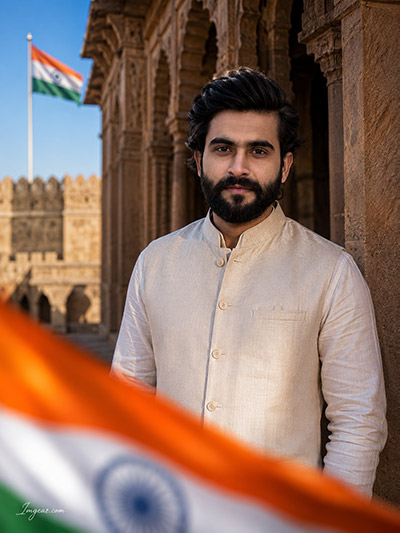
Design a sophisticated traditional look at historical landmarks while preserving exact facial identity. Grab this text prompt now to test it on your profile.
PROMPT
{
“image_label”: “Imggear.com_3”,
“version”: “3.5”,
“aspect_ratio”: “3:4”,
“prompt”: “An ultra-realistic, photorealistic premium masterpiece, preserving the exact identity, facial proportions, bone structure, eye depth, sharp jawline, authentic facial characteristics, and skin micro-textures (visible pores, fine lines) of the subject in the uploaded personal reference photo without alteration. The facial lighting must seamlessly fuse with the ambient scene highlights and cast realistic shadows, allowing the subject to naturally integrate with the environment’s lighting, shadows, depth, atmospheric perspective, and optical characteristics while preserving the subject’s true identity without alteration, seamlessly integrating the subject into this dramatic portrait, while maintaining complete identity consistency throughout the image. The subject is a mature South Asian male in his mid-40s with a sturdy, dignified physical build and broad shoulders, standing tall with a composed, solemn expression, looking directly at the camera with quiet strength. He is wearing an elegant, premium custom luxury traditional Indian outfit consisting of a structured cream-colored raw silk Nehru jacket with fine fabric texture and neat front buttons, layered over a matching cream silk kurta. The setting is a historic Indian stone fort corridor characterized by magnificent carved sandstone arches, pillars, and weathered, textured walls. In the background, under a clear blue sky, a tall flagpole flies the Indian national flag. In the foreground, a highly blurred, out-of-focus Indian tricolor flag waves dynamically, creating a beautiful cinematic layered depth and rich foreground bokeh. Captured using a full-frame professional mirrorless camera with an 85mm f/1.4 prime lens in RAW format, delivering hyper-detailed edge sharpness, extreme high-definition micro-details on skin and silk fabric, natural optical rendering, and premium creamy bokeh. Dramatic, high-contrast natural sunlight casts deep shadows along the corridor arches, creating a beautiful interplay of light and shadow across his face and attire, enhanced with professional color grading. A minimal, premium handwritten signature \”Imggear.com\” is elegantly positioned in the bottom-left corner in a thin, soft white cursive Petit Formal Script with slight transparency.”,
“negative_prompt”: “(plastic skin, waxy skin, CGI rendering, AI beauty filter look, porcelain skin, over-smoothed skin, airbrushed skin, synthetic textures, doll-like face, uncanny valley, artificial symmetry), (deformed face, distorted facial features, asymmetrical eyes, bad anatomy, bad proportions, extra limbs, extra fingers, missing fingers, malformed hands, mutated hands), (unnatural lighting, flat lighting, harsh direct sunlight, blown-out highlights, crushed shadows, oversaturated colors, neon colors, unrealistic color grading, HDR look, overexposed, underexposed), (blurry, out of focus, low resolution, pixelated, jpeg artifacts, grainy noise, motion blur, soft focus), (dry land, dusty ground, indoor background, wrong environment, mismatched background), (clothing logos, brand marks, trademarked patterns, text overlays, random watermark placement, duplicate watermark, extra signature), (cartoon style, illustration, painting, 3D render, anime, stylized art, digital art look), (identity mismatch, face swap artifacts, inconsistent facial features, altered bone structure, changed eye color, different face shape), (Western business suit, modern t-shirt, casual jeans, military uniform, police officer badge, epaulettes, modern skyscraper, ocean beach, winter snow, glasses, sunglasses)”
}
Rooftop Cityscape 15 August AI Image Generation with Face Lock Technique
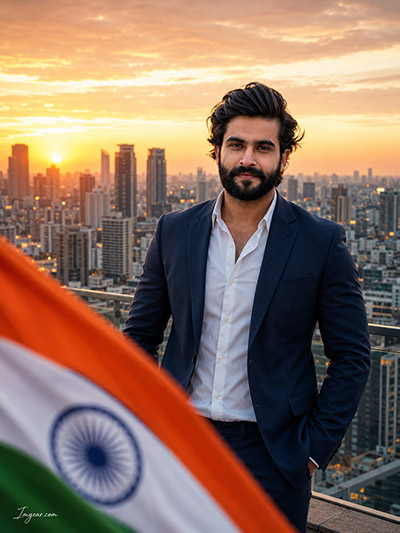
Craft a modern executive portrait set against a golden hour urban backdrop paired with the national flag. Want to try making one yourself?
PROMPT
{
“image_label”: “Imggear.com_4”,
“version”: “3.5”,
“aspect_ratio”: “3:4”,
“prompt”: “An ultra-realistic, photorealistic premium masterpiece, preserving the exact identity, facial proportions, bone structure, eye depth, sharp jawline, authentic facial characteristics, and skin micro-textures (visible pores, fine lines) of the subject in the uploaded personal reference photo without alteration. The facial lighting must seamlessly fuse with the ambient scene highlights and cast realistic shadows, allowing the subject to naturally integrate with the environment’s lighting, shadows, depth, atmospheric perspective, and optical characteristics while preserving the subject’s true identity without alteration, seamlessly integrating the subject into this cinematic scene, while maintaining complete identity consistency throughout the image. The subject is a mature South Asian male in his mid-40s with a powerful, elegant physical build and broad shoulders, standing confidently on a high-rise rooftop. He is facing forward, looking directly at the camera with a warm, subtle, and charismatic smile. He is wearing a sharp, bespoke, premium custom luxury navy blue business suit jacket and matching tailored trousers, paired with a crisp, unbuttoned white dress shirt underneath. The background is a breathtaking, expansive, panoramic city skyline of a modern metropolis during a warm golden hour sunset, with skyscrapers stretching into the distance under a warm-hued sky. In the immediate foreground, a large, vibrant Indian national flag waves dynamically, creating a soft, blurred foreground element that frames the subject beautifully. Captured using a full-frame professional mirrorless camera with an 85mm f/1.4 prime lens in RAW format, delivering hyper-detailed edge sharpness, extreme high-definition micro-details on skin and suit fabric, natural optical rendering, and premium creamy bokeh. The scene is illuminated by warm sunset backlighting with soft rim light accentuating his silhouette, combined with balanced fill light on his face to maintain true-to-life skin tones. A minimal, premium handwritten signature \”Imggear.com\” is elegantly positioned in the bottom-left corner in a thin, soft white cursive Petit Formal Script with slight transparency.”,
“negative_prompt”: “(plastic skin, waxy skin, CGI rendering, AI beauty filter look, porcelain skin, over-smoothed skin, airbrushed skin, synthetic textures, doll-like face, uncanny valley, artificial symmetry), (deformed face, distorted facial features, asymmetrical eyes, bad anatomy, bad proportions, extra limbs, extra fingers, missing fingers, malformed hands, mutated hands), (unnatural lighting, flat lighting, harsh direct sunlight, blown-out highlights, crushed shadows, oversaturated colors, neon colors, unrealistic color grading, HDR look, overexposed, underexposed), (blurry, out of focus, low resolution, pixelated, jpeg artifacts, grainy noise, motion blur, soft focus), (dry land, dusty ground, indoor background, wrong environment, mismatched background), (clothing logos, brand marks, trademarked patterns, text overlays, random watermark placement, duplicate watermark, extra signature), (cartoon style, illustration, painting, 3D render, anime, stylized art, digital art look), (identity mismatch, face swap artifacts, inconsistent facial features, altered bone structure, changed eye color, different face shape), (traditional clothing, kurta, Nehru jacket, sherwani, police uniform, military uniform, badge, epaulettes, historic fort, ancient ruins, forest, sea, sunglasses, tie, bow tie)”
}
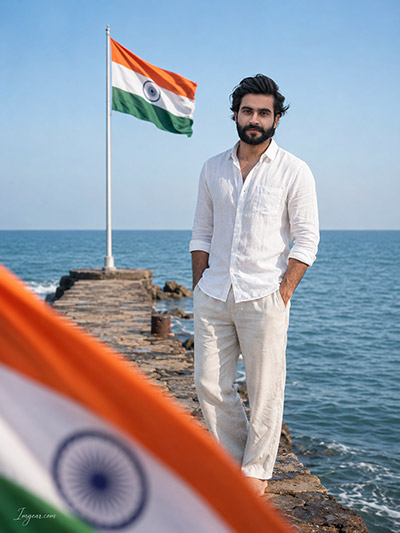
Coastal Pier Independence Day AI Photo Prompt for Accurate Face Matching
Capture serene ocean vibes alongside the national flag while keeping facial details perfectly intact. Share your results in the comments below!
PROMPT
{
“image_label”: “Imggear.com_5”,
“version”: “3.5”,
“aspect_ratio”: “3:4”,
“prompt”: “An ultra-realistic, photorealistic premium masterpiece, preserving the exact identity, facial proportions, bone structure, eye depth, sharp jawline, authentic facial characteristics, and skin micro-textures (visible pores, fine lines) of the subject in the uploaded personal reference photo without alteration. The facial lighting must seamlessly fuse with the ambient scene highlights and cast realistic shadows, allowing the subject to naturally integrate with the environment’s lighting, shadows, depth, atmospheric perspective, and optical characteristics while preserving the subject’s true identity without alteration, seamlessly integrating the subject into this cinematic scene, while maintaining complete identity consistency throughout the image. The subject is a mature South Asian male in his mid-40s with a lean, tall physical build and broad shoulders, standing barefoot on a rustic stone pier jutting into a calm, blue ocean under a bright, clear sky. He has a calm, confident, and relaxed demeanor, looking forward with a serene expression and making direct eye contact with the camera. He is wearing a relaxed, premium custom luxury white linen long-sleeved shirt with casually rolled-up sleeves, paired with matching loose-fitting beige linen trousers. Behind him on the pier, a large Indian national flag waves proudly on a tall white flagpole. In the foreground, a beautifully blurred, out-of-focus wave of the Indian tricolor flag swoops across the bottom, framing the shot with creamy foreground bokeh. Captured using a full-frame professional mirrorless camera with an 85mm f/1.4 prime lens in RAW format, delivering hyper-detailed edge sharpness, extreme high-definition micro-details on skin and linen fabric, natural optical rendering, and premium creamy bokeh. The scene features bright, natural outdoor seaside lighting with realistic global illumination and soft, natural shadows, giving a clean, filmic, and high-end editorial look. A minimal, premium handwritten signature \”Imggear.com\” is elegantly positioned in the bottom-left corner in a thin, soft white cursive Petit Formal Script with slight transparency.”,
“negative_prompt”: “(plastic skin, waxy skin, CGI rendering, AI beauty filter look, porcelain skin, over-smoothed skin, airbrushed skin, synthetic textures, doll-like face, uncanny valley, artificial symmetry), (deformed face, distorted facial features, asymmetrical eyes, bad anatomy, bad proportions, extra limbs, extra fingers, missing fingers, malformed hands, mutated hands), (unnatural lighting, flat lighting, harsh direct sunlight, blown-out highlights, crushed shadows, oversaturated colors, neon colors, unrealistic color grading, HDR look, overexposed, underexposed), (blurry, out of focus, low resolution, pixelated, jpeg artifacts, grainy noise, motion blur, soft focus), (dry land, dusty ground, indoor background, wrong environment, mismatched background), (clothing logos, brand marks, trademarked patterns, text overlays, random watermark placement, duplicate watermark, extra signature), (cartoon style, illustration, painting, 3D render, anime, stylized art, digital art look), (identity mismatch, face swap artifacts, inconsistent facial features, altered bone structure, changed eye color, different face shape), (shoes, boots, sandals, formal business suit, tie, police badge, military uniform, epaulettes, mountain peaks, urban city skyscraper, dense forest, sunset shadows)”
}
💡 AI Photo Editing Pro Tips for Perfect Results
Keep Faces Consistent: If the AI changes the face, add this exact phrase to the very beginning of your prompt: “Preserve facial identity 100%, do not alter facial features or proportions.”
Reroll for Perfection: Run every prompt 2–3 times! The second or third generation is almost always sharper and packed with better details.
Get the DSLR Look: Want that beautiful, blurred background? Just add “f/1.8 shallow depth of field” to your prompt.
Control the Camera Shot: Tell the AI exactly what frame you want by adding terms like “Close-up portrait,” “Full-body shot,” or “Wide-angle view.”
Set the Vibe with Lighting: Lighting makes or breaks an AI image. Add “Cinematic lighting,” “Golden hour sunset,” or “Soft studio lighting” for a professional touch.
📐 Best Aspect Ratio: Use 3:4 Vertical for stunning, ready-to-post results on Instagram and Pinterest.