Unlock the absolute best results with my tested-and-proven Gemini AI Prompt toolkit designed to generate viral AI art in seconds. I personally ran these trending text-to-image formulas to bypass the usual fluff, delivering stunning hyper-realistic details and cinematic lighting instantly. Stop wasting hours guessing the right keywords—just use these free copy-paste prompts and aesthetic editing hacks to create jaw-dropping visuals that dominate social feeds. Ready to create your next masterpiece? Grab the exact blueprints below and watch your creativity explode!
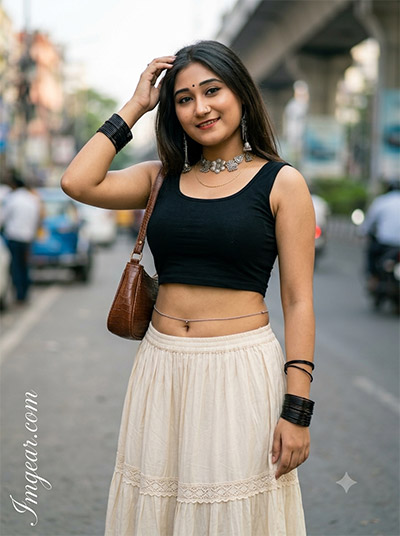
How to Generate Realistic Indian Street Style Portraits with Gemini AI
I spent the afternoon perfecting text-to-image settings to recreate this vibrant, natural daylight look. This exact Gemini AI prompt captures rich cultural aesthetics, crisp textures, and cinematic depth effortlessly. Have you tried generating urban fashion portraits yet?
PROMPT
{
“image_label”: “Imggear.com_1”,
“version”: “3.5”,
“aspect_ratio”: “3:4”,
“prompt”: “An ultra-realistic, photorealistic premium masterpiece, preserving the exact identity, facial proportions, bone structure, eye depth, sharp jawline, authentic facial characteristics, and skin micro-textures (visible pores, fine lines) of the subject in the uploaded personal reference photo without alteration. The facial lighting must seamlessly fuse with the ambient scene highlights and cast realistic shadows, allowing the subject to naturally integrate with the environment’s lighting, shadows, depth, atmospheric perspective, and optical characteristics while preserving the subject’s true identity without alteration, seamlessly integrating the subject into this cinematic scene, while maintaining complete identity consistency throughout the image. The subject is dynamically detected as a young female of lean physical build, appearing approximately in her early-to-mid twenties. She is wearing a premium custom black crop top paired with a flowing cream-colored maxi skirt featuring delicate lace trim. A brown textured shoulder bag is slung over her right shoulder. Accessories include a silver oxidized necklace, dangling earrings, a delicate belly chain, multiple black bangles on the left wrist, a traditional bindi, and a nose ring. Her left hand is raised, gently touching the side of her head. She gazes directly at the camera with a gentle, serene smile. The background is an urban city street during daytime, heavily blurred to feature city infrastructure, vehicles, and streetlights. Captured using a full-frame professional mirrorless camera with an 85mm f/1.4 prime lens in RAW format, featuring natural optical rendering, premium creamy bokeh, realistic lens compression, true-to-life color science, filmic dynamic range, natural optical imperfections, and ultra-photorealistic professional RAW camera image rendering. Render the subject with premium true-to-life human skin using Physically Based Rendering (PBR), preserving authentic skin pores, fine skin grain, realistic sub-surface scattering (SSS), natural melanin transitions, facial micro-contrast, realistic micro skin displacement, subtle oil diffusion, realistic lip texture, natural eyelid folds, organic facial imperfections, and realistic skin translucency. Avoid artificial HDR, CGI rendering, plastic skin, beauty-filter processing, over-sharpening, synthetic AI-generated textures, unrealistic optical effects, and excessive digital enhancement. Apply cinematic Hollywood-style color grading with natural skin tones, soft volumetric lighting, realistic highlight roll-off, physically accurate light bounce, organic shadow transitions, premium editorial photography color science, and cinematic global illumination. An Imggear.com watermark is located in the bottom-left corner written in Petit Formal Script, featuring thin, elegant cursive strokes in soft white (#ffffff) with slight transparency, possessing a minimal, premium handwritten signature appearance seamlessly blended with no background.”
}
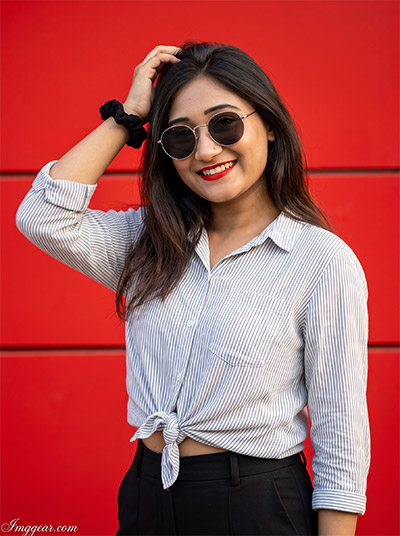
Crafting High Contrast Red Background Portraiture via Gemini AI Prompt
Achieve this striking look featuring bold red lips, dark sunglasses, and an intense crimson backdrop. By leveraging a specialized Gemini AI prompt, you can seamlessly blend sharp commercial aesthetics with flawless casual lighting. Copy this exact recipe right now.
PROMPT
{
“image_label”: “Imggear.com_2”,
“version”: “3.5”,
“aspect_ratio”: “3:4”,
“prompt”: “An ultra-realistic, photorealistic premium masterpiece, preserving the exact identity, facial proportions, bone structure, eye depth, sharp jawline, authentic facial characteristics, and skin micro-textures (visible pores, fine lines) of the subject in the uploaded personal reference photo without alteration. The facial lighting must seamlessly fuse with the ambient scene highlights and cast realistic shadows, allowing the subject to naturally integrate with the environment’s lighting, shadows, depth, atmospheric perspective, and optical characteristics while preserving the subject’s true identity without alteration, seamlessly integrating the subject into this cinematic scene, while maintaining complete identity consistency throughout the image. The subject is dynamically detected as a young female of athletic-lean build, appearing approximately in her mid-twenties. She wears round sunglasses with premium metal frames. Her attire consists of a light-colored, striped button-down shirt stylishly tied at the waist, and tailored black pants. She wears bright red lipstick, a small nose stud, and a black scrunchie on her left wrist. Her hand is positioned near the top of her head. She is smiling brightly. The background consists of a vibrant, solid red wall detailed with horizontal structural lines. Captured using a full-frame professional mirrorless camera with an 85mm f/1.4 prime lens in RAW format, featuring natural optical rendering, premium creamy bokeh, realistic lens compression, true-to-life color science, filmic dynamic range, natural optical imperfections, and ultra-photorealistic professional RAW camera image rendering. Render the subject with premium true-to-life human skin using Physically Based Rendering (PBR), preserving authentic skin pores, fine skin grain, realistic sub-surface scattering (SSS), natural melanin transitions, facial micro-contrast, realistic micro skin displacement, subtle oil diffusion, realistic lip texture, natural eyelid folds, organic facial imperfections, and realistic skin translucency. Avoid artificial HDR, CGI rendering, plastic skin, beauty-filter processing, over-sharpening, synthetic AI-generated textures, unrealistic optical effects, and excessive digital enhancement. Apply cinematic Hollywood-style color grading with natural skin tones, hard directional cinematic light, realistic highlight roll-off, physically accurate light bounce, organic shadow transitions, premium editorial photography color science, and cinematic global illumination. An Imggear.com watermark is located in the bottom-left corner written in Petit Formal Script, featuring thin, elegant cursive strokes in soft white (#ffffff) with slight transparency, possessing a minimal, premium handwritten signature appearance seamlessly blended with no background.”
}
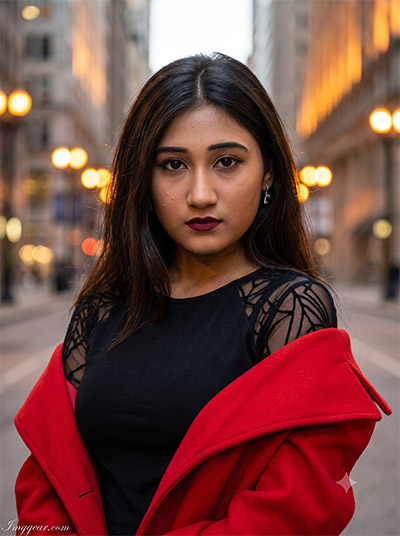
Cinematic Twilight Bokeh Portrait Generation Using Gemini AI Prompt
Create a moody, urban aesthetic with this deep red coat styling and golden hour backdrop. Using this specific Gemini AI prompt makes it incredibly simple to balanced gorgeous bokeh rendering with intricate wardrobe details. What kind of cityscape will you build first?
PROMPT
{
“image_label”: “Imggear.com_3”,
“version”: “3.5”,
“aspect_ratio”: “3:4”,
“prompt”: “An ultra-realistic, photorealistic premium masterpiece, preserving the exact identity, facial proportions, bone structure, eye depth, sharp jawline, authentic facial characteristics, and skin micro-textures (visible pores, fine lines) of the subject in the uploaded personal reference photo without alteration. The facial lighting must seamlessly fuse with the ambient scene highlights and cast realistic shadows, allowing the subject to naturally integrate with the environment’s lighting, shadows, depth, atmospheric perspective, and optical characteristics while preserving the subject’s true identity without alteration, seamlessly integrating the subject into this cinematic scene, while maintaining complete identity consistency throughout the image. The subject is dynamically detected as a young female of lean physical build, appearing approximately in her early twenties. She wears a black top featuring sheer, intricately patterned sleeves, layered beneath a vibrant bright red coat that is elegantly draped off her shoulders. She accessorizes with small silver earrings and wears dark, bold lipstick. She maintains a serious, intense expression while looking directly at the camera. The background is a blurred urban street scene characterized by city buildings illuminated by warm, glowing ambient street lighting. Captured using a full-frame professional mirrorless camera with an 85mm f/1.4 prime lens in RAW format, featuring natural optical rendering, premium creamy bokeh, realistic lens compression, true-to-life color science, filmic dynamic range, natural optical imperfections, and ultra-photorealistic professional RAW camera image rendering. Render the subject with premium true-to-life human skin using Physically Based Rendering (PBR), preserving authentic skin pores, fine skin grain, realistic sub-surface scattering (SSS), natural melanin transitions, facial micro-contrast, realistic micro skin displacement, subtle oil diffusion, realistic lip texture, natural eyelid folds, organic facial imperfections, and realistic skin translucency. Avoid artificial HDR, CGI rendering, plastic skin, beauty-filter processing, over-sharpening, synthetic AI-generated textures, unrealistic optical effects, and excessive digital enhancement. Apply cinematic Hollywood-style color grading with natural skin tones, warm ambient scene highlights, realistic highlight roll-off, physically accurate light bounce, organic shadow transitions, premium editorial photography color science, and cinematic global illumination. An Imggear.com watermark is located in the bottom-left corner written in Petit Formal Script, featuring thin, elegant cursive strokes in soft white (#ffffff) with slight transparency, possessing a minimal, premium handwritten signature appearance seamlessly blended with no background.”
}
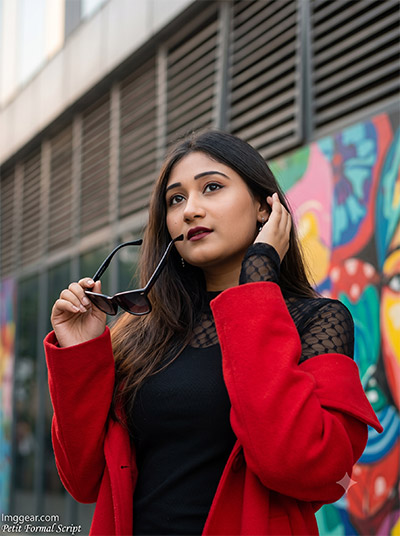
Urban Graffiti Portrait Generation Secrets via Gemini AI Prompt
Explore the perfect mix of vivid street art backdrops and bold fashion choices using this setup. This custom Gemini AI prompt configuration handles complex foreground lighting and shallow depth of field flawlessly. Join our community group and share your generations.
PROMPT
{
“image_label”: “Imggear.com_4”,
“version”: “3.5”,
“aspect_ratio”: “3:4”,
“prompt”: “An ultra-realistic, photorealistic premium masterpiece, preserving the exact identity, facial proportions, bone structure, eye depth, sharp jawline, authentic facial characteristics, and skin micro-textures (visible pores, fine lines) of the subject in the uploaded personal reference photo without alteration. The facial lighting must seamlessly fuse with the ambient scene highlights and cast realistic shadows, allowing the subject to naturally integrate with the environment’s lighting, shadows, depth, atmospheric perspective, and optical characteristics while preserving the subject’s true identity without alteration, seamlessly integrating the subject into this cinematic scene, while maintaining complete identity consistency throughout the image. The subject is dynamically detected as a young female of lean physical build, appearing approximately in her early twenties. She holds a pair of premium black sunglasses in her right hand, positioned away from her face, while her left hand gently touches the side of her head. She wears a black top with sheer, patterned long sleeves and a bright red coat styled draped off her shoulders. She features subtle makeup with dark lipstick and small earrings. Her gaze is directed upward and to the left. The environment is an urban setting featuring a building facade with horizontal slats alongside a vibrant, colorful mural or painted door. Captured using a full-frame professional mirrorless camera with an 85mm f/1.4 prime lens in RAW format, featuring natural optical rendering, premium creamy bokeh, realistic lens compression, true-to-life color science, filmic dynamic range, natural optical imperfections, and ultra-photorealistic professional RAW camera image rendering. Render the subject with premium true-to-life human skin using Physically Based Rendering (PBR), preserving authentic skin pores, fine skin grain, realistic sub-surface scattering (SSS), natural melanin transitions, facial micro-contrast, realistic micro skin displacement, subtle oil diffusion, realistic lip texture, natural eyelid folds, organic facial imperfections, and realistic skin translucency. Avoid artificial HDR, CGI rendering, plastic skin, beauty-filter processing, over-sharpening, synthetic AI-generated textures, unrealistic optical effects, and excessive digital enhancement. Apply cinematic Hollywood-style color grading with natural skin tones, soft volumetric lighting, realistic highlight roll-off, physically accurate light bounce, organic shadow transitions, premium editorial photography color science, and cinematic global illumination. An Imggear.com watermark is located in the bottom-left corner written in Petit Formal Script, featuring thin, elegant cursive strokes in soft white (#ffffff) with slight transparency, possessing a minimal, premium handwritten signature appearance seamlessly blended with no background.”
}
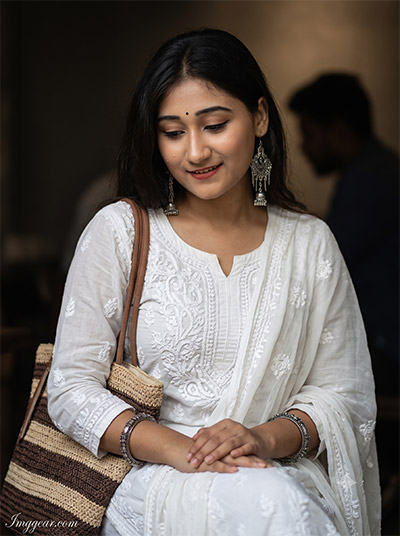
Traditional White Kurtis Look Made Easy via Gemini AI Prompt
Capture an elegant, serene ambiance emphasizing traditional silver jewelry details and candid indoor expressions. The configuration of this Gemini AI prompt balances intricate embroidery work with soft, directional lighting smoothly. Start rendering this exact style right away.
PROMPT
{
“image_label”: “Imggear.com_5”,
“version”: “3.5”,
“aspect_ratio”: “3:4”,
“prompt”: “An ultra-realistic, photorealistic premium masterpiece, preserving the exact identity, facial proportions, bone structure, eye depth, sharp jawline, authentic facial characteristics, and skin micro-textures (visible pores, fine lines) of the subject in the uploaded personal reference photo without alteration. The facial lighting must seamlessly fuse with the ambient scene highlights and cast realistic shadows, allowing the subject to naturally integrate with the environment’s lighting, shadows, depth, atmospheric perspective, and optical characteristics while preserving the subject’s true identity without alteration, seamlessly integrating the subject into this cinematic scene, while maintaining complete identity consistency throughout the image. The subject is dynamically detected as a young female of lean build, appearing approximately in her early to mid-twenties. She is seated indoors in a softly lit cafe or waiting area. She wears a premium white kurta adorned with intricate embroidery, paired with a matching dupatta. Her traditional adornments include a bindi, large dangling oxidized silver earrings, and oxidized silver bangles on both wrists. A woven tote bag featuring brown and beige stripes rests on her left shoulder. Her hands are gently resting in her lap, and she looks downward with a soft, gentle smile. The background is dark and softly blurred, revealing the faint silhouette of another person in the ambient depth. Captured using a full-frame professional mirrorless camera with an 85mm f/1.4 prime lens in RAW format, featuring natural optical rendering, premium creamy bokeh, realistic lens compression, true-to-life color science, filmic dynamic range, natural optical imperfections, and ultra-photorealistic professional RAW camera image rendering. Render the subject with premium true-to-life human skin using Physically Based Rendering (PBR), preserving authentic skin pores, fine skin grain, realistic sub-surface scattering (SSS), natural melanin transitions, facial micro-contrast, realistic micro skin displacement, subtle oil diffusion, realistic lip texture, natural eyelid folds, organic facial imperfections, and realistic skin translucency. Avoid artificial HDR, CGI rendering, plastic skin, beauty-filter processing, over-sharpening, synthetic AI-generated textures, unrealistic optical effects, and excessive digital enhancement. Apply cinematic Hollywood-style color grading with natural skin tones, soft volumetric lighting, realistic highlight roll-off, physically accurate light bounce, organic shadow transitions, premium editorial photography color science, and cinematic global illumination. An Imggear.com watermark is located in the bottom-left corner written in Petit Formal Script, featuring thin, elegant cursive strokes in soft white (#ffffff) with slight transparency, possessing a minimal, premium handwritten signature appearance seamlessly blended with no background.”
}
💡 AI Photo Editing Pro Tips for Perfect Results
Keep Faces Consistent: If the AI changes the face, add this exact phrase to the very beginning of your prompt: “Preserve facial identity 100%, do not alter facial features or proportions.”
Reroll for Perfection: Run every prompt 2–3 times! The second or third generation is almost always sharper and packed with better details.
Get the DSLR Look: Want that beautiful, blurred background? Just add “f/1.8 shallow depth of field” to your prompt.
Control the Camera Shot: Tell the AI exactly what frame you want by adding terms like “Close-up portrait,” “Full-body shot,” or “Wide-angle view.”
Set the Vibe with Lighting: Lighting makes or breaks an AI image. Add “Cinematic lighting,” “Golden hour sunset,” or “Soft studio lighting” for a professional touch.
📐 Best Aspect Ratio: Use 3:4 Vertical for stunning, ready-to-post results on Instagram and Pinterest.