Want to recreate the viral prompt seen Krishna photo editing boy trend without spending hours manually editing photos? Achieving that cinematic, 8K ultra-realistic devotional aesthetic—where Lord Krishna appears behind you in glowing clouds while your exact facial identity remains untouched—is easier than ever. By leveraging the advanced image-generation powers of Gemini AI and ChatGPT, you can turn any basic portrait into a breathtaking spiritual masterpiece in seconds. Below, you’ll find the exact copy-paste prompts and step-by-step instructions to rank your edits #1 across social media.
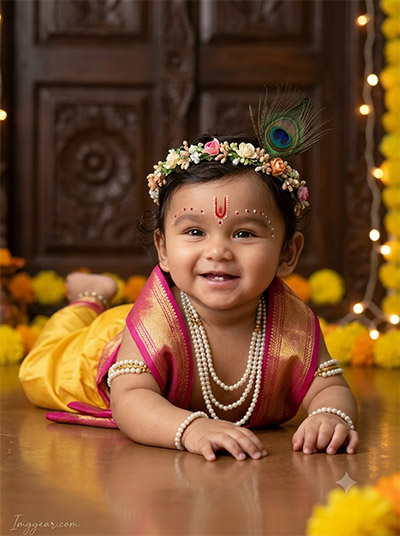
Cute Baby Krishna AI Portrait Editing Prompt Guide
Transform simple toddler photos into divine festival portraits featuring traditional yellow dhotis, floral crowns, and warm warm-toned background lighting. Ready to test this adorable Janmashtami concept with your own photos today?
PROMPT
{
“image_label”: “Imggear.com_1”,
“version”: “3.5”,
“aspect_ratio”: “3:4”,
“prompt”: “An ultra-realistic, photorealistic premium masterpiece, preserving the exact identity, facial proportions, bone structure, eye depth, sharp jawline, authentic facial characteristics, and skin micro-textures (visible pores, fine lines) of the subject in the uploaded personal reference photo without alteration. The facial lighting must seamlessly fuse with the ambient scene highlights and cast realistic shadows, allowing the subject to naturally integrate with the environment’s lighting, shadows, depth, atmospheric perspective, and optical characteristics while preserving the subject’s true identity without alteration, seamlessly integrating the subject into this traditional festive portrait, while maintaining complete identity consistency throughout the image. Render the subject with premium true-to-life human skin using PBR, preserving authentic skin pores, fine skin grain, natural melanin transitions, facial micro-contrast, subtle oil diffusion, organic facial imperfections, and realistic skin translucency. Infant, male, apparent age 8-12 months, chubby baby build, narrow shoulders, soft rounded physical proportions. Pose is lying prone on stomach on a reflective floor, looking slightly off-camera. Wearing a premium pink and gold silk upper drape, yellow silk dhoti, layered pearl necklaces, pearl armbands, and a generic floral crown with a peacock feather. Red tilak and white dots on forehead. Environment features a dark wooden carved door, scattered yellow marigolds, and warm glowing string lights. Captured using a full-frame professional mirrorless camera with an 85mm f/1.4 prime lens in RAW format. hyper-detailed edge sharpness, extreme high-definition micro-details on skin and fabric, natural optical rendering, and premium creamy bokeh. Soft diffused shadows, vivid yet natural color saturation, deep punchy shadows, bright clean highlights, strong tonal contrast. Premium editorial-grade color grading, warm highlights, rich mid-tones, natural skin tones. Watermark text \”Imggear.com\” in the bottom-left corner, Petit Formal Script font, thin elegant cursive strokes, soft white (#ffffff) color, slight transparency, minimal premium handwritten signature appearance seamlessly blended with no background.”,
“negative_prompt”: “(plastic skin, waxy skin, CGI rendering, AI beauty filter look, porcelain skin, over-smoothed skin, airbrushed skin, synthetic textures, doll-like face, uncanny valley, artificial symmetry), (deformed face, distorted facial features, asymmetrical eyes, bad anatomy, bad proportions, extra limbs, extra fingers, missing fingers, malformed hands, mutated hands), (unnatural lighting, flat lighting, harsh direct sunlight, blown-out highlights, crushed shadows, oversaturated colors, neon colors, unrealistic color grading, HDR look, overexposed, underexposed), (blurry, out of focus, low resolution, pixelated, jpeg artifacts, grainy noise, motion blur, soft focus), (dry land, dusty ground, indoor background, wrong environment, mismatched background), (clothing logos, brand marks, trademarked patterns, text overlays, random watermark placement, duplicate watermark, extra signature), (cartoon style, illustration, painting, 3D render, anime, stylized art, digital art look), (identity mismatch, face swap artifacts, inconsistent facial features, altered bone structure, changed eye color, different face shape), (standing, sitting, adult body, modern clothing, missing pearls, poorly drawn feathers, cluttered floor, wrong watermark font).”
}
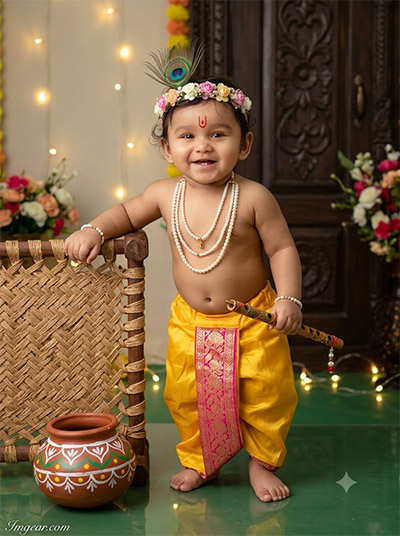
Create Standing Little Krishna Boy AI Photo Editing Looks
Design vibrant standing toddler portraits featuring a bamboo flute, decorative clay pot, and festive background lights. Grab the exact prompt now and upgrade your festive photoshoot edits!
PROMPT
{
“image_label”: “Imggear.com_2”,
“version”: “3.5”,
“aspect_ratio”: “3:4”,
“prompt”: “An ultra-realistic, photorealistic premium masterpiece, preserving the exact identity, facial proportions, bone structure, eye depth, sharp jawline, authentic facial characteristics, and skin micro-textures (visible pores, fine lines) of the subject in the uploaded personal reference photo without alteration. The facial lighting must seamlessly fuse with the ambient scene highlights and cast realistic shadows, allowing the subject to naturally integrate with the environment’s lighting, shadows, depth, atmospheric perspective, and optical characteristics while preserving the subject’s true identity without alteration, seamlessly integrating the subject into this joyful festive portrait, while maintaining complete identity consistency throughout the image. Render the subject with premium true-to-life human skin using PBR, preserving authentic skin pores, fine skin grain, natural melanin transitions, facial micro-contrast, subtle oil diffusion, organic facial imperfections, and realistic skin translucency. Infant, male, apparent age 10-14 months, chubby baby build, narrow shoulders, soft rounded physical proportions. Pose is standing, leaning left arm on a miniature wooden woven cot, holding a decorated flute in right hand, wide happy smile. Wearing a premium yellow silk dhoti with a pink and gold brocade center panel, layered pearl necklaces, pearl bracelets, and a generic floral crown with a peacock feather. Environment features a painted earthen pot on a green reflective floor, warm string lights, and a dark carved wooden door with floral arrangements in the background. Captured using a full-frame professional mirrorless camera with an 85mm f/1.4 prime lens in RAW format. hyper-detailed edge sharpness, extreme high-definition micro-details on skin and fabric, natural optical rendering, and premium creamy bokeh. Soft diffused shadows, vivid yet natural color saturation, deep punchy shadows, bright clean highlights, strong tonal contrast. Premium editorial-grade color grading, warm highlights, rich mid-tones, natural skin tones. Watermark text \”Imggear.com\” in the bottom-left corner, Petit Formal Script font, thin elegant cursive strokes, soft white (#ffffff) color, slight transparency, minimal premium handwritten signature appearance seamlessly blended with no background.”,
“negative_prompt”: “(plastic skin, waxy skin, CGI rendering, AI beauty filter look, porcelain skin, over-smoothed skin, airbrushed skin, synthetic textures, doll-like face, uncanny valley, artificial symmetry), (deformed face, distorted facial features, asymmetrical eyes, bad anatomy, bad proportions, extra limbs, extra fingers, missing fingers, malformed hands, mutated hands), (unnatural lighting, flat lighting, harsh direct sunlight, blown-out highlights, crushed shadows, oversaturated colors, neon colors, unrealistic color grading, HDR look, overexposed, underexposed), (blurry, out of focus, low resolution, pixelated, jpeg artifacts, grainy noise, motion blur, soft focus), (dry land, dusty ground, indoor background, wrong environment, mismatched background), (clothing logos, brand marks, trademarked patterns, text overlays, random watermark placement, duplicate watermark, extra signature), (cartoon style, illustration, painting, 3D render, anime, stylized art, digital art look), (identity mismatch, face swap artifacts, inconsistent facial features, altered bone structure, changed eye color, different face shape), (sitting, crawling, crying expression, missing flute, poorly drawn wooden cot, modern furniture, mismatched floor color).”
}
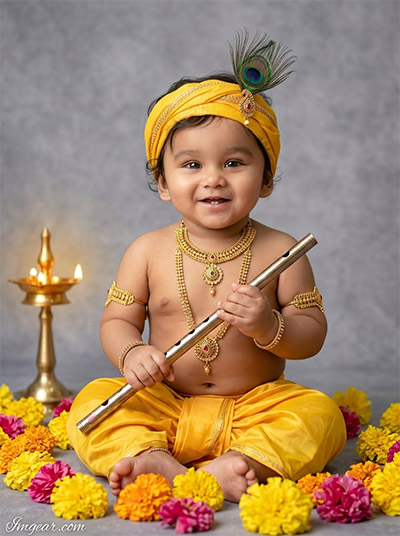
Little Krishna Photo Editing Prompt for AI Boy Images
Craft studio-quality toddler photos featuring a yellow turban, golden jewelry, bansuri, and soft brass diya lighting against textured backdrops. Which variation will you recreate first?
PROMPT
{
“image_label”: “Imggear.com_3”,
“version”: “3.5”,
“aspect_ratio”: “3:4”,
“prompt”: “An ultra-realistic, photorealistic premium masterpiece, preserving the exact identity, facial proportions, bone structure, eye depth, sharp jawline, authentic facial characteristics, and skin micro-textures (visible pores, fine lines) of the subject in the uploaded personal reference photo without alteration. The facial lighting must seamlessly fuse with the ambient scene highlights and cast realistic shadows, allowing the subject to naturally integrate with the environment’s lighting, shadows, depth, atmospheric perspective, and optical characteristics while preserving the subject’s true identity without alteration, seamlessly integrating the subject into this classic studio portrait, while maintaining complete identity consistency throughout the image. Render the subject with premium true-to-life human skin using PBR, preserving authentic skin pores, fine skin grain, natural melanin transitions, facial micro-contrast, subtle oil diffusion, organic facial imperfections, and realistic skin translucency. Infant, male, apparent age 8-12 months, chubby baby build, narrow shoulders, soft rounded physical proportions. Pose is sitting cross-legged, holding a metallic flute with both hands, smiling warmly at the camera. Outfit features a bare chest, premium yellow draped silk dhoti, ornate generic gold necklaces, gold armbands, gold bracelets, and a yellow headwrap adorned with a peacock feather. Environment includes a soft grey textured studio backdrop, scattered yellow and pink marigold flowers on the floor, and a glowing brass oil lamp to the left. Captured using a full-frame professional mirrorless camera with an 85mm f/1.4 prime lens in RAW format. hyper-detailed edge sharpness, extreme high-definition micro-details on skin and fabric, natural optical rendering, and premium creamy bokeh. Soft diffused shadows, vivid yet natural color saturation, deep punchy shadows, bright clean highlights, strong tonal contrast. Premium editorial-grade color grading, warm highlights, rich mid-tones, natural skin tones. Watermark text \”Imggear.com\” in the bottom-left corner, Petit Formal Script font, thin elegant cursive strokes, soft white (#ffffff) color, slight transparency, minimal premium handwritten signature appearance seamlessly blended with no background.”,
“negative_prompt”: “(plastic skin, waxy skin, CGI rendering, AI beauty filter look, porcelain skin, over-smoothed skin, airbrushed skin, synthetic textures, doll-like face, uncanny valley, artificial symmetry), (deformed face, distorted facial features, asymmetrical eyes, bad anatomy, bad proportions, extra limbs, extra fingers, missing fingers, malformed hands, mutated hands), (unnatural lighting, flat lighting, harsh direct sunlight, blown-out highlights, crushed shadows, oversaturated colors, neon colors, unrealistic color grading, HDR look, overexposed, underexposed), (blurry, out of focus, low resolution, pixelated, jpeg artifacts, grainy noise, motion blur, soft focus), (dry land, dusty ground, indoor background, wrong environment, mismatched background), (clothing logos, brand marks, trademarked patterns, text overlays, random watermark placement, duplicate watermark, extra signature), (cartoon style, illustration, painting, 3D render, anime, stylized art, digital art look), (identity mismatch, face swap artifacts, inconsistent facial features, altered bone structure, changed eye color, different face shape), (standing, lying down, outdoor setting, busy background, missing brass lamp, poorly drawn gold jewelry, untextured background).”
}
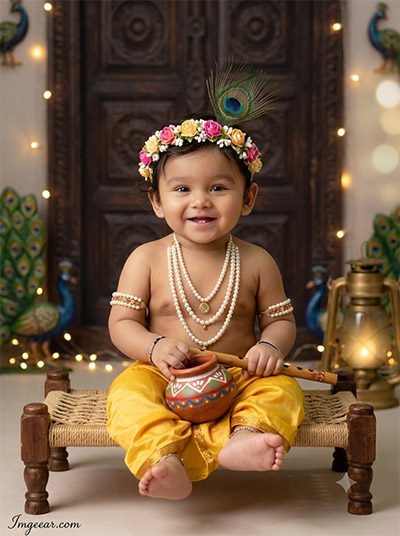
Generate Cute Krishna Boy AI Photo Edits Easily
Learn how to generate cozy baby portraits seated on a wooden cot with peacock decor, miniature matki, and warm glowing lanterns. Give this magical photo creation method a try for your next post!
PROMPT
{
“image_label”: “Imggear.com_4”,
“version”: “3.5”,
“aspect_ratio”: “3:4”,
“prompt”: “An ultra-realistic, photorealistic premium masterpiece, preserving the exact identity, facial proportions, bone structure, eye depth, sharp jawline, authentic facial characteristics, and skin micro-textures (visible pores, fine lines) of the subject in the uploaded personal reference photo without alteration. The facial lighting must seamlessly fuse with the ambient scene highlights and cast realistic shadows, allowing the subject to naturally integrate with the environment’s lighting, shadows, depth, atmospheric perspective, and optical characteristics while preserving the subject’s true identity without alteration, seamlessly integrating the subject into this traditional festive portrait, while maintaining complete identity consistency throughout the image. Render the subject with premium true-to-life human skin using PBR, preserving authentic skin pores, fine skin grain, natural melanin transitions, facial micro-contrast, subtle oil diffusion, organic facial imperfections, and realistic skin translucency. Infant, male, apparent age 8-12 months, chubby baby build, narrow shoulders, soft rounded physical proportions. Pose is sitting on a miniature wooden woven cot, holding a painted earthen pot and wooden flute, looking directly at the camera with a gentle expression. Outfit features a bare chest, premium yellow silk dhoti, layered pearl necklaces, pearl armbands, and a generic floral crown with a prominent peacock feather. Environment includes a dark carved wooden door flanked by peacock feather motifs, warm glowing string lights, and a brass lantern in the soft background. Captured using a full-frame professional mirrorless camera with an 85mm f/1.4 prime lens in RAW format. hyper-detailed edge sharpness, extreme high-definition micro-details on skin and fabric, natural optical rendering, and premium creamy bokeh. Soft diffused shadows, vivid yet natural color saturation, deep punchy shadows, bright clean highlights, strong tonal contrast. Premium editorial-grade color grading, warm highlights, rich mid-tones, natural skin tones. Watermark text \”Imggear.com\” in the bottom-left corner, Petit Formal Script font, thin elegant cursive strokes, soft white (#ffffff) color, slight transparency, minimal premium handwritten signature appearance seamlessly blended with no background.”,
“negative_prompt”: “(plastic skin, waxy skin, CGI rendering, AI beauty filter look, porcelain skin, over-smoothed skin, airbrushed skin, synthetic textures, doll-like face, uncanny valley, artificial symmetry), (deformed face, distorted facial features, asymmetrical eyes, bad anatomy, bad proportions, extra limbs, extra fingers, missing fingers, malformed hands, mutated hands), (unnatural lighting, flat lighting, harsh direct sunlight, blown-out highlights, crushed shadows, oversaturated colors, neon colors, unrealistic color grading, HDR look, overexposed, underexposed), (blurry, out of focus, low resolution, pixelated, jpeg artifacts, grainy noise, motion blur, soft focus), (dry land, dusty ground, indoor background, wrong environment, mismatched background), (clothing logos, brand marks, trademarked patterns, text overlays, random watermark placement, duplicate watermark, extra signature), (cartoon style, illustration, painting, 3D render, anime, stylized art, digital art look), (identity mismatch, face swap artifacts, inconsistent facial features, altered bone structure, changed eye color, different face shape), (standing, floor sitting, missing earthen pot, plain background, modern clothing, poorly drawn woven cot, harsh flash lighting).”
}
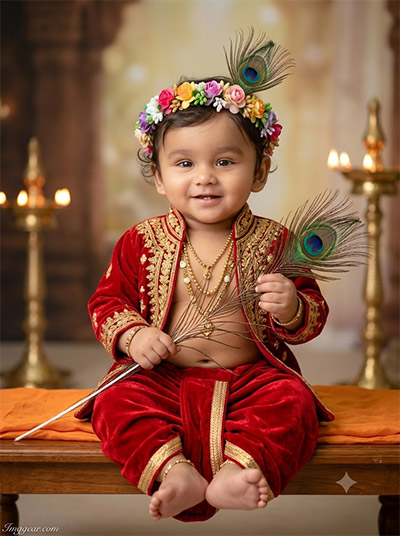
Royal Red Outfit Krishna AI Photo Edit Prompt Ideas
Recreate this majestic studio portrait featuring rich red velvet attire, single peacock feather stem, and glowing brass oil lamps. Drop a comment below if you want more viral prompt concepts like this!
PROMPT
{
“image_label”: “Imggear.com_5”,
“version”: “3.5”,
“aspect_ratio”: “3:4”,
“prompt”: “An ultra-realistic, photorealistic premium masterpiece, preserving the exact identity, facial proportions, bone structure, eye depth, sharp jawline, authentic facial characteristics, and skin micro-textures (visible pores, fine lines) of the subject in the uploaded personal reference photo without alteration. The facial lighting must seamlessly fuse with the ambient scene highlights and cast realistic shadows, allowing the subject to naturally integrate with the environment’s lighting, shadows, depth, atmospheric perspective, and optical characteristics while preserving the subject’s true identity without alteration, seamlessly integrating the subject into this regal festive portrait, while maintaining complete identity consistency throughout the image. Render the subject with premium true-to-life human skin using PBR, preserving authentic skin pores, fine skin grain, natural melanin transitions, facial micro-contrast, subtle oil diffusion, organic facial imperfections, and realistic skin translucency. Infant, male, apparent age 8-12 months, chubby baby build, narrow shoulders, soft rounded physical proportions. Pose is sitting gracefully on a wooden bench draped with orange fabric, holding a long peacock feather in both hands, smiling softly. Outfit consists of a premium red velvet and gold-embroidered open jacket with a matching red velvet dhoti, layered gold necklaces, gold bracelets, and a colorful generic floral crown adorned with a peacock feather. Environment showcases a softly lit traditional temple-like interior, featuring warm glowing brass lamps melting into the creamy background blur. Captured using a full-frame professional mirrorless camera with an 85mm f/1.4 prime lens in RAW format. hyper-detailed edge sharpness, extreme high-definition micro-details on skin and fabric, natural optical rendering, and premium creamy bokeh. Soft diffused shadows, vivid yet natural color saturation, deep punchy shadows, bright clean highlights, strong tonal contrast. Premium editorial-grade color grading, warm highlights, rich mid-tones, natural skin tones. Watermark text \”Imggear.com\” in the bottom-left corner, Petit Formal Script font, thin elegant cursive strokes, soft white (#ffffff) color, slight transparency, minimal premium handwritten signature appearance seamlessly blended with no background.”,
“negative_prompt”: “(plastic skin, waxy skin, CGI rendering, AI beauty filter look, porcelain skin, over-smoothed skin, airbrushed skin, synthetic textures, doll-like face, uncanny valley, artificial symmetry), (deformed face, distorted facial features, asymmetrical eyes, bad anatomy, bad proportions, extra limbs, extra fingers, missing fingers, malformed hands, mutated hands), (unnatural lighting, flat lighting, harsh direct sunlight, blown-out highlights, crushed shadows, oversaturated colors, neon colors, unrealistic color grading, HDR look, overexposed, underexposed), (blurry, out of focus, low resolution, pixelated, jpeg artifacts, grainy noise, motion blur, soft focus), (dry land, dusty ground, indoor background, wrong environment, mismatched background), (clothing logos, brand marks, trademarked patterns, text overlays, random watermark placement, duplicate watermark, extra signature), (cartoon style, illustration, painting, 3D render, anime, stylized art, digital art look), (identity mismatch, face swap artifacts, inconsistent facial features, altered bone structure, changed eye color, different face shape), (standing, floor sitting, modern clothing, blue outfit, bare chest, missing wooden bench, poorly drawn flowers, missing brass lamps).”
}
💡 AI Photo Editing Pro Tips for Perfect Results
Keep Faces Consistent: If the AI changes the face, add this exact phrase to the very beginning of your prompt: “Preserve facial identity 100%, do not alter facial features or proportions.”
Reroll for Perfection: Run every prompt 2–3 times! The second or third generation is almost always sharper and packed with better details.
Get the DSLR Look: Want that beautiful, blurred background? Just add “f/1.8 shallow depth of field” to your prompt.
Control the Camera Shot: Tell the AI exactly what frame you want by adding terms like “Close-up portrait,” “Full-body shot,” or “Wide-angle view.”
Set the Vibe with Lighting: Lighting makes or breaks an AI image. Add “Cinematic lighting,” “Golden hour sunset,” or “Soft studio lighting” for a professional touch.
📐 Best Aspect Ratio: Use 3:4 Vertical for stunning, ready-to-post results on Instagram and Pinterest.