Struggling to nail clean, grain-free low-light aesthetics in your generative renders? I spent the weekend testing these ChatGPT Prompts For Night Photos to help you instantly bypass the typical muddy textures and weird facial distortions. This curated list of free copy-paste prompts utilizes cutting-edge text-to-image semantic hacks to render hyper-realistic neon glows, accurate twilight long-exposures, and cinematic moody shadows flawlessly on your first attempt. Stop wasting hours on failed generations and blurry nightscapes—unlock the exact word formulas below and start creating masterpiece art tonight!
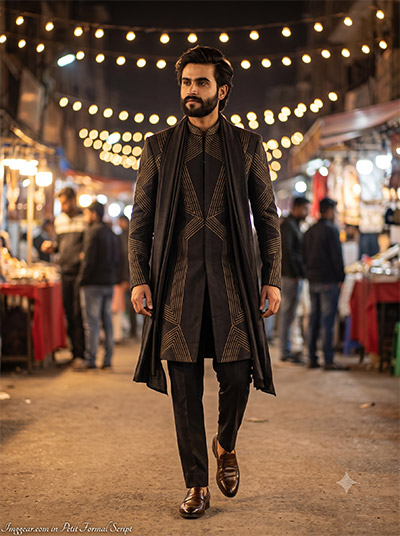
Cinematic Night Street Style Generation Guide via ChatGPT
Master the art of prompting intricate ethnic textures and warm overhead string lights in dark settings. This unique word sequence built for ChatGPT balances deep background bokeh with clean focal sharp lines. Give it a run to see the difference yourself.
PROMPT
{
“image_label”: “Imggear.com_1”,
“version”: “3.5”,
“aspect_ratio”: “3:4”,
“prompt”: “ An ultra-realistic, photorealistic premium masterpiece, enforcing a 100% exact facial match that precisely replicates the unique facial features, bone structure, eye depth, sharp jawline, and authentic skin micro-textures (pores, fine lines) of the subject in the uploaded personal reference photo. The facial lighting must seamlessly fuse with the ambient scene highlights and cast realistic shadows, allowing the hair texture to naturally adapt to the environment’s physics while keeping the true identity perfectly consistent and unmodified, integrating them into this cinematic urban street market scene at night. Version: 3.5. Aspect Ratio: 3:4. The subject is a dynamically built male in his late twenties to early thirties with an athletic physical frame and balanced shoulder breadth. He is dressed in a premium custom luxury designer brand garment, featuring an elongated dark silhouette adorned with highly intricate, symmetrical metallic gold geometric stitching, complemented by a long, softly draped dark fabric overlay over the shoulder, paired with tailored dark trousers and polished leather loafers. The subject is captured mid-stride, exhibiting dynamic forward momentum with a confident posture, gazing slightly off-camera to the left. The camera operates at eye-level using a 50mm lens to achieve a shallow depth of field, rendering the bustling night market background into a heavy creamy background bokeh of warm, suspended string lights and blurred shop facades. The lighting scenario features soft, warm volumetric ambient light from the overhead illumination, providing gentle highlights and deep, rich cinematic shadows across the anatomy. The photographic texture mimics pristine high-end digital sharpness with realistic sub-surface scattering, optimized for professional 8K upscaling without any plastic AI appearance. At the bottom-left corner, a minimal, premium handwritten signature reads ‘Imggear.com’ rendered in a Petit Formal Script, featuring thin, elegant cursive strokes in soft white (#ffffff) with slight transparency, seamlessly blended with no background.”
}
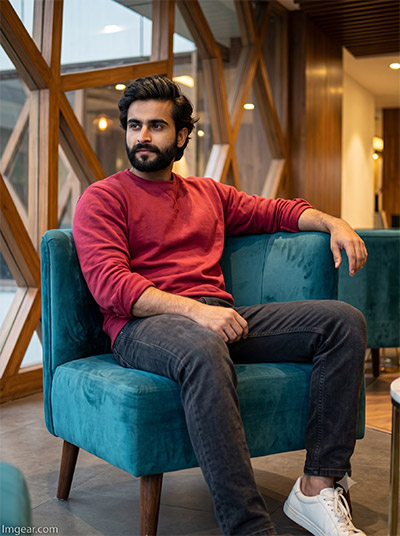
Indoor Low Light Man Portrait Text Formula for ChatGPT
Forcing an image generator to handle realistic velvet textures and warm geometric window lighting inside a dim lounge is tricky. This custom phrasing built with ChatGPT manages tricky exposures and rich colors seamlessly. Don’t miss out on this blueprint.
PROMPT
{
“image_label”: “Imggear.com_2”,
“version”: “3.5”,
“aspect_ratio”: “3:4”,
“prompt”: “ An ultra-realistic, photorealistic premium masterpiece, enforcing a 100% exact facial match that precisely replicates the unique facial features, bone structure, eye depth, sharp jawline, and authentic skin micro-textures (pores, fine lines) of the subject in the uploaded personal reference photo. The facial lighting must seamlessly fuse with the ambient scene highlights and cast realistic shadows, allowing the hair texture to naturally adapt to the environment’s physics while keeping the true identity perfectly consistent and unmodified, integrating them into this relaxed, modern contemporary architectural lounge scene. Version: 3.5. Aspect Ratio: 3:4. The subject is a male in his late twenties with a robust, muscular, and broad-shouldered physical build. He is seated casually on a luxurious, plush teal velvet armchair, positioned asymmetrically with his right arm resting comfortably on the backrest and his left hand resting near his lap. He is dressed in a premium custom luxury designer brand garment consisting of a solid, heavy-cotton crimson crewneck sweatshirt with the sleeves slightly pushed up, paired with dark, textured charcoal denim jeans and thick, pristine white athletic sneakers. The camera captures the scene from a straight-on, seated eye-level perspective using a standard 35mm lens, maintaining crisp focus on the subject while allowing a mild, shallow depth of field to gently soften the background. The environment features warm, diffused interior lighting from overhead modern pendant lamps, highlighting the structural geometric wooden window frames and reflective glass panels in the background. The photographic texture delivers pristine high-end digital sharpness, mimicking professional editorial photography with perfect sub-surface scattering and immaculate 8K upscaling potential. The subject holds a confident, observant expression, looking decisively to the left of the frame. At the bottom-left corner, a minimal, premium handwritten signature reads ‘Imggear.com’ rendered in a Petit Formal Script, featuring thin, elegant cursive strokes in soft white (#ffffff) with slight transparency, seamlessly blended with no background.”
}
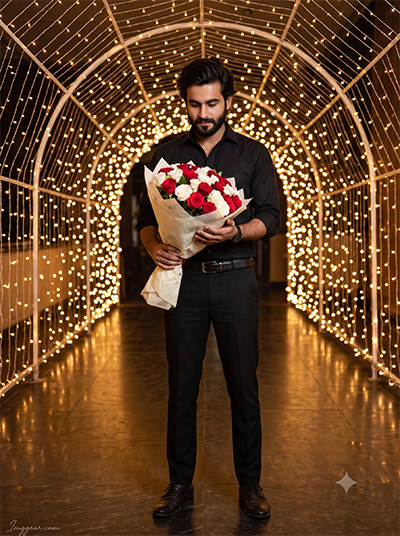
Sparkling Tunnel Man Portrait ChatGPT Prompts For Night Photos
Recreating this stunning portrait inside a glowing fairy light archway is incredibly satisfying. I formulated this specific sequence in ChatGPT to seamlessly coordinate thousands of tiny background bokeh dots while maintaining sharp focus on the central subject and his rose bouquet. Would you use this for a romantic theme?
PROMPT
{
“image_label”: “Imggear.com_3”,
“version”: “3.5”,
“aspect_ratio”: “3:4”,
“prompt”: “ An ultra-realistic, photorealistic premium masterpiece, enforcing a 100% exact facial match that precisely replicates the unique facial features, bone structure, eye depth, sharp jawline, and authentic skin micro-textures (pores, fine lines) of the subject in the uploaded personal reference photo. The facial lighting must seamlessly fuse with the ambient scene highlights and cast realistic shadows, allowing the hair texture to naturally adapt to the environment’s physics while keeping the true identity perfectly consistent and unmodified, integrating them into this stunning nighttime architectural scene inside an illuminated arched tunnel. Version: 3.5. Aspect Ratio: 3:4. The subject is a male in his early twenties with a lean, athletic build and well-proportioned frame. He stands firmly in the exact center of the frame, dressed in a premium custom luxury designer brand garment featuring a monochromatic black ensemble: a fitted, crisp black button-down shirt with the sleeves rolled to the forearms, tailored black trousers, dark leather dress shoes, and a sleek black leather belt with a generic high-end metallic double-ring buckle. In his right arm, he holds a beautiful, large bouquet of fresh red and white roses wrapped in pale textured paper. The environment consists of a massive, continuous archway constructed entirely of dense, warm glowing string lights, which stretch deep into the background. The ground is a highly polished, dark reflective surface that perfectly mirrors the illuminated archway above, creating a fully immersive geometry. The camera utilizes a wider 24mm to 35mm lens positioned straight on, capturing the deep leading lines and maintaining a broad depth of field. The lighting is an omnidirectional, warm volumetric wrap originating from the surrounding fairy lights, casting a highly flattering, multi-source glow on the subject’s face and arms. The photographic texture emphasizes pristine high-end digital sharpness, deep contrast ratios, and realistic sub-surface scattering, optimized for 8K upscaling. The subject has his head tilted slightly downward, looking gently toward the bouquet with a calm, contemplative expression. At the bottom-left corner, a minimal, premium handwritten signature reads ‘Imggear.com’ rendered in a Petit Formal Script, featuring thin, elegant cursive strokes in soft white (#ffffff) with slight transparency, seamlessly blended with no background.”
}
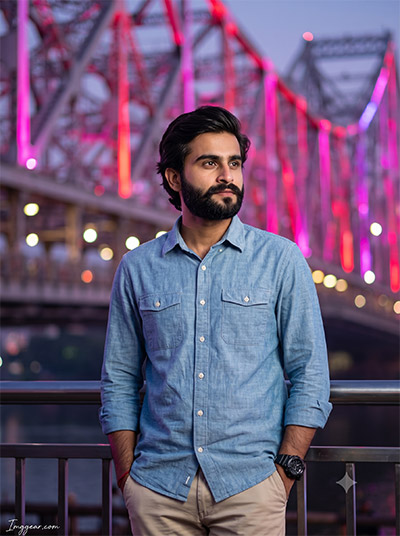
Neon Bridge Portrait ChatGPT Prompts For Night Photos
Nailing neon reflections on a denim shirt under low-light conditions is effortless with the right word formula. This setup processed via ChatGPT configures pink bridge illumination and a clean city aesthetic flawlessly. Claim the exact copy-paste wording instantly.
PROMPT
{
“image_label”: “Imggear.com_4”,
“version”: “3.5”,
“aspect_ratio”: “3:4”,
“prompt”: “ An ultra-realistic, photorealistic premium masterpiece, enforcing a 100% exact facial match that precisely replicates the unique facial features, bone structure, eye depth, sharp jawline, and authentic skin micro-textures (pores, fine lines) of the subject in the uploaded personal reference photo. The facial lighting must seamlessly fuse with the ambient scene highlights and cast realistic shadows, allowing the hair texture to naturally adapt to the environment’s physics while keeping the true identity perfectly consistent and unmodified, integrating them into this vibrant outdoor urban evening portrait. Version: 3.5. Aspect Ratio: 3:4. The subject is a male in his mid-twenties with a standard, athletic build and defined shoulders. He stands in a relaxed, casual posture with both hands resting casually in his pockets, positioned slightly behind a dark metallic railing. He is dressed in a premium custom luxury designer brand garment, specifically a light blue, heavy-weave chambray or denim button-down shirt featuring dual chest pockets and natural fabric folds, paired with light khaki chinos and a rugged black tactical sports watch on his left wrist. The camera operates from a medium eye-level angle using an 85mm portrait lens with a very shallow depth of field. This precise lens focus keeps the subject and the immediate railing impeccably sharp while dissolving the background—a massive, architecturally complex modern bridge—into a heavy, colorful creamy background bokeh illuminated by vibrant neon pink, red, and purple architectural lighting. The scene’s primary lighting consists of soft, diffused frontal illumination that flatters the facial structure, complemented by the distant neon colors that provide subtle rim lighting on the edges of the silhouette. The photographic texture replicates native high-end digital sharpness and organic analog warmth, achieving perfect sub-surface scattering for an immaculate 8K upscaled finish. The subject is looking distantly off-camera to the right with a calm, observant gaze. At the bottom-left corner, a minimal, premium handwritten signature reads ‘Imggear.com’ rendered in a Petit Formal Script, featuring thin, elegant cursive strokes in soft white (#ffffff) with slight transparency, seamlessly blended with no background.”
}
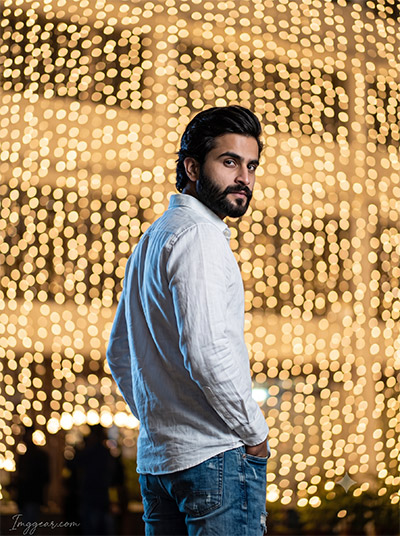
Golden Bokeh Man Portrait ChatGPT Prompts For Night Photos
Emphasizing dramatic background lighting wall patterns while keeping sharp details on a white linen shirt is simple. This custom layout generated using ChatGPT handles bright light circles and side profiles brilliantly. Check out the setup to master this look.
PROMPT
{
“image_label”: “Imggear.com_5”,
“version”: “3.5”,
“aspect_ratio”: “3:4”,
“prompt”: “ An ultra-realistic, photorealistic premium masterpiece, enforcing a 100% exact facial match that precisely replicates the unique facial features, bone structure, eye depth, sharp jawline, and authentic skin micro-textures (pores, fine lines) of the subject in the uploaded personal reference photo. The facial lighting must seamlessly fuse with the ambient scene highlights and cast realistic shadows, allowing the hair texture to naturally adapt to the environment’s physics while keeping the true identity perfectly consistent and unmodified, integrating them into this highly dramatic nighttime portrait against a massive wall of lights. Version: 3.5. Aspect Ratio: 3:4. The subject is a male in his late twenties with a lean, toned physical build. He is captured in a highly dynamic, kinetic posture, standing with his body angled away but his torso sharply twisted to look back intimately over his right shoulder, with both hands tucked casually into his pockets. He is dressed in a premium custom luxury designer brand garment featuring a crisp, white button-down shirt with a highly visible, micro-textured crinkled linen or seersucker weave, paired with medium-wash blue denim jeans featuring subtle distressing. The camera utilizes a telephoto lens shot wide open to achieve an extremely shallow depth of field. This compresses the background—a massive building facade draped in thousands of string lights—into an overwhelming, dense matrix of huge, warm, creamy golden circular bokeh balls. The lighting setup is incredibly high-contrast and cinematic: a stark, cool-toned direct rim light sharply illuminates the left edge of his face, shoulder, and the textured folds of the white shirt, cutting through the warm, golden volumetric glow radiating from the background. The photographic texture prioritizes absolute pristine high-end digital sharpness for professional 8K upscaling, capturing every minute fabric wrinkle and facial pore with perfect sub-surface skin scattering. The subject possesses an intense, serious expression, maintaining direct, piercing eye contact with the lens over his shoulder. At the bottom-left corner, a minimal, premium handwritten signature reads ‘Imggear.com’ rendered in a Petit Formal Script, featuring thin, elegant cursive strokes in soft white (#ffffff) with slight transparency, seamlessly blended with no background.”
}
💡 AI Photo Editing Pro Tips for Perfect Results
Keep Faces Consistent: If the AI changes the face, add this exact phrase to the very beginning of your prompt: “Preserve facial identity 100%, do not alter facial features or proportions.”
Reroll for Perfection: Run every prompt 2–3 times! The second or third generation is almost always sharper and packed with better details.
Get the DSLR Look: Want that beautiful, blurred background? Just add “f/1.8 shallow depth of field” to your prompt.
Control the Camera Shot: Tell the AI exactly what frame you want by adding terms like “Close-up portrait,” “Full-body shot,” or “Wide-angle view.”
Set the Vibe with Lighting: Lighting makes or breaks an AI image. Add “Cinematic lighting,” “Golden hour sunset,” or “Soft studio lighting” for a professional touch.
📐 Best Aspect Ratio: Use 3:4 Vertical for stunning, ready-to-post results on Instagram and Pinterest.