Creating a breathtaking, cinematic Krishna Prompt Girl portrait often feels frustrating when your AI generator delivers blurred details or wrong outfit styles. You want a flawless, ultra-realistic festive photo without spending hours tweaking text prompts. In this guide, you will discover the exact, tested prompts designed for Gemini AI and ChatGPT. Simply copy, paste, and instantly generate high-resolution, viral devotional photos that stand out on social media!
Create Stunning Krishna Devotional Female Portraits Using AI Prompts
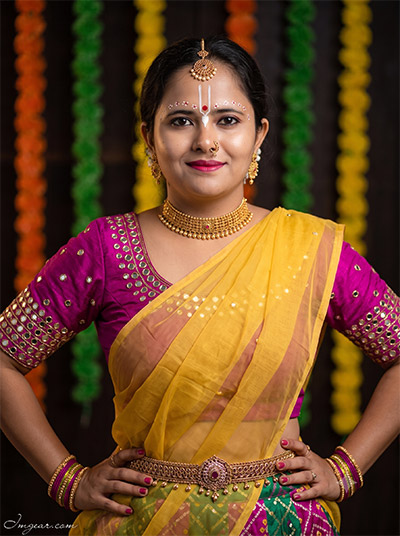
Transform your photos into traditional devotional portraits featuring intricate saree styling and classic festive jewelry. Grab the exact prompt text below to recreate this authentic cultural aesthetic effortlessly.
PROMPT
{
“image_label”: “Imggear.com_1”,
“version”: “3.5”,
“aspect_ratio”: “3:4”,
“prompt”: “Version: 3.5 An ultra-realistic, photorealistic premium masterpiece, preserving the exact identity, facial proportions, bone structure, eye depth, sharp jawline, authentic facial characteristics, and skin micro-textures (visible pores, fine lines) of the subject in the uploaded personal reference photo without alteration. The facial lighting must seamlessly fuse with the ambient scene highlights and cast realistic shadows, allowing the subject to naturally integrate with the environment’s lighting, shadows, depth, atmospheric perspective, and optical characteristics while preserving the subject’s true identity without alteration, seamlessly integrating the subject into this cinematic portrait, while maintaining complete identity consistency throughout the image. Female, apparent age 22, slender physical build, narrow shoulder width. Render the subject with premium true-to-life human skin using PBR, preserving authentic skin pores, fine skin grain, natural melanin transitions, facial micro-contrast, subtle oil diffusion, organic facial imperfections, and realistic skin translucency. Captured using a full-frame professional mirrorless camera with an 85mm f/1.4 prime lens in RAW format, hyper-detailed edge sharpness, extreme high-definition micro-details on skin and fabric, natural optical rendering, and premium creamy bokeh. Volumetric light, studio lights, rim lighting, soft diffused shadows, elevated with vivid yet natural color saturation, deep punchy shadows, bright clean highlights, and strong tonal contrast. Apply premium editorial-grade color grading — warm highlights, rich mid-tones, natural skin tones — with enhanced micro-contrast and clarity. Subject stands confidently, hands on hips, looking directly at the camera with a subtle smile. Wearing a premium custom luxury festive garment: a magenta short-sleeved top with reflective mirror-work, a sheer yellow draped fabric, and a green and magenta patterned skirt. Adorned with a gold choker, earrings, forehead ornament, nose ring, wrist bangles, and an ornate waist belt. Facial details include a traditional white U-shaped forehead mark with a red center dot, and white dotted patterns above the eyebrows. Dark indoor background illuminated by out-of-focus vertical floral garlands in green, orange, and yellow. Watermark: \”Imggear.com\” positioned in the bottom-left corner, Petit Formal Script font, thin elegant cursive strokes, soft white (#ffffff) color with slight transparency, minimal premium handwritten signature appearance, seamlessly blended with no background.”,
“negative_prompt”: “(plastic skin, waxy skin, CGI rendering, AI beauty filter look, porcelain skin, over-smoothed skin, airbrushed skin, synthetic textures, doll-like face, uncanny valley, artificial symmetry), (deformed face, distorted facial features, asymmetrical eyes, bad anatomy, bad proportions, extra limbs, extra fingers, missing fingers, malformed hands, mutated hands), (unnatural lighting, flat lighting, harsh direct sunlight, blown-out highlights, crushed shadows, oversaturated colors, neon colors, unrealistic color grading, HDR look, overexposed, underexposed), (blurry, out of focus, low resolution, pixelated, jpeg artifacts, grainy noise, motion blur, soft focus), (dry land, dusty ground, indoor background, wrong environment, mismatched background), (clothing logos, brand marks, trademarked patterns, text overlays, random watermark placement, duplicate watermark, extra signature), (cartoon style, illustration, painting, 3D render, anime, stylized art, digital art look), (identity mismatch, face swap artifacts, inconsistent facial features, altered bone structure, changed eye color, different face shape), (inaccurate clothing patterns, messy facial paint, missing jewelry, asymmetrical waist belt).”
}
Traditional Indian Girl Krishna Portrait Prompt for AI Art
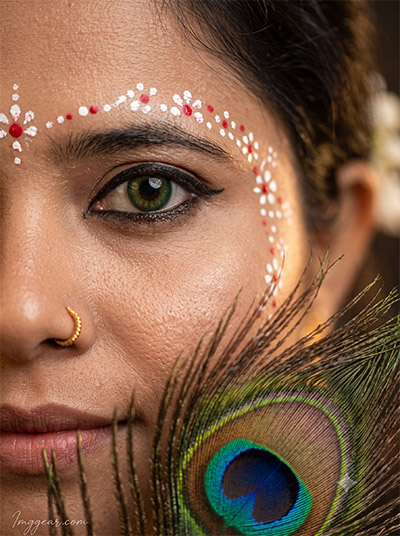
Capture extreme close-up details using a peacock feather accent and delicate chandan art across the forehead. Want to test this macro aesthetic on your own portraits? Try copying the full prompt script below today.
PROMPT
{
“image_label”: “Imggear.com_2”,
“version”: “3.5”,
“aspect_ratio”: “3:4”,
“prompt”: “Version: 3.5 An ultra-realistic, photorealistic premium masterpiece, preserving the exact identity, facial proportions, bone structure, eye depth, sharp jawline, authentic facial characteristics, and skin micro-textures (visible pores, fine lines) of the subject in the uploaded personal reference photo without alteration. The facial lighting must seamlessly fuse with the ambient scene highlights and cast realistic shadows, allowing the subject to naturally integrate with the environment’s lighting, shadows, depth, atmospheric perspective, and optical characteristics while preserving the subject’s true identity without alteration, seamlessly integrating the subject into this cinematic portrait, while maintaining complete identity consistency throughout the image. Female, apparent age 20, slender physical build. Render the subject with premium true-to-life human skin using PBR, preserving authentic skin pores, fine skin grain, natural melanin transitions, facial micro-contrast, subtle oil diffusion, organic facial imperfections, and realistic skin translucency. Captured using a full-frame professional mirrorless camera with an 85mm f/1.4 prime lens in RAW format, hyper-detailed edge sharpness, extreme high-definition micro-details on skin and fabric, natural optical rendering, and premium creamy bokeh. Volumetric light, studio lights, rim lighting, soft diffused shadows, elevated with vivid yet natural color saturation, deep punchy shadows, bright clean highlights, and strong tonal contrast. Apply premium editorial-grade color grading — warm highlights, rich mid-tones, natural skin tones — with enhanced micro-contrast and clarity. Extreme macro close-up of the left side of the face, gazing directly into the lens with a soft expression. Wearing a green colored contact lens, heavy black eyeliner, and a gold nose ring. A large peacock feather is held in the immediate foreground, partially obscuring the lower face. Facial details include delicate white and red floral dotted patterns painted along the eyebrow and upper cheekbone. Studio lighting with macro depth of field blurring the background entirely. Watermark: \”Imggear.com\” positioned in the bottom-left corner, Petit Formal Script font, thin elegant cursive strokes, soft white (#ffffff) color with slight transparency, minimal premium handwritten signature appearance, seamlessly blended with no background.”,
“negative_prompt”: “(plastic skin, waxy skin, CGI rendering, AI beauty filter look, porcelain skin, over-smoothed skin, airbrushed skin, synthetic textures, doll-like face, uncanny valley, artificial symmetry), (deformed face, distorted facial features, asymmetrical eyes, bad anatomy, bad proportions, extra limbs, extra fingers, missing fingers, malformed hands, mutated hands), (unnatural lighting, flat lighting, harsh direct sunlight, blown-out highlights, crushed shadows, oversaturated colors, neon colors, unrealistic color grading, HDR look, overexposed, underexposed), (blurry, out of focus, low resolution, pixelated, jpeg artifacts, grainy noise, motion blur, soft focus), (dry land, dusty ground, indoor background, wrong environment, mismatched background), (clothing logos, brand marks, trademarked patterns, text overlays, random watermark placement, duplicate watermark, extra signature), (cartoon style, illustration, painting, 3D render, anime, stylized art, digital art look), (identity mismatch, face swap artifacts, inconsistent facial features, altered bone structure, changed eye color, different face shape), (incorrect eye color, missing peacock feather, messy eyeliner, distorted facial markings).”
}
Design Festive Indian Girl Krishna AI Photo Prompts Easily
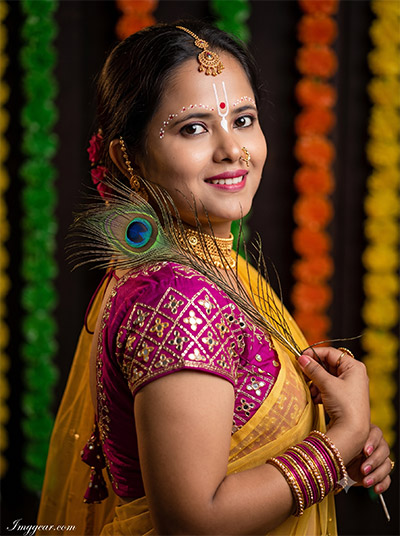
Highlight soft studio lighting alongside vibrant yellow drape attire, golden ornaments, and marigold floral backdrops. How would you customize this traditional look for your next viral post?
PROMPT
{
“image_label”: “Imggear.com_3”,
“version”: “3.5”,
“aspect_ratio”: “3:4”,
“prompt”: “Version: 3.5 An ultra-realistic, photorealistic premium masterpiece, preserving the exact identity, facial proportions, bone structure, eye depth, sharp jawline, authentic facial characteristics, and skin micro-textures (visible pores, fine lines) of the subject in the uploaded personal reference photo without alteration. The facial lighting must seamlessly fuse with the ambient scene highlights and cast realistic shadows, allowing the subject to naturally integrate with the environment’s lighting, shadows, depth, atmospheric perspective, and optical characteristics while preserving the subject’s true identity without alteration, seamlessly integrating the subject into this cinematic portrait, while maintaining complete identity consistency throughout the image. Female, apparent age 22, slender physical build. Render the subject with premium true-to-life human skin using PBR, preserving authentic skin pores, fine skin grain, natural melanin transitions, facial micro-contrast, subtle oil diffusion, organic facial imperfections, and realistic skin translucency. Captured using a full-frame professional mirrorless camera with an 85mm f/1.4 prime lens in RAW format, hyper-detailed edge sharpness, extreme high-definition micro-details on skin and fabric, natural optical rendering, and premium creamy bokeh. Volumetric light, studio lights, rim lighting, soft diffused shadows, elevated with vivid yet natural color saturation, deep punchy shadows, bright clean highlights, and strong tonal contrast. Apply premium editorial-grade color grading — warm highlights, rich mid-tones, natural skin tones — with enhanced micro-contrast and clarity. Subject angled slightly, looking back over the shoulder with a soft smile, holding a peacock feather across the chest. Wearing a premium custom luxury festive garment: a magenta short-sleeved top with mirror-work, and a sheer yellow draped fabric. Adorned with a gold choker, earrings, forehead ornament, nose ring, and bangles. Facial details include a white U-shaped forehead mark with a red dot, and white dotted patterns above the eyebrows. Dark indoor background with out-of-focus vertical floral garlands in green, orange, and yellow. Watermark: \”Imggear.com\” positioned in the bottom-left corner, Petit Formal Script font, thin elegant cursive strokes, soft white (#ffffff) color with slight transparency, minimal premium handwritten signature appearance, seamlessly blended with no background.”,
“negative_prompt”: “(plastic skin, waxy skin, CGI rendering, AI beauty filter look, porcelain skin, over-smoothed skin, airbrushed skin, synthetic textures, doll-like face, uncanny valley, artificial symmetry), (deformed face, distorted facial features, asymmetrical eyes, bad anatomy, bad proportions, extra limbs, extra fingers, missing fingers, malformed hands, mutated hands), (unnatural lighting, flat lighting, harsh direct sunlight, blown-out highlights, crushed shadows, oversaturated colors, neon colors, unrealistic color grading, HDR look, overexposed, underexposed), (blurry, out of focus, low resolution, pixelated, jpeg artifacts, grainy noise, motion blur, soft focus), (dry land, dusty ground, indoor background, wrong environment, mismatched background), (clothing logos, brand marks, trademarked patterns, text overlays, random watermark placement, duplicate watermark, extra signature), (cartoon style, illustration, painting, 3D render, anime, stylized art, digital art look), (identity mismatch, face swap artifacts, inconsistent facial features, altered bone structure, changed eye color, different face shape), (missing peacock feather, inconsistent jewelry, unnatural fabric drape).”
}
Generate Peaceful Radha Krishna Girl Photo Prompts with AI
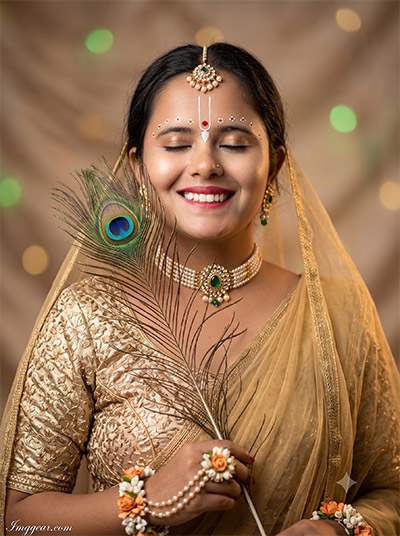
Master this serene closed-eye pose styled in golden ethnic attire, pearl jewelry, and bokeh lighting accents. Recreate this tranquil expression instantly by copying the instructions inside.
PROMPT
{
“image_label”: “Imggear.com_4”,
“version”: “3.5”,
“aspect_ratio”: “3:4”,
“prompt”: “Version: 3.5 An ultra-realistic, photorealistic premium masterpiece, preserving the exact identity, facial proportions, bone structure, eye depth, sharp jawline, authentic facial characteristics, and skin micro-textures (visible pores, fine lines) of the subject in the uploaded personal reference photo without alteration. The facial lighting must seamlessly fuse with the ambient scene highlights and cast realistic shadows, allowing the subject to naturally integrate with the environment’s lighting, shadows, depth, atmospheric perspective, and optical characteristics while preserving the subject’s true identity without alteration, seamlessly integrating the subject into this cinematic portrait, while maintaining complete identity consistency throughout the image. Female, apparent age 20, slender physical build. Render the subject with premium true-to-life human skin using PBR, preserving authentic skin pores, fine skin grain, natural melanin transitions, facial micro-contrast, subtle oil diffusion, organic facial imperfections, and realistic skin translucency. Captured using a full-frame professional mirrorless camera with an 85mm f/1.4 prime lens in RAW format, hyper-detailed edge sharpness, extreme high-definition micro-details on skin and fabric, natural optical rendering, and premium creamy bokeh. Volumetric light, studio lights, rim lighting, soft diffused shadows, elevated with vivid yet natural color saturation, deep punchy shadows, bright clean highlights, and strong tonal contrast. Apply premium editorial-grade color grading — warm highlights, rich mid-tones, natural skin tones — with enhanced micro-contrast and clarity. Subject stands with eyes closed and a joyful gentle smile, head tilted slightly, holding a large peacock feather vertically near the face. Wearing a metallic gold embroidered top and a sheer golden draped veil covering the shoulders. Adorned with a pearl and gold choker featuring a central green stone, matching earrings, forehead ornament, and floral wrist accessories. Facial details include a white U-shaped forehead mark with a red dot and white dotted patterns above the eyebrows. Soft, warm studio environment with a smooth, blurred background featuring subtle green and golden circular bokeh lights. Watermark: \”Imggear.com\” positioned in the bottom-left corner, Petit Formal Script font, thin elegant cursive strokes, soft white (#ffffff) color with slight transparency, minimal premium handwritten signature appearance, seamlessly blended with no background.”,
“negative_prompt”: “(plastic skin, waxy skin, CGI rendering, AI beauty filter look, porcelain skin, over-smoothed skin, airbrushed skin, synthetic textures, doll-like face, uncanny valley, artificial symmetry), (deformed face, distorted facial features, asymmetrical eyes, bad anatomy, bad proportions, extra limbs, extra fingers, missing fingers, malformed hands, mutated hands), (unnatural lighting, flat lighting, harsh direct sunlight, blown-out highlights, crushed shadows, oversaturated colors, neon colors, unrealistic color grading, HDR look, overexposed, underexposed), (blurry, out of focus, low resolution, pixelated, jpeg artifacts, grainy noise, motion blur, soft focus), (dry land, dusty ground, indoor background, wrong environment, mismatched background), (clothing logos, brand marks, trademarked patterns, text overlays, random watermark placement, duplicate watermark, extra signature), (cartoon style, illustration, painting, 3D render, anime, stylized art, digital art look), (identity mismatch, face swap artifacts, inconsistent facial features, altered bone structure, changed eye color, different face shape), (eyes open, missing pearl choker, harsh background lighting, missing feather).”
}
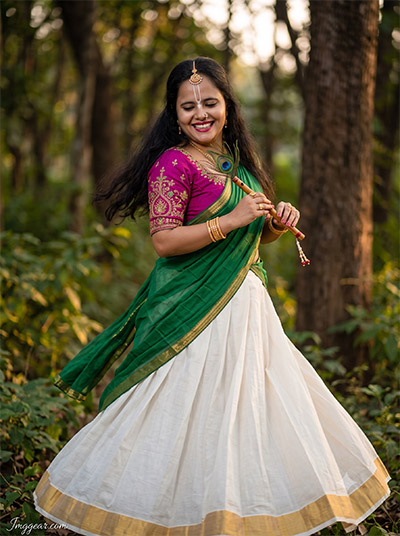
Blend natural forest surroundings with dynamic motion shots holding a bamboo flute, flowing lehenga, and warm golden hour light. Ready to bring your creative vision to life? Uncover the exact generator prompt right here.
PROMPT
{
“image_label”: “Imggear.com_5”,
“version”: “3.5”,
“aspect_ratio”: “3:4”,
“prompt”: “Version: 3.5 An ultra-realistic, photorealistic premium masterpiece, preserving the exact identity, facial proportions, bone structure, eye depth, sharp jawline, authentic facial characteristics, and skin micro-textures (visible pores, fine lines) of the subject in the uploaded personal reference photo without alteration. The facial lighting must seamlessly fuse with the ambient scene highlights and cast realistic shadows, allowing the subject to naturally integrate with the environment’s lighting, shadows, depth, atmospheric perspective, and optical characteristics while preserving the subject’s true identity without alteration, seamlessly integrating the subject into this cinematic portrait, while maintaining complete identity consistency throughout the image. Female, apparent age 24, slender physical build, narrow shoulders. Render the subject with premium true-to-life human skin using PBR, preserving authentic skin pores, fine skin grain, natural melanin transitions, facial micro-contrast, subtle oil diffusion, organic facial imperfections, and realistic skin translucency. Captured using a full-frame professional mirrorless camera with an 85mm f/1.4 prime lens in RAW format, hyper-detailed edge sharpness, extreme high-definition micro-details on skin and fabric, natural optical rendering, and premium creamy bokeh. Volumetric light, studio lights, rim lighting, soft diffused shadows, elevated with vivid yet natural color saturation, deep punchy shadows, bright clean highlights, and strong tonal contrast. Apply premium editorial-grade color grading — warm highlights, rich mid-tones, natural skin tones — with enhanced micro-contrast and clarity. Subject in a dynamic mid-twirl pose, looking down with a broad joyful smile, hands brought together holding a small decorated wooden flute and a peacock feather. Wearing a flowing white pleated skirt with a wide gold border, a magenta short-sleeved top with metallic embroidery, and a green draped fabric with pink patterned borders. Adorned with gold bangles, rings, a nose ring, and a forehead ornament. Facial details include a white U-shaped forehead mark with a red dot. Outdoor natural forest setting, lush green foliage and tall tree trunks softly blurred in the background. Watermark: \”Imggear.com\” positioned in the bottom-left corner, Petit Formal Script font, thin elegant cursive strokes, soft white (#ffffff) color with slight transparency, minimal premium handwritten signature appearance, seamlessly blended with no background.”,
“negative_prompt”: “(plastic skin, waxy skin, CGI rendering, AI beauty filter look, porcelain skin, over-smoothed skin, airbrushed skin, synthetic textures, doll-like face, uncanny valley, artificial symmetry), (deformed face, distorted facial features, asymmetrical eyes, bad anatomy, bad proportions, extra limbs, extra fingers, missing fingers, malformed hands, mutated hands), (unnatural lighting, flat lighting, harsh direct sunlight, blown-out highlights, crushed shadows, oversaturated colors, neon colors, unrealistic color grading, HDR look, overexposed, underexposed), (blurry, out of focus, low resolution, pixelated, jpeg artifacts, grainy noise, motion blur, soft focus), (dry land, dusty ground, indoor background, wrong environment, mismatched background), (clothing logos, brand marks, trademarked patterns, text overlays, random watermark placement, duplicate watermark, extra signature), (cartoon style, illustration, painting, 3D render, anime, stylized art, digital art look), (identity mismatch, face swap artifacts, inconsistent facial features, altered bone structure, changed eye color, different face shape), (stiff posture, motion blur on subject, missing flute, missing feather, incorrect skirt physics).”
}
Krishna Prompt Girl Forest Portrait AI Edit Guide
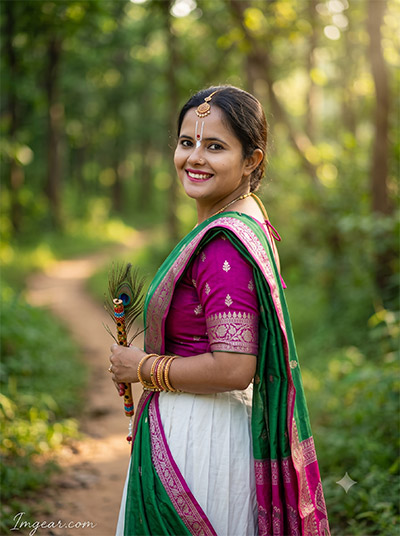
Frame lush woodland pathways using soft sunlight, a decorated bansuri, green saree accents, and Tilak markings. What unique outdoor concept will you create with this copy-paste formula?
PROMPT
{
“image_label”: “Imggear.com_6”,
“version”: “3.5”,
“aspect_ratio”: “3:4”,
“prompt”: “Version: 3.5 An ultra-realistic, photorealistic premium masterpiece, preserving the exact identity, facial proportions, bone structure, eye depth, sharp jawline, authentic facial characteristics, and skin micro-textures (visible pores, fine lines) of the subject in the uploaded personal reference photo without alteration. The facial lighting must seamlessly fuse with the ambient scene highlights and cast realistic shadows, allowing the subject to naturally integrate with the environment’s lighting, shadows, depth, atmospheric perspective, and optical characteristics while preserving the subject’s true identity without alteration, seamlessly integrating the subject into this cinematic portrait, while maintaining complete identity consistency throughout the image. Female, apparent age 24, slender physical build. Render the subject with premium true-to-life human skin using PBR, preserving authentic skin pores, fine skin grain, natural melanin transitions, facial micro-contrast, subtle oil diffusion, organic facial imperfections, and realistic skin translucency. Captured using a full-frame professional mirrorless camera with an 85mm f/1.4 prime lens in RAW format, hyper-detailed edge sharpness, extreme high-definition micro-details on skin and fabric, natural optical rendering, and premium creamy bokeh. Volumetric light, studio lights, rim lighting, soft diffused shadows, elevated with vivid yet natural color saturation, deep punchy shadows, bright clean highlights, and strong tonal contrast. Apply premium editorial-grade color grading — warm highlights, rich mid-tones, natural skin tones — with enhanced micro-contrast and clarity. Subject standing outdoors, torso turned away while looking back over the shoulder directly at the camera with a cheerful smile, holding a small decorated flute and a peacock feather. Wearing a magenta short-sleeved top with metallic embroidery, a white pleated skirt, and a green draped fabric with pink patterned borders. Adorned with gold bangles, a nose ring, and a forehead ornament. Facial details include a white U-shaped forehead mark with a red dot. Outdoor natural setting, a dirt path winding through lush green forest foliage, deeply blurred background. Watermark: \”Imggear.com\” positioned in the bottom-left corner, Petit Formal Script font, thin elegant cursive strokes, soft white (#ffffff) color with slight transparency, minimal premium handwritten signature appearance, seamlessly blended with no background.”,
“negative_prompt”: “(plastic skin, waxy skin, CGI rendering, AI beauty filter look, porcelain skin, over-smoothed skin, airbrushed skin, synthetic textures, doll-like face, uncanny valley, artificial symmetry), (deformed face, distorted facial features, asymmetrical eyes, bad anatomy, bad proportions, extra limbs, extra fingers, missing fingers, malformed hands, mutated hands), (unnatural lighting, flat lighting, harsh direct sunlight, blown-out highlights, crushed shadows, oversaturated colors, neon colors, unrealistic color grading, HDR look, overexposed, underexposed), (blurry, out of focus, low resolution, pixelated, jpeg artifacts, grainy noise, motion blur, soft focus), (dry land, dusty ground, indoor background, wrong environment, mismatched background), (clothing logos, brand marks, trademarked patterns, text overlays, random watermark placement, duplicate watermark, extra signature), (cartoon style, illustration, painting, 3D render, anime, stylized art, digital art look), (identity mismatch, face swap artifacts, inconsistent facial features, altered bone structure, changed eye color, different face shape), (awkward neck angle, missing flute, missing feather, indoor setting).”
}
💡 AI Photo Editing Pro Tips for Perfect Results
Keep Faces Consistent: If the AI changes the face, add this exact phrase to the very beginning of your prompt: “Preserve facial identity 100%, do not alter facial features or proportions.”
Reroll for Perfection: Run every prompt 2–3 times! The second or third generation is almost always sharper and packed with better details.
Get the DSLR Look: Want that beautiful, blurred background? Just add “f/1.8 shallow depth of field” to your prompt.
Control the Camera Shot: Tell the AI exactly what frame you want by adding terms like “Close-up portrait,” “Full-body shot,” or “Wide-angle view.”
Set the Vibe with Lighting: Lighting makes or breaks an AI image. Add “Cinematic lighting,” “Golden hour sunset,” or “Soft studio lighting” for a professional touch.
📐 Best Aspect Ratio: Use 3:4 Vertical for stunning, ready-to-post results on Instagram and Pinterest.