Frustrated by AI image generators distorting your face or producing blurry, artificial-looking festive pictures? You are not alone. Getting a flawless Ganesh Chaturthi 8k Realistic AI Photo Prompt that preserves your exact facial features while generating vibrant mandap backgrounds can be tricky. Luckily, using optimized text scripts for Gemini AI and ChatGPT solves this instantly. Below, you will find ready-to-use, copy-paste prompts designed to generate ultra-HD, studio-quality devotional photos in seconds.
Realistic Ganesh Chaturthi AI Photo Prompt for Ultra HD Edits
Capture authentic festival moments using this realistic Ganesh Chaturthi photo prompt that creates stunning high-resolution portraits of traditional celebrations. Try copying this exact prompt now to elevate your festive edits.
PROMPT
{
“image_label”: “Imggear.com_1”,
“version”: “3.5”,
“aspect_ratio”: “3:4”,
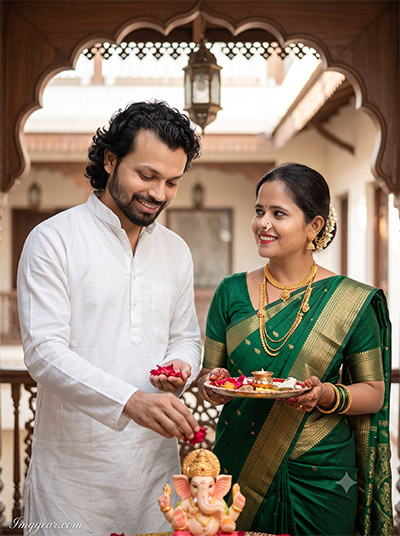
“prompt”: “An ultra-realistic, photorealistic premium masterpiece, preserving the exact identities, facial proportions, bone structure, eye depth, sharp jawlines, authentic facial characteristics, and skin micro-textures (visible pores, fine lines) of the young adult couple featured in the reference photo, seamlessly integrating them into this dynamic cinematic portrait while maintaining complete identity consistency. The subjects, a young adult man and woman, are captured in a close-up pose performing a traditional Hindu pooja (ritual). The man, on the left wearing a crisp white cotton kurta shirt, smiles down gently while holding and offering small red rose petals onto a miniature Ganesha idol. The woman, on the right, wears a rich emerald-green silk saree with intricate gold Zari borders and patterns, adorned with traditional gold jewelry (layered necklace, earrings, bangles, and nose ring); she holds a decorated pooja thali (plate) with offerings and looks towards the man with a warm smile. Both individuals exhibit realistic skin textures with pore-level detail and natural subsurface scattering. They stand in an elegantly decorated indoor courtyard/balcony setting with a distinctive wooden arched trim, ornate railing, and hanging lantern in the background. The lighting is soft, diffused natural light from the rear, casting realistic shadows. Shot on a full-frame professional mirrorless camera with an 85mm f/1.4 prime lens in RAW format, featuring hyper-detailed edge sharpness, extreme high-definition micro-details on skin and fabric, natural optical rendering, and premium creamy bokeh in the background. The image has an aspect ratio of 3:4. The watermark ‘Imggear.com’ appears in the bottom-left corner in a thin, elegant Petit Formal Script font, soft white with slight transparency.”,
“negative_prompt”: “(plastic skin, waxy skin, CGI rendering, AI beauty filter look, porcelain skin, over-smoothed skin, airbrushed skin, synthetic textures, doll-like face, uncanny valley, artificial symmetry), (deformed face, distorted facial features, asymmetrical eyes, bad anatomy, bad proportions, extra limbs, extra fingers, missing fingers, malformed hands, mutated hands), (unnatural lighting, flat lighting, harsh direct sunlight, blown-out highlights, crushed shadows, oversaturated colors, neon colors, unrealistic color grading, HDR look, overexposed, underexposed), (blurry, out of focus, low resolution, pixelated, jpeg artifacts, grainy noise, motion blur, soft focus), (dry land, dusty ground, indoor background, wrong environment, mismatched background), (clothing logos, brand marks, trademarked patterns, text overlays, random watermark placement, duplicate watermark, extra signature), (cartoon style, illustration, painting, 3D render, anime, stylized art, digital art look), (identity mismatch, face swap artifacts, inconsistent facial features, altered bone structure, changed eye color, different face shape)”
}
Design Festive Couple Portraits with This Ganesh Chaturthi AI Photo Prompt
Discover how to generate warm, studio-quality Indian couple celebration pictures featuring vibrant idols and golden backgrounds. Which custom festive style will you recreate first?
PROMPT
{
“image_label”: “Imggear.com_3”,
“version”: “3.5”,
“aspect_ratio”: “3:4”,
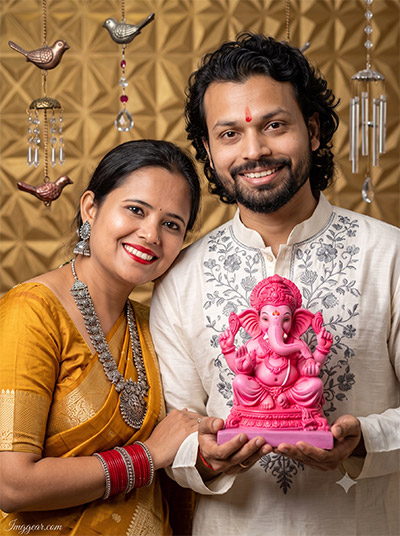
“prompt”: “An ultra-realistic, photorealistic premium masterpiece, preserving the exact identities, facial proportions, bone structure, eye depth, sharp jawlines, authentic facial characteristics, and skin micro-textures (visible pores, fine lines) of the adult couple in the reference photo, seamlessly integrating them into this detailed close-up shot while maintaining complete identity consistency. The subjects, an adult man and woman, are posed closely together, smiling at the camera. The man, on the right, holds a detailed, bright pink Ganesha idol with both hands, presenting it. He wears a premium off-white kurta with intricate grey floral embroidery and has a red tilak (mark) on his forehead. The woman, on the left, leans slightly on the man’s shoulder, looking warmly at the camera; she wears a rich golden-yellow saree and heavy traditional silver jewelry (necklace, large earrings) and multiple red bangles. Both individuals have realistic skin textures with visible pores and natural subsurface scattering. The background is an ornate interior with a textured golden geometric wall pattern and decorative hanging ornaments (birds, crystal chimes). The lighting is bright and directional, highlighting facial details and the colors of the idol. Shot on a full-frame professional mirrorless camera with an 85mm f/1.4 prime lens in RAW format, featuring hyper-detailed edge sharpness, extreme high-definition micro-details on skin and fabric, natural optical rendering, and premium creamy bokeh. Aspect ratio 3:4. The watermark ‘Imggear.com’ is located in the bottom-left corner in a thin, elegant Petit Formal Script font, soft white with slight transparency.”,
“negative_prompt”: “(plastic skin, waxy skin, CGI rendering, AI beauty filter look, porcelain skin, over-smoothed skin, airbrushed skin, synthetic textures, doll-like face, uncanny valley, artificial symmetry), (deformed face, distorted facial features, asymmetrical eyes, bad anatomy, bad proportions, extra limbs, extra fingers, missing fingers, malformed hands, mutated hands), (unnatural lighting, flat lighting, harsh direct sunlight, blown-out highlights, crushed shadows, oversaturated colors, neon colors, unrealistic color grading, HDR look, overexposed, underexposed), (blurry, out of focus, low resolution, pixelated, jpeg artifacts, grainy noise, motion blur, soft focus), (dry land, dusty ground, outdoor background, wrong environment, mismatched background), (clothing logos, brand marks, trademarked patterns, text overlays, random watermark placement, duplicate watermark, extra signature), (cartoon style, illustration, painting, 3D render, anime, stylized art, digital art look), (identity mismatch, face swap artifacts, inconsistent facial features, altered bone structure, changed eye color, different face shape), (visible wires, cluttered background)”
}
Craft High-Resolution Festive Images with This Ganesh Chaturthi AI Prompt
Transform simple ideas into striking traditional prayer scenes complete with vibrant silk attire and detailed backdrop setups. Grab the free prompt now and start generating your own cultural photos.
PROMPT
{
“image_label”: “Imggear.com_4”,
“version”: “3.5”,
“aspect_ratio”: “3:4”,
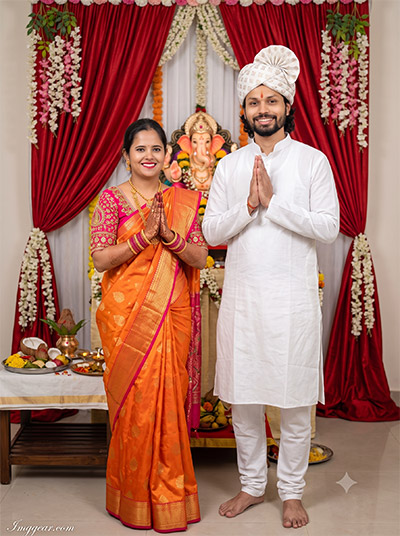
“prompt”: “An ultra-realistic, photorealistic premium masterpiece, preserving the exact identities, facial proportions, bone structure, eye depth, sharp jawlines, authentic facial characteristics, and skin micro-textures (visible pores, fine lines) of the adult couple in the reference photo, seamlessly integrating them into this full-body indoor standing portrait while maintaining complete identity consistency. The subjects, an adult man and woman, are standing symmetrically and smiling at the camera. The man, on the right, wears a traditional white kurta with texture and white pajamas, paired with a white patterned turban; his hands are held in a namaste (prayer) pose. The woman, on the left, wears a vibrant orange silk saree with intricate gold patterns, paired with a heavily embroidered pink blouse and traditional gold jewelry (necklace, earrings, bangles, floral hair ornament); her hands are also held in namaste. Both display realistic skin with visible pores. They stand on a clean indoor floor. The background features a decorated altar with a Ganesha idol flanked by large red silk curtains and cascading floral garlands. A table with pooja offerings is visible to the left. The lighting is diffused ambient indoor light, bright and even, with soft highlights. Shot on a full-frame professional mirrorless camera with an 85mm f/1.4 prime lens in RAW format, featuring hyper-detailed edge sharpness, extreme high-definition micro-details on skin and fabric, natural optical rendering, and premium creamy bokeh. Aspect ratio 3:4. The watermark ‘Imggear.com’ is placed in the bottom-left corner in a thin, elegant Petit Formal Script font, soft white with slight transparency.”,
“negative_prompt”: “(plastic skin, waxy skin, CGI rendering, AI beauty filter look, porcelain skin, over-smoothed skin, airbrushed skin, synthetic textures, doll-like face, uncanny valley, artificial symmetry), (deformed face, distorted facial features, asymmetrical eyes, bad anatomy, bad proportions, extra limbs, extra fingers, missing fingers, malformed hands, mutated hands), (unnatural lighting, flat lighting, harsh direct sunlight, blown-out highlights, crushed shadows, oversaturated colors, neon colors, unrealistic color grading, HDR look, overexposed, underexposed), (blurry, out of focus, low resolution, pixelated, jpeg artifacts, grainy noise, motion blur, soft focus), (dry land, dusty ground, outdoor background, wrong environment, mismatched background), (clothing logos, brand marks, trademarked patterns, text overlays, random watermark placement, duplicate watermark, extra signature), (cartoon style, illustration, painting, 3D render, anime, stylized art, digital art look), (identity mismatch, face swap artifacts, inconsistent facial features, altered bone structure, changed eye color, different face shape), (visible wires, clutter)”
}
Authentic Vinayaka Chaturthi AI Image Generator Prompts to Try
Realize stunningly lifelike home shrine portraits featuring elegant traditional attire and warm festive lighting with this simple formula. Drop a comment below if you want more prompt variations like this.
PROMPT
{
“image_label”: “Imggear.com_5”,
“version”: “3.5”,
“aspect_ratio”: “3:4”,
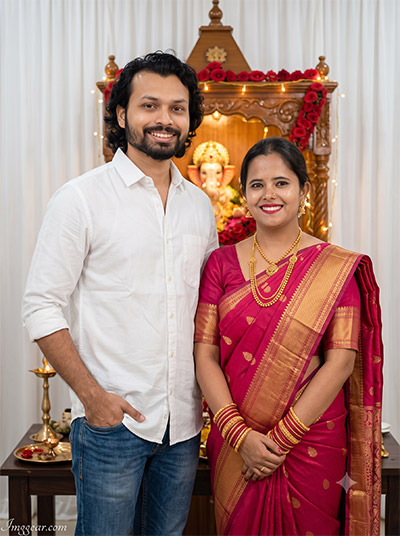
“prompt”: “An ultra-realistic, photorealistic premium masterpiece, preserving the exact identities, facial proportions, bone structure, eye depth, sharp jawlines, authentic facial characteristics, and skin micro-textures (visible pores, fine lines) of the adult couple in the reference photo, seamlessly integrating them into this standing portrait while maintaining complete identity consistency. The subjects, an adult man and woman, are standing side-by-side and smiling directly at the camera. The man, on the left, wears a simple white premium cotton button-down shirt and blue denim jeans, his right hand casually in his pocket. The woman, on the right, wears a rich pink silk saree with elaborate gold borders and patterns, adorned with traditional gold jewelry (layered necklace, earrings) and multiple gold and red bangles. Both individuals exhibit realistic skin with pore-level detail. They stand in front of a traditionally decorated wooden altar housing a Ganesha idol, adorned with red rose garlands and string lights. A dark wooden table with pooja items and an oil lamp is visible in the foreground. The background is a clean white curtain. The lighting is ambient and warm, primarily from the string lights and indoor sources, casting natural highlights on skin and fabric. Shot on a full-frame professional mirrorless camera with an 85mm f/1.4 prime lens in RAW format, featuring hyper-detailed edge sharpness, extreme high-definition micro-details on skin and fabric, natural optical rendering, and premium creamy bokeh. Aspect ratio 3:4. The watermark ‘Imggear.com’ is located in the bottom-left corner in a thin, elegant Petit Formal Script font, soft white with slight transparency.”,
“negative_prompt”: “(plastic skin, waxy skin, CGI rendering, AI beauty filter look, porcelain skin, over-smoothed skin, airbrushed skin, synthetic textures, doll-like face, uncanny valley, artificial symmetry), (deformed face, distorted facial features, asymmetrical eyes, bad anatomy, bad proportions, extra limbs, extra fingers, missing fingers, malformed hands, mutated hands), (unnatural lighting, flat lighting, harsh direct sunlight, blown-out highlights, crushed shadows, oversaturated colors, neon colors, unrealistic color grading, HDR look, overexposed, underexposed), (blurry, out of focus, low resolution, pixelated, jpeg artifacts, grainy noise, motion blur, soft focus), (dry land, dusty ground, outdoor background, wrong environment, mismatched background), (clothing logos, brand marks, trademarked patterns, text overlays, random watermark placement, duplicate watermark, extra signature), (cartoon style, illustration, painting, 3D render, anime, stylized art, digital art look), (identity mismatch, face swap artifacts, inconsistent facial features, altered bone structure, changed eye color, different face shape), (visible wires, clutter)”
}
💡 AI Photo Editing Pro Tips for Perfect Results
Keep Faces Consistent: If the AI changes the face, add this exact phrase to the very beginning of your prompt: “Preserve facial identity 100%, do not alter facial features or proportions.”
Reroll for Perfection: Run every prompt 2–3 times! The second or third generation is almost always sharper and packed with better details.
Get the DSLR Look: Want that beautiful, blurred background? Just add “f/1.8 shallow depth of field” to your prompt.
Control the Camera Shot: Tell the AI exactly what frame you want by adding terms like “Close-up portrait,” “Full-body shot,” or “Wide-angle view.”
Set the Vibe with Lighting: Lighting makes or breaks an AI image. Add “Cinematic lighting,” “Golden hour sunset,” or “Soft studio lighting” for a professional touch.
📐 Best Aspect Ratio: Use 3:4 Vertical for stunning, ready-to-post results on Instagram and Pinterest.