Looking to generate stunning, photorealistic festival edits with a custom Ganpati Bappa AI Photo Prompt? Getting accurate facial expressions, realistic lighting, and detailed idol backgrounds can be frustrating when AI tools mangle features or alter skin tones. We tested dozens of prompt structures across Gemini AI and ChatGPT to curate ready-to-use, copy-paste formulas that preserve your exact facial identity. Preview our top viral prompts below to generate 4K devotional portraits for Instagram and WhatsApp in seconds!
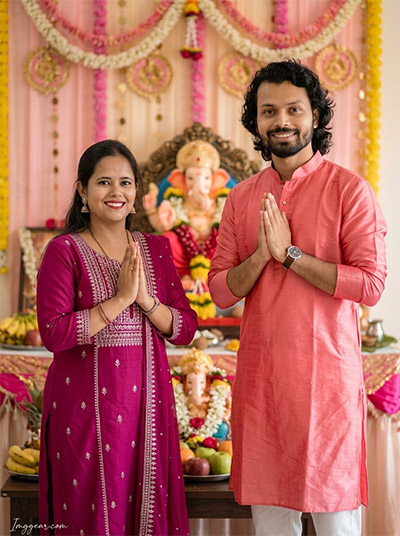
Create Vibrant Festive Images with Ganpati Bappa AI Photo Prompts
Transform your festive portrait into a stunning festival celebration with our custom prompt guide. Copy the prompt today to design your own perfect devotion-themed portrait.
PROMPT
{
“image_label”: “Imggear.com_1”,
“version”: “3.5”,
“aspect_ratio”: “3:4”,
“prompt”: “An ultra-realistic, photorealistic premium masterpiece, preserving the exact identity, facial proportions, bone structure, eye depth, sharp jawline, authentic facial characteristics, and skin micro-textures (visible pores, fine lines) of the subject in the uploaded personal reference photo without alteration. The facial lighting must seamlessly fuse with the ambient scene highlights and cast realistic shadows, allowing the subject to naturally integrate with the environment’s lighting, shadows, depth, atmospheric perspective, and optical characteristics while preserving the subject’s true identity without alteration, seamlessly integrating the subject into this festive cultural portrait, while maintaining complete identity consistency throughout the image. A female subject approximately 25-30 years old with slender build stands on the left in Namaste posture with a warm smile, beside a male subject approximately 30-35 years old of athletic build on the right in Namaste posture. The female wears a magenta ethnic long kurti suit with silver embroidery and matching trousers; the male wears a bright coral pink silk kurta with white trousers and wrist watch. Captured using a full-frame professional mirrorless camera with an 85mm f/1.4 prime lens in RAW format, hyper-detailed edge sharpness, extreme high-definition micro-details on skin and fabric, natural optical rendering, and premium creamy bokeh. Indoor festival altar with a decorated Ganesha idol, pink decorations, floral garlands, and fruit offerings. Soft ambient lighting with PBR skin translucency, warm highlights, and deep shadows. Minimalist thin cursive handwritten signature watermark reading \”Imggear.com\” in soft white (#ffffff) with subtle transparency located in the bottom-left corner.”,
“negative_prompt”: “(plastic skin, waxy skin, CGI rendering, AI beauty filter look, porcelain skin, over-smoothed skin, airbrushed skin, synthetic textures, doll-like face, uncanny valley, artificial symmetry), (deformed face, distorted facial features, asymmetrical eyes, bad anatomy, bad proportions, extra limbs, extra fingers, missing fingers, malformed hands, mutated hands), (unnatural lighting, flat lighting, harsh direct sunlight, blown-out highlights, crushed shadows, oversaturated colors, neon colors, unrealistic color grading, HDR look, overexposed, underexposed), (blurry, out of focus, low resolution, pixelated, jpeg artifacts, grainy noise, motion blur, soft focus), (dry land, dusty ground, indoor background, wrong environment, mismatched background), (clothing logos, brand marks, trademarked patterns, text overlays, random watermark placement, duplicate watermark, extra signature), (cartoon style, illustration, painting, 3D render, anime, stylized art, digital art look), (identity mismatch, face swap artifacts, inconsistent facial features, altered bone structure, changed eye color, different face shape), hair description, modern casualwear, cluttered background.”
}
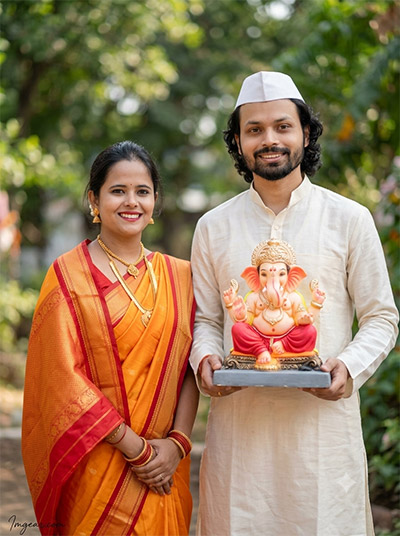
Master Traditional Festivities with Lord Ganesha AI Editing Prompts
Generate realistic outdoor Marathi couple pictures holding idol artwork effortlessly with smart text commands. Ready to give your social feed a cultural upgrade?
PROMPT
{
“image_label”: “Imggear.com_2”,
“version”: “3.5”,
“aspect_ratio”: “3:4”,
“prompt”: “An ultra-realistic, photorealistic premium masterpiece, preserving the exact identity, facial proportions, bone structure, eye depth, sharp jawline, authentic facial characteristics, and skin micro-textures (visible pores, fine lines) of the subject in the uploaded personal reference photo without alteration. The facial lighting must seamlessly fuse with the ambient scene highlights and cast realistic shadows, allowing the subject to naturally integrate with the environment’s lighting, shadows, depth, atmospheric perspective, and optical characteristics while preserving the subject’s true identity without alteration, seamlessly integrating the subject into this vibrant outdoor festival portrait, while maintaining complete identity consistency throughout the image. A female subject approximately 22-27 years old with slender build stands on the left in a saffron orange silk saree with red borders and gold jewelry, beside a male subject approximately 25-30 years old with medium build on the right wearing an off-white kurta and white cap, holding a tray with a Ganesha idol. Captured using a full-frame professional mirrorless camera with an 85mm f/1.4 prime lens in RAW format, hyper-detailed edge sharpness, extreme high-definition micro-details on skin and fabric, natural optical rendering, and premium creamy bokeh. Outdoor tropical background with soft natural daylight and greenery bokeh. PBR skin rendering with realistic translucency. Minimalist thin cursive handwritten signature watermark reading \”Imggear.com\” in soft white (#ffffff) with subtle transparency located in the bottom-left corner.”,
“negative_prompt”: “(plastic skin, waxy skin, CGI rendering, AI beauty filter look, porcelain skin, over-smoothed skin, airbrushed skin, synthetic textures, doll-like face, uncanny valley, artificial symmetry), (deformed face, distorted facial features, asymmetrical eyes, bad anatomy, bad proportions, extra limbs, extra fingers, missing fingers, malformed hands, mutated hands), (unnatural lighting, flat lighting, harsh direct sunlight, blown-out highlights, crushed shadows, oversaturated colors, neon colors, unrealistic color grading, HDR look, overexposed, underexposed), (blurry, out of focus, low resolution, pixelated, jpeg artifacts, grainy noise, motion blur, soft focus), (dry land, dusty ground, indoor background, wrong environment, mismatched background), (clothing logos, brand marks, trademarked patterns, text overlays, random watermark placement, duplicate watermark, extra signature), (cartoon style, illustration, painting, 3D render, anime, stylized art, digital art look), (identity mismatch, face swap artifacts, inconsistent facial features, altered bone structure, changed eye color, different face shape), hair description, indoor backdrop, modern western attire.”
}
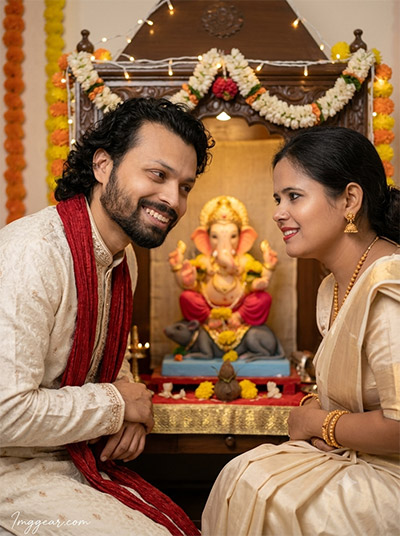
Design Warm Puja Moments Using Ganesh Chaturthi AI Prompts
Bring cozy home temple portraits to life with golden warm fairy lights and authentic traditional attire styling. Tap here to discover how easy it is to recreate this aesthetic.
PROMPT
{
“image_label”: “Imggear.com_3”,
“version”: “3.5”,
“aspect_ratio”: “3:4”,
“prompt”: “An ultra-realistic, photorealistic premium masterpiece, preserving the exact identity, facial proportions, bone structure, eye depth, sharp jawline, authentic facial characteristics, and skin micro-textures (visible pores, fine lines) of the subject in the uploaded personal reference photo without alteration. The facial lighting must seamlessly fuse with the ambient scene highlights and cast realistic shadows, allowing the subject to naturally integrate with the environment’s lighting, shadows, depth, atmospheric perspective, and optical characteristics while preserving the subject’s true identity without alteration, seamlessly integrating the subject into this intimate festive portrait, while maintaining complete identity consistency throughout the image. A male subject approximately 25-30 years old with lean build on the left wearing an off-white embroidered kurta with a red stole leans in with a joyful smile, alongside a female subject approximately 20-25 years old with petite build on the right in a cream silk outfit with gold jewelry leaning in toward a decorated Ganesha shrine. Captured using a full-frame professional mirrorless camera with an 85mm f/1.4 prime lens in RAW format, hyper-detailed edge sharpness, extreme high-definition micro-details on skin and fabric, natural optical rendering, and premium creamy bokeh. Indoor festival setup with fairy lights, floral garlands, and a central Ganesha idol on a Mooshak base. Warm illumination, PBR skin texture, and soft contrast. Minimalist thin cursive handwritten signature watermark reading \”Imggear.com\” in soft white (#ffffff) with subtle transparency located in the bottom-left corner.”,
“negative_prompt”: “(plastic skin, waxy skin, CGI rendering, AI beauty filter look, porcelain skin, over-smoothed skin, airbrushed skin, synthetic textures, doll-like face, uncanny valley, artificial symmetry), (deformed face, distorted facial features, asymmetrical eyes, bad anatomy, bad proportions, extra limbs, extra fingers, missing fingers, malformed hands, mutated hands), (unnatural lighting, flat lighting, harsh direct sunlight, blown-out highlights, crushed shadows, oversaturated colors, neon colors, unrealistic color grading, HDR look, overexposed, underexposed), (blurry, out of focus, low resolution, pixelated, jpeg artifacts, grainy noise, motion blur, soft focus), (dry land, dusty ground, indoor background, wrong environment, mismatched background), (clothing logos, brand marks, trademarked patterns, text overlays, random watermark placement, duplicate watermark, extra signature), (cartoon style, illustration, painting, 3D render, anime, stylized art, digital art look), (identity mismatch, face swap artifacts, inconsistent facial features, altered bone structure, changed eye color, different face shape), hair description, outdoor daylight, harsh shadows.”
}
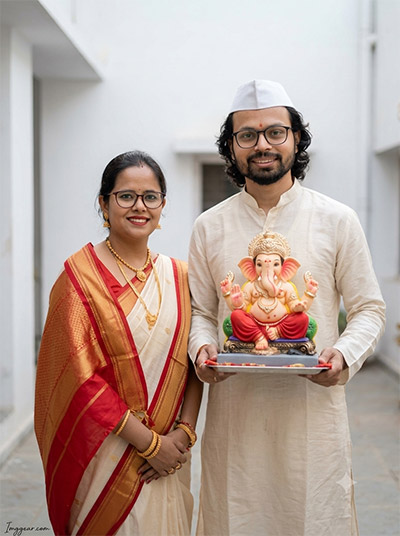
Minimalist Vinayaka Chaturthi Photo Prompts for Clean Couples Shots
Craft simple yet elegant portraits featuring traditional Maharashtrian outfits against bright modern backdrops. What style will you generate first?
PROMPT
{
“image_label”: “Imggear.com_4”,
“version”: “3.5”,
“aspect_ratio”: “3:4”,
“prompt”: “An ultra-realistic, photorealistic premium masterpiece, preserving the exact identity, facial proportions, bone structure, eye depth, sharp jawline, authentic facial characteristics, and skin micro-textures (visible pores, fine lines) of the subject in the uploaded personal reference photo without alteration. The facial lighting must seamlessly fuse with the ambient scene highlights and cast realistic shadows, allowing the subject to naturally integrate with the environment’s lighting, shadows, depth, atmospheric perspective, and optical characteristics while preserving the subject’s true identity without alteration, seamlessly integrating the subject into this candid outdoor festive portrait, while maintaining complete identity consistency throughout the image. A female subject approximately 28-33 years old with medium build wearing eyeglasses stands on the left in an off-white and red saree with gold borders, beside a male subject approximately 30-35 years old of medium build wearing eyeglasses and a white cap in an off-white kurta, holding a tray bearing a Ganesha idol. Captured using a full-frame professional mirrorless camera with an 85mm f/1.4 prime lens in RAW format, hyper-detailed edge sharpness, extreme high-definition micro-details on skin and fabric, natural optical rendering, and premium creamy bokeh. Courtyard setting with white walls under diffused outdoor daylight. True PBR skin micro-textures and balanced contrast. Minimalist thin cursive handwritten signature watermark reading \”Imggear.com\” in soft white (#ffffff) with subtle transparency located in the bottom-left corner.”,
“negative_prompt”: “(plastic skin, waxy skin, CGI rendering, AI beauty filter look, porcelain skin, over-smoothed skin, airbrushed skin, synthetic textures, doll-like face, uncanny valley, artificial symmetry), (deformed face, distorted facial features, asymmetrical eyes, bad anatomy, bad proportions, extra limbs, extra fingers, missing fingers, malformed hands, mutated hands), (unnatural lighting, flat lighting, harsh direct sunlight, blown-out highlights, crushed shadows, oversaturated colors, neon colors, unrealistic color grading, HDR look, overexposed, underexposed), (blurry, out of focus, low resolution, pixelated, jpeg artifacts, grainy noise, motion blur, soft focus), (dry land, dusty ground, indoor background, wrong environment, mismatched background), (clothing logos, brand marks, trademarked patterns, text overlays, random watermark placement, duplicate watermark, extra signature), (cartoon style, illustration, painting, 3D render, anime, stylized art, digital art look), (identity mismatch, face swap artifacts, inconsistent facial features, altered bone structure, changed eye color, different face shape), hair description, studio background, casual apparel.”
}
Floral Ganesha Festival Picture Prompts for Candid Couple Editing
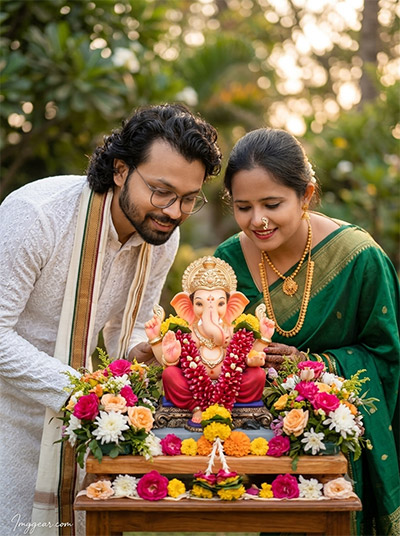
Capture intimate outdoor festive memories featuring rich green traditional attire and soft natural lighting using simple instructions. Grab the text prompt now and start creating instantly.
PROMPT
{
“image_label”: “Imggear.com_5”,
“version”: “3.5”,
“aspect_ratio”: “3:4”,
“prompt”: “An ultra-realistic, photorealistic premium masterpiece, preserving the exact identity, facial proportions, bone structure, eye depth, sharp jawline, authentic facial characteristics, and skin micro-textures (visible pores, fine lines) of the subject in the uploaded personal reference photo without alteration. The facial lighting must seamlessly fuse with the ambient scene highlights and cast realistic shadows, allowing the subject to naturally integrate with the environment’s lighting, shadows, depth, atmospheric perspective, and optical characteristics while preserving the subject’s true identity without alteration, seamlessly integrating the subject into this warm outdoor festive portrait, while maintaining complete identity consistency throughout the image. A male subject approximately 25-30 years old with lean build wearing eyeglasses leans in from the left in a white chikankari kurta and traditional stole, beside a female subject approximately 22-27 years old with slender build on the right in an emerald green saree with gold trim and nose ring. They lean toward a Ganesha idol on a wooden altar adorned with floral arrangements. Captured using a full-frame professional mirrorless camera with an 85mm f/1.4 prime lens in RAW format, hyper-detailed edge sharpness, extreme high-definition micro-details on skin and fabric, natural optical rendering, and premium creamy bokeh. Soft outdoor garden lighting with warm color grading and creamy bokeh. PBR skin texture. Minimalist thin cursive handwritten signature watermark reading \”Imggear.com\” in soft white (#ffffff) with subtle transparency located in the bottom-left corner.”,
“negative_prompt”: “(plastic skin, waxy skin, CGI rendering, AI beauty filter look, porcelain skin, over-smoothed skin, airbrushed skin, synthetic textures, doll-like face, uncanny valley, artificial symmetry), (deformed face, distorted facial features, asymmetrical eyes, bad anatomy, bad proportions, extra limbs, extra fingers, missing fingers, malformed hands, mutated hands), (unnatural lighting, flat lighting, harsh direct sunlight, blown-out highlights, crushed shadows, oversaturated colors, neon colors, unrealistic color grading, HDR look, overexposed, underexposed), (blurry, out of focus, low resolution, pixelated, jpeg artifacts, grainy noise, motion blur, soft focus), (dry land, dusty ground, indoor background, wrong environment, mismatched background), (clothing logos, brand marks, trademarked patterns, text overlays, random watermark placement, duplicate watermark, extra signature), (cartoon style, illustration, painting, 3D render, anime, stylized art, digital art look), (identity mismatch, face swap artifacts, inconsistent facial features, altered bone structure, changed eye color, different face shape), hair description, plain studio backdrop, western clothes.”
}
💡 AI Photo Editing Pro Tips for Perfect Results
Keep Faces Consistent: If the AI changes the face, add this exact phrase to the very beginning of your prompt: “Preserve facial identity 100%, do not alter facial features or proportions.”
Reroll for Perfection: Run every prompt 2–3 times! The second or third generation is almost always sharper and packed with better details.
Get the DSLR Look: Want that beautiful, blurred background? Just add “f/1.8 shallow depth of field” to your prompt.
Control the Camera Shot: Tell the AI exactly what frame you want by adding terms like “Close-up portrait,” “Full-body shot,” or “Wide-angle view.”
Set the Vibe with Lighting: Lighting makes or breaks an AI image. Add “Cinematic lighting,” “Golden hour sunset,” or “Soft studio lighting” for a professional touch.
📐 Best Aspect Ratio: Use 3:4 Vertical for stunning, ready-to-post results on Instagram and Pinterest.