Tired of generic AI photos that fail to get likes on social media? Using the right Funny iPhone 18 Pro Max Photo Prompt inside Gemini AI or ChatGPT is the fastest way to generate hilarious, photorealistic memes—from the viral “sold a kidney for an iPhone” hospital selfie to absurd Apple Store flexes. In this guide, you will get exact copy-paste AI prompts designed to keep your facial identity intact while delivering maximum comedy. Let’s dive in and start creating viral hits instantly! (88 words)
Funny iPhone 18 Pro Max Prompt For Kidney Trade Meme
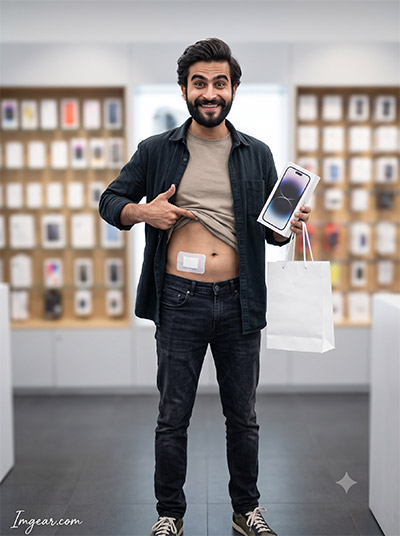
The classic meme about trading an organ for technology. See how AI visualizes this dark joke with a simple creative prompt in a convincing photograph style. Ready to generate your own hilarious concepts now
PROMPT
{
“prompt_id”: “iphone18_funny_boy_01”,
“title”: “Sold My Kidney for iPhone 18 Pro Max – Boy”,
“identity_preservation”: {
“face_match”: “100% identical to reference image, no face change”,
“no_alterations”: “no reshaping, no morphing, no beautification, no stylization”,
“preserve”: “exact facial proportions, contours, natural skin details, overall likeness”
},
“scene”: “Bright premium Apple-style showroom, soft diffused lighting, blurred display shelves in background”,
“funny_element”: “Small clean rectangular bandage on lower abdomen (non-graphic, no blood, no gore) as a playful ‘sold my kidney for this phone’ joke”,
“outfit”: “Plain t-shirt lifted slightly to show bandage, open overshirt, dark jeans, sneakers”,
“pose”: “Standing proudly, holding new iPhone and white shopping bag, one hand pointing at the bandage jokingly”,
“expression”: “Exaggerated proud ‘worth it’ smile, eyebrows raised dramatically”,
“location”: “Inside premium phone retail store”,
“camera_style”: “Shot on DSLR, 50mm lens, natural store lighting, shallow depth of field, high-end professional retouch”,
“quality_tags”: [“photorealistic”, “not AI looking”, “real skin texture”, “natural shadows”, “meme-style humor but realistic photo”],
“watermark”: {
“text”: “Imggear.com”,
“placement”: “bottom-left corner, seamlessly blended, no background box”,
“font_style”: “Petit Formal Script – thin elegant cursive strokes, minimal premium handwritten-signature look”,
“color”: “#FFFFFF with slight transparency”,
“letter_spacing”: “1px”
},
“aspect_ratio”: “3:4”
}
Create Hilarious Smartphone Meme Images With This AI Prompt
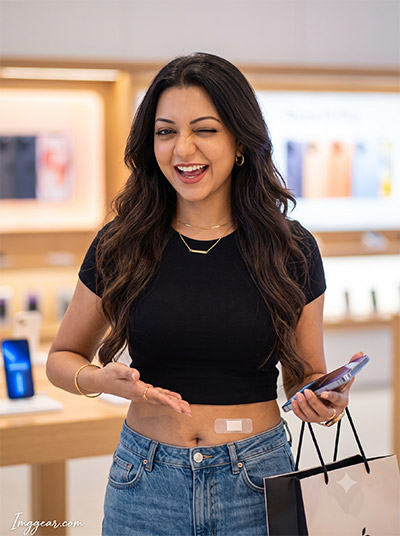
Ever wondered how to turn popular tech jokes into realistic photo renders? Recreate this viral smartphone meme concept using a simple text input. What crazy tech joke would you try generating next?
PROMPT
{
“prompt_id”: “iphone18_funny_girl_01”,
“title”: “Sold My Kidney for iPhone 18 Pro Max – Girl”,
“identity_preservation”: {
“face_match”: “100% identical to reference image, no face change”,
“no_alterations”: “no reshaping, no morphing, no beautification, no stylization”,
“preserve”: “exact facial proportions, contours, natural skin details, overall likeness”
},
“scene”: “Bright luxury Apple-style showroom, soft glowing lighting, blurred product displays behind”,
“funny_element”: “Small clean rectangular bandage peeking near lower abdomen (non-graphic, no blood, no gore) as a playful ‘sold my kidney for this phone’ joke”,
“outfit”: “Fitted crop top showing bandage slightly, high-waist jeans, minimal gold jewelry”,
“pose”: “Playful confident pose, holding iPhone and shopping bag, free hand dramatically gesturing toward the bandage”,
“expression”: “Exaggerated proud ‘totally worth it’ smile with a wink-like playful vibe”,
“location”: “Inside premium phone retail store”,
“camera_style”: “Shot on DSLR, 50mm lens, natural soft lighting, shallow bokeh, high-end professional retouch”,
“quality_tags”: [“photorealistic”, “not AI looking”, “real skin texture with natural glow”, “meme-style humor but realistic photo”],
“watermark”: {
“text”: “Imggear.com”,
“placement”: “bottom-left corner, seamlessly blended, no background box”,
“font_style”: “Petit Formal Script – thin elegant cursive strokes, minimal premium handwritten-signature look”,
“color”: “#FFFFFF with slight transparency”,
“letter_spacing”: “1px”
},
“aspect_ratio”: “3:4”
}
Empty Wallet Funny Apple Store AI Photo Prompt Idea
Capture pure post-purchase regret with an expressive image of buying the latest flagship phone. Learn how to craft realistic, humorous tech scenarios using simple text inputs. Grab the full prompt and test it out today
PROMPT
{
“prompt_id”: “iphone18_funny_boy_02”,
“title”: “EMI Life But Worth It – Boy”,
“identity_preservation”: {
“face_match”: “100% identical to reference image, no face change”,
“no_alterations”: “no reshaping, no morphing, no beautification, no stylization”,
“preserve”: “exact facial proportions, contours, natural skin details, overall likeness”
},
“scene”: “Bright Apple-style showroom, soft diffused lighting, blurred display shelves”,
“funny_element”: “Holding a fake torn wallet with a few coins falling out, exaggerated broke-but-happy comedy vibe”,
“outfit”: “Plain t-shirt, open overshirt, dark jeans, sneakers”,
“pose”: “One hand proudly holding new iPhone up high, other hand showing empty torn wallet”,
“expression”: “Dramatic half-crying half-smiling face, comedic exaggeration”,
“location”: “Inside premium phone retail store”,
“camera_style”: “Shot on DSLR, 50mm lens, natural lighting, shallow depth of field, high-end retouch”,
“quality_tags”: [“photorealistic”, “not AI looking”, “real skin texture”, “meme humor but realistic photo”],
“watermark”: {
“text”: “Imggear.com”,
“placement”: “bottom-left corner, seamlessly blended, no background box”,
“font_style”: “Petit Formal Script – thin elegant cursive strokes, minimal premium handwritten-signature look”,
“color”: “#FFFFFF with slight transparency”,
“letter_spacing”: “1px”
},
“aspect_ratio”: “3:4”
}
Broke Purse Funny iPhone 18 Pro Max Photo Prompt Guide
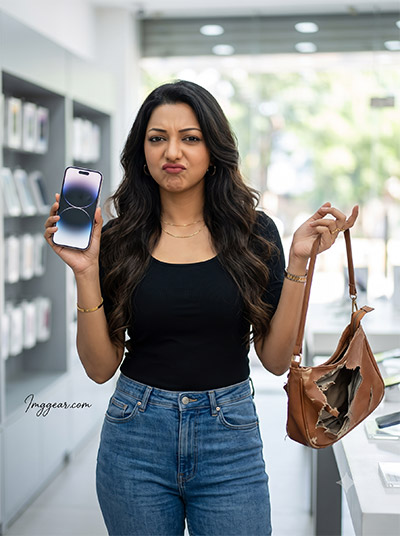
Realistically render hilarious tech shopping aftermaths using clever image generation inputs. This viral concept shows a woman holding a brand new device alongside a ripped, empty handbag. Discover the full prompt here to try it yourself
PROMPT
{
“prompt_id”: “iphone18_funny_girl_02”,
“title”: “EMI Life But Worth It – Girl”,
“identity_preservation”: {
“face_match”: “100% identical to reference image, no face change”,
“no_alterations”: “no reshaping, no morphing, no beautification, no stylization”,
“preserve”: “exact facial proportions, contours, natural skin details, overall likeness”
},
“scene”: “Bright luxury showroom, soft glowing lighting, blurred product displays”,
“funny_element”: “Holding an empty torn purse dramatically, comedic broke-but-happy vibe”,
“outfit”: “Fitted top, high-waist jeans, minimal jewelry”,
“pose”: “One hand holding iPhone up proudly, other hand tossing empty purse in air comically”,
“expression”: “Exaggerated dramatic pout mixed with proud smile”,
“location”: “Inside premium phone retail store”,
“camera_style”: “Shot on DSLR, 50mm lens, soft natural lighting, shallow bokeh, high-end retouch”,
“quality_tags”: [“photorealistic”, “not AI looking”, “real skin texture with natural glow”, “meme humor but realistic photo”],
“watermark”: {
“text”: “Imggear.com”,
“placement”: “bottom-left corner, seamlessly blended, no background box”,
“font_style”: “Petit Formal Script – thin elegant cursive strokes, minimal premium handwritten-signature look”,
“color”: “#FFFFFF with slight transparency”,
“letter_spacing”: “1px”
},
“aspect_ratio”: “3:4”
}
Hilarious Smartphone Baby Portrait Prompt Idea For Image Generation
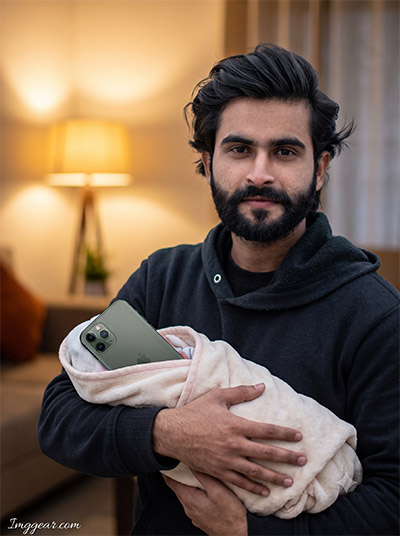
Treat your expensive new gadget like family with this ridiculous portrait style concept. Generative tools make it super easy to craft cozy lighting and surreal comedy photos in seconds. What hilarious photo concept should we prompt next
PROMPT
{
“prompt_id”: “iphone18_funny_boy_03”,
“title”: “Treating Phone Like a Baby – Boy”,
“identity_preservation”: {
“face_match”: “100% identical to reference image, no face change”,
“no_alterations”: “no reshaping, no morphing, no beautification, no stylization”,
“preserve”: “exact facial proportions, contours, natural skin details, overall likeness”
},
“scene”: “Cozy home living room, warm lamp lighting, softly blurred background”,
“funny_element”: “Phone wrapped in a soft baby blanket, holding it like a newborn baby”,
“outfit”: “Comfy hoodie, casual pants”,
“pose”: “Cradling wrapped phone gently in both arms like a baby, protective stance”,
“expression”: “Overly caring, emotional exaggerated fatherly expression”,
“location”: “Home living room”,
“camera_style”: “Shot on DSLR, warm cozy lighting, shallow bokeh, high-end professional retouch”,
“quality_tags”: [“photorealistic”, “candid comedic moment”, “real skin texture”, “no artificial smoothing”],
“watermark”: {
“text”: “Imggear.com”,
“placement”: “bottom-left corner, seamlessly blended, no background box”,
“font_style”: “Petit Formal Script – thin elegant cursive strokes, minimal premium handwritten-signature look”,
“color”: “#FFFFFF with slight transparency”,
“letter_spacing”: “1px”
},
“aspect_ratio”: “3:4”
}
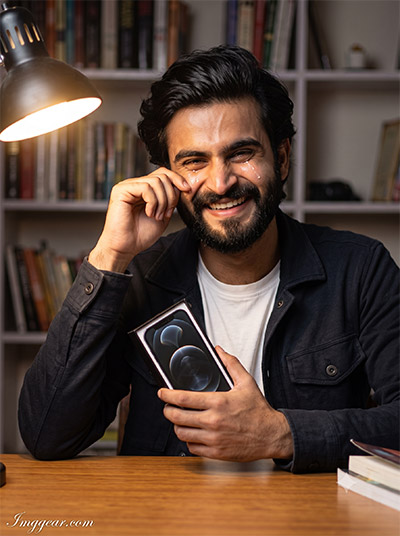
Crying Tears Of Joy iPhone Unboxing AI Image Prompt
Express overwhelming happiness and comedic emotion with dramatic warm desk lighting. Learn how subtle details like tears and realistic expressions bring this creative unboxing concept to life. Tap here to copy the prompt instantly
PROMPT
{
“prompt_id”: “iphone18_funny_boy_05”,
“title”: “Emotional Unboxing Tears – Boy”,
“identity_preservation”: {
“face_match”: “100% identical to reference image, no face change”,
“no_alterations”: “no reshaping, no morphing, no beautification, no stylization”,
“preserve”: “exact facial proportions, contours, natural skin details, overall likeness”
},
“scene”: “Study table setup, warm desk lamp light, softly blurred bookshelf background”,
“funny_element”: “Fake exaggerated happy tears rolling down cheeks while unboxing phone”,
“outfit”: “Plain white t-shirt, casual jacket”,
“pose”: “Sitting at desk, holding open phone box close to chest, hand wiping fake tear”,
“expression”: “Overdramatic emotional crying-with-joy expression”,
“location”: “Home study room / desk setup”,
“camera_style”: “Shot on DSLR, warm lighting, shallow bokeh, high-end professional retouch”,
“quality_tags”: [“photorealistic”, “candid comedic moment”, “real skin texture”, “no artificial smoothing”],
“watermark”: {
“text”: “Imggear.com”,
“placement”: “bottom-left corner, seamlessly blended, no background box”,
“font_style”: “Petit Formal Script – thin elegant cursive strokes, minimal premium handwritten-signature look”,
“color”: “#FFFFFF with slight transparency”,
“letter_spacing”: “1px”
},
“aspect_ratio”: “3:4”
}
Generate Emotional Unboxing Scenes With This Tech Meme AI Prompt
Show pure happiness by depicting a woman weeping with joy while clutching her brand new smartphone box in a cozy bedroom setting. Artificial intelligence allows you to easily design photorealistic character portraits with deep emotion. Give this text recipe a try now
PROMPT
{
“prompt_id”: “iphone18_funny_girl_05”,
“title”: “Emotional Unboxing Tears – Girl”,
“identity_preservation”: {
“face_match”: “100% identical to reference image, no face change”,
“no_alterations”: “no reshaping, no morphing, no beautification, no stylization”,
“preserve”: “exact facial proportions, contours, natural skin details, overall likeness”
},
“scene”: “Cozy aesthetic room, fairy lights softly blurred, warm lamp glow”,
“funny_element”: “Fake exaggerated happy tears rolling down cheeks while unboxing phone”,
“outfit”: “Oversized knit sweater, hair let down naturally”,
“pose”: “Sitting on bed, holding open phone box close to chest, hand dramatically wiping tear”,
“expression”: “Overdramatic emotional crying-with-joy expression”,
“location”: “Bedroom aesthetic setup”,
“camera_style”: “Shot on DSLR, warm cozy lighting, shallow bokeh, high-end professional retouch”,
“quality_tags”: [“photorealistic”, “candid comedic moment”, “real skin texture”, “no artificial smoothing”],
“watermark”: {
“text”: “Imggear.com”,
“placement”: “bottom-left corner, seamlessly blended, no background box”,
“font_style”: “Petit Formal Script – thin elegant cursive strokes, minimal premium handwritten-signature look”,
“color”: “#FFFFFF with slight transparency”,
“letter_spacing”: “1px”
},
“aspect_ratio”: “3:4”
}
💡 AI Photo Editing Pro Tips for Perfect Results
Keep Faces Consistent: If the AI changes the face, add this exact phrase to the very beginning of your prompt: “Preserve facial identity 100%, do not alter facial features or proportions.”
Reroll for Perfection: Run every prompt 2–3 times! The second or third generation is almost always sharper and packed with better details.
Get the DSLR Look: Want that beautiful, blurred background? Just add “f/1.8 shallow depth of field” to your prompt.
Control the Camera Shot: Tell the AI exactly what frame you want by adding terms like “Close-up portrait,” “Full-body shot,” or “Wide-angle view.”
Set the Vibe with Lighting: Lighting makes or breaks an AI image. Add “Cinematic lighting,” “Golden hour sunset,” or “Soft studio lighting” for a professional touch.
📐 Best Aspect Ratio: Use 3:4 Vertical for stunning, ready-to-post results on Instagram and Pinterest.