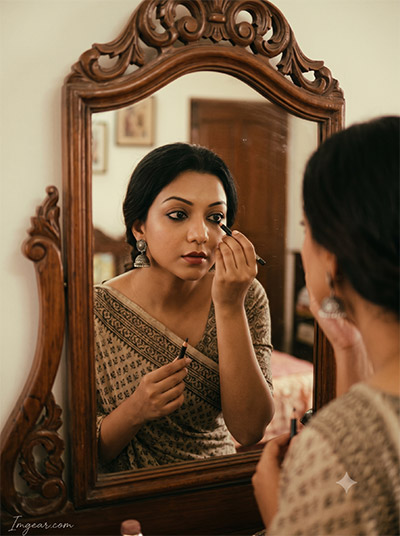
Are you struggling to recreate the viral traditional portrait trend with realistic reflections and authentic facial features? You are not alone—most generic image prompts leave your photo looking distorted or overly fake. Fortunately, with our tested Mirror Kajal Look AI Photo Editing Prompts, you can generate breathtaking, high-definition traditional portraits in seconds. Whether you choose Gemini AI or ChatGPT, this step-by-step prompt guide will help you craft flawless mirror reflections, soft cinematic lighting, and detailed kajal-lined eyes that stun on social media.
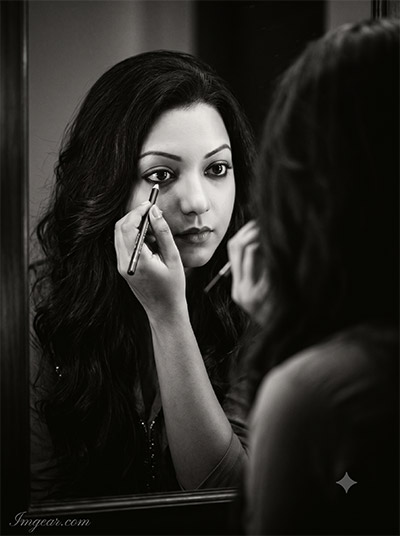
Create Dramatic Eye Makeup Visuals with Mirror Kajal Look AI Prompts
Master the art of generating intense monochrome portraits featuring reflective makeup application. Copy this easy prompt setup to level up your photography edits today.
PROMPT
{
“id”: 1,
“title”: “Cinematic B&W Kajal Portrait”,
“style”: “photorealistic, black-and-white, cinematic”,
“shot_type”: “close-up portrait”,
“aspect_ratio”: “3:4”,
“subject”: {
“source”: “uploaded reference image”,
“identity_preservation”: “preserving her exact facial features and identity”
},
“identity_lock”: {
“face_matching”: “Face must remain 100% identical to the reference image. No face change.”,
“no_alterations”: “Strictly NO reshaping, NO morphing, NO beautification, and NO stylization of facial features.”,
“mandatory_preservation”: “Maintain exact original facial proportions, contours, natural skin details, and overall likeness.”
},
“action”: “applying kajal while looking into a mirror”,
“setting”: “in front of a mirror”,
“wardrobe”: {
“outfit”: null,
“jewelry”: null,
“hair_accessories”: null,
“bindi”: null
},
“lighting”: null,
“camera”: null,
“composition”: null,
“visual_effects”: null,
“constraints”: null,
“watermark”: {
“text”: “Imggear.com”,
“placement”: “Bottom-left corner, seamlessly blended with no background.”,
“font_style”: “Petit Formal Script style, thin elegant cursive strokes, minimal premium handwritten-signature appearance.”,
“color_effects”: “Soft white (#FFFFFF) with slight transparency, 1px letter spacing.”
},
“notes”: “Original prompt defers styling/lighting/camera details to an external reference (\”Image1\”) not included in the text”
}
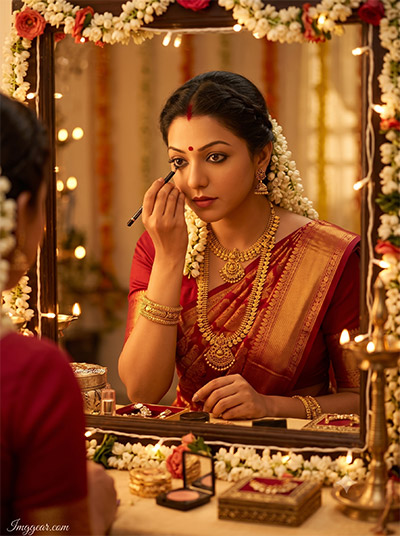
Traditional Festive Mirror Kajal AI Editing Prompt Ideas
Transform simple portraits into vibrant traditional bridal aesthetic photos with warm lighting and intricate details. How would you customize this gorgeous reflection style for your next photo batch?
PROMPT
{
“id”: 2,
“title”: “South Indian Bridal Kajal Look”,
“style”: “South Indian bridal, traditional”,
“shot_type”: null,
“aspect_ratio”: “3:4”,
“subject”: {
“source”: “uploaded adult woman”,
“identity_preservation”: “preserve her recognizable face”
},
“identity_lock”: {
“face_matching”: “Face must remain 100% identical to the reference image. No face change.”,
“no_alterations”: “Strictly NO reshaping, NO morphing, NO beautification, and NO stylization of facial features.”,
“mandatory_preservation”: “Maintain exact original facial proportions, contours, natural skin details, and overall likeness.”
},
“action”: “applying kajal in front of a decorated vanity mirror”,
“setting”: “decorated vanity mirror, bridal room”,
“wardrobe”: {
“outfit”: “rich silk saree”,
“jewelry”: “gold temple jewelry”,
“hair_accessories”: “jasmine flowers”,
“bindi”: “red bindi”
},
“lighting”: “soft golden bridal-room lighting”,
“camera”: null,
“composition”: null,
“visual_effects”: null,
“constraints”: null,
“watermark”: {
“text”: “Imggear.com”,
“placement”: “Bottom-left corner, seamlessly blended with no background.”,
“font_style”: “Petit Formal Script style, thin elegant cursive strokes, minimal premium handwritten-signature appearance.”,
“color_effects”: “Soft white (#FFFFFF) with slight transparency, 1px letter spacing.”
},
“notes”: null
}
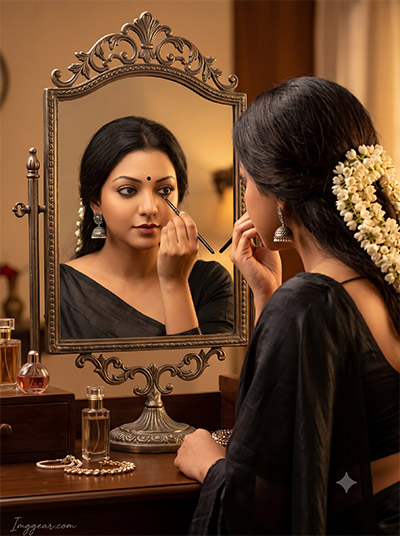
Vintage Vanity Reflection AI Prompts for Aesthetic Eye Makeup Portraits
Recreate this elegant dark saree look using vintage brass mirror details, subtle gajra styling, and soft indoor lighting. Grab the exact text prompt below and try it out!
PROMPT
{
“id”: 3,
“title”: “Elegant Indian Kajal Look”,
“style”: “elegant Indian”,
“shot_type”: null,
“aspect_ratio”: “3:4”,
“subject”: {
“source”: “uploaded adult woman”,
“identity_preservation”: “preserve her recognizable face”
},
“identity_lock”: {
“face_matching”: “Face must remain 100% identical to the reference image. No face change.”,
“no_alterations”: “Strictly NO reshaping, NO morphing, NO beautification, and NO stylization of facial features.”,
“mandatory_preservation”: “Maintain exact original facial proportions, contours, natural skin details, and overall likeness.”
},
“action”: “applying kajal while looking into an antique mirror”,
“setting”: “antique mirror, dressing room”,
“wardrobe”: {
“outfit”: “black saree”,
“jewelry”: “silver jhumka earrings”,
“hair_accessories”: “jasmine flowers in her hair”,
“bindi”: “small black bindi”
},
“lighting”: “warm dressing-room light”,
“camera”: null,
“composition”: null,
“visual_effects”: null,
“constraints”: [“show one accurate mirror reflection”],
“watermark”: {
“text”: “Imggear.com”,
“placement”: “Bottom-left corner, seamlessly blended with no background.”,
“font_style”: “Petit Formal Script style, thin elegant cursive strokes, minimal premium handwritten-signature appearance.”,
“color_effects”: “Soft white (#FFFFFF) with slight transparency, 1px letter spacing.”
},
“notes”: null
}
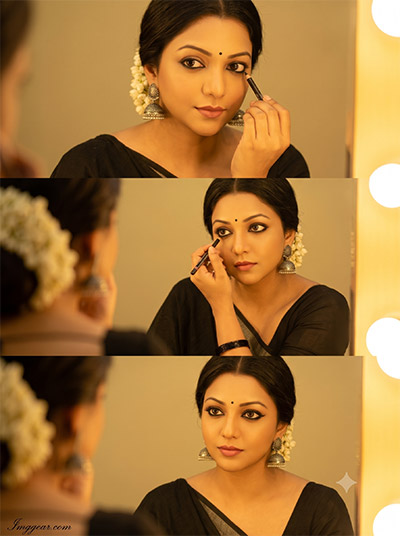
Step by Step Dressing Room Mirror Kajal Look AI Prompts
Craft a stunning three frame sequence capturing vanity light glows, jhumka earrings, and precise eye lining techniques. Unlock the secret formula to generate this storyboard layout right now!
PROMPT
{
“id”: 4,
“title”: “Three-Panel Kajal Application Grid”,
“style”: null,
“shot_type”: “three-panel vertical photo grid”,
“aspect_ratio”: “3:4”,
“subject”: {
“source”: “uploaded adult woman”,
“identity_preservation”: “keep the same recognizable face, outfit and lighting across all three panels”
},
“identity_lock”: {
“face_matching”: “Face must remain 100% identical to the reference image. No face change.”,
“no_alterations”: “Strictly NO reshaping, NO morphing, NO beautification, and NO stylization of facial features.”,
“mandatory_preservation”: “Maintain exact original facial proportions, contours, natural skin details, and overall likeness.”
},
“action”: “applying kajal in front of a mirror”,
“setting”: “in front of a mirror”,
“wardrobe”: {
“outfit”: “black saree”,
“jewelry”: “silver jhumkas”,
“hair_accessories”: “jasmine flowers”,
“bindi”: “small bindi”
},
“lighting”: “warm golden dressing-room light”,
“camera”: null,
“composition”: {
“panel_count”: 3,
“top”: “close-up of her holding the kajal near her eye”,
“middle”: “clear mirror reflection while applying kajal along the lower lash line”,
“bottom”: “finished kajal look as she gazes confidently into the mirror”
},
“visual_effects”: null,
“constraints”: [“three equal panels”, “no text”, “no extra people”],
“watermark”: {
“text”: “Imggear.com”,
“placement”: “Bottom-left corner, seamlessly blended with no background.”,
“font_style”: “Petit Formal Script style, thin elegant cursive strokes, minimal premium handwritten-signature appearance.”,
“color_effects”: “Soft white (#FFFFFF) with slight transparency, 1px letter spacing.”
},
“notes”: null
}
Wooden Mirror Kajal Look AI Photo Editing Prompts
Achieve a warm aesthetic in your digital photography by combining ornate carved wooden frames with earthy sarees and subtle eyeliner details. Which custom tweak will you try first?
PROMPT
{
“id”: 5,
“title”: “Retro 1970s Kajal Portrait”,
“style”: “retro 1970s cinematic analog film, reminiscent of 35mm film photography”,
“shot_type”: null,
“aspect_ratio”: “3:4”,
“subject”: {
“source”: “reference image”,
“identity_preservation”: “preserving her identical face”
},
“identity_lock”: {
“face_matching”: “Face must remain 100% identical to the reference image. No face change.”,
“no_alterations”: “Strictly NO reshaping, NO morphing, NO beautification, and NO stylization of facial features.”,
“mandatory_preservation”: “Maintain exact original facial proportions, contours, natural skin details, and overall likeness.”
},
“action”: “delicately applying traditional black kajal”,
“setting”: “ornate, vintage carved wooden vanity mirror”,
“wardrobe”: {
“outfit”: “simple vintage saree”,
“jewelry”: “classic silver jhumka earrings”,
“hair_accessories”: null,
“bindi”: null
},
“lighting”: null,
“camera”: null,
“composition”: null,
“visual_effects”: [“rich warm grain”, “subtle motion blur”, “soft focus”, “faded color palette”],
“watermark”: {
“text”: “Imggear.com”,
“placement”: “Bottom-left corner, seamlessly blended with no background.”,
“font_style”: “Petit Formal Script style, thin elegant cursive strokes, minimal premium handwritten-signature appearance.”,
“color_effects”: “Soft white (#FFFFFF) with slight transparency, 1px letter spacing.”
},
“notes”: null
}
💡 AI Photo Editing Pro Tips for Perfect Results
Keep Faces Consistent: If the AI changes the face, add this exact phrase to the very beginning of your prompt: “Preserve facial identity 100%, do not alter facial features or proportions.”
Reroll for Perfection: Run every prompt 2–3 times! The second or third generation is almost always sharper and packed with better details.
Get the DSLR Look: Want that beautiful, blurred background? Just add “f/1.8 shallow depth of field” to your prompt.
Control the Camera Shot: Tell the AI exactly what frame you want by adding terms like “Close-up portrait,” “Full-body shot,” or “Wide-angle view.”
Set the Vibe with Lighting: Lighting makes or breaks an AI image. Add “Cinematic lighting,” “Golden hour sunset,” or “Soft studio lighting” for a professional touch.
📐 Best Aspect Ratio: Use 3:4 Vertical for stunning, ready-to-post results on Instagram and Pinterest.