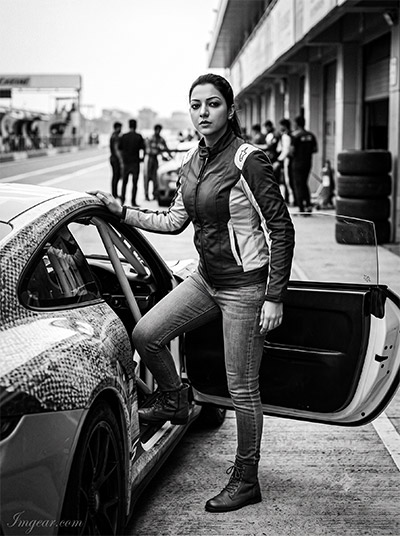
Generating dramatic, photorealistic monochrome automotive shots often feels impossible when image generators output washed-out contrast or synthetic lighting. Finding the exact cinematic black and white car photos prompts for Gemini AI and ChatGPT solves this instantly by giving you precise control over deep shadows, volumetric lighting, and high-fidelity film texture. Below, we preview the exact, copy-paste prompts designed to transform simple text inputs into high-contrast, editorial-grade automotive masterpieces across both Gemini AI and ChatGPT.
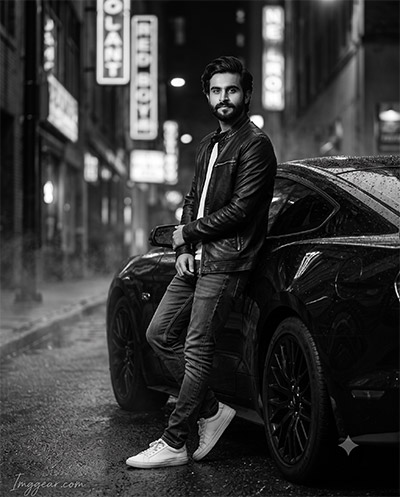
Capture Dramatic Noir Style with Monochrome Automotive Prompts
Elevate your vehicle photography using this AI prompt designed for moody noir aesthetics. Learn how light and wet pavement combine to create striking automotive portraits effortlessly. Ready to test this look on your next project?
PROMPT
{
“prompt_id”: 1,
“style_name”: “Neon Midnight Reflection”,
“subject_gender”: “male”,
“subject_description”: “Male subject from the reference photo, calm confident expression, gaze slightly off-camera”,
“outfit”: “Black leather jacket over a plain white tee, slim dark denim, white low-top sneakers”,
“car”: “Modern black sports coupe, glossy rain-slicked body”,
“pose”: “Leaning back against the front door, arms loosely crossed, ankles crossed”,
“background_setting”: “Narrow downtown street at night, neon signage reduced to soft gray bokeh, wet asphalt”,
“weather”: “Rain just stopped, damp road, faint ground mist”,
“lighting”: “Low-key hard key light from front-right sculpting jaw and car body; soft fill keeps the face fully visible despite deep shadows; specular highlights on wet asphalt”,
“color_grading”: “High-contrast monochrome, deep retained-detail blacks, silver-gelatin film look, fine natural grain”,
“camera_angle”: “Eye-level, front three-quarter angle”,
“lens_aperture”: “35mm equivalent, f/2.0, subject and car sharp, background soft”,
“aspect_ratio”: “4:5”,
“quality_enhancers”: “Photorealistic skin texture, sharp focus on eyes, cinematic tonal depth, 8K detail”,
“negative_prompt”: “no color tint, no warped car panels, no extra/distorted fingers, no blurred face, no distorted watermark, no extra logos or text”,
“identity_preservation”: {
“face_matching”: “Face must remain 100% identical to the reference image. No face change.”,
“no_alterations”: “Strictly NO reshaping, NO morphing, NO beautification, and NO stylization of facial features.”,
“mandatory_preservation”: “Maintain exact original facial proportions, contours, natural skin details, and overall likeness.”
},
“watermark”: {
“text”: “Imggear.com”,
“placement”: “Bottom-left corner, seamlessly blended with no background”,
“font_style”: “Petit Formal Script style, thin elegant cursive strokes, minimal premium handwritten-signature appearance”,
“color_effect”: “Soft white (#FFFFFF) with slight transparency, 1px letter spacing”
}
}
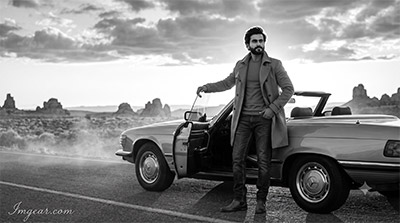
Classic Desert Roadtrip Prompts for Monochrome Vehicle Shots
Master the art of outdoor vintage aesthetics using monochrome car prompts that emphasize backlight and dramatic clouds. Perfect for giving open road portraits an effortless cinematic edge. Give this exact prompt a try today!
PROMPT
{
“prompt_id”: 2,
“style_name”: “Golden-Hour Rim Light on the Open Highway”,
“subject_gender”: “female”,
“subject_description”: “Female subject from the reference photo, relaxed and confident, head turned slightly toward the horizon”,
“outfit”: “Flowing lightweight trench coat open over a fitted top, straight-leg jeans, ankle boots”,
“car”: “Classic convertible, top down, chrome trim”,
“pose”: “Standing beside the open driver’s door, one hand on the door frame, weight on one hip”,
“background_setting”: “Open desert highway to a low horizon, scattered rock formations, dramatic cloud texture”,
“weather”: “Clear and dry, faint dust haze near the ground”,
“lighting”: “Warm backlight from the low sun rimming hair and shoulders, paired with soft frontal fill so the face stays fully visible and evenly lit rather than falling into silhouette”,
“color_grading”: “Wide tonal range from near-white sky to deep gray rock shadow, soft highlight bloom, fine film grain”,
“camera_angle”: “Low camera angle, wide shot”,
“lens_aperture”: “24mm equivalent, f/8, deep focus across subject, car, and landscape”,
“aspect_ratio”: “16:9”,
“quality_enhancers”: “Natural skin tone in grayscale, realistic hair movement, crisp landscape detail”,
“negative_prompt”: “no full silhouette on the face, no blown-out skin highlights, no color cast, no lens flare over the watermark, no motion blur on the face”,
“identity_preservation”: {
“face_matching”: “Face must remain 100% identical to the reference image. No face change.”,
“no_alterations”: “Strictly NO reshaping, NO morphing, NO beautification, and NO stylization of facial features.”,
“mandatory_preservation”: “Maintain exact original facial proportions, contours, natural skin details, and overall likeness.”
},
“watermark”: {
“text”: “Imggear.com”,
“placement”: “Bottom-left corner, seamlessly blended with no background”,
“font_style”: “Petit Formal Script style, thin elegant cursive strokes, minimal premium handwritten-signature appearance”,
“color_effect”: “Soft white (#FFFFFF) with slight transparency, 1px letter spacing”
}
}
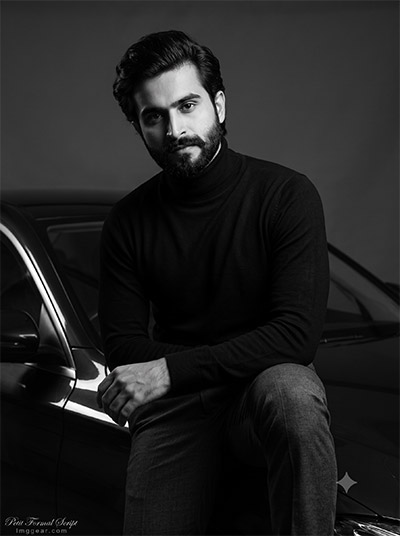
Studio Portrait Prompts for Sleek Monochrome Vehicle Edits
Recreate this high-end, studio-lit look featuring deep shadows and a minimalist turtleneck aesthetic using custom generative instructions. Perfect for sleek personal branding. Which luxury ride would you showcase with this concept?
PROMPT
{
“prompt_id”: 3,
“style_name”: “Studio Chiaroscuro Portrait”,
“subject_gender”: “male”,
“subject_description”: “Male subject from the reference photo, composed serious expression, slight downward chin tilt”,
“outfit”: “Fitted black turtleneck, tailored charcoal trousers”,
“car”: “Sleek dark sedan, partially visible at frame edge with one sharp highlight along its bodyline”,
“pose”: “Seated on the edge of the car’s hood, forearms on knees, leaning slightly toward camera”,
“background_setting”: “Bare studio backdrop, seamless dark gray paper, no props”,
“weather”: “Indoor studio — not applicable”,
“lighting”: “Single hard spotlight at 45 degrees (Rembrandt-style) forming a small triangle of light under the far eye; near side of the face stays clearly lit and identifiable despite heavy shadow on the far side”,
“color_grading”: “Deep punchy contrast, near-black background, crisp midtones on skin, minimal grain for a clean editorial finish”,
“camera_angle”: “Slightly low angle, medium shot”,
“lens_aperture”: “85mm equivalent, f/1.8, tack-sharp focus on the eyes”,
“aspect_ratio”: “4:5”,
“quality_enhancers”: “Studio-grade sharpness, refined tonal separation, natural skin micro-texture”,
“negative_prompt”: “no fully shadowed face, no clipped skin highlights, no over-smoothed plastic skin, no double shadows, no distorted watermark”,
“identity_preservation”: {
“face_matching”: “Face must remain 100% identical to the reference image. No face change.”,
“no_alterations”: “Strictly NO reshaping, NO morphing, NO beautification, and NO stylization of facial features.”,
“mandatory_preservation”: “Maintain exact original facial proportions, contours, natural skin details, and overall likeness.”
},
“watermark”: {
“text”: “Imggear.com”,
“placement”: “Bottom-left corner, seamlessly blended with no background”,
“font_style”: “Petit Formal Script style, thin elegant cursive strokes, minimal premium handwritten-signature appearance”,
“color_effect”: “Soft white (#FFFFFF) with slight transparency, 1px letter spacing”
}
}
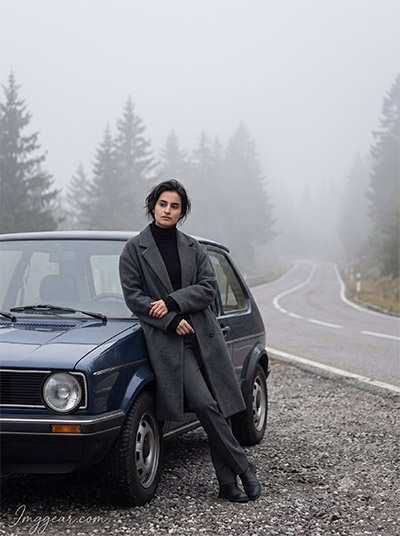
Foggy Mountain Road Ideas for Vintage Auto Photography Prompts
Generate atmospheric misty scenery paired with classic hatchback styling using specialized AI image prompts. Soft diffuse lighting brings out muted color tones along winding forest passes. Drop a comment with your favorite drive location!
PROMPT
{
“prompt_id”: 4,
“style_name”: “Foggy Mountain Pass Editorial”,
“subject_gender”: “female”,
“subject_description”: “Female subject from the reference photo, calm thoughtful expression, gazing down the road”,
“outfit”: “Oversized wool coat, fitted turtleneck, straight trousers, flat boots”,
“car”: “Compact vintage hatchback parked at a scenic pull-off”,
“pose”: “Leaning against the front fender, arms loosely folded, one foot crossed over the other”,
“background_setting”: “Winding mountain road disappearing into fog, layered pine silhouettes fading into mist”,
“weather”: “Overcast with rolling fog, faint drizzle”,
“lighting”: “Soft, even, diffused overcast daylight — naturally flattering and even across the face, gentle contrast on coat texture”,
“color_grading”: “Airy high-key grays, soft highlight roll-off, minimal grain, gentle fog-diffused glow”,
“camera_angle”: “Eye-level, medium-wide shot”,
“lens_aperture”: “50mm equivalent, f/4, subject and receding road both in focus”,
“aspect_ratio”: “16:9”,
“quality_enhancers”: “Natural fabric texture, soft atmospheric depth, editorial fashion polish”,
“negative_prompt”: “no harsh shadows on the face, no color tint in the fog, no flattened mountain layers, no over-sharpened background, no misplaced watermark”,
“identity_preservation”: {
“face_matching”: “Face must remain 100% identical to the reference image. No face change.”,
“no_alterations”: “Strictly NO reshaping, NO morphing, NO beautification, and NO stylization of facial features.”,
“mandatory_preservation”: “Maintain exact original facial proportions, contours, natural skin details, and overall likeness.”
},
“watermark”: {
“text”: “Imggear.com”,
“placement”: “Bottom-left corner, seamlessly blended with no background”,
“font_style”: “Petit Formal Script style, thin elegant cursive strokes, minimal premium handwritten-signature appearance”,
“color_effect”: “Soft white (#FFFFFF) with slight transparency, 1px letter spacing”
}
}
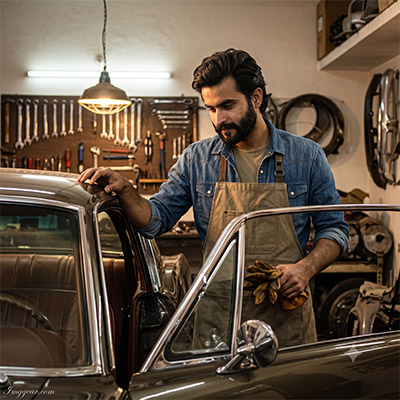
Vintage Mechanic Garage AI Prompts for Classic Car Scenes
Craft authentic workshop portraits filled with warm overhead lighting, leather details, and rustic tool displays. Transform basic ideas into detailed automotive art effortlessly. Grab the full prompt now to generate your own!
PROMPT
{
“prompt_id”: 5,
“style_name”: “Vintage Garage Craftsmanship”,
“subject_gender”: “male”,
“subject_description”: “Male subject from the reference photo, focused and quietly proud expression, looking down at the car”,
“outfit”: “Rolled-up denim shirt sleeves, canvas apron over a plain tee, worn leather gloves held in one hand”,
“car”: “Restored vintage muscle car with polished chrome trim and leather interior details”,
“pose”: “Standing at the open driver’s door, one hand on the chrome window frame, body angled three-quarters toward the car”,
“background_setting”: “Warm cluttered home garage — tool wall, hanging work lamp, soft-focus background”,
“weather”: “Indoor — not applicable”,
“lighting”: “Warm tungsten side light from a hanging work lamp raking across chrome and leather to reveal texture, with soft secondary fill keeping the face evenly and clearly lit”,
“color_grading”: “Rich tonal contrast, deep texture in metal and leather, moderate film grain for a hand-crafted feel”,
“camera_angle”: “Slightly low angle, medium shot favoring the chrome detail and subject’s hand”,
“lens_aperture”: “50mm equivalent, f/2.8”,
“aspect_ratio”: “1:1”,
“quality_enhancers”: “Tactile material detail on chrome and leather, natural skin and fabric texture, documentary authenticity”,
“negative_prompt”: “no plastic-looking chrome, no flattened texture, no lamp glare on the face, no warped hand or fingers, no watermark distortion”,
“identity_preservation”: {
“face_matching”: “Face must remain 100% identical to the reference image. No face change.”,
“no_alterations”: “Strictly NO reshaping, NO morphing, NO beautification, and NO stylization of facial features.”,
“mandatory_preservation”: “Maintain exact original facial proportions, contours, natural skin details, and overall likeness.”
},
“watermark”: {
“text”: “Imggear.com”,
“placement”: “Bottom-left corner, seamlessly blended with no background”,
“font_style”: “Petit Formal Script style, thin elegant cursive strokes, minimal premium handwritten-signature appearance”,
“color_effect”: “Soft white (#FFFFFF) with slight transparency, 1px letter spacing”
}
}
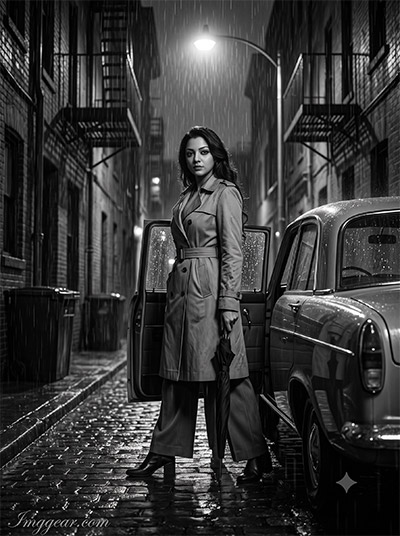
Rainy City Alley Prompts for Noir Style Automobile Photography
Recreate this atmospheric, film-noir render showcasing a trench-coat wearing figure standing by an open car door in a wet cobblestone lane. Achieve realistic rain reflections with simple prompts. Tap here to copy the prompt instantly!
PROMPT
{
“prompt_id”: 6,
“style_name”: “Rain-Soaked Noir Alley”,
“subject_gender”: “female”,
“subject_description”: “Female subject from the reference photo, composed slightly guarded expression, direct gaze at camera”,
“outfit”: “Belted trench coat, wide-leg trousers, low block-heel boots”,
“car”: “Classic sedan parked along a narrow alley, wet reflections along its length”,
“pose”: “Standing just behind the open rear door, holding a closed umbrella down at her side rather than overhead so it doesn’t shadow the face”,
“background_setting”: “Narrow noir-style alley, a single overhead street lamp, fire escapes fading into darkness”,
“weather”: “Steady light rain, wet cobblestones reflecting lamp light”,
“lighting”: “Single overhead street lamp as key light, forming a soft pool of light on the face and shoulders; deep shadows fill the rest of the alley without touching the face”,
“color_grading”: “Classic film-noir contrast, glossy black reflections, silvery highlights on raindrops, moderate grain”,
“camera_angle”: “Eye-level, medium shot”,
“lens_aperture”: “35mm equivalent, f/2.2, sharp focus on the face”,
“aspect_ratio”: “4:5”,
“quality_enhancers”: “Realistic rain droplet detail, natural wet-fabric sheen, cinematic noir mood”,
“negative_prompt”: “no umbrella shadow across the face, no color cast in reflections, no over-darkened face, no melted or streaked watermark”,
“identity_preservation”: {
“face_matching”: “Face must remain 100% identical to the reference image. No face change.”,
“no_alterations”: “Strictly NO reshaping, NO morphing, NO beautification, and NO stylization of facial features.”,
“mandatory_preservation”: “Maintain exact original facial proportions, contours, natural skin details, and overall likeness.”
},
“watermark”: {
“text”: “Imggear.com”,
“placement”: “Bottom-left corner, seamlessly blended with no background”,
“font_style”: “Petit Formal Script style, thin elegant cursive strokes, minimal premium handwritten-signature appearance”,
“color_effect”: “Soft white (#FFFFFF) with slight transparency, 1px letter spacing”
}
}
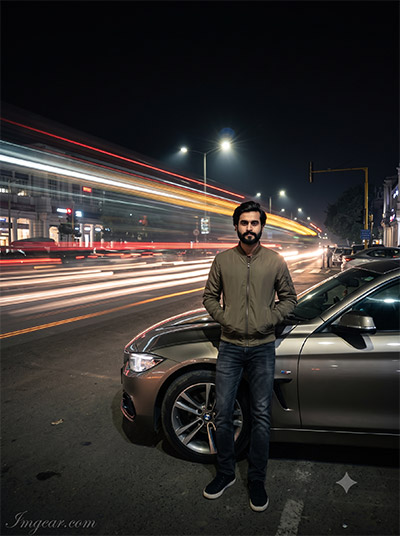
Long Exposure Night Street Prompts for Modern Car Photography
Recreate dynamic urban light trails and sharp vehicle portraits using tailored prompts for AI image generators. Blending slow shutter effects with street lighting creates stunning night energy. Want to copy this exact setup for your artwork?
PROMPT
{
“prompt_id”: 7,
“style_name”: “Long-Exposure Motion Trail”,
“subject_gender”: “male”,
“subject_description”: “Male subject from the reference photo, still and composed, steady direct gaze despite motion around him”,
“outfit”: “Fitted bomber jacket, dark jeans, minimal sneakers”,
“car”: “Modern coupe parked at the curb, held steady in frame”,
“pose”: “Standing perfectly still beside the front wheel, hands in jacket pockets, weight evenly balanced”,
“background_setting”: “Busy city intersection at night, passing traffic reduced to long light-trail streaks”,
“weather”: “Dry, clear night”,
“lighting”: “Ambient city light plus one soft key light locked onto the subject so only the background blurs; subject and car remain fully sharp and motion-free, including the face”,
“color_grading”: “High contrast between bright light trails and deep black background, clean sharp mid-tones on the subject, subtle grain”,
“camera_angle”: “Tripod-style locked-off eye-level shot”,
“lens_aperture”: “28mm equivalent, f/11, long-exposure effect isolated to the background”,
“aspect_ratio”: “16:9”,
“quality_enhancers”: “Crisp light-trail rendering, zero motion blur on the subject’s face and body”,
“negative_prompt”: “no motion blur on the subject or car, no ghosting on the face, no color in the light trails, no distorted watermark”,
“identity_preservation”: {
“face_matching”: “Face must remain 100% identical to the reference image. No face change.”,
“no_alterations”: “Strictly NO reshaping, NO morphing, NO beautification, and NO stylization of facial features.”,
“mandatory_preservation”: “Maintain exact original facial proportions, contours, natural skin details, and overall likeness.”
},
“watermark”: {
“text”: “Imggear.com”,
“placement”: “Bottom-left corner, seamlessly blended with no background”,
“font_style”: “Petit Formal Script style, thin elegant cursive strokes, minimal premium handwritten-signature appearance”,
“color_effect”: “Soft white (#FFFFFF) with slight transparency, 1px letter spacing”
}
}
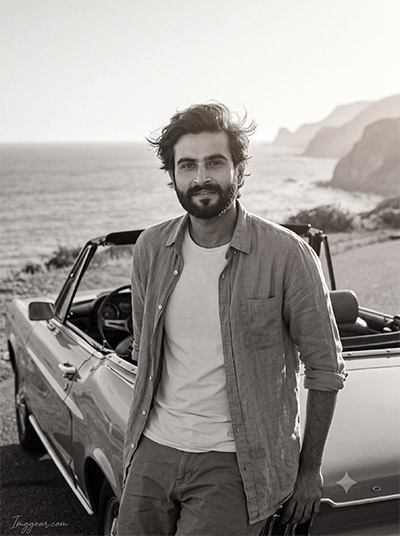
Coastal Highway Prompts for Black and White Convertible Photos
Design breezy, ocean-side portraits leaning against vintage convertibles with tailored AI generation inputs. Soft sunlight and coastal cliffs create an effortless film look. Explore the complete prompt inside!
PROMPT
{
“prompt_id”: 9,
“style_name”: “Coastal Backlit Wind”,
“subject_gender”: “male”,
“subject_description”: “Male subject from the reference photo, relaxed with a slight smile, eyes toward camera”,
“outfit”: “Open linen shirt over a plain tee, rolled sleeves, casual trousers”,
“car”: “Classic convertible parked on a coastal road, top down”,
“pose”: “Leaning against the rear of the car, one arm along the trunk edge, hair lightly lifted by the wind”,
“background_setting”: “Coastal road with the ocean behind, distant cliffs fading into haze”,
“weather”: “Breezy, clear late-afternoon light”,
“lighting”: “Warm backlight from low sun grazing hair and shoulders, softened by a frontal reflector-style fill so the face stays fully bright and clearly visible”,
“color_grading”: “Soft airy tonal range with gentle highlight glow, deep gray ocean tones, fine natural grain”,
“camera_angle”: “Eye-level, medium shot”,
“lens_aperture”: “50mm equivalent, f/2.8, background softly compressed”,
“aspect_ratio”: “16:9”,
“quality_enhancers”: “Natural wind-blown hair detail, realistic fabric movement, rich tonal grayscale”,
“negative_prompt”: “no silhouette on the face, no overexposed sky, no color tint, no flattened ocean texture, no faded watermark”,
“identity_preservation”: {
“face_matching”: “Face must remain 100% identical to the reference image. No face change.”,
“no_alterations”: “Strictly NO reshaping, NO morphing, NO beautification, and NO stylization of facial features.”,
“mandatory_preservation”: “Maintain exact original facial proportions, contours, natural skin details, and overall likeness.”
},
“watermark”: {
“text”: “Imggear.com”,
“placement”: “Bottom-left corner, seamlessly blended with no background”,
“font_style”: “Petit Formal Script style, thin elegant cursive strokes, minimal premium handwritten-signature appearance”,
“color_effect”: “Soft white (#FFFFFF) with slight transparency, 1px letter spacing”
}
}
High-Speed Racetrack Prompts for Monochromatic Sports Car Edits
Capture intense pit lane moments featuring female drivers, racing suits, and high-performance vehicles using structured prompts. Bring bold high-contrast monochrome vibes to motorsport imagery. Unlock the prompt to try it yourself right now!
PROMPT
{
“prompt_id”: 10,
“style_name”: “Racetrack Grit & Grain”,
“subject_gender”: “female”,
“subject_description”: “Female subject from the reference photo, focused determined expression, looking slightly past the camera”,
“outfit”: “Fitted racing jacket with contrast panels, jeans, lace-up boots”,
“car”: “Track-prepped sports car with visible racing livery texture, parked in the pit lane”,
“pose”: “Standing beside the open door, one hand on the roll cage, weight forward as if about to get in”,
“background_setting”: “Pit lane with blurred garage structures and tire stacks in the background”,
“weather”: “Overcast, even daylight”,
“lighting”: “Flat even overcast daylight giving consistent flattering light across the face, with slightly harder side light picking out the car’s body lines and livery texture”,
“color_grading”: “Gritty high-contrast grain, deep blacks in tire treads and shadows, crisp bright highlights on the car body”,
“camera_angle”: “Slightly low dynamic angle, medium-wide shot”,
“lens_aperture”: “35mm equivalent, f/4”,
“aspect_ratio”: “16:9”,
“quality_enhancers”: “Realistic fabric and metal texture, authentic motorsport grit, sharp facial clarity despite the gritty grain”,
“negative_prompt”: “no artificial grain obscuring the face, no color cast, no warped roll cage or car lines, no watermark lost in tire shadows”,
“identity_preservation”: {
“face_matching”: “Face must remain 100% identical to the reference image. No face change.”,
“no_alterations”: “Strictly NO reshaping, NO morphing, NO beautification, and NO stylization of facial features.”,
“mandatory_preservation”: “Maintain exact original facial proportions, contours, natural skin details, and overall likeness.”
},
“watermark”: {
“text”: “Imggear.com”,
“placement”: “Bottom-left corner, seamlessly blended with no background”,
“font_style”: “Petit Formal Script style, thin elegant cursive strokes, minimal premium handwritten-signature appearance”,
“color_effect”: “Soft white (#FFFFFF) with slight transparency, 1px letter spacing”
}
}
💡 AI Photo Editing Pro Tips for Perfect Results
Keep Faces Consistent: If the AI changes the face, add this exact phrase to the very beginning of your prompt: “Preserve facial identity 100%, do not alter facial features or proportions.”
Reroll for Perfection: Run every prompt 2–3 times! The second or third generation is almost always sharper and packed with better details.
Get the DSLR Look: Want that beautiful, blurred background? Just add “f/1.8 shallow depth of field” to your prompt.
Control the Camera Shot: Tell the AI exactly what frame you want by adding terms like “Close-up portrait,” “Full-body shot,” or “Wide-angle view.”
Set the Vibe with Lighting: Lighting makes or breaks an AI image. Add “Cinematic lighting,” “Golden hour sunset,” or “Soft studio lighting” for a professional touch.
📐 Best Aspect Ratio: Use 3:4 Vertical for stunning, ready-to-post results on Instagram and Pinterest.