Generating realistic street photography with dramatic, ethereal skies can feel nearly impossible when your AI model keeps pumping out flat, generic lighting. If you are struggling to capture golden-hour hazes, moody twilight hues, or cinematic shadows, you are not alone. By using precise aesthetic sky street AI photo prompts designed specifically for ChatGPT and Gemini AI, you can instantly bypass trial and error. Below, you will find copy-and-paste prompts engineered to render photorealistic lighting, atmospheric textures, and stunning cityscape visuals every single time.
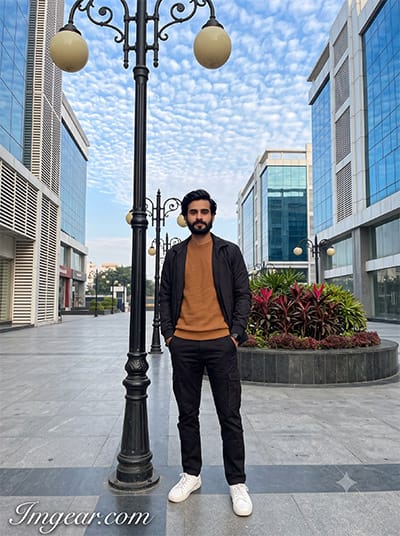
Create Stunning Urban Street Photos with Aesthetic Sky AI Prompts
Transform simple city portraits using creative prompts to craft a dramatic fluffy cloud background and sharp urban vibe. Grab the full text prompt inside to test it on your next edit.
PROMPT
{
“identity_reference”: {
“source”: “uploaded_photo”,
“subject”: “man”,
“preserve_exactly”: [
“face”, “facial_structure”, “eyes”, “eyebrows”, “nose”,
“lips”, “jawline”, “beard”, “moustache”, “skin_tone”,
“hairline”, “hairstyle”, “natural_features”
],
“forbidden_changes”: [“reshape”, “beautify”, “age”, “de-age”, “replace_face”],
“use_photo_for”: “identity_only”,
“do_not_copy”: [“background”, “clothing”, “pose”, “composition”]
},
“shot_type”: “photorealistic full-body outdoor portrait”,
“pose”: {
“stance”: “standing naturally upright beside the lamp”,
“gap_from_lamp”: “small visible gap, no contact”,
“contact_rules”: “do not touch, lean on, hold, or rest against the lamp”,
“hands”: “both inside trouser pockets”,
“legs”: “one leg slightly forward, relaxed weight distribution”,
“shoulders”: “relaxed, body slightly angled”,
“gaze”: “toward camera, calm confident expression”,
“style”: “natural candid lifestyle pose, not a fashion-model stance”
},
“outfit”: {
“top”: “black lightweight open jacket over warm caramel/brown textured crew-neck sweater”,
“bottom”: “black relaxed-fit cargo trousers”,
“footwear”: “clean white sneakers with subtle black details”,
“accessories”: “minimal black wristwatch”
},
“scene”: {
“setting”: “modern commercial plaza beside a wide paved road/open parking area, Indian city”,
“foreground”: “grey interlocking pavers”,
“left_side”: “curved landscaped planter, weathered salmon-pink concrete curb, deep-red foliage, yellow-green shrubs”,
“main_lamp”: “tall black decorative metal pole, elegant double-curved arms, two cream-colored downward-facing globe lights”,
“repeating_elements”: “additional matching lamps into the distance along the left side”
},
“background”: {
“building”: “large modern white commercial/institutional building”,
“facade”: “reflective blue glass windows, angular glass sections, white horizontal louvers, peach/salmon architectural bands, dark structural columns”,
“ground_level”: “storefronts / white shutters”
},
“sky_environment”: {
“sky”: “large vibrant blue sky”,
“clouds”: “detailed altocumulus clouds”
},
“watermark”: {
“text”: “Imggear.com”,
“placement”: “bottom-left corner, seamlessly blended, no background box”,
“font”: “Petit Formal Script style, thin elegant cursive strokes”,
“color”: “#FFFFFF, slight transparency, 1px letter spacing”
},
“aspect_ratio”: “3:4”
}
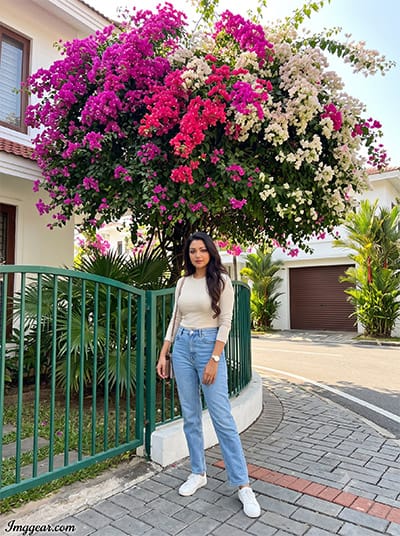
Vibrant Bougainvillea Outdoor Photography Prompt Ideas for AI
Elevate outdoor portraits with rich botanical colors and soft natural daylight using smart generation formulas. Curious how to recreate this lush floral background for your own portrait edits? Check out the guide now.
PROMPT
{
“identity_reference”: {
“source”: “uploaded_photo”,
“subject”: “woman”,
“preserve_exactly”: [
“face_shape”, “eyes”, “eyebrows”, “nose”, “lips”, “jawline”,
“cheeks”, “skin_tone”, “hairline”, “hairstyle”, “hair_texture”
],
“recognizability”: “must remain clearly recognizable as the same real person”,
“do_not_copy”: [“background”, “clothes”, “body”, “pose”, “angle”, “lighting”]
},
“shot_type”: “photorealistic full-body image”,
“anatomy”: “realistic feminine proportions and anatomy”,
“outfit”: {
“top”: “fitted cream/off-white long-sleeve top”,
“bottom”: “high-waisted light-blue straight-leg jeans”,
“footwear”: “clean white sneakers”,
“accessories”: “minimal wristwatch, small shoulder bag”
},
“composition”: {
“placement”: “slightly off-center, lower-left foreground, near a garden fence”,
“body_angle”: “turned 10-15 degrees toward the street”
},
“pose”: {
“hands”: “one hand holds the bag strap, other rests naturally at her side”,
“shoulders”: “relaxed”,
“legs”: “one leg slightly forward, weight naturally shifted, both feet firmly grounded”,
“head”: “turned slightly toward the street with a subtle confident smile”,
“style”: “candid and effortless, not fashion modeling”
},
“scene”: {
“main_backdrop”: “massive overflowing bougainvillea forming a dense rounded canopy of magenta, hot-pink and pale-white flowers with dark-green leaves”,
“structure”: “covers much of a white house, cascades over a curved low green metal fence”,
“additional_elements”: [“tropical plants”, “palm leaves”, “closed brown corrugated garage door on the right”],
“street”: “clean street extending into the distance with trimmed hedges, trees and houses”,
“ground”: “grey interlocking concrete pavers, subtle red-brick line, concrete driveway”
},
“lighting”: {
“time”: “bright mid-morning sunlight”,
“accuracy”: “physically accurate highlights and shadows on the woman, flowers, fence, trees and pavement”,
“matching”: “lighting, exposure, color temperature, contrast and shadow direction matched perfectly to environment”
},
“camera”: {
“type”: “realistic smartphone photograph”,
“lens”: “28mm-equivalent wide-angle”,
“height”: “chest-to-eye level”,
“distance”: “far enough away for a natural full-body shot”
},
“watermark”: {
“text”: “Imggear.com”,
“placement”: “bottom-left corner, seamlessly blended, no background box”,
“font”: “Petit Formal Script style, thin elegant cursive strokes”,
“color”: “#FFFFFF, slight transparency, 1px letter spacing”
},
“aspect_ratio”: “3:4”
}
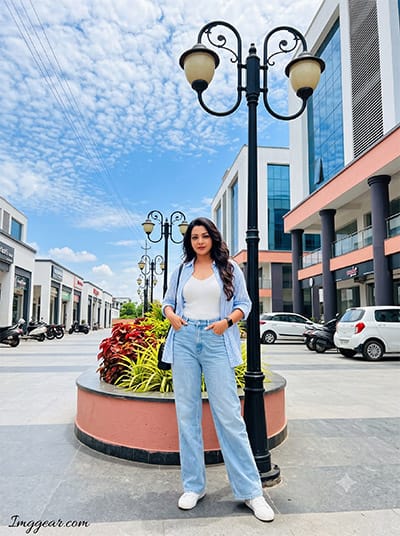
Aesthetic Sky Street AI Photo Prompts for Stunning Urban Edits
Boost your outdoor fashion shots with bright blue skies and modern plaza backgrounds using simple prompts. Have you tried this aesthetic style on your photos yet?
PROMPT
{
“identity_reference”: {
“source”: “uploaded_photo”,
“subject”: “woman”,
“preserve_exactly”: [“face”, “skin_tone”, “hairline”, “hairstyle”, “natural_features”],
“forbidden_changes”: [“redesign”, “beautification”, “age_changes”],
“do_not_copy”: [“background”, “pose”, “clothing”]
},
“shot_type”: “photorealistic vertical full-body portrait”,
“setting”: “spacious Indian commercial plaza”,
“outfit”: {
“top”: “open oversized light-blue/white striped shirt over fitted white ribbed sleeveless top”,
“bottom”: “high-waisted light-wash wide-leg jeans”,
“footwear”: “white low-top sneakers”,
“accessories”: “black wristwatch, thin-strap black shoulder bag”,
“note”: “no changes to outfit”
},
“pose”: {
“position”: “stands beside, but never touches, a tall black double-arm street lamp with cream globes”,
“hands”: “both in front pockets”,
“legs”: “one leg slightly forward, one foot turned outward”,
“shoulders”: “relaxed, body angled toward camera”,
“head”: “gently tilted, direct gaze, soft confident smile”
},
“scene”: {
“ground”: “grey paving”,
“planter”: “curved salmon-pink planter with red and yellow-green foliage”,
“lamps”: “matching lamps repeating into the distance”,
“vehicles”: [“parked scooters”, “motorcycles”, “white hatchback”],
“signage”: “small rooftop signage reading a plaza name”
},
“background”: {
“building”: “modern white building”,
“facade”: “blue glass, louvers, salmon bands, dark columns, storefronts”
},
“sky_environment”: {
“sky”: “vivid blue sky”,
“clouds”: “white altocumulus clouds”,
“details”: “thin upper-left wires”
},
“camera”: {
“lens”: “14mm ultra-wide”,
“aperture”: “f/11”,
“iso”: 100,
“focus”: “deep focus, everything sharp”,
“lighting”: “bright midday light, realistic proportions, skin, hair, fabrics, reflections and contact shadows”
},
“negative_prompts”: [
“identity drift”, “wrong outfit”, “lamp contact”, “bad anatomy”,
“extra fingers”, “floating feet”, “CGI look”, “artificial HDR”,
“pasted-on effects”, “text errors”
],
“watermark”: {
“text”: “Imggear.com”,
“placement”: “bottom-left corner, seamlessly blended, no background box”,
“font”: “Petit Formal Script style, thin elegant cursive strokes”,
“color”: “#FFFFFF, slight transparency, 1px letter spacing”
},
“aspect_ratio”: “3:4”
}
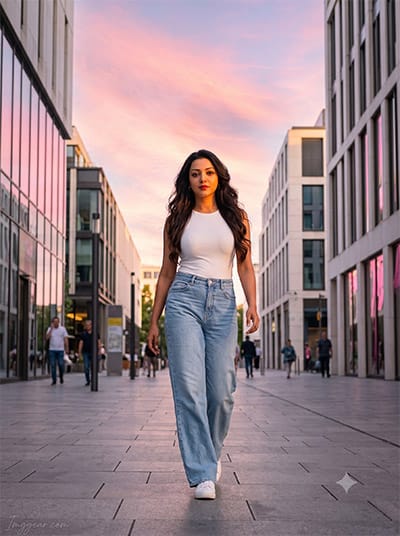
Sunset City Portrait Prompts for Dreamy AI Photography
Add pastel pink skies and golden hour reflections to modern street walk shots using detailed generation prompts. Learn how to master this aesthetic photo editing style today.
PROMPT
{
“identity_reference”: {
“source”: “uploaded_photo”,
“subject”: “woman”,
“preserve_exactly”: [“face”, “skin_tone”, “hairstyle”, “natural_features”],
“use_photo_for”: “identity_only”
},
“shot_type”: “photorealistic full-body portrait”,
“action”: “casually walking through a clean modern city street”,
“sky”: “dreamy cotton-candy sky filled with soft pink, peach and lavender clouds”,
“outfit”: {
“top”: “white fitted top”,
“bottom”: “light-blue wide-leg jeans”,
“footwear”: “white sneakers”
},
“lighting”: {
“time”: “sunset”,
“on_subject”: “warm sunset light on her face”,
“environment”: “subtle pink reflections on windows, soft shadows across the pavement”
},
“pose”: “natural candid walking pose, realistic anatomy”,
“camera”: {
“lens”: “28mm”,
“style”: “street-photography perspective”
},
“color_matching”: “sky, foreground lighting and color temperature matched naturally across the whole scene”,
“negative_prompts”: [
“face alteration”, “distorted hands”, “artificial glow”,
“pasted-on appearance”, “text errors”
],
“watermark”: {
“text”: “Imggear.com”,
“placement”: “bottom-left corner, seamlessly blended, no background box”,
“font”: “Petit Formal Script style, thin elegant cursive strokes”,
“color”: “#FFFFFF, slight transparency, 1px letter spacing”
},
“aspect_ratio”: “3:4”
}
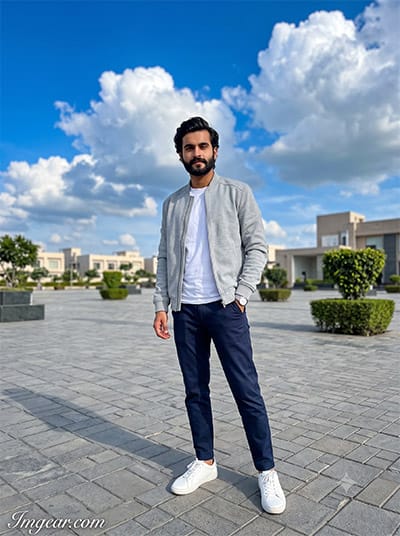
Master Bright Outdoor Photography with Aesthetic Sky Street AI Photo Prompts
Give your outdoor male fashion portraits an instant upgrade using vibrant blue skies and crisp cloud backgrounds. Unlock the exact prompt formula to replicate this clean aesthetic today.
PROMPT
{
“identity_reference”: {
“source”: “uploaded_photo”,
“subject”: “man”,
“preserve_exactly”: [
“face”, “facial_structure”, “eyes”, “eyebrows”, “nose”, “lips”,
“jawline”, “beard”, “moustache”, “skin_tone”, “hairline”, “hairstyle”
],
“forbidden_changes”: [“reshape”, “beautify”, “age”, “de-age”, “replace_face”],
“use_photo_for”: “identity_only”,
“do_not_copy”: [“background”, “clothing”, “pose”, “composition”]
},
“shot_type”: “photorealistic full-body outdoor portrait”,
“pose”: {
“stance”: “standing casually in an open paved plaza, weight on one leg”,
“hands”: “one hand in trouser pocket, other loosely at his side”,
“shoulders”: “relaxed, body angled three-quarters”,
“gaze”: “toward camera, calm confident expression”,
“style”: “natural candid lifestyle pose, not fashion-model stance”
},
“outfit”: {
“top”: “light grey structured bomber jacket over a plain white t-shirt”,
“bottom”: “navy tapered chinos”,
“footwear”: “white leather sneakers”,
“accessories”: “minimal steel wristwatch”
},
“scene”: {
“setting”: “wide open modern plaza in an Indian city, minimal foot traffic”,
“foreground”: “grey interlocking pavers”,
“elements”: “a few scattered planters with trimmed green shrubs, distant modern low-rise buildings at the edges”
},
“sky_environment”: {
“sky”: “expansive vivid blue sky filling most of the upper frame”,
“clouds”: “large dramatic cumulus clouds with strong sunlit edges”,
“mood”: “bright, open, aesthetic postcard-like sky”
},
“lighting”: {
“sources”: “bright open daylight, sun high and slightly behind”,
“quality”: “even natural light with soft directional shadow”,
“shadow”: “short soft shadow on the pavers”
},
“camera”: {
“lens”: “35mm f/2”,
“depth_of_field”: “moderate, buildings softly rendered, sky crisp”,
“grade”: “clean bright editorial grade, natural skin texture with pores”
},
“watermark”: {
“text”: “Imggear.com”,
“placement”: “bottom-left corner, seamlessly blended, no background box”,
“font”: “Petit Formal Script style, thin elegant cursive strokes”,
“color”: “#FFFFFF, slight transparency, 1px letter spacing”
},
“aspect_ratio”: “3:4”
}
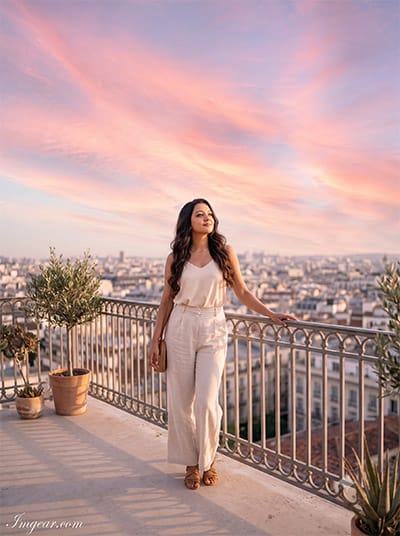
Generate Pink Twilight Rooftop Shots using AI Sky Prompts
Warm dusk light paired with soft pastel hues transforms ordinary balcony views into high-end editorial portraits. Ready to copy this prompt idea and upgrade your feed?
PROMPT
{
“identity_reference”: {
“source”: “uploaded_photo”,
“subject”: “woman”,
“preserve_exactly”: [“face_shape”, “eyes”, “eyebrows”, “nose”, “lips”, “jawline”, “skin_tone”, “hairline”, “hairstyle”, “hair_texture”],
“recognizability”: “must remain clearly recognizable as the same real person”,
“do_not_copy”: [“background”, “clothes”, “body”, “pose”, “angle”, “lighting”]
},
“shot_type”: “photorealistic full-body portrait”,
“anatomy”: “realistic feminine proportions and anatomy”,
“outfit”: {
“top”: “flowy cream sleeveless top”,
“bottom”: “high-waisted wide-leg linen trousers”,
“footwear”: “tan strappy sandals”,
“accessories”: “thin gold necklace, small woven bag”
},
“pose”: {
“stance”: “standing near a rooftop railing, body turned slightly toward the sky”,
“hands”: “one hand resting on the railing, other holding the bag strap”,
“head”: “tilted slightly upward, soft serene smile”,
“style”: “relaxed candid rooftop moment, not posed”
},
“scene”: {
“setting”: “open rooftop terrace overlooking a city skyline”,
“foreground”: “light concrete flooring, a few potted plants along the railing”
},
“sky_environment”: {
“sky”: “wide pastel sunset sky in soft pink, peach and lavender tones”,
“clouds”: “long streaked clouds catching the last warm light”,
“mood”: “dreamy, aesthetic, large sky dominating the frame”
},
“lighting”: {
“sources”: “warm low sun mixed with cool ambient sky light”,
“quality”: “soft golden rim light on hair and shoulders”,
“shadow”: “long soft shadow across the terrace floor”
},
“camera”: {
“lens”: “50mm f/1.8”,
“depth_of_field”: “shallow, skyline softly blurred, sky kept detailed”,
“grade”: “warm pastel cinematic grade, natural skin texture with pores”
},
“watermark”: {
“text”: “Imggear.com”,
“placement”: “bottom-left corner, seamlessly blended, no background box”,
“font”: “Petit Formal Script style, thin elegant cursive strokes”,
“color”: “#FFFFFF, slight transparency, 1px letter spacing”
},
“aspect_ratio”: “3:4”
}
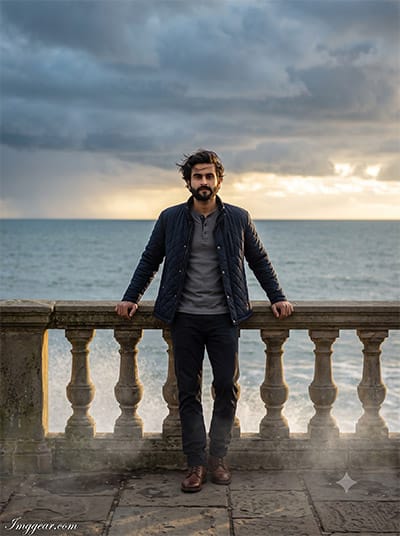
Dramatic Ocean Horizon Sky Prompts for Cinematic AI Photos
Capture intense overcast sea views and moody lighting with targeted prompts that enhance coastal portraits effortlessly. Want to replicate this cinematic vibe on your next edit? Tap here to see the prompt.
PROMPT
{
“identity_reference”: {
“source”: “uploaded_photo”,
“subject”: “man”,
“preserve_exactly”: [“face”, “facial_structure”, “eyes”, “eyebrows”, “nose”, “lips”, “jawline”, “beard”, “moustache”, “skin_tone”, “hairline”, “hairstyle”],
“forbidden_changes”: [“reshape”, “beautify”, “age”, “de-age”, “replace_face”],
“do_not_copy”: [“background”, “clothing”, “pose”, “composition”]
},
“shot_type”: “photorealistic cinematic full-body portrait”,
“pose”: {
“stance”: “standing at a seaside promenade railing, looking out toward the horizon then turning to camera”,
“hands”: “both forearms resting lightly on the railing”,
“gaze”: “calm, slightly windswept, direct look at camera”,
“style”: “cinematic travel-editorial stance”
},
“outfit”: {
“top”: “navy quilted jacket over a grey henley”,
“bottom”: “dark straight-fit trousers”,
“footwear”: “brown leather boots”,
“accessories”: “none”
},
“scene”: {
“setting”: “coastal promenade with a stone railing overlooking the sea”,
“foreground”: “weathered stone paving, sea spray mist near the railing”
},
“sky_environment”: {
“sky”: “dramatic pre-storm sky, deep grey-blue with breaking golden light”,
“clouds”: “heavy layered storm clouds with a bright golden gap on the horizon”,
“mood”: “moody, powerful, aesthetic dramatic sky”
},
“lighting”: {
“sources”: “golden light breaking through storm clouds, low angle”,
“quality”: “strong contrast between dark sky and warm rim light on subject”,
“shadow”: “hard-edged directional shadow”
},
“camera”: {
“lens”: “50mm f/1.4”,
“depth_of_field”: “shallow, sea and sky held sharp behind subject”,
“grade”: “moody cinematic storm-light grade, visible skin texture”
},
“watermark”: {
“text”: “Imggear.com”,
“placement”: “bottom-left corner, seamlessly blended, no background box”,
“font”: “Petit Formal Script style, thin elegant cursive strokes”,
“color”: “#FFFFFF, slight transparency, 1px letter spacing”
},
“aspect_ratio”: “3:4”
}
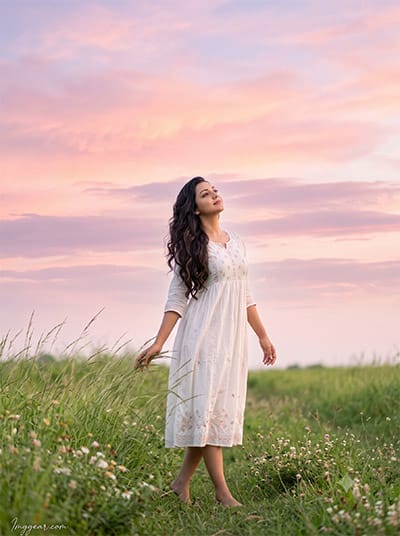
Dreamy Meadow Sunset Portrait Ideas with AI Prompts
Blend soft pink clouds and lush green fields to recreate this serene outdoor aesthetic in your image edits. Want to copy the exact text prompt? Head over to the post now.
PROMPT
{
“identity_reference”: {
“source”: “uploaded_photo”,
“subject”: “woman”,
“preserve_exactly”: [“face_shape”, “eyes”, “eyebrows”, “nose”, “lips”, “jawline”, “skin_tone”, “hairline”, “hairstyle”, “hair_texture”],
“recognizability”: “must remain clearly recognizable as the same real person”,
“do_not_copy”: [“background”, “clothes”, “body”, “pose”, “angle”, “lighting”]
},
“shot_type”: “photorealistic full-body portrait”,
“anatomy”: “realistic feminine proportions and anatomy”,
“outfit”: {
“top”: “soft white cotton dress with light embroidery”,
“bottom”: “flowy midi length, same dress”,
“footwear”: “barefoot”,
“accessories”: “simple thin bracelet”
},
“pose”: {
“stance”: “standing in an open grassy field, one hand gently touching tall grass”,
“hands”: “one hand brushing through grass, other relaxed at her side”,
“head”: “looking up slightly toward the sky, peaceful expression”,
“style”: “dreamy candid outdoor moment”
},
“scene”: {
“setting”: “open green field with tall grass swaying gently”,
“foreground”: “wildflowers scattered through the grass”
},
“sky_environment”: {
“sky”: “wide dreamy cotton-candy sky in soft pink, peach and lavender clouds”,
“clouds”: “soft layered clouds filling most of the frame”,
“mood”: “whimsical, aesthetic, large sky as the dominant element”
},
“lighting”: {
“sources”: “soft diffused late-afternoon light”,
“quality”: “gentle, even, romantic glow”,
“shadow”: “minimal, soft ambient shadow in the grass”
},
“camera”: {
“lens”: “35mm f/2”,
“depth_of_field”: “moderate, field softly blurred at the edges, sky kept detailed”,
“grade”: “soft pastel filmic grade, natural skin texture with pores”
},
“watermark”: {
“text”: “Imggear.com”,
“placement”: “bottom-left corner, seamlessly blended, no background box”,
“font”: “Petit Formal Script style, thin elegant cursive strokes”,
“color”: “#FFFFFF, slight transparency, 1px letter spacing”
},
“aspect_ratio”: “3:4”
}
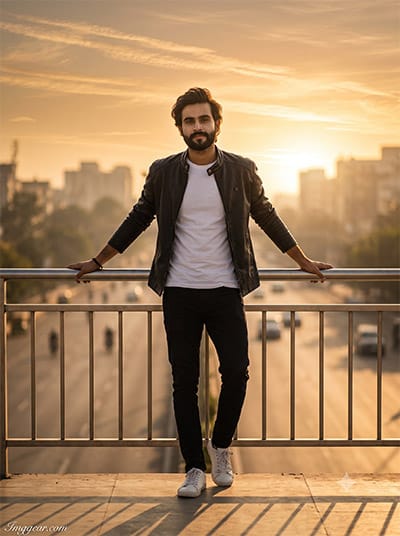
Golden Hour Highway Overpass Prompts for Realistic AI Edits
Recreate this stunning backlit sunrise portrait with soft amber sky tones and highway backdrop effects using easy generation inputs. Want to try crafting this exact photo style yourself? Dive into the complete post right now.
PROMPT
{
“identity_reference”: {
“source”: “uploaded_photo”,
“subject”: “man”,
“preserve_exactly”: [“face”, “facial_structure”, “eyes”, “eyebrows”, “nose”, “lips”, “jawline”, “beard”, “moustache”, “skin_tone”, “hairline”, “hairstyle”],
“forbidden_changes”: [“reshape”, “beautify”, “age”, “de-age”, “replace_face”],
“do_not_copy”: [“background”, “clothing”, “pose”, “composition”]
},
“shot_type”: “photorealistic cinematic full-body portrait”,
“pose”: {
“stance”: “standing on a pedestrian overpass, leaning slightly against the railing”,
“hands”: “both hands resting on the railing”,
“gaze”: “confident, relaxed, direct look at camera”,
“style”: “urban editorial candid stance”
},
“outfit”: {
“top”: “black leather jacket over a plain white tee”,
“bottom”: “black slim jeans”,
“footwear”: “white sneakers”,
“accessories”: “simple black bracelet”
},
“scene”: {
“setting”: “elevated pedestrian overpass above a wide city road”,
“foreground”: “metal railing, road and distant traffic below softly blurred”
},
“sky_environment”: {
“sky”: “wide golden-hour sky with warm haze”,
“clouds”: “thin streaked clouds glowing orange and gold”,
“mood”: “warm, expansive, aesthetic city sky”
},
“lighting”: {
“sources”: “low warm sun behind the skyline, strong backlight”,
“quality”: “rim light on subject with warm haze diffusing the background”,
“shadow”: “long dramatic shadow across the overpass”
},
“camera”: {
“lens”: “85mm f/1.8”,
“depth_of_field”: “shallow, city and road softly blurred, sky glow kept vivid”,
“grade”: “warm golden cinematic grade, visible skin texture with pores”
},
“watermark”: {
“text”: “Imggear.com”,
“placement”: “bottom-left corner, seamlessly blended, no background box”,
“font”: “Petit Formal Script style, thin elegant cursive strokes”,
“color”: “#FFFFFF, slight transparency, 1px letter spacing”
},
“aspect_ratio”: “3:4”
}
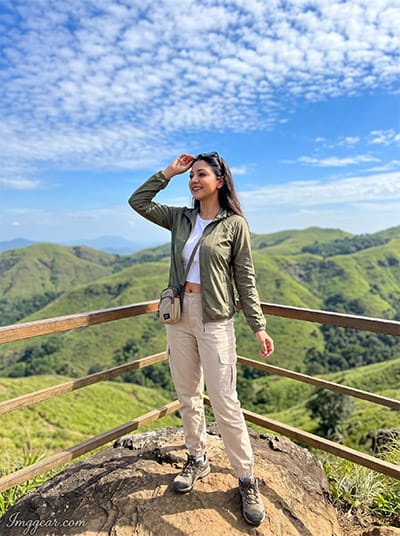
Mountain Peak Overlook AI Photo Prompts with Aesthetic Sky Effects
Elevate travel portraits with breathtaking hill viewpoints and vivid altocumulus sky backgrounds. What kind of outdoor scenery will you create next using these text inputs?
PROMPT
{
“identity_reference”: {
“source”: “uploaded_photo”,
“subject”: “woman”,
“preserve_exactly”: [“face_shape”, “eyes”, “eyebrows”, “nose”, “lips”, “jawline”, “skin_tone”, “hairline”, “hairstyle”, “hair_texture”],
“recognizability”: “must remain clearly recognizable as the same real person”,
“do_not_copy”: [“background”, “clothes”, “body”, “pose”, “angle”, “lighting”]
},
“shot_type”: “photorealistic full-body portrait”,
“anatomy”: “realistic feminine proportions and anatomy”,
“outfit”: {
“top”: “fitted olive-green windbreaker over a white crop top”,
“bottom”: “high-waisted beige cargo pants”,
“footwear”: “white trekking sneakers”,
“accessories”: “small crossbody bag, sunglasses on head”
},
“pose”: {
“stance”: “standing at a hilltop viewpoint, arms slightly raised as if taking in the view”,
“hands”: “one hand shading eyes, other relaxed at her side”,
“head”: “looking out toward the horizon, joyful open expression”,
“style”: “energetic candid travel moment”
},
“scene”: {
“setting”: “hilltop viewpoint overlooking rolling green hills”,
“foreground”: “rocky ledge, a low wooden safety rail”
},
“sky_environment”: {
“sky”: “vast vivid blue sky with crisp white altocumulus clouds”,
“clouds”: “detailed, high-contrast, filling much of the upper frame”,
“mood”: “bright, expansive, classic aesthetic sky”
},
“lighting”: {
“sources”: “bright midday sun, clear air”,
“quality”: “crisp natural light, strong blue-sky contrast”,
“shadow”: “short defined shadow on the rocky ledge”
},
“camera”: {
“lens”: “35mm f/2”,
“depth_of_field”: “moderate, hills softly rendered, sky crisp and detailed”,
“grade”: “vibrant natural travel grade, visible skin texture with pores”
},
“watermark”: {
“text”: “Imggear.com”,
“placement”: “bottom-left corner, seamlessly blended, no background box”,
“font”: “Petit Formal Script style, thin elegant cursive strokes”,
“color”: “#FFFFFF, slight transparency, 1px letter spacing”
},
“aspect_ratio”: “3:4”
}
💡 AI Photo Editing Pro Tips for Perfect Results
Keep Faces Consistent: If the AI changes the face, add this exact phrase to the very beginning of your prompt: “Preserve facial identity 100%, do not alter facial features or proportions.”
Reroll for Perfection: Run every prompt 2–3 times! The second or third generation is almost always sharper and packed with better details.
Get the DSLR Look: Want that beautiful, blurred background? Just add “f/1.8 shallow depth of field” to your prompt.
Control the Camera Shot: Tell the AI exactly what frame you want by adding terms like “Close-up portrait,” “Full-body shot,” or “Wide-angle view.”
Set the Vibe with Lighting: Lighting makes or breaks an AI image. Add “Cinematic lighting,” “Golden hour sunset,” or “Soft studio lighting” for a professional touch.
📐 Best Aspect Ratio: Use 3:4 Vertical for stunning, ready-to-post results on Instagram and Pinterest.