Finding realistic AI Lehenga Photo Editing Prompts that preserve your natural facial features while delivering authentic bridal textures can be frustrating. Most generic prompts produce artificial backgrounds or distorted outfits. Luckily, you do not need expensive photoshoots or complex tools to achieve stunning ethnic makeovers. In this guide, you will discover pre-tested, copy-paste prompts explicitly crafted for Gemini AI and ChatGPT. Simply follow our step-by-step instructions to create flawless, ultra-realistic lehenga portraits in seconds!
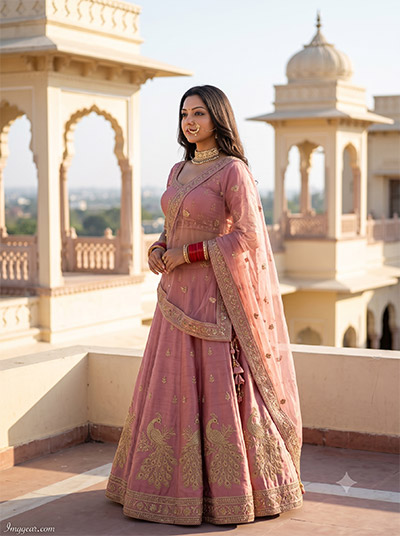
Pastel Pink Palace AI Lehenga Photo Editing Prompts
Transform your portrait into a regal Indian royal aesthetic using these simple AI lehenga photo editing prompts. Swap your outfit for a dusty pink embroidered ethnic choli in seconds. Ready to upgrade your traditional style? Give this prompt a try today!
PROMPT
{
“image_label”: “Imggear.com_6”,
“version”: “3.5”,
“aspect_ratio”: “3:4”,
“prompt”: “An ultra-realistic, photorealistic premium masterpiece, preserving the exact identity, facial proportions, bone structure, eye depth, sharp jawline, authentic facial characteristics, and skin micro-textures (visible pores, fine lines) of the subject in the uploaded personal reference photo without alteration. The facial lighting must seamlessly fuse with the ambient scene highlights and cast realistic shadows, allowing the subject to naturally integrate with the environment’s lighting, shadows, depth, atmospheric perspective, and optical characteristics while preserving the subject’s true identity without alteration, seamlessly integrating the subject into this cinematic scene, while maintaining complete identity consistency throughout the image. The subject is a female in her early 20s with a slender physical build, standing outdoors on a palace rooftop terrace in a three-quarter pose looking serene into the distance. She wears a dusty rose pink lehenga with intricate gold peacock embroidery across the skirt, matching blouse, pinned sheer dupatta, ornate gold nose ring, choker, and traditional red bangles. Captured using a full-frame professional mirrorless camera with an 85mm f/1.4 prime lens in RAW format, hyper-detailed edge sharpness, extreme high-definition micro-details on skin and fabric, natural optical rendering, and premium creamy bokeh. Illuminated by bright golden hour sunlight against a backdrop of cream architectural palace pavilions. Watermark: \”Imggear.com\” positioned in the bottom-left corner, thin elegant Petit Formal Script font style, soft white (#ffffff) with slight transparency, seamlessly blended.”,
“negative_prompt”: “(plastic skin, waxy skin, CGI rendering, AI beauty filter look, porcelain skin, over-smoothed skin, airbrushed skin, synthetic textures, doll-like face, uncanny valley, artificial symmetry), (deformed face, distorted facial features, asymmetrical eyes, bad anatomy, bad proportions, extra limbs, extra fingers, missing fingers, malformed hands, mutated hands), (unnatural lighting, flat lighting, harsh direct sunlight, blown-out highlights, crushed shadows, oversaturated colors, neon colors, unrealistic color grading, HDR look, overexposed, underexposed), (blurry, out of focus, low resolution, pixelated, jpeg artifacts, grainy noise, motion blur, soft focus), (dry land, dusty ground, indoor background, wrong environment, mismatched background), (clothing logos, brand marks, trademarked patterns, text overlays, random watermark placement, duplicate watermark, extra signature), (cartoon style, illustration, painting, 3D render, anime, stylized art, digital art look), (identity mismatch, face swap artifacts, inconsistent facial features, altered bone structure, changed eye color, different face shape), modern industrial area, neon city, harsh flash light, rainy weather.”
}
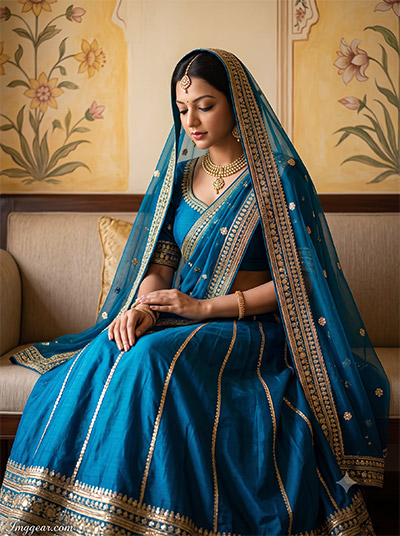
Create Royal Peacock Blue AI Lehenga Photo Editing Prompts
Recreate this elegant portrait featuring a traditional ocean blue bridal outfit set inside a vintage palace. Master subtle studio lighting using our custom prompts to craft timeless ethnic aesthetic edits. Drop your thoughts in the comments below!
PROMPT
{
“image_label”: “Imggear.com_7”,
“version”: “3.5”,
“aspect_ratio”: “3:4”,
“prompt”: “An ultra-realistic, photorealistic premium masterpiece, preserving the exact identity, facial proportions, bone structure, eye depth, sharp jawline, authentic facial characteristics, and skin micro-textures (visible pores, fine lines) of the subject in the uploaded personal reference photo without alteration. The facial lighting must seamlessly fuse with the ambient scene highlights and cast realistic shadows, allowing the subject to naturally integrate with the environment’s lighting, shadows, depth, atmospheric perspective, and optical characteristics while preserving the subject’s true identity without alteration, seamlessly integrating the subject into this dramatic portrait, while maintaining complete identity consistency throughout the image. The subject is a female in her mid-20s with a slender physical build, seated gracefully on an indoor sofa looking downward with a tranquil expression and hands resting on her lap. She wears a vibrant royal teal lehenga with gold gota patti embroidery, a matching blouse, a heavily detailed draped veil dupatta, and traditional gold jewelry. Captured using a full-frame professional mirrorless camera with an 85mm f/1.4 prime lens in RAW format, hyper-detailed edge sharpness, extreme high-definition micro-details on skin and fabric, natural optical rendering, and premium creamy bokeh. Set indoors against a wall featuring hand-painted floral fresco art in warm yellow and beige tones. Watermark: \”Imggear.com\” positioned in the bottom-left corner, thin elegant Petit Formal Script font style, soft white (#ffffff) with slight transparency, seamlessly blended.”,
“negative_prompt”: “(plastic skin, waxy skin, CGI rendering, AI beauty filter look, porcelain skin, over-smoothed skin, airbrushed skin, synthetic textures, doll-like face, uncanny valley, artificial symmetry), (deformed face, distorted facial features, asymmetrical eyes, bad anatomy, bad proportions, extra limbs, extra fingers, missing fingers, malformed hands, mutated hands), (unnatural lighting, flat lighting, harsh direct sunlight, blown-out highlights, crushed shadows, oversaturated colors, neon colors, unrealistic color grading, HDR look, overexposed, underexposed), (blurry, out of focus, low resolution, pixelated, jpeg artifacts, grainy noise, motion blur, soft focus), (dry land, dusty ground, indoor background, wrong environment, mismatched background), (clothing logos, brand marks, trademarked patterns, text overlays, random watermark placement, duplicate watermark, extra signature), (cartoon style, illustration, painting, 3D render, anime, stylized art, digital art look), (identity mismatch, face swap artifacts, inconsistent facial features, altered bone structure, changed eye color, different face shape), outdoor beach, modern street, harsh shadows, dark room.”
}
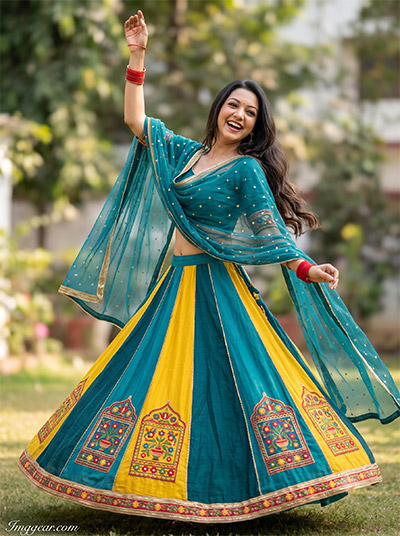
Outdoor Joyful Yellow Teal AI Lehenga Photo Editing Prompts
Capture vibrant motion and cheerful celebration with custom AI lehenga photo editing prompts designed for festive outdoor photography. Easily generate swirling color-blocked outfits in high-definition detail. Want to test this look out?
PROMPT
{
“image_label”: “Imggear.com_8”,
“version”: “3.5”,
“aspect_ratio”: “3:4”,
“prompt”: “An ultra-realistic, photorealistic premium masterpiece, preserving the exact identity, facial proportions, bone structure, eye depth, sharp jawline, authentic facial characteristics, and skin micro-textures (visible pores, fine lines) of the subject in the uploaded personal reference photo without alteration. The facial lighting must seamlessly fuse with the ambient scene highlights and cast realistic shadows, allowing the subject to naturally integrate with the environment’s lighting, shadows, depth, atmospheric perspective, and optical characteristics while preserving the subject’s true identity without alteration, seamlessly integrating the subject into this cinematic scene, while maintaining complete identity consistency throughout the image. The subject is a female in her early 20s with a slender physical build, twirling dynamically outdoors with one arm raised high and a joyful, laughing expression. She wears a multi-paneled teal and yellow lehenga with traditional folk embroidery panels, a sheer teal dupatta with gold accents, and red bangles. Captured using a full-frame professional mirrorless camera with an 85mm f/1.4 prime lens in RAW format, hyper-detailed edge sharpness, extreme high-definition micro-details on skin and fabric, natural optical rendering, and premium creamy bokeh. Set outdoors under bright natural daylight against a softly blurred garden backdrop. Watermark: \”Imggear.com\” positioned in the bottom-left corner, thin elegant Petit Formal Script font style, soft white (#ffffff) with slight transparency, seamlessly blended.”,
“negative_prompt”: “(plastic skin, waxy skin, CGI rendering, AI beauty filter look, porcelain skin, over-smoothed skin, airbrushed skin, synthetic textures, doll-like face, uncanny valley, artificial symmetry), (deformed face, distorted facial features, asymmetrical eyes, bad anatomy, bad proportions, extra limbs, extra fingers, missing fingers, malformed hands, mutated hands), (unnatural lighting, flat lighting, harsh direct sunlight, blown-out highlights, crushed shadows, oversaturated colors, neon colors, unrealistic color grading, HDR look, overexposed, underexposed), (blurry, out of focus, low resolution, pixelated, jpeg artifacts, grainy noise, motion blur, soft focus), (dry land, dusty ground, indoor background, wrong environment, mismatched background), (clothing logos, brand marks, trademarked patterns, text overlays, random watermark placement, duplicate watermark, extra signature), (cartoon style, illustration, painting, 3D render, anime, stylized art, digital art look), (identity mismatch, face swap artifacts, inconsistent facial features, altered bone structure, changed eye color, different face shape), studio backdrop, indoor office, night scene, static pose.”
}
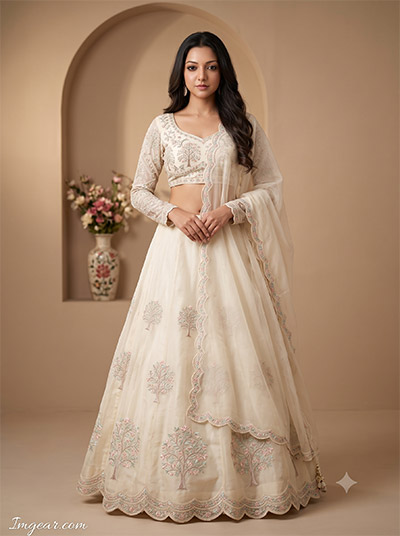
Minimalist Ivory Aesthetic AI Lehenga Photo Editing Prompts
Master clean monochromatic styling for your digital portraits by using these specialized AI lehenga photo editing prompts to generate subtle ivory textures. Hurry up, grab this prompt formula before everyone else starts using it!
PROMPT
{
“image_label”: “Imggear.com_9”,
“version”: “3.5”,
“aspect_ratio”: “3:4”,
“prompt”: “An ultra-realistic, photorealistic premium masterpiece, preserving the exact identity, facial proportions, bone structure, eye depth, sharp jawline, authentic facial characteristics, and skin micro-textures (visible pores, fine lines) of the subject in the uploaded personal reference photo without alteration. The facial lighting must seamlessly fuse with the ambient scene highlights and cast realistic shadows, allowing the subject to naturally integrate with the environment’s lighting, shadows, depth, atmospheric perspective, and optical characteristics while preserving the subject’s true identity without alteration, seamlessly integrating the subject into this dramatic portrait, while maintaining complete identity consistency throughout the image. The subject is a female in her early-to-mid 20s with a slender physical build, standing upright facing the camera with hands gently clasped in front and a serene expression. She wears a cream ivory organza lehenga with delicate pastel embroidered tree motifs, a scalloped border, a long-sleeve embroidered blouse, and a draped sheer dupatta. Captured using a full-frame professional mirrorless camera with an 85mm f/1.4 prime lens in RAW format, hyper-detailed edge sharpness, extreme high-definition micro-details on skin and fabric, natural optical rendering, and premium creamy bokeh. Set in a warm neutral indoor room featuring an arched alcove with a floral vase under soft diffused light. Watermark: \”Imggear.com\” positioned in the bottom-left corner, thin elegant Petit Formal Script font style, soft white (#ffffff) with slight transparency, seamlessly blended.”,
“negative_prompt”: “(plastic skin, waxy skin, CGI rendering, AI beauty filter look, porcelain skin, over-smoothed skin, airbrushed skin, synthetic textures, doll-like face, uncanny valley, artificial symmetry), (deformed face, distorted facial features, asymmetrical eyes, bad anatomy, bad proportions, extra limbs, extra fingers, missing fingers, malformed hands, mutated hands), (unnatural lighting, flat lighting, harsh direct sunlight, blown-out highlights, crushed shadows, oversaturated colors, neon colors, unrealistic color grading, HDR look, overexposed, underexposed), (blurry, out of focus, low resolution, pixelated, jpeg artifacts, grainy noise, motion blur, soft focus), (dry land, dusty ground, indoor background, wrong environment, mismatched background), (clothing logos, brand marks, trademarked patterns, text overlays, random watermark placement, duplicate watermark, extra signature), (cartoon style, illustration, painting, 3D render, anime, stylized art, digital art look), (identity mismatch, face swap artifacts, inconsistent facial features, altered bone structure, changed eye color, different face shape), outdoor forest, urban street, dark night, harsh flash light.”
}
💡 AI Photo Editing Pro Tips for Perfect Results
Keep Faces Consistent: If the AI changes the face, add this exact phrase to the very beginning of your prompt: “Preserve facial identity 100%, do not alter facial features or proportions.”
Reroll for Perfection: Run every prompt 2–3 times! The second or third generation is almost always sharper and packed with better details.
Get the DSLR Look: Want that beautiful, blurred background? Just add “f/1.8 shallow depth of field” to your prompt.
Control the Camera Shot: Tell the AI exactly what frame you want by adding terms like “Close-up portrait,” “Full-body shot,” or “Wide-angle view.”
Set the Vibe with Lighting: Lighting makes or breaks an AI image. Add “Cinematic lighting,” “Golden hour sunset,” or “Soft studio lighting” for a professional touch.
📐 Best Aspect Ratio: Use 3:4 Vertical for stunning, ready-to-post results on Instagram and Pinterest.