Unlock stunning, viral digital masterpieces instantly with the ultimate Gemini AI Prompt blueprint tested by me for mind-blowing results. I spent weeks tweaking these exact free copy-paste prompts to unlock hyper-realistic textures and breathtaking lighting that standard generators miss. Inside, you will discover the trending text-to-image formulas and secret aesthetic editing hacks that blew up my portfolio overnight. Stop wasting hours guessing the right keywords. Grab this proven creator toolkit right now, copy the formulas, and watch your creative visions come to life flawlessly in seconds!
Create Cinematic Desi Portraits Using This Gemini AI Prompt
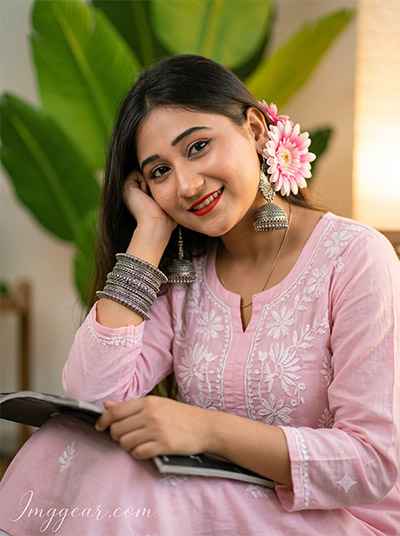
Achieve warm lighting and realistic textures in your cultural AI renders. I cracked the formula for this beautiful aesthetic using a simple Gemini AI prompt you can steal right now. What will you create first with this setup?
PROMPT
{
“image_label”: “Imggear.com_1”,
“version”: “3.5”,
“aspect_ratio”: “3:4”,
“prompt”: “An ultra-realistic, photorealistic premium masterpiece, preserving the exact identity, facial proportions, bone structure, eye depth, sharp jawline, authentic facial characteristics, and skin micro-textures (visible pores, fine lines) of the subject in the uploaded personal reference photo without alteration. The facial lighting must seamlessly fuse with the ambient scene highlights and cast realistic shadows, allowing the subject to naturally integrate with the environment’s lighting, shadows, depth, atmospheric perspective, and optical characteristics while preserving the subject’s true identity without alteration, seamlessly integrating the subject into this warm indoor lifestyle portrait, while maintaining complete identity consistency throughout the image. The subject is dynamically detected as a female in her early 20s with a slender, delicate build and soft shoulders. She is seated in a highly relaxed, intimate posture, leaning gently to her right side with her head resting softly against her right hand, while her left arm rests casually in her lap holding an unbranded dark magazine. She is looking directly at the camera with a warm, genuine smile. Her outfit consists of a light pastel pink traditional tunic featuring delicate, intricate white floral embroidery around the neckline and chest. She is adorned with heavy, layered oxidized silver bangles on her right wrist, a large pink and white daisy-like floral adornment positioned near her right ear, and prominent, highly detailed oxidized silver dome-shaped earrings. The environment is a cozy, softly lit indoor or shaded patio setting, featuring a large, softly blurred vibrant green broadleaf plant in the background, complemented by a warm, glowing light source from the right side of the frame. The lighting features a beautiful golden-hour warmth, with soft diffused illumination casting a glowing rim light on the right side of her face, highlighting realistic sub-surface scattering (SSS), pristine pore-level facial detail, and natural melanin transitions. Captured using a full-frame professional mirrorless camera with an 85mm f/1.4 prime lens in RAW format, the image features incredibly shallow depth of field, transforming the background into premium creamy bokeh while maintaining extreme optical sharpness on the eyes and jewelry. The rendering strictly avoids plastic skin, waxy appearance, and CGI rendering, prioritizing physically accurate material rendering of the embroidered fabric and silver metals. Positioned in the bottom-left corner is a watermark reading \”Imggear.com\” written in a Petit Formal Script, featuring thin, elegant cursive strokes in soft white (#ffffff) with slight transparency, seamlessly blended into the image with a minimal, premium handwritten signature appearance and no background. Version 3.5. Aspect Ratio 3:4.”
}
Create Stunning Portrait Photography with this Gemini AI Prompt
Achieve this soft, natural look in your own portraits using this specific Gemini AI prompt. I have broken down the settings for you to get professional results easily. Want to see how I did it?
PROMPT
{
“image_label”: “Imggear.com_2”,
“version”: “3.5”,
“aspect_ratio”: “3:4”,
“prompt”: “An ultra-realistic, photorealistic premium masterpiece, preserving the exact identity, facial proportions, bone structure, eye depth, sharp jawline, authentic facial characteristics, and skin micro-textures (visible pores, fine lines) of the subject in the uploaded personal reference photo without alteration. The facial lighting must seamlessly fuse with the ambient scene highlights and cast realistic shadows, allowing the subject to naturally integrate with the environment’s lighting, shadows, depth, atmospheric perspective, and optical characteristics while preserving the subject’s true identity without alteration, seamlessly integrating the subject into this intimate close-up portrait, while maintaining complete identity consistency throughout the image. The subject is dynamically detected as a female in her early 20s with a slender build, captured from the chest up in a tight, engaging composition. She is positioned with her shoulders angled slightly away, but her face is turned forward, featuring a subtle, elegant head tilt and a bright, captivating smile while maintaining direct eye contact with the lens. She is wearing a light pastel pink traditional tunic adorned with highly detailed, raised pink and white floral embroidery across the chest. She is accessorized with massive, statement oxidized silver earrings featuring a central circular mirror element and dangling dome-shaped bells, alongside a large pink and white daisy floral adornment placed delicately near her left ear. The environment is a softly abstracted indoor space, featuring a neutral, warm-toned wall and the heavily out-of-focus edge of a green botanical element on the right side. The lighting is masterfully diffused, utilizing a soft frontal fill light that reveals extraordinary pore-level facial detail, under-eye details, natural eyelid folds, and realistic lip texture, paired with a subtle, warm rim light that kisses the left side of her face, enhancing the glowing skin translucency and realistic sub-surface scattering (SSS). Captured using a full-frame professional mirrorless camera with an 85mm f/1.4 prime lens in RAW format, the image demonstrates pristine high-end digital sharpness on the eyelashes and silver jewelry, while the background completely melts into a heavy, creamy bokeh. The rendering avoids artificial symmetry and excessive smoothing, preserving natural skin grain and authentic professional camera realism. Positioned in the bottom-left corner is a watermark reading \”Imggear.com\” written in a Petit Formal Script, featuring thin, elegant cursive strokes in soft white (#ffffff) with slight transparency, seamlessly blended into the image with a minimal, premium handwritten signature appearance and no background. Version 3.5. Aspect Ratio 3:4.”
}
Mastering Outdoor Lifestyle Photos with this Gemini AI Prompt
Discover how to generate crisp, natural-looking outdoor portraits by using this specific Gemini AI prompt. I have refined the settings so you can achieve the perfect balance of light and depth. Ready to try this technique for yourself?
PROMPT
{
“image_label”: “Imggear.com_3”,
“version”: “3.5”,
“aspect_ratio”: “3:4”,
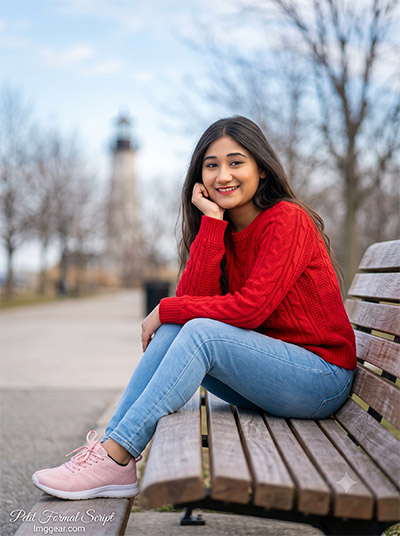
“prompt”: “An ultra-realistic, photorealistic premium masterpiece, preserving the exact identity, facial proportions, bone structure, eye depth, sharp jawline, authentic facial characteristics, and skin micro-textures (visible pores, fine lines) of the subject in the uploaded personal reference photo without alteration. The facial lighting must seamlessly fuse with the ambient scene highlights and cast realistic shadows, allowing the subject to naturally integrate with the environment’s lighting, shadows, depth, atmospheric perspective, and optical characteristics while preserving the subject’s true identity without alteration, seamlessly integrating the subject into this crisp outdoor daytime portrait, while maintaining complete identity consistency throughout the image. The subject is dynamically detected as a female in her mid-20s with a proportionate, athletic build and relaxed shoulders. She is seated comfortably on a slatted wooden bench, with her body angled toward the left of the frame but her face turned directly toward the camera, sporting a radiant, confident smile. Her right elbow rests on her right knee, with her hand gently supporting her chin, while her left hand rests casually on her lap. She is dressed in a vibrant, heavy-knit textured red sweater with a classic cable-knit pattern, paired with well-fitted, light-blue classic denim jeans. On her feet are premium pastel-pink athletic lifestyle sneakers featuring thick, ridged soles and dark low-cut socks, meticulously rendered to remove all commercial logos. The environment is an open outdoor park or promenade setting, characterized by a beautifully blurred background featuring bare winter trees, a distant soft-white structural tower or lighthouse, and a dynamic sky with scattered soft white clouds against a pale blue backdrop. The lighting is natural, crisp daylight, providing broad, even illumination that creates realistic micro skin displacement, natural melanin definition, and a beautiful catchlight in the eyes. Captured using a full-frame professional mirrorless camera with an 85mm f/1.4 prime lens in RAW format, showcasing cinematic Hollywood-style color grading with a subtle teal-and-orange contrast that makes the red sweater pop against the cool background. The image features realistic lens compression, perfect optical sharpness on the subject, and a smooth depth of field. Positioned in the bottom-left corner is a watermark reading \”Imggear.com\” written in a Petit Formal Script, featuring thin, elegant cursive strokes in soft white (#ffffff) with slight transparency, seamlessly blended into the image with a minimal, premium handwritten signature appearance and no background. Version 3.5. Aspect Ratio 3:4.”
}
Capture Moody Cinematic Lighting Using This Gemini AI Prompt
Recreate this atmospheric, low-light aesthetic by utilizing the Gemini AI prompt I have shared below. It is the perfect approach for achieving those rich, moody night shots. Grab the text and start creating your own masterpiece tonight.
PROMPT
{
“image_label”: “Imggear.com_4”,
“version”: “3.5”,
“aspect_ratio”: “3:4”,
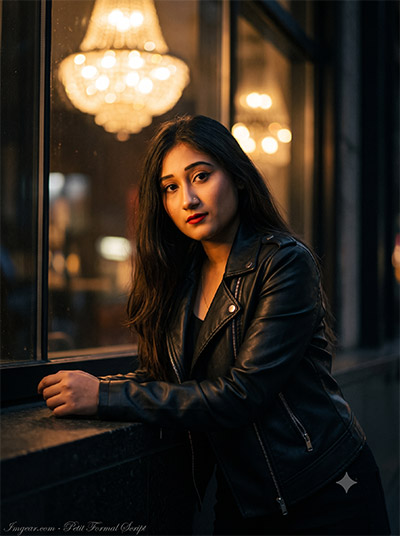
“prompt”: “An ultra-realistic, photorealistic premium masterpiece, preserving the exact identity, facial proportions, bone structure, eye depth, sharp jawline, authentic facial characteristics, and skin micro-textures (visible pores, fine lines) of the subject in the uploaded personal reference photo without alteration. The facial lighting must seamlessly fuse with the ambient scene highlights and cast realistic shadows, allowing the subject to naturally integrate with the environment’s lighting, shadows, depth, atmospheric perspective, and optical characteristics while preserving the subject’s true identity without alteration, seamlessly integrating the subject into this moody cinematic night street portrait, while maintaining complete identity consistency throughout the image. The subject is dynamically detected as a female in her mid-20s with a confident, strong build. She is leaning slightly forward, resting her arms comfortably on a dark urban ledge or counter, portraying an intense, captivating gaze directed straight into the lens with a neutral, enigmatic expression. She is outfitted in a premium unbranded black leather biker jacket with visible micro-leather grain and silver metal hardware, layered over a simple, dark unbranded top. The environment is a vibrant urban nightscape, characterized by a dark foreground ledge and a magnificent, out-of-focus background dominated by the reflection of a massive, ornate golden chandelier or array of incandescent bulb fixtures in a glass window, alongside the faint shapes of vintage black streetlamps on the right. The lighting is heavily cinematic, featuring dark, dramatic shadows that contrast with the warm, glowing amber and golden ambient light wrapping around the subject’s face, highlighting pristine pore-level facial detail, a bold red lip texture, and stunning sub-surface scattering (SSS) in the low-light conditions. Captured using a full-frame professional mirrorless camera with an 85mm f/1.4 prime lens in RAW format, specifically mimicking night photography settings by introducing a beautiful, organic 35mm filmic sensor noise (high ISO characteristics) that enhances realism without degrading sharpness. The exceptionally shallow depth of field transforms the background light sources into massive, glowing orbs of creamy bokeh. The rendering avoids artificial HDR, ensuring deep, rich blacks and physically correct light bounce. Positioned in the bottom-left corner is a watermark reading \”Imggear.com\” written in a Petit Formal Script, featuring thin, elegant cursive strokes in soft white (#ffffff) with slight transparency, seamlessly blended into the image with a minimal, premium handwritten signature appearance and no background. Version 3.5. Aspect Ratio 3:4.”
}
Urban Fashion Photography Secrets via Gemini AI Prompt
Enhance your portrait photography by applying this effective Gemini AI prompt to achieve a sophisticated urban look. Learn how to balance bold colors and natural textures in your next edit. Have you experimented with these settings yet?
PROMPT
{
“image_label”: “Imggear.com_5”,
“version”: “3.5”,
“aspect_ratio”: “3:4”,
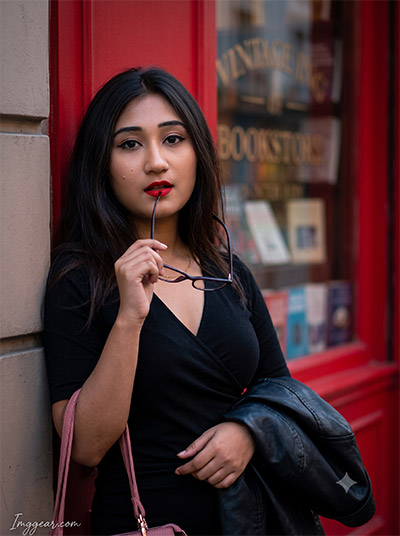
“prompt”: “An ultra-realistic, photorealistic premium masterpiece, preserving the exact identity, facial proportions, bone structure, eye depth, sharp jawline, authentic facial characteristics, and skin micro-textures (visible pores, fine lines) of the subject in the uploaded personal reference photo without alteration. The facial lighting must seamlessly fuse with the ambient scene highlights and cast realistic shadows, allowing the subject to naturally integrate with the environment’s lighting, shadows, depth, atmospheric perspective, and optical characteristics while preserving the subject’s true identity without alteration, seamlessly integrating the subject into this vibrant urban dusk portrait, while maintaining complete identity consistency throughout the image. The subject is dynamically detected as a female in her mid-20s with an elegant, athletic build and sharp posture. She is standing casually, leaning her left shoulder against a solid architectural wall, turning her head to look directly at the camera with a poised, confident expression. Her right hand is raised slightly, delicately holding the arm of a pair of dark-rimmed eyeglasses near her mouth, while her left hand rests near her waist, holding the bright pink strap of a handbag. She is wearing a sleek, long-sleeved black top with a slight V-neck, with a black leather biker jacket casually draped over her left arm. The environment features a striking, vivid red vintage bookstore storefront, featuring a deeply saturated red painted wall and a glass window displaying beautifully blurred, unbranded generic literature and books inside. The text on the glass has been fully generalized into elegant, unbranded typography to ensure legal safety. The lighting is a soft, diffused urban twilight, casting gentle, even illumination over the subject, creating stunning color separation between the stark black outfit and the vivid red background. The light reveals flawless pore-level facial detail, bold red lip texture, subtle oil diffusion on the skin, and organic skin grain. Captured using a full-frame professional mirrorless camera with an 85mm f/1.4 prime lens in RAW format, delivering breathtaking optical sharpness on the subject’s face and hands, while the architectural background falls away into a natural, creamy optical blur. The rendering strictly avoids AI beauty filters, prioritizing true-to-life color science and cinematic editorial grading. Positioned in the bottom-left corner is a watermark reading \”Imggear.com\” written in a Petit Formal Script, featuring thin, elegant cursive strokes in soft white (#ffffff) with slight transparency, seamlessly blended into the image with a minimal, premium handwritten signature appearance and no background. Version 3.5. Aspect Ratio 3:4.”
}
💡 AI Photo Editing Pro Tips for Perfect Results
Keep Faces Consistent: If the AI changes the face, add this exact phrase to the very beginning of your prompt: “Preserve facial identity 100%, do not alter facial features or proportions.”
Reroll for Perfection: Run every prompt 2–3 times! The second or third generation is almost always sharper and packed with better details.
Get the DSLR Look: Want that beautiful, blurred background? Just add “f/1.8 shallow depth of field” to your prompt.
Control the Camera Shot: Tell the AI exactly what frame you want by adding terms like “Close-up portrait,” “Full-body shot,” or “Wide-angle view.”
Set the Vibe with Lighting: Lighting makes or breaks an AI image. Add “Cinematic lighting,” “Golden hour sunset,” or “Soft studio lighting” for a professional touch.
📐 Best Aspect Ratio: Use 3:4 Vertical for stunning, ready-to-post results on Instagram and Pinterest.