Struggling with distorted faces and unnatural hands when generating festive AI photos? Finding a copy-ready Ganesh Chaturthi Gemini Prompt guarantees ultra-realistic 8K Ganpati Bappa portraits without losing your natural identity. Whether you use Gemini AI or ChatGPT, our identity-preserving prompts deliver studio-quality festival portraits, 9:16 WhatsApp DPs, and golden mandap wallpapers in seconds. Below, you’ll unlock tested copy-paste prompts designed to get perfect lighting, authentic traditional attire, and flawless hands every single time.
Create Festive Traditional Portraits with Ganesh Chaturthi Gemini Prompt
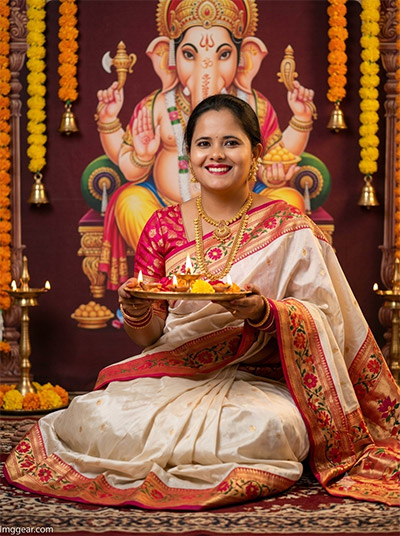
Capture authentic holiday joy in rich ethnic attire holding a decorated pooja thali. Use this simple Ganesh Chaturthi Gemini Prompt to transform ordinary photos into festive artistic portraits. Give this realistic AI style a try today!
PROMPT
{
“image_label”: “Imggear.com_2”,
“version”: “3.5”,
“aspect_ratio”: “3:4”,
“prompt”: “An ultra-realistic, photorealistic premium masterpiece, preserving the exact identity, facial proportions, bone structure, eye depth, sharp jawline, authentic facial characteristics, and skin micro-textures (visible pores, fine lines) of the subject in the uploaded personal reference photo without alteration. The facial lighting must seamlessly fuse with the ambient scene highlights and cast realistic shadows, allowing the subject to naturally integrate with the environment’s lighting, shadows, depth, atmospheric perspective, and optical characteristics while preserving the subject’s true identity without alteration, seamlessly integrating the subject into this festive cinematic scene, while maintaining complete identity consistency throughout the image. The subject, a young adult female with a graceful presence, is sitting cross-legged on a traditional patterned rug. She is holding a brass *arati* tray with lit oil lamps and flowers, looking directly at the camera with a joyful, celebratory smile. She wears a premium custom luxury traditional Indian Paithani saree in off-white silk with intricate red and gold floral borders and a matching pink blouse. She is adorned with heavy traditional gold jewelry and bangles. The background is a richly decorated setting with a large mural of Lord Ganesh on a deep maroon backdrop, hanging fresh marigold garlands, and small brass bells. Lighting is warm, emanating from the *arati* lamps and overhead spotlights, creating soft, atmospheric shadows. Captured with a professional RAW camera and an 85mm f/1.4 lens, featuring extreme micro-details on skin and fabric. A minimal, premium handwritten-style watermark \”Imggear.com\” in soft white (#ffffff) with slight transparency is in the bottom-left corner.”,
“negative_prompt”: “(plastic skin, waxy skin, CGI rendering, AI beauty filter look, porcelain skin, over-smoothed skin, airbrushed skin, synthetic textures, doll-like face, uncanny valley, artificial symmetry), (deformed face, distorted facial features, asymmetrical eyes, bad anatomy, bad proportions, extra limbs, extra fingers, missing fingers, malformed hands, mutated hands), (unnatural lighting, flat lighting, harsh direct sunlight, blown-out highlights, crushed shadows, oversaturated colors, neon colors, unrealistic color grading, HDR look, overexposed, underexposed), (blurry, out of focus, low resolution, pixelated, jpeg artifacts, grainy noise, motion blur, soft focus), (dry land, dusty ground, indoor background, wrong environment, mismatched background), (clothing logos, brand marks, trademarked patterns, text overlays, random watermark placement, duplicate watermark, extra signature), (cartoon style, illustration, painting, 3D render, anime, stylized art, digital art look), (identity mismatch, face swap artifacts, inconsistent facial features, altered bone structure, changed eye color, different face shape), (casual attire, modern background elements, unlit *diyas*, daytime lighting).”
}
Gemini Prompts to Generate Warm Festival Photography
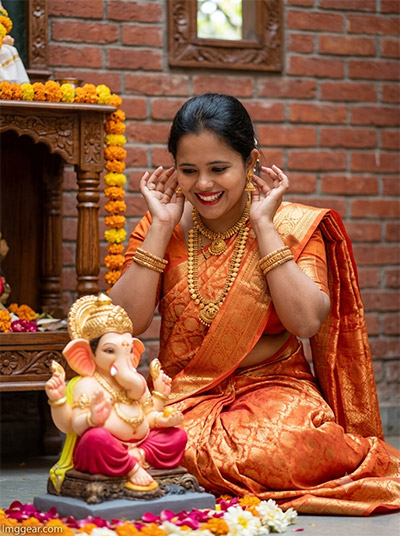
Highlight joyful moments alongside a Lord Ganesha idol against a rustic brick backdrop. Using a tailored Gemini prompt lets you reproduce this vibrant orange saree look with realistic lighting effortlessly. What custom tweak will you add first?
PROMPT
{
“image_label”: “Imggear.com_3”,
“version”: “3.5”,
“aspect_ratio”: “3:4”,
“prompt”: “An ultra-realistic, photorealistic premium masterpiece, preserving the exact identity, facial proportions, bone structure, eye depth, sharp jawline, authentic facial characteristics, and skin micro-textures (visible pores, fine lines) of the subject in the uploaded personal reference photo without alteration. The facial lighting must seamlessly fuse with the ambient scene highlights and cast realistic shadows, allowing the subject to naturally integrate with the environment’s lighting, shadows, depth, atmospheric perspective, and optical characteristics while preserving the subject’s true identity without alteration, seamlessly integrating the subject into this candid indoor portrait, while maintaining complete identity consistency throughout the image. The subject, a young adult female with a bright, joyful expression and broad smile, is looking down affectionately at a smaller, beautifully adorned seated Ganesh idol. She is in a playful, candid pose, with both hands raised near her head, perhaps adjusting an earring or reacting with delight. She wears a premium custom luxury traditional Indian silk saree in a warm light orange/peach shade, intricately embroidered with gold patterns. She is adorned with heavy traditional gold jewelry and purple glass bangles. The setting is an indoor traditional courtyard with a rustic red brick wall and an elaborate wooden *mandap* decorated with fresh marigolds framing the idol. The foreground is covered in loose flower petals. Natural, soft diffused daylight filters in from above. Captured with a professional RAW camera and an 85mm f/1.4 lens, showcasing hyper-detailed skin grain and fabric textures. A minimal, premium handwritten-style watermark \”Imggear.com\” in soft white (#ffffff) with slight transparency is in the bottom-left corner.”,
“negative_prompt”: “(plastic skin, waxy skin, CGI rendering, AI beauty filter look, porcelain skin, over-smoothed skin, airbrushed skin, synthetic textures, doll-like face, uncanny valley, artificial symmetry), (deformed face, distorted facial features, asymmetrical eyes, bad anatomy, bad proportions, extra limbs, extra fingers, missing fingers, malformed hands, mutated hands), (unnatural lighting, flat lighting, harsh direct sunlight, blown-out highlights, crushed shadows, oversaturated colors, neon colors, unrealistic color grading, HDR look, overexposed, underexposed), (blurry, out of focus, low resolution, pixelated, jpeg artifacts, grainy noise, motion blur, soft focus), (dry land, dusty ground, indoor background, wrong environment, mismatched background), (clothing logos, brand marks, trademarked patterns, text overlays, random watermark placement, duplicate watermark, extra signature), (cartoon style, illustration, painting, 3D render, anime, stylized art, digital art look), (identity mismatch, face swap artifacts, inconsistent facial features, altered bone structure, changed eye color, different face shape), (outdoor setting, modern architecture, casual clothing, flash photography, unsmiling expression).”
}
Outdoor Cultural Photos with Ganesh Chaturthi Gemini Prompt Ideas
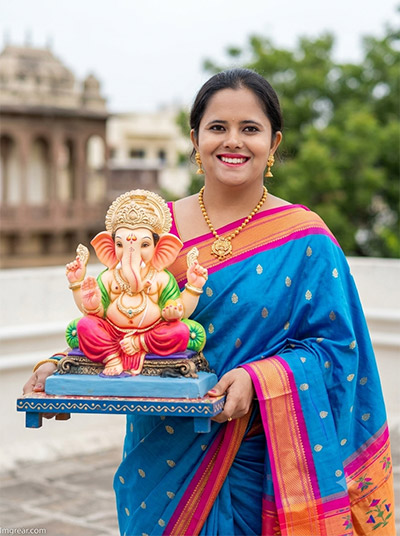
Beautiful outdoor shots wearing a vivid blue silk saree while carrying an eco-friendly Ganesha murti are simple to recreate. With this Ganesh Chaturthi Gemini prompt guide, your digital edits will look completely natural. Copy the text now to start creating!
PROMPT
{
“image_label”: “Imggear.com_4”,
“version”: “3.5”,
“aspect_ratio”: “3:4”,
“prompt”: “An ultra-realistic, photorealistic premium masterpiece, preserving the exact identity, facial proportions, bone structure, eye depth, sharp jawline, authentic facial characteristics, and skin micro-textures (visible pores, fine lines) of the subject in the uploaded personal reference photo without alteration. The facial lighting must seamlessly fuse with the ambient scene highlights and cast realistic shadows, allowing the subject to naturally integrate with the environment’s lighting, shadows, depth, atmospheric perspective, and optical characteristics while preserving the subject’s true identity without alteration, seamlessly integrating the subject into this outdoor festive portrait, while maintaining complete identity consistency throughout the image. The subject, a young adult female with a bright, celebratory smile, is standing on an open rooftop. She is holding a decorated blue wooden tray bearing a large, intricately painted, colorful traditional Lord Ganesh idol. She wears a premium custom luxury traditional Indian Paithani silk saree in vibrant blue with a pink and orange border and intricate gold *butti* work. She is adorned with heavy traditional gold jewelry and bangles. The background shows slightly blurred traditional Indian architecture under a bright, overcast sky, with some green foliage visible. Lighting is natural, bright daylight, providing even coverage but enhanced contrast. Captured with a professional RAW camera and an 85mm f/1.4 lens, ensuring extreme high-definition details on the idol’s paintwork, skin pores, and saree weave. A minimal, premium handwritten-style watermark \”Imggear.com\” in soft white (#ffffff) with slight transparency is in the bottom-left corner.”,
“negative_prompt”: “(plastic skin, waxy skin, CGI rendering, AI beauty filter look, porcelain skin, over-smoothed skin, airbrushed skin, synthetic textures, doll-like face, uncanny valley, artificial symmetry), (deformed face, distorted facial features, asymmetrical eyes, bad anatomy, bad proportions, extra limbs, extra fingers, missing fingers, malformed hands, mutated hands), (unnatural lighting, flat lighting, harsh direct sunlight, blown-out highlights, crushed shadows, oversaturated colors, neon colors, unrealistic color grading, HDR look, overexposed, underexposed), (blurry, out of focus, low resolution, pixelated, jpeg artifacts, grainy noise, motion blur, soft focus), (dry land, dusty ground, indoor background, wrong environment, mismatched background), (clothing logos, brand marks, trademarked patterns, text overlays, random watermark placement, duplicate watermark, extra signature), (cartoon style, illustration, painting, 3D render, anime, stylized art, digital art look), (identity mismatch, face swap artifacts, inconsistent facial features, altered bone structure, changed eye color, different face shape), (indoor setting, modern clothing, flash photography, low light, unsmiling expression).”
}
How to Craft Warm Devotional Imagery with a Ganesh Chaturthi Gemini Prompt
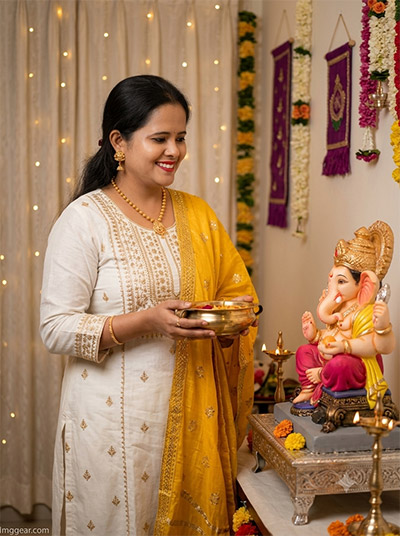
Bring cozy indoor celebrations to life with soft fairy lights and elegant white traditional wear holding a brass bowl near the idol. Crafting this look takes seconds using our exact Ganesh Chaturthi Gemini prompt. Drop your thoughts in the comments!
PROMPT
{
“image_label”: “Imggear.com_5”,
“version”: “3.5”,
“aspect_ratio”: “3:4”,
“prompt”: “An ultra-realistic, photorealistic premium masterpiece, preserving the exact identity, facial proportions, bone structure, eye depth, sharp jawline, authentic facial characteristics, and skin micro-textures (visible pores, fine lines) of the subject in the uploaded personal reference photo without alteration. The facial lighting must seamlessly fuse with the ambient scene highlights and cast realistic shadows, allowing the subject to naturally integrate with the environment’s lighting, shadows, depth, atmospheric perspective, and optical characteristics while preserving the subject’s true identity without alteration, seamlessly integrating the subject into this intimate domestic cinematic portrait, while maintaining complete identity consistency throughout the image. The subject, a young adult female with a warm, joyful expression and smile, is standing in a home *puja* room. She is looking towards a highly decorated Lord Ganesh idol. She is holding a traditional brass bowl containing offerings. She wears a premium custom luxury traditional Indian white *kurta* set with delicate gold embroidery, paired with a vibrant yellow *dupatta* with gold accents draped over her shoulder. The background features soft white and pink sheer curtains decorated with string lights, hanging floral garlands, and traditional purple wall hangings. A highly ornate Lord Ganesh idol in *shahi* (royal) attire sits on a decorated silver pedestal. Lit brass oil lamps (*diyas*) are placed around. The scene is illuminated by warm ambient indoor lighting and the glow of the string lights, creating a cozy and inviting atmosphere. Captured with a professional RAW camera and an 85mm f/1.4 lens, featuring extreme high-definition details on skin pores and fabric textures. A minimal, premium handwritten-style watermark \”Imggear.com\” in soft white (#ffffff) with slight transparency is in the bottom-left corner.”,
“negative_prompt”: “(plastic skin, waxy skin, CGI rendering, AI beauty filter look, porcelain skin, over-smoothed skin, airbrushed skin, synthetic textures, doll-like face, uncanny valley, artificial symmetry), (deformed face, distorted facial features, asymmetrical eyes, bad anatomy, bad proportions, extra limbs, extra fingers, missing fingers, malformed hands, mutated hands), (unnatural lighting, flat lighting, harsh direct sunlight, blown-out highlights, crushed shadows, oversaturated colors, neon colors, unrealistic color grading, HDR look, overexposed, underexposed), (blurry, out of focus, low resolution, pixelated, jpeg artifacts, grainy noise, motion blur, soft focus), (dry land, dusty ground, indoor background, wrong environment, mismatched background), (clothing logos, brand marks, trademarked patterns, text overlays, random watermark placement, duplicate watermark, extra signature), (cartoon style, illustration, painting, 3D render, anime, stylized art, digital art look), (identity mismatch, face swap artifacts, inconsistent facial features, altered bone structure, changed eye color, different face shape), (outdoor setting, modern architecture, western clothing, flash photography, low light grain, unsmiling expression).”
}
💡 AI Photo Editing Pro Tips for Perfect Results
Keep Faces Consistent: If the AI changes the face, add this exact phrase to the very beginning of your prompt: “Preserve facial identity 100%, do not alter facial features or proportions.”
Reroll for Perfection: Run every prompt 2–3 times! The second or third generation is almost always sharper and packed with better details.
Get the DSLR Look: Want that beautiful, blurred background? Just add “f/1.8 shallow depth of field” to your prompt.
Control the Camera Shot: Tell the AI exactly what frame you want by adding terms like “Close-up portrait,” “Full-body shot,” or “Wide-angle view.”
Set the Vibe with Lighting: Lighting makes or breaks an AI image. Add “Cinematic lighting,” “Golden hour sunset,” or “Soft studio lighting” for a professional touch.
📐 Best Aspect Ratio: Use 3:4 Vertical for stunning, ready-to-post results on Instagram and Pinterest.