Struggling to generate realistic devotional photos for Ganesh Chaturthi that actually go viral on Instagram? You are not alone—most generic image prompts create awkward or distorted results. Fortunately, using the right Ganpati Bappa Hugging Prompt with Gemini AI and ChatGPT completely transforms your results. In this guide, you will get free, copy-paste prompts designed to produce hyper-realistic, emotionally moving images and video templates in just one click. Let’s create your viral masterpiece!
Design Divine Festive Photos with Ganpati Bappa Hugging Prompt
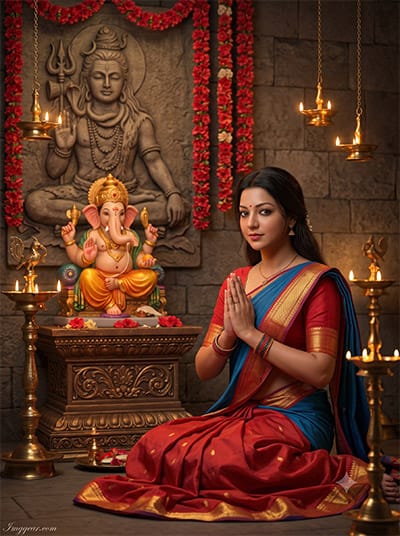
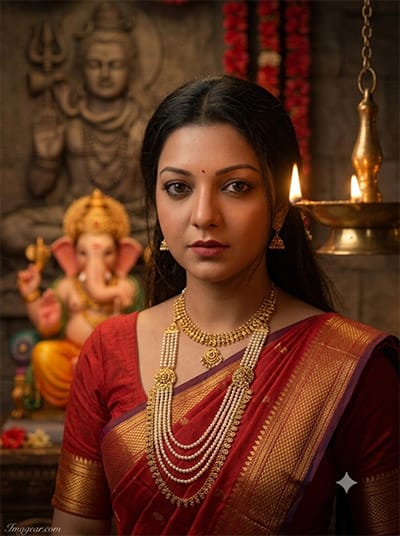
Recreate this heartwarming divine portrait in seconds. Using a detailed Ganpati Bappa hugging prompt lets you capture incredible sacred moments with glowing traditional lamps and ornate decor. Want to try crafting your own version today?
PROMPT
{
“image_label”: “Imggear.com_1”,
“version”: “3.5”,
“aspect_ratio”: “3:4”,
“prompt”: “An ultra-realistic, photorealistic premium masterpiece, preserving the exact identity, facial proportions, bone structure, eye depth, sharp jawline, authentic facial characteristics, and skin micro-textures (visible pores, fine lines) of the young woman in the uploaded personal reference photo without alteration. The facial lighting must seamlessly fuse with the ambient scene highlights and cast realistic shadows, integrating the subject into this cinematic scene. The subject is a young woman (early 20s, slender build), sitting on a floor in anjali mudra (prayer) pose, wearing the specific red and gold saree with a blue drape. Her expression is serene. The setting is a devotional altar with a Ganesha idol on an ornate pedestal, a large Shiva relief on the stone wall behind, and hanging garlands of red flowers. Multiple traditional oil lamps provide warm, volumetric lighting, enhanced by cinematic global illumination, and an 85mm f/1.4 lens creates a shallow depth of field with premium creamy bokeh. Watermark: ‘Imggear.com’ in a delicate Petit Formal Script, soft white, in the bottom-left corner.”,
“negative_prompt”: “(plastic skin, waxy skin, CGI rendering, AI beauty filter look, porcelain skin, over-smoothed skin, airbrushed skin, synthetic textures, doll-like face, uncanny valley, artificial symmetry), (deformed face, distorted facial features, asymmetrical eyes, bad anatomy, bad proportions, extra limbs, extra fingers, missing fingers, malformed hands, mutated hands), (unnatural lighting, flat lighting, harsh direct sunlight, blown-out highlights, crushed shadows, oversaturated colors, neon colors, unrealistic color grading, HDR look, overexposed, underexposed), (blurry, out of focus, low resolution, pixelated, jpeg artifacts, grainy noise, motion blur, soft focus), (clothing logos, brand marks, trademarked patterns, text overlays, random watermark placement, duplicate watermark, extra signature), (cartoon style, illustration, painting, 3D render, anime, stylized art, digital art look), (identity mismatch, face swap artifacts, inconsistent facial features, altered bone structure, changed eye color, different face shape)”
}
How to Create Warm Devotional Edits with Ganpati Bappa AI Image Prompts
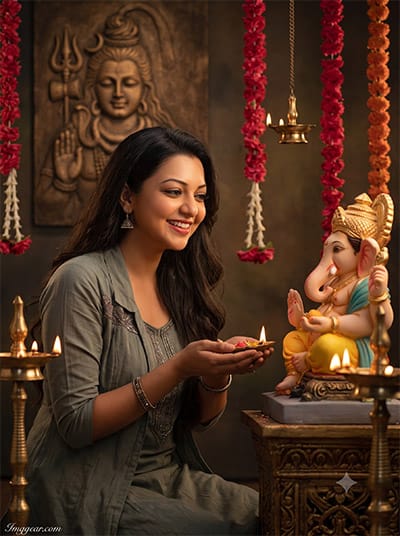
Bring vibrant spiritual warmth to your festive artwork using simple prompt techniques. Generate stunning images of devotees performing puja before Lord Ganesha with rich golden lighting and traditional decor. Copy this prompt and transform your festive photos now!
PROMPT
{
“image_label”: “Imggear.com_2”,
“version”: “3.5”,
“aspect_ratio”: “3:4”,
“prompt”: “An ultra-realistic, photorealistic premium masterpiece, preserving the exact identity, facial proportions, bone structure, eye depth, sharp jawline, authentic facial characteristics, and skin micro-textures (visible pores, fine lines) of the young woman in the uploaded personal reference photo without alteration. The facial lighting must seamlessly fuse with the ambient scene highlights and cast realistic shadows, integrating the subject into this dramatic portrait. This young woman (early 20s, slender build) is in a similar sitting pose as the reference image, but now smiling and looking towards the right, holding a small offering in her hands, as if receiving a blessing from the Ganesha idol which is positioned slightly closer. The lighting from the oil lamps is more focused on her joyful expression. The background details—the Shiva relief, Ganesha on the pedestal, and flower garlands—are identical. High-definition micro-details on skin, fabric, and jewelry, with hyper-detailed edge sharpness and an 85mm f/1.4 lens for premium creamy bokeh. Watermark: ‘Imggear.com’ in a delicate Petit Formal Script, soft white, in the bottom-left corner.”,
“negative_prompt”: “(plastic skin, waxy skin, CGI rendering, AI beauty filter look, porcelain skin, over-smoothed skin, airbrushed skin, synthetic textures, doll-like face, uncanny valley, artificial symmetry), (deformed face, distorted facial features, asymmetrical eyes, bad anatomy, bad proportions, extra limbs, extra fingers, missing fingers, malformed hands, mutated hands), (unnatural lighting, flat lighting, harsh direct sunlight, blown-out highlights, crushed shadows, oversaturated colors, neon colors, unrealistic color grading, HDR look, overexposed, underexposed), (blurry, out of focus, low resolution, pixelated, jpeg artifacts, grainy noise, motion blur, soft focus), (clothing logos, brand marks, trademarked patterns, text overlays, random watermark placement, duplicate watermark, extra signature), (cartoon style, illustration, painting, 3D render, anime, stylized art, digital art look), (identity mismatch, face swap artifacts, inconsistent facial features, altered bone structure, changed eye color, different face shape)”
}
Spiritual Festive Portrait Ideas using Ganesha Puja AI Photo Prompts
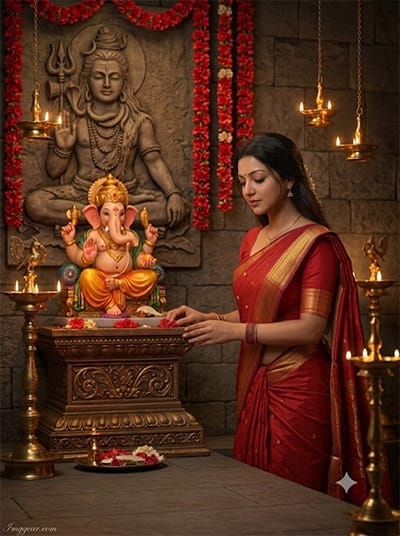
Capturing the quiet elegance of traditional prayer rituals becomes effortless with precise lighting cues. Render soft candle glimmers and rich crimson drapery flawlessly. Which devotional aesthetic are you planning to construct next?
PROMPT
{
“image_label”: “Imggear.com_3”,
“version”: “3.5”,
“aspect_ratio”: “3:4”,
“prompt”: “An ultra-realistic, photorealistic premium masterpiece, preserving the exact identity, facial proportions, bone structure, eye depth, sharp jawline, authentic facial characteristics, and skin micro-textures (visible pores, fine lines) of the young woman in the uploaded personal reference photo without alteration. The facial lighting must seamlessly fuse with the ambient scene highlights and cast realistic shadows, integrating the subject into this dramatic portrait. This young woman (early 20s, slender build) is now standing gracefully beside the Ganesha altar, her hands gently touching the base of the pedestal. She is wearing the specific red and gold saree, and her expression is one of reverence. The camera angle is slightly higher, showing more of the intricate details on the Shiva relief on the wall and the arrangement of offerings. The warm light from multiple sources highlights the rich fabric texture and delicate jewelry. High-definition edge sharpness and 85mm f/1.4 lens rendering. Watermark: ‘Imggear.com’ in a delicate Petit Formal Script, soft white, in the bottom-left corner.”,
“negative_prompt”: “(plastic skin, waxy skin, CGI rendering, AI beauty filter look, porcelain skin, over-smoothed skin, airbrushed skin, synthetic textures, doll-like face, uncanny valley, artificial symmetry), (deformed face, distorted facial features, asymmetrical eyes, bad anatomy, bad proportions, extra limbs, extra fingers, missing fingers, malformed hands, mutated hands), (unnatural lighting, flat lighting, harsh direct sunlight, blown-out highlights, crushed shadows, oversaturated colors, neon colors, unrealistic color grading, HDR look, overexposed, underexposed), (blurry, out of focus, low resolution, pixelated, jpeg artifacts, grainy noise, motion blur, soft focus), (clothing logos, brand marks, trademarked patterns, text overlays, random watermark placement, duplicate watermark, extra signature), (cartoon style, illustration, painting, 3D render, anime, stylized art, digital art look), (identity mismatch, face swap artifacts, inconsistent facial features, altered bone structure, changed eye color, different face shape)”
}
Crafting Dynamic Cultural Shots with Lord Ganesha AI Photo Prompts
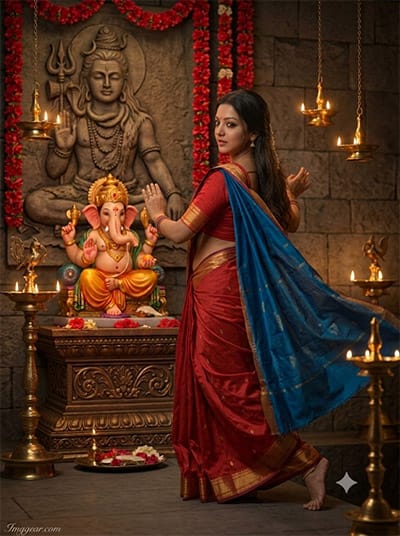
Elevate your devotional aesthetic by adding graceful motion to traditional attire. Swirling silk drapes paired with soft ambient candlelight create pure cinematic magic. Drop a comment below if you want more prompt variations like this one.
PROMPT
{
“image_label”: “Imggear.com_4”,
“version”: “3.5”,
“aspect_ratio”: “3:4”,
“prompt”: “An ultra-realistic, photorealistic premium masterpiece, preserving the exact identity, facial proportions, bone structure, eye depth, sharp jawline, authentic facial characteristics, and skin micro-textures (visible pores, fine lines) of the young woman in the uploaded personal reference photo without alteration. The facial lighting must seamlessly fuse with the ambient scene highlights and cast realistic shadows, integrating the subject into this dynamic cinematic scene. This young woman (early 20s, slender build) is captured in a graceful dance-like movement, her hands slightly raised, looking back over her shoulder towards the Ganesha idol. She still wears the red and gold saree, but the blue drape flows dramatically with the motion. The scene is illuminated by more intense, flickering light from the oil lamps, creating long shadows and emphasizing texture and movement. The perspective is lower, focusing on her expression and the fluidity of her pose. High-definition micro-details, edge sharpness, and 85mm f/1.4 natural optical rendering. Watermark: ‘Imggear.com’ in a delicate Petit Formal Script, soft white, in the bottom-left corner.”,
“negative_prompt”: “(plastic skin, waxy skin, CGI rendering, AI beauty filter look, porcelain skin, over-smoothed skin, airbrushed skin, synthetic textures, doll-like face, uncanny valley, artificial symmetry), (deformed face, distorted facial features, asymmetrical eyes, bad anatomy, bad proportions, extra limbs, extra fingers, missing fingers, malformed hands, mutated hands), (unnatural lighting, flat lighting, harsh direct sunlight, blown-out highlights, crushed shadows, oversaturated colors, neon colors, unrealistic color grading, HDR look, overexposed, underexposed), (blurry, out of focus, low resolution, pixelated, jpeg artifacts, grainy noise, motion blur, soft focus), (clothing logos, brand marks, trademarked patterns, text overlays, random watermark placement, duplicate watermark, extra signature), (cartoon style, illustration, painting, 3D render, anime, stylized art, digital art look), (identity mismatch, face swap artifacts, inconsistent facial features, altered bone structure, changed eye color, different face shape)”
}
Close-Up Divine Photography Ideas with Ganesha Festival AI Prompts
Master detailed gold jewelry and warm ambient depth-of-field easily. A tailored Ganesha photo prompt highlights intricate saree textures while keeping background elements softly blurred. Give this prompt a spin right now to see the results yourself!
PROMPT
{
“image_label”: “Imggear.com_5”,
“version”: “3.5”,
“aspect_ratio”: “3:4”,
“prompt”: “An ultra-realistic, photorealistic premium masterpiece, preserving the exact identity, facial proportions, bone structure, eye depth, sharp jawline, authentic facial characteristics, and skin micro-textures (visible pores, fine lines) of the young woman in the uploaded personal reference photo without alteration. The facial lighting must seamlessly fuse with the ambient scene highlights and cast realistic shadows, integrating the subject into this dramatic cinematic scene. This young woman (early 20s, slender build) is captured from a closer perspective, looking directly at the camera with a profound, focused expression. She is still wearing the red and gold saree and multiple gold necklaces, including the elaborate pearl multi-layered piece. The scene is illuminated by a new, focused light source (perhaps a single, larger oil lamp), casting dramatic highlights and deep shadows across her features and the intricate jewelry. The Ganesha idol and background details are softly blurred, creating a very strong sense of focus on her gaze and presence. High-definition micro-details and edge sharpness with 85mm f/1.4 premium creamy bokeh. Watermark: ‘Imggear.com’ in a delicate Petit Formal Script, soft white, in the bottom-left corner.”,
“negative_prompt”: “(plastic skin, waxy skin, CGI rendering, AI beauty filter look, porcelain skin, over-smoothed skin, airbrushed skin, synthetic textures, doll-like face, uncanny valley, artificial symmetry), (deformed face, distorted facial features, asymmetrical eyes, bad anatomy, bad proportions, extra limbs, extra fingers, missing fingers, malformed hands, mutated hands), (unnatural lighting, flat lighting, harsh direct sunlight, blown-out highlights, crushed shadows, oversaturated colors, neon colors, unrealistic color grading, HDR look, overexposed, underexposed), (blurry, out of focus, low resolution, pixelated, jpeg artifacts, grainy noise, motion blur, soft focus), (clothing logos, brand marks, trademarked patterns, text overlays, random watermark placement, duplicate watermark, extra signature), (cartoon style, illustration, painting, 3D render, anime, stylized art, digital art look), (identity mismatch, face swap artifacts, inconsistent facial features, altered bone structure, changed eye color, different face shape)”
}
💡 AI Photo Editing Pro Tips for Perfect Results
Keep Faces Consistent: If the AI changes the face, add this exact phrase to the very beginning of your prompt: “Preserve facial identity 100%, do not alter facial features or proportions.”
Reroll for Perfection: Run every prompt 2–3 times! The second or third generation is almost always sharper and packed with better details.
Get the DSLR Look: Want that beautiful, blurred background? Just add “f/1.8 shallow depth of field” to your prompt.
Control the Camera Shot: Tell the AI exactly what frame you want by adding terms like “Close-up portrait,” “Full-body shot,” or “Wide-angle view.”
Set the Vibe with Lighting: Lighting makes or breaks an AI image. Add “Cinematic lighting,” “Golden hour sunset,” or “Soft studio lighting” for a professional touch.
📐 Best Aspect Ratio: Use 3:4 Vertical for stunning, ready-to-post results on Instagram and Pinterest.