Generating realistic festival art shouldn’t feel frustrating when capturing the true emotional spirit of Bappa’s farewell. If you want ultra-detailed immersion scenes without distorted hands or generic backgrounds, using optimized Ganpati Visarjan AI Prompts is the solution. By feeding precise instructions into Gemini AI or ChatGPT, you can create stunning 4K visuals featuring traditional dhol-tasha processions, golden-hour riverbank immersions, and personalized devotional portraits. Preview our copy-paste prompt list below to transform your festival ideas into viral photos.
Craft Festive Festive Ganpati Visarjan Photo Edits Using AI Prompts
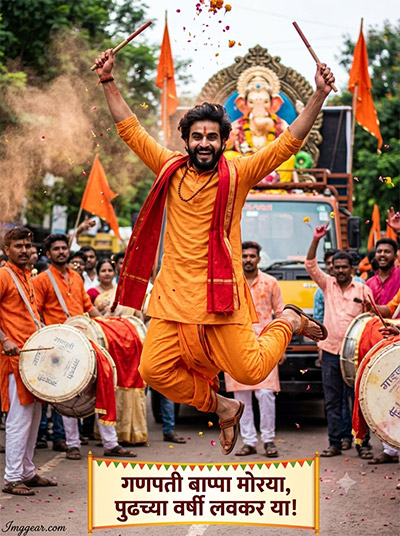
Capture the energetic spirit of Ganesh immersion celebrations with high-action festive photo concepts. Copy this exact prompt text to generate vibrant drum-beating festival imagery in seconds. Drop your creations in the comments below!
PROMPT
{
“prompt_id”: “GPV-BOY-01”,
“category”: “Boys Solo”,
“shot_type”: “Full Body”,
“subject”: { “gender”: “Male”, “count”: 1, “age_group”: “young adult” },
“attire”: “Traditional Maharashtrian dhoti-kurta in saffron/orange, red angavastram on shoulder, tilak on forehead, simple mala (beads) around neck, bare feet or traditional sandals”,
“pose_and_action”: “Mid-dance jump near dhol players, arms raised high with dhol sticks or hands in air, joyful energetic expression, body slightly tilted mid-motion”,
“movement”: “Dynamic mid-motion capture — dust/gulal particles frozen in air, natural motion blur on background crowd and feet”,
“background_setting”: “Maharashtra Ganpati Visarjan procession street, decorated Ganpati idol on truck/trolley in soft-blurred background, dhol-tasha group, saffron flags, flower petals falling”,
“camera_and_realism”: {
“camera_style”: “Shot on DSLR (Canon EOS R5 look), 50mm f/1.8 lens”,
“settings”: “Shallow depth of field, natural daylight/golden hour, candid photojournalism style, realistic skin pores and texture, slight natural imperfections, authentic film-like color grading”,
“avoid”: [“plastic/smooth AI skin”, “symmetrical perfect face”, “over-sharpening”, “digital glow”, “airbrushed look”]
},
“identity_preservation”: {
“face_match”: “100% identical to reference image, no face change”,
“no_alterations”: “Strictly no reshaping, no morphing, no beautification, no stylization of facial features”,
“mandatory_preservation”: “Maintain exact original facial proportions, contours, natural skin details, overall likeness”
},
“marathi_slogan_overlay”: {
“text”: “गणपती बाप्पा मोरया, पुढच्या वर्षी लवकर या!”,
“placement”: “Small festive banner-style text, bottom-center or top area, bold Devanagari font”,
“note”: “EDITABLE — change only this text to reuse the prompt with a different slogan”
},
“watermark”: {
“text”: “Imggear.com”,
“placement”: “Bottom-left corner, seamlessly blended, no background box”,
“font_style”: “Petit Formal Script, thin elegant cursive strokes, minimal premium handwritten-signature appearance”,
“color_effects”: “Soft white (#FFFFFF) with slight transparency, 1px letter spacing”
},
“aspect_ratio”: “3:4”,
“resolution”: “12K, ultra-photorealistic”
}
Ganesh Immersion Photo Prompts to Create Serene Festival Portraits
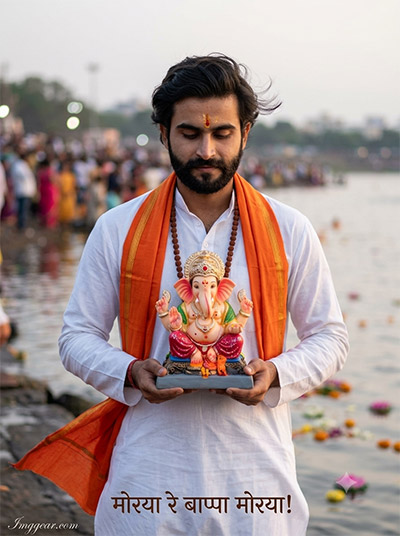
Recreate this quiet, devotional moment by the riverfront featuring traditional attire and soft natural lighting. Try this textual blueprint today to generate your own respectful cultural portrait. How would you style your final prompt setup?
PROMPT
{
“prompt_id”: “GPV-BOY-02”,
“category”: “Boys Solo”,
“shot_type”: “Half Body”,
“subject”: { “gender”: “Male”, “count”: 1, “age_group”: “young adult” },
“attire”: “White kurta-pajama with orange/saffron stole draped over shoulders, rudraksha mala, tilak on forehead”,
“pose_and_action”: “Holding a small decorated Ganpati murti close to chest with both hands, eyes slightly closed in devotion, gentle emotional expression”,
“movement”: “Subtle — soft breeze moving stole fabric and loose hair strands, calm devotional stillness”,
“background_setting”: “Softly blurred visarjan ghat/lake edge, evening light, distant crowd and floating flowers on water”,
“camera_and_realism”: {
“camera_style”: “Shot on DSLR (Nikon Z8 look), 85mm f/1.4 lens”,
“settings”: “Warm evening tone, shallow depth of field, natural skin texture with visible pores, realistic candid festival photography feel”,
“avoid”: [“plastic/smooth AI skin”, “perfect symmetry”, “digital sheen”, “over-processed HDR look”]
},
“identity_preservation”: {
“face_match”: “100% identical to reference image, no face change”,
“no_alterations”: “Strictly no reshaping, no morphing, no beautification, no stylization of facial features”,
“mandatory_preservation”: “Maintain exact original facial proportions, contours, natural skin details, overall likeness”
},
“marathi_slogan_overlay”: {
“text”: “मोरया रे बाप्पा मोरया!”,
“placement”: “Small subtle text near bottom edge, elegant Devanagari script”,
“note”: “EDITABLE — change only this text to reuse the prompt with a different slogan”
},
“watermark”: {
“text”: “Imggear.com”,
“placement”: “Bottom-left corner, seamlessly blended, no background box”,
“font_style”: “Petit Formal Script, thin elegant cursive strokes, minimal premium handwritten-signature appearance”,
“color_effects”: “Soft white (#FFFFFF) with slight transparency, 1px letter spacing”
},
“aspect_ratio”: “3:4”,
“resolution”: “12K, ultra-photorealistic”
}
Expressive Ganesh Immersion AI Photo Prompts for Vivid Portraits
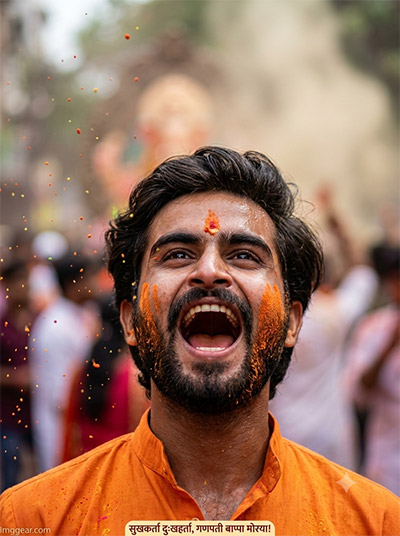
Bring the intense joy of street celebrations to life with close-up powder throw effects and raw emotion. Perfect for generating striking festival portraits in seconds. Save this custom input for your next edit!
PROMPT
{
“prompt_id”: “GPV-BOY-03”,
“category”: “Boys Solo”,
“shot_type”: “Close-up”,
“subject”: { “gender”: “Male”, “count”: 1, “age_group”: “young adult” },
“attire”: “Saffron kurta collar visible, gulal (colored powder) smeared naturally on cheeks and forehead, tilak visible”,
“pose_and_action”: “Head tilted slightly back, mouth open mid-shout/cheer ‘Ganpati Bappa Morya’, eyes bright with excitement”,
“movement”: “Colored gulal powder frozen mid-air around face, natural motion blur on powder particles”,
“background_setting”: “Heavily blurred bokeh of procession crowd and orange/pink gulal cloud”,
“camera_and_realism”: {
“camera_style”: “Shot on DSLR (Canon EOS R6 look), 85mm f/1.4 lens, close portrait crop”,
“settings”: “Natural skin texture, visible pores and slight sweat sheen from festival heat, candid unposed feel, realistic color grading”,
“avoid”: [“plastic/smooth AI skin”, “airbrushing”, “unnatural symmetry”, “digital glow”]
},
“identity_preservation”: {
“face_match”: “100% identical to reference image, no face change”,
“no_alterations”: “Strictly no reshaping, no morphing, no beautification, no stylization of facial features”,
“mandatory_preservation”: “Maintain exact original facial proportions, contours, natural skin details, overall likeness”
},
“marathi_slogan_overlay”: {
“text”: “सुखकर्ता दुःखहर्ता, गणपती बाप्पा मोरया!”,
“placement”: “Thin text strip near bottom, festive bold Devanagari font”,
“note”: “EDITABLE — change only this text to reuse the prompt with a different slogan”
},
“watermark”: {
“text”: “Imggear.com”,
“placement”: “Bottom-left corner, seamlessly blended, no background box”,
“font_style”: “Petit Formal Script, thin elegant cursive strokes, minimal premium handwritten-signature appearance”,
“color_effects”: “Soft white (#FFFFFF) with slight transparency, 1px letter spacing”
},
“aspect_ratio”: “3:4”,
“resolution”: “12K, ultra-photorealistic”
}
Traditional Maharashtrian Ganpati Visarjan Photo Ideas Using AI
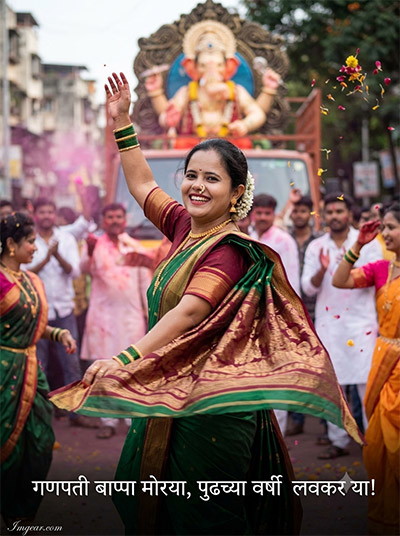
Designed for capturing authentic cultural dance moments, this style highlights elegant green sarees, flying flower petals, and festive street energy. Tap below to grab the full prompt details right away.
PROMPT
{
“prompt_id”: “GPV-GIRL-01”,
“category”: “Girls Solo”,
“shot_type”: “Full Body”,
“subject”: { “gender”: “Female”, “count”: 1, “age_group”: “young adult” },
“attire”: “Traditional nauvari (9-yard) saree in green/maroon, nath (nose ring), bindi, gajra (flower string) in hair, traditional jewelry”,
“pose_and_action”: “Dancing with one hand raised and dupatta/pallu flowing, joyful spinning motion, bright festive smile”,
“movement”: “Saree pallu and hair caught mid-swirl from dancing motion, natural motion blur on hem and background”,
“background_setting”: “Maharashtra Ganpati visarjan street procession, decorated idol truck blurred in background, flower petals and gulal in air”,
“camera_and_realism”: {
“camera_style”: “Shot on DSLR (Canon EOS R5 look), 50mm f/1.8 lens”,
“settings”: “Natural daylight, shallow depth of field, realistic skin texture and natural makeup finish, candid photojournalism style”,
“avoid”: [“plastic/smooth AI skin”, “perfect symmetry”, “digital glow”, “over-smoothed face”]
},
“identity_preservation”: {
“face_match”: “100% identical to reference image, no face change”,
“no_alterations”: “Strictly no reshaping, no morphing, no beautification, no stylization of facial features”,
“mandatory_preservation”: “Maintain exact original facial proportions, contours, natural skin details, overall likeness”
},
“marathi_slogan_overlay”: {
“text”: “गणपती बाप्पा मोरया, पुढच्या वर्षी लवकर या!”,
“placement”: “Bottom banner text, bold festive Devanagari font”,
“note”: “EDITABLE — change only this text to reuse the prompt with a different slogan”
},
“watermark”: {
“text”: “Imggear.com”,
“placement”: “Bottom-left corner, seamlessly blended, no background box”,
“font_style”: “Petit Formal Script, thin elegant cursive strokes, minimal premium handwritten-signature appearance”,
“color_effects”: “Soft white (#FFFFFF) with slight transparency, 1px letter spacing”
},
“aspect_ratio”: “3:4”,
“resolution”: “12K, ultra-photorealistic”
}
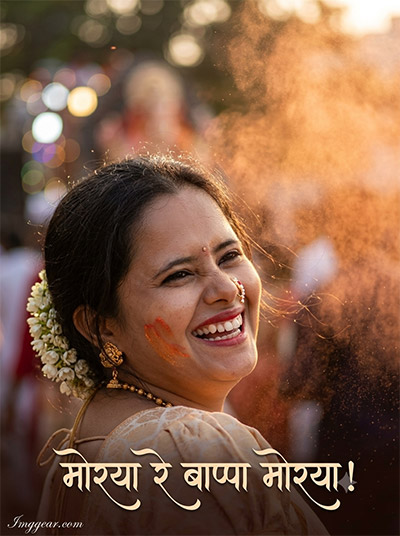
Candid Golden Hour Ganesh Festival AI Photo Prompts
Master the art of generating warm, cinematic portraiture featuring joyous expressions, saffron powder dust, and gajra hair styling. Want to see how simple adjustments transform this visual style? Explore the recipe now!
PROMPT
{
“prompt_id”: “GPV-GIRL-02”,
“category”: “Girls Solo”,
“shot_type”: “Close-up”,
“subject”: { “gender”: “Female”, “count”: 1, “age_group”: “young adult” },
“attire”: “Traditional paithani saree blouse visible at shoulders, nath, bindi, gajra flowers in hair, small gulal marks on cheek”,
“pose_and_action”: “Candid genuine laughing expression, head slightly tilted, eyes crinkled with joy”,
“movement”: “Loose hair strands and gulal dust softly moving with breeze, subtle natural motion”,
“background_setting”: “Heavily blurred bokeh of procession lights and orange gulal cloud in evening light”,
“camera_and_realism”: {
“camera_style”: “Shot on DSLR (Nikon Z8 look), 85mm f/1.4 portrait lens”,
“settings”: “Warm golden-hour tone, realistic skin texture with visible pores, natural candid unposed feel, authentic color grading”,
“avoid”: [“plastic/smooth AI skin”, “airbrushing”, “unnatural symmetry”, “digital glow”]
},
“identity_preservation”: {
“face_match”: “100% identical to reference image, no face change”,
“no_alterations”: “Strictly no reshaping, no morphing, no beautification, no stylization of facial features”,
“mandatory_preservation”: “Maintain exact original facial proportions, contours, natural skin details, overall likeness”
},
“marathi_slogan_overlay”: {
“text”: “मोरया रे बाप्पा मोरया!”,
“placement”: “Thin text strip near bottom edge, elegant Devanagari script”,
“note”: “EDITABLE — change only this text to reuse the prompt with a different slogan”
},
“watermark”: {
“text”: “Imggear.com”,
“placement”: “Bottom-left corner, seamlessly blended, no background box”,
“font_style”: “Petit Formal Script, thin elegant cursive strokes, minimal premium handwritten-signature appearance”,
“color_effects”: “Soft white (#FFFFFF) with slight transparency, 1px letter spacing”
},
“aspect_ratio”: “3:4”,
“resolution”: “12K, ultra-photorealistic”
}
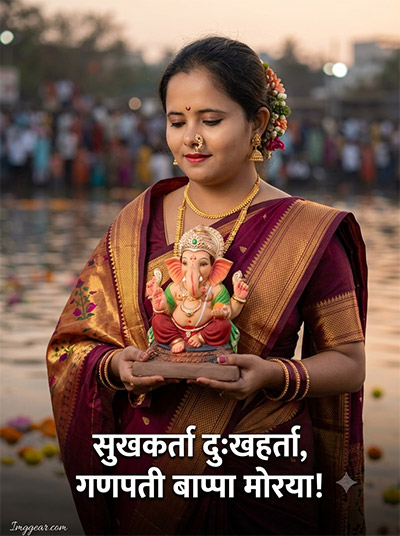
Generate Peaceful Ganesh Immersion Photos with Smart Prompts
Highlight traditional Indian attire and serene lakeside reflections using careful prompt structure. This approach helps render intricate jewelry and authentic idol details effortlessly. Which festival aesthetic will you build next?
PROMPT
{
“prompt_id”: “GPV-GIRL-03”,
“category”: “Girls Solo”,
“shot_type”: “Half Body”,
“subject”: { “gender”: “Female”, “count”: 1, “age_group”: “young adult” },
“attire”: “Elegant paithani saree in maroon/gold, traditional jewelry, bindi, hair tied with flowers”,
“pose_and_action”: “Holding a small decorated Ganpati murti with both hands slightly raised in offering gesture, serene devotional expression, eyes gently lowered”,
“movement”: “Soft breeze moving saree pallu and hair, calm stillness with slight fabric motion”,
“background_setting”: “Softly blurred visarjan ghat/lake edge at dusk, floating flowers on water, distant procession lights”,
“camera_and_realism”: {
“camera_style”: “Shot on DSLR (Canon EOS R6 look), 85mm f/1.4 lens”,
“settings”: “Warm evening tone, shallow depth of field, natural skin texture, realistic candid festival photography feel”,
“avoid”: [“plastic/smooth AI skin”, “perfect symmetry”, “digital sheen”, “over-processed HDR look”]
},
“identity_preservation”: {
“face_match”: “100% identical to reference image, no face change”,
“no_alterations”: “Strictly no reshaping, no morphing, no beautification, no stylization of facial features”,
“mandatory_preservation”: “Maintain exact original facial proportions, contours, natural skin details, overall likeness”
},
“marathi_slogan_overlay”: {
“text”: “सुखकर्ता दुःखहर्ता, गणपती बाप्पा मोरया!”,
“placement”: “Small festive banner text, bottom-center, bold Devanagari font”,
“note”: “EDITABLE — change only this text to reuse the prompt with a different slogan”
},
“watermark”: {
“text”: “Imggear.com”,
“placement”: “Bottom-left corner, seamlessly blended, no background box”,
“font_style”: “Petit Formal Script, thin elegant cursive strokes, minimal premium handwritten-signature appearance”,
“color_effects”: “Soft white (#FFFFFF) with slight transparency, 1px letter spacing”
},
“aspect_ratio”: “3:4”,
“resolution”: “12K, ultra-photorealistic”
}
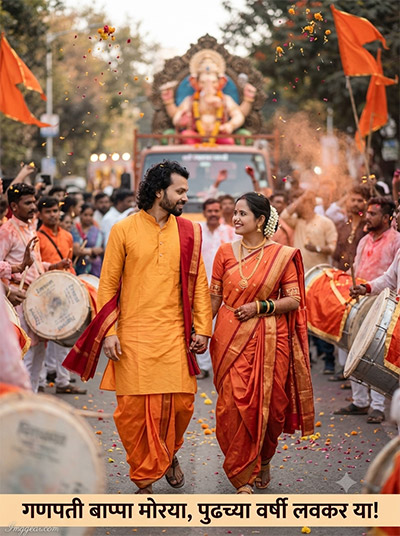
Creative Couple Ganesh Visarjan AI Prompts for Festival Photos
Replicate this candid walking portrait featuring traditional orange attire, street drums, and falling orange flower petals. Learn how to construct this prompt to generate your own lively couple portraits. Ready to make your own custom image?
PROMPT
{
“prompt_id”: “GPV-COUPLE-01”,
“category”: “Couple”,
“shot_type”: “Full Body”,
“subject”: { “gender”: “Male & Female”, “count”: 2, “age_group”: “young adult couple” },
“attire”: “Male: saffron dhoti-kurta with red angavastram; Female: nauvari saree in matching festive tone, traditional jewelry and gajra”,
“pose_and_action”: “Walking hand-in-hand through the procession, both looking at each other and smiling, natural candid stride”,
“movement”: “Fabric and hair gently swaying mid-step, natural motion blur on background crowd”,
“background_setting”: “Maharashtra Ganpati visarjan street procession, decorated idol truck/trolley blurred in background, dhol-tasha group, flower petals falling”,
“camera_and_realism”: {
“camera_style”: “Shot on DSLR (Canon EOS R5 look), 35mm f/1.8 lens for environmental context”,
“settings”: “Natural daylight, candid photojournalism style, realistic skin texture on both subjects, authentic color grading”,
“avoid”: [“plastic/smooth AI skin”, “symmetrical perfect faces”, “digital glow”, “over-sharpening”]
},
“identity_preservation”: {
“face_match”: “100% identical to reference images for both individuals, no face change”,
“no_alterations”: “Strictly no reshaping, no morphing, no beautification, no stylization of facial features”,
“mandatory_preservation”: “Maintain exact original facial proportions, contours, natural skin details, overall likeness for both”
},
“marathi_slogan_overlay”: {
“text”: “गणपती बाप्पा मोरया, पुढच्या वर्षी लवकर या!”,
“placement”: “Bottom banner text, bold festive Devanagari font”,
“note”: “EDITABLE — change only this text to reuse the prompt with a different slogan”
},
“watermark”: {
“text”: “Imggear.com”,
“placement”: “Bottom-left corner, seamlessly blended, no background box”,
“font_style”: “Petit Formal Script, thin elegant cursive strokes, minimal premium handwritten-signature appearance”,
“color_effects”: “Soft white (#FFFFFF) with slight transparency, 1px letter spacing”
},
“aspect_ratio”: “3:4”,
“resolution”: “12K, ultra-photorealistic”
}
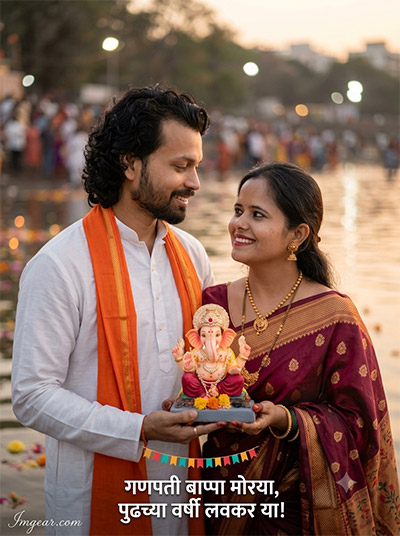
Romantic Couple Ganesh Immersion Photo Prompts for Warm Visuals
Blend soft twilight light with intimate expressions while holding a clay deity idol by the riverbanks. Use these exact style descriptors to generate beautiful festive couple photos. Want to unlock the full prompt secret?
PROMPT
{
“prompt_id”: “GPV-COUPLE-02”,
“category”: “Couple”,
“shot_type”: “Half Body”,
“subject”: { “gender”: “Male & Female”, “count”: 2, “age_group”: “young adult couple” },
“attire”: “Male: white kurta with orange stole; Female: paithani saree with traditional jewelry”,
“pose_and_action”: “Both holding a small decorated Ganpati murti together, one hand each supporting it, warm affectionate smiles toward each other”,
“movement”: “Subtle — soft breeze on clothing, calm shared devotional moment”,
“background_setting”: “Softly blurred visarjan ghat/lake edge, golden evening light, floating flowers on water”,
“camera_and_realism”: {
“camera_style”: “Shot on DSLR (Nikon Z8 look), 50mm f/1.8 lens”,
“settings”: “Warm evening tone, shallow depth of field, realistic skin texture for both subjects, authentic candid feel”,
“avoid”: [“plastic/smooth AI skin”, “perfect symmetry”, “digital sheen”]
},
“identity_preservation”: {
“face_match”: “100% identical to reference images for both individuals, no face change”,
“no_alterations”: “Strictly no reshaping, no morphing, no beautification, no stylization of facial features”,
“mandatory_preservation”: “Maintain exact original facial proportions, contours, natural skin details, overall likeness for both”
},
“marathi_slogan_overlay”: {
“text”: “मोरया रे बाप्पा मोरया!”,
“placement”: “Small subtle text near bottom edge, elegant Devanagari script”,
“note”: “EDITABLE — change only this text to reuse the prompt with a different slogan”
},
“watermark”: {
“text”: “Imggear.com”,
“placement”: “Bottom-left corner, seamlessly blended, no background box”,
“font_style”: “Petit Formal Script, thin elegant cursive strokes, minimal premium handwritten-signature appearance”,
“color_effects”: “Soft white (#FFFFFF) with slight transparency, 1px letter spacing”
},
“aspect_ratio”: “3:4”,
“resolution”: “12K, ultra-photorealistic”
}
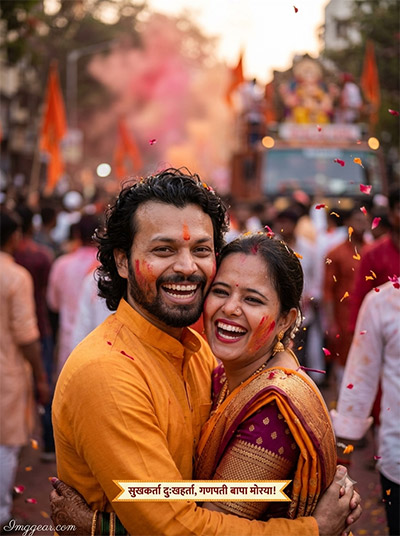
Produce realistic festival snapshots showing authentic laughter, pink gulal clouds, and airborne flower petals. This text generation strategy captures true emotional connections amidst procession crowds. Grab the template to test it yourself!
PROMPT
{
“prompt_id”: “GPV-COUPLE-03”,
“category”: “Couple”,
“shot_type”: “Close-up”,
“subject”: { “gender”: “Male & Female”, “count”: 2, “age_group”: “young adult couple” },
“attire”: “Male: saffron kurta collar visible; Female: nauvari saree blouse visible, both with light gulal marks on cheeks”,
“pose_and_action”: “Cheek-to-cheek joyful candid moment, both laughing together, eyes bright with festive excitement”,
“movement”: “Gulal powder particles frozen mid-air around them, natural motion blur on background”,
“background_setting”: “Heavily blurred bokeh of procession crowd and colored gulal cloud”,
“camera_and_realism”: {
“camera_style”: “Shot on DSLR (Canon EOS R6 look), 85mm f/1.4 portrait lens”,
“settings”: “Natural skin texture with visible pores for both subjects, candid unposed feel, realistic color grading”,
“avoid”: [“plastic/smooth AI skin”, “airbrushing”, “unnatural symmetry”, “digital glow”]
},
“identity_preservation”: {
“face_match”: “100% identical to reference images for both individuals, no face change”,
“no_alterations”: “Strictly no reshaping, no morphing, no beautification, no stylization of facial features”,
“mandatory_preservation”: “Maintain exact original facial proportions, contours, natural skin details, overall likeness for both”
},
“marathi_slogan_overlay”: {
“text”: “सुखकर्ता दुःखहर्ता, गणपती बाप्पा मोरया!”,
“placement”: “Thin text strip near bottom, festive bold Devanagari font”,
“note”: “EDITABLE — change only this text to reuse the prompt with a different slogan”
},
“watermark”: {
“text”: “Imggear.com”,
“placement”: “Bottom-left corner, seamlessly blended, no background box”,
“font_style”: “Petit Formal Script, thin elegant cursive strokes, minimal premium handwritten-signature appearance”,
“color_effects”: “Soft white (#FFFFFF) with slight transparency, 1px letter spacing”
},
“aspect_ratio”: “3:4”,
“resolution”: “12K, ultra-photorealistic”
}
Energetic Couple Dancing Ganesh Festival Photo Generation Prompts
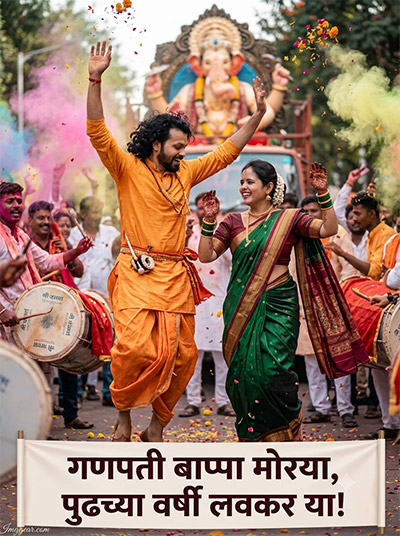
Recreate this lively street parade image with traditional dancing, colourful gulal smoke, and dhol tasha drummers in full celebration. Perfect for crafting dynamic Indian cultural scenes. Share your thoughts on this setup in the community forum!
PROMPT
{
“prompt_id”: “GPV-COUPLE-04”,
“category”: “Couple”,
“shot_type”: “Full Body”,
“subject”: { “gender”: “Male & Female”, “count”: 2, “age_group”: “young adult couple” },
“attire”: “Male: saffron dhoti-kurta with dhol-style accessories; Female: green/maroon nauvari saree, gajra in hair”,
“pose_and_action”: “Dancing together mid-motion to dhol-tasha rhythm, both hands raised, big joyful expressions, dynamic energetic stance”,
“movement”: “Strong mid-dance motion — saree pallu flowing, dust and gulal in the air, natural motion blur on limbs and background crowd”,
“background_setting”: “Maharashtra Ganpati visarjan street procession at peak energy, decorated idol truck blurred, dhol-tasha players, colorful gulal cloud, flower petals”,
“camera_and_realism”: {
“camera_style”: “Shot on DSLR (Canon EOS R5 look), 35mm f/1.8 lens, action photography style”,
“settings”: “Fast shutter feel with slight natural motion blur, natural daylight, realistic skin texture on both subjects, authentic festival color grading”,
“avoid”: [“plastic/smooth AI skin”, “perfect symmetry”, “digital glow”, “over-sharpening”]
},
“identity_preservation”: {
“face_match”: “100% identical to reference images for both individuals, no face change”,
“no_alterations”: “Strictly no reshaping, no morphing, no beautification, no stylization of facial features”,
“mandatory_preservation”: “Maintain exact original facial proportions, contours, natural skin details, overall likeness for both”
},
“marathi_slogan_overlay”: {
“text”: “गणपती बाप्पा मोरया, पुढच्या वर्षी लवकर या!”,
“placement”: “Bottom banner text, bold festive Devanagari font”,
“note”: “EDITABLE — change only this text to reuse the prompt with a different slogan”
},
“watermark”: {
“text”: “Imggear.com”,
“placement”: “Bottom-left corner, seamlessly blended, no background box”,
“font_style”: “Petit Formal Script, thin elegant cursive strokes, minimal premium handwritten-signature appearance”,
“color_effects”: “Soft white (#FFFFFF) with slight transparency, 1px letter spacing”
},
“aspect_ratio”: “3:4”,
“resolution”: “12K, ultra-photorealistic”
}
💡 AI Photo Editing Pro Tips for Perfect Results
Keep Faces Consistent: If the AI changes the face, add this exact phrase to the very beginning of your prompt: “Preserve facial identity 100%, do not alter facial features or proportions.”
Reroll for Perfection: Run every prompt 2–3 times! The second or third generation is almost always sharper and packed with better details.
Get the DSLR Look: Want that beautiful, blurred background? Just add “f/1.8 shallow depth of field” to your prompt.
Control the Camera Shot: Tell the AI exactly what frame you want by adding terms like “Close-up portrait,” “Full-body shot,” or “Wide-angle view.”
Set the Vibe with Lighting: Lighting makes or breaks an AI image. Add “Cinematic lighting,” “Golden hour sunset,” or “Soft studio lighting” for a professional touch.
📐 Best Aspect Ratio: Use 3:4 Vertical for stunning, ready-to-post results on Instagram and Pinterest.