Generating realistic Halloween portraits using AI often leads to distorted faces or overly fake filters. If you want photorealistic horror aesthetics without losing your facial likeness, using the right Gemini AI and ChatGPT prompts is the key. In this guide, you will get copy-paste ready Gemini Halloween photo prompts for men designed specifically to keep your face intact while adding cinematic vampire, gothic, or dark fantasy lighting. Select your prompt below and upgrade your profile picture instantly.
Craft Vampire Costumes Using Gemini Halloween Photo Prompts for Men
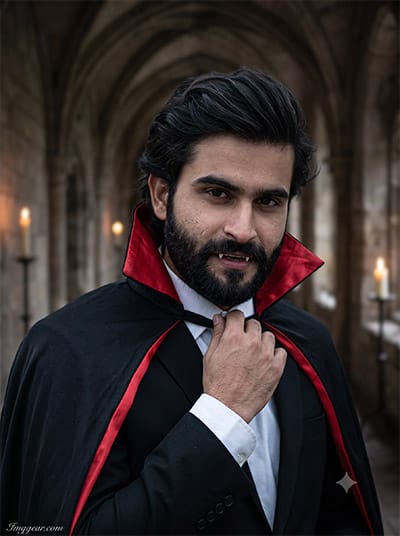
Transforming your portrait into a classic vampire portrait in an ancient stone corridor takes just one simple prompt using Gemini. Try generating your spooky look today!
PROMPT
{
“prompt_id”: 1,
“theme”: “Classic Vampire Count”,
“identity_preservation”: {
“face_matching”: “100% identical to reference image, no face change”,
“no_alterations”: [
“no reshaping”,
“no morphing”,
“no beautification”,
“no stylization of facial features”
],
“mandatory_preservation”: “exact original facial proportions, contours, natural skin details, overall likeness”
},
“realism”: {
“camera”: “Shot on professional DSLR, 85mm lens, shallow depth of field”,
“lighting”: “Natural cinematic lighting, soft shadows, no artificial CGI look”,
“retouch”: “High-end professional retouching, skin texture preserved, magazine-quality finish”,
“authenticity”: “Must look like a real photograph taken by a professional photographer, not AI-generated or fake looking”
},
“style”: “Dark gothic cinematic portrait”,
“background”: “Old haunted castle hallway with candlelight”,
“pose”: “Standing confidently, one hand adjusting cape collar”,
“expression”: “Intense, mysterious gaze with slight smirk”,
“location”: “Gothic castle interior”,
“dress”: “Black tailored vampire suit with red silk lining cape, white shirt”,
“watermark”: {
“text”: “Imggear.com”,
“placement”: “Bottom-left corner, seamlessly blended with background, no box/background behind text”,
“font_style”: “Petit Formal Script, thin elegant cursive strokes, minimal premium handwritten-signature look”,
“color”: “#FFFFFF soft white with slight transparency (approx 70% opacity)”,
“letter_spacing”: “1px”
},
“aspect_ratio”: “3:4”
}
Gemini AI Zombie Apocalypse Photo Ideas for Men
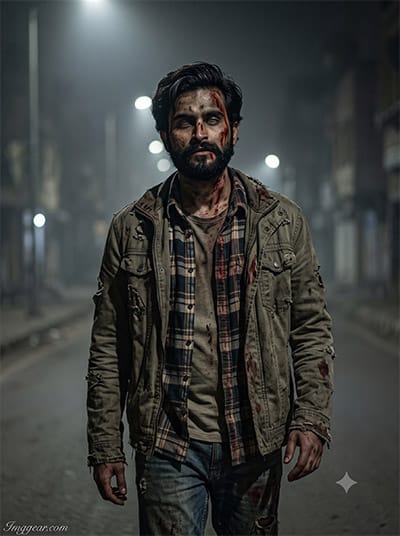
Turn any ordinary street shot into a chilling apocalyptic scene using intelligent Gemini image prompts. What terrifying look will you design first?
PROMPT
{
“prompt_id”: 2,
“theme”: “Zombie Survivor”,
“identity_preservation”: {
“face_matching”: “100% identical to reference image, no face change”,
“no_alterations”: [
“no reshaping”,
“no morphing”,
“no beautification”,
“no stylization of facial features”
],
“mandatory_preservation”: “exact original facial proportions, contours, natural skin details, overall likeness”
},
“realism”: {
“camera”: “Shot on professional DSLR, 85mm lens, shallow depth of field”,
“lighting”: “Natural cinematic lighting, soft shadows, no artificial CGI look”,
“retouch”: “High-end professional retouching, skin texture preserved, magazine-quality finish”,
“authenticity”: “Must look like a real photograph taken by a professional photographer, not AI-generated or fake looking”
},
“style”: “Gritty realistic horror portrait”,
“background”: “Foggy abandoned street at night”,
“pose”: “Walking forward, torn jacket, slight limp stance”,
“expression”: “Blank, eerie stare”,
“location”: “Deserted city street”,
“dress”: “Torn flannel shirt, ripped jeans, dirt and fake blood effects on face and clothes”,
“watermark”: {
“text”: “Imggear.com”,
“placement”: “Bottom-left corner, seamlessly blended with background, no box/background behind text”,
“font_style”: “Petit Formal Script, thin elegant cursive strokes, minimal premium handwritten-signature look”,
“color”: “#FFFFFF soft white with slight transparency (approx 70% opacity)”,
“letter_spacing”: “1px”
},
“aspect_ratio”: “3:4”
}
Skeleton Suit Style Inspiration via Gemini Halloween Photo Prompts for Men
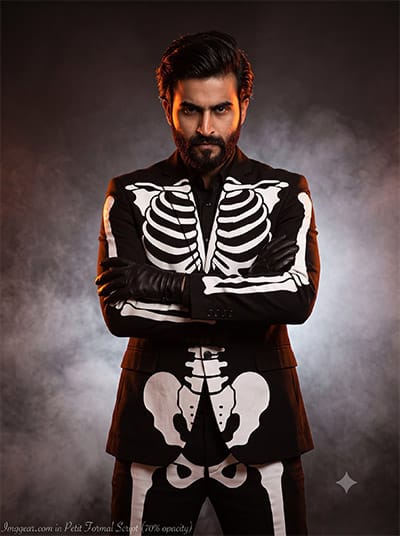
Dappered skeletal attire set against a misty backdrop highlights how effortless custom male portraits can be when guided by Gemini. Copy this precise prompt to recreate the aesthetic now!
PROMPT
{
“prompt_id”: 3,
“theme”: “Skeleton Suit Man”,
“identity_preservation”: {
“face_matching”: “100% identical to reference image, no face change”,
“no_alterations”: [
“no reshaping”,
“no morphing”,
“no beautification”,
“no stylization of facial features”
],
“mandatory_preservation”: “exact original facial proportions, contours, natural skin details, overall likeness”
},
“realism”: {
“camera”: “Shot on professional DSLR, 85mm lens, shallow depth of field”,
“lighting”: “Natural cinematic lighting, soft shadows, no artificial CGI look”,
“retouch”: “High-end professional retouching, skin texture preserved, magazine-quality finish”,
“authenticity”: “Must look like a real photograph taken by a professional photographer, not AI-generated or fake looking”
},
“style”: “High-fashion horror editorial”,
“background”: “Dark studio with fog and orange rim lighting”,
“pose”: “Arms crossed, powerful stance”,
“expression”: “Sharp, serious look”,
“location”: “Professional studio setup”,
“dress”: “Fitted black suit with printed skeleton bone design, black gloves”,
“watermark”: {
“text”: “Imggear.com”,
“placement”: “Bottom-left corner, seamlessly blended with background, no box/background behind text”,
“font_style”: “Petit Formal Script, thin elegant cursive strokes, minimal premium handwritten-signature look”,
“color”: “#FFFFFF soft white with slight transparency (approx 70% opacity)”,
“letter_spacing”: “1px”
},
“aspect_ratio”: “3:4”
}
Pumpkin Patch Autumn Aesthetic Using Gemini Halloween Photo Prompts for Men
Capture cozy autumn vibes with a glowing jack-o-lantern at golden hour, crafted effortlessly through targeted prompts in Gemini. Want to test this warm seasonal photo editing style yourself?
PROMPT
{
“prompt_id”: 4,
“theme”: “Pumpkin King”,
“identity_preservation”: {
“face_matching”: “100% identical to reference image, no face change”,
“no_alterations”: [
“no reshaping”,
“no morphing”,
“no beautification”,
“no stylization of facial features”
],
“mandatory_preservation”: “exact original facial proportions, contours, natural skin details, overall likeness”
},
“realism”: {
“camera”: “Shot on professional DSLR, 85mm lens, shallow depth of field”,
“lighting”: “Natural cinematic lighting, soft shadows, no artificial CGI look”,
“retouch”: “High-end professional retouching, skin texture preserved, magazine-quality finish”,
“authenticity”: “Must look like a real photograph taken by a professional photographer, not AI-generated or fake looking”
},
“style”: “Fantasy Halloween portrait”,
“background”: “Pumpkin patch field during golden hour sunset”,
“pose”: “Sitting on wooden crate holding carved pumpkin”,
“expression”: “Warm mischievous smile”,
“location”: “Outdoor pumpkin farm”,
“dress”: “Rustic orange-brown coat, plaid scarf, brown boots”,
“watermark”: {
“text”: “Imggear.com”,
“placement”: “Bottom-left corner, seamlessly blended with background, no box/background behind text”,
“font_style”: “Petit Formal Script, thin elegant cursive strokes, minimal premium handwritten-signature look”,
“color”: “#FFFFFF soft white with slight transparency (approx 70% opacity)”,
“letter_spacing”: “1px”
},
“aspect_ratio”: “3:4”
}
Dark Sorcerer Looks with Gemini Halloween Photo Prompts for Men
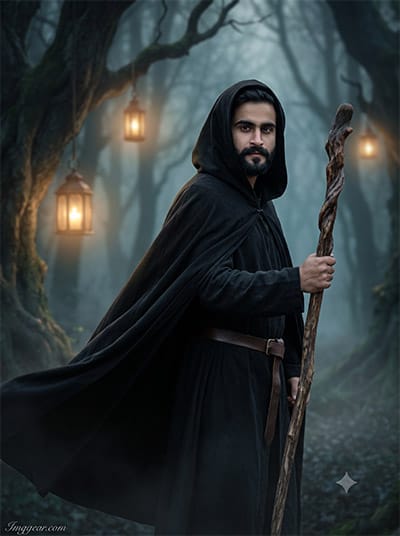
Cloaked in a hooded robe amidst glowing lanterns and misty woods, this male wizard concept shows the power of Gemini for spooky edits. Share your thoughts on this fantasy style below!
PROMPT
{
“prompt_id”: 5,
“theme”: “Dark Wizard”,
“identity_preservation”: {
“face_matching”: “100% identical to reference image, no face change”,
“no_alterations”: [
“no reshaping”,
“no morphing”,
“no beautification”,
“no stylization of facial features”
],
“mandatory_preservation”: “exact original facial proportions, contours, natural skin details, overall likeness”
},
“realism”: {
“camera”: “Shot on professional DSLR, 85mm lens, shallow depth of field”,
“lighting”: “Natural cinematic lighting, soft shadows, no artificial CGI look”,
“retouch”: “High-end professional retouching, skin texture preserved, magazine-quality finish”,
“authenticity”: “Must look like a real photograph taken by a professional photographer, not AI-generated or fake looking”
},
“style”: “Moody fantasy cinematic”,
“background”: “Misty forest with glowing lanterns”,
“pose”: “Holding wooden staff, cloak flowing in wind”,
“expression”: “Calm, powerful expression”,
“location”: “Enchanted forest at night”,
“dress”: “Long black hooded cloak, leather belt, dark robes”,
“watermark”: {
“text”: “Imggear.com”,
“placement”: “Bottom-left corner, seamlessly blended with background, no box/background behind text”,
“font_style”: “Petit Formal Script, thin elegant cursive strokes, minimal premium handwritten-signature look”,
“color”: “#FFFFFF soft white with slight transparency (approx 70% opacity)”,
“letter_spacing”: “1px”
},
“aspect_ratio”: “3:4”
}
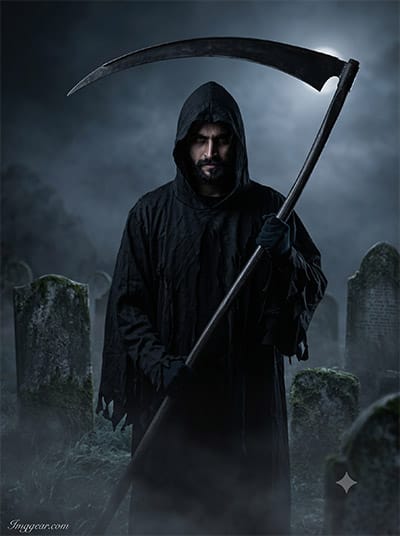
Grim Reaper Portrait Edits via Gemini Halloween Photo Prompts for Men
Standing under moonlight with a scythe in a misty graveyard, this grim reaper look illustrates how Gemini turns plain photos into haunting masterpieces. Grab the exact prompt now!
PROMPT
{
“prompt_id”: 6,
“theme”: “Grim Reaper”,
“identity_preservation”: {
“face_matching”: “100% identical to reference image, no face change”,
“no_alterations”: [
“no reshaping”,
“no morphing”,
“no beautification”,
“no stylization of facial features”
],
“mandatory_preservation”: “exact original facial proportions, contours, natural skin details, overall likeness”
},
“realism”: {
“camera”: “Shot on professional DSLR, 85mm lens, shallow depth of field”,
“lighting”: “Natural cinematic lighting, soft shadows, no artificial CGI look”,
“retouch”: “High-end professional retouching, skin texture preserved, magazine-quality finish”,
“authenticity”: “Must look like a real photograph taken by a professional photographer, not AI-generated or fake looking”
},
“style”: “Dramatic low-key horror portrait”,
“background”: “Graveyard with tombstones and fog”,
“pose”: “Standing tall holding scythe, hood partially covering face”,
“expression”: “Shadowed, eyes barely visible, intense”,
“location”: “Old cemetery at midnight”,
“dress”: “Black tattered hooded robe, dark gloves”,
“watermark”: {
“text”: “Imggear.com”,
“placement”: “Bottom-left corner, seamlessly blended with background, no box/background behind text”,
“font_style”: “Petit Formal Script, thin elegant cursive strokes, minimal premium handwritten-signature look”,
“color”: “#FFFFFF soft white with slight transparency (approx 70% opacity)”,
“letter_spacing”: “1px”
},
“aspect_ratio”: “3:4”
}
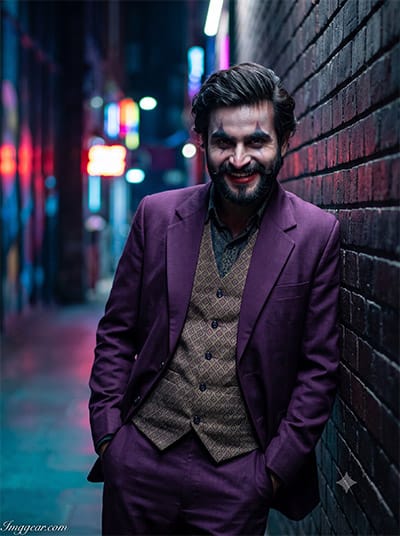
Evil Clown Urban FX via Gemini Halloween Photo Prompts for Men
Dressed in a bold purple suit leaning against neon brick alleyways, this sinister villain photo relies on Gemini to hit the ideal cinematic atmosphere. Head over to the tutorial and build yours!
PROMPT
{
“prompt_id”: 7,
“theme”: “Joker-Inspired Clown”,
“identity_preservation”: {
“face_matching”: “100% identical to reference image, no face change”,
“no_alterations”: [
“no reshaping”,
“no morphing”,
“no beautification”,
“no stylization of facial features”
],
“mandatory_preservation”: “exact original facial proportions, contours, natural skin details, overall likeness”
},
“realism”: {
“camera”: “Shot on professional DSLR, 85mm lens, shallow depth of field”,
“lighting”: “Natural cinematic lighting, soft shadows, no artificial CGI look”,
“retouch”: “High-end professional retouching, skin texture preserved, magazine-quality finish”,
“authenticity”: “Must look like a real photograph taken by a professional photographer, not AI-generated or fake looking”
},
“style”: “Edgy cinematic character portrait”,
“background”: “Neon-lit dark alley”,
“pose”: “Leaning against brick wall, hands in pockets”,
“expression”: “Wicked grin, playful yet dark”,
“location”: “Urban alley at night”,
“dress”: “Purple vintage suit, patterned vest, subtle clown-inspired makeup”,
“watermark”: {
“text”: “Imggear.com”,
“placement”: “Bottom-left corner, seamlessly blended with background, no box/background behind text”,
“font_style”: “Petit Formal Script, thin elegant cursive strokes, minimal premium handwritten-signature look”,
“color”: “#FFFFFF soft white with slight transparency (approx 70% opacity)”,
“letter_spacing”: “1px”
},
“aspect_ratio”: “3:4”
}
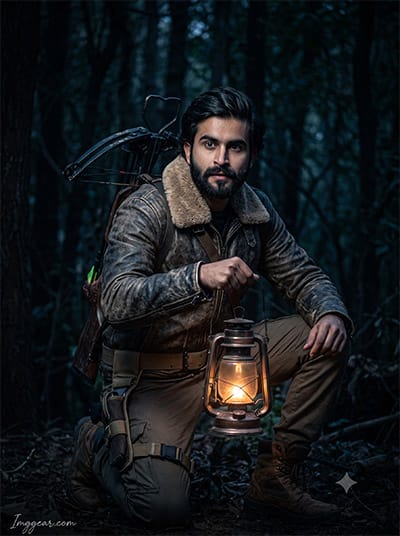
Monster Hunter Portrait Guide with Gemini Halloween Photo Prompts for Men
Equipped with a crossbow, shearling jacket, and glowing oil lantern deep in dim woods, this rugged survivor concept shows how Gemini transforms simple portraits into dramatic survival scenes. Give this prompt a spin right now!
PROMPT
{
“prompt_id”: 8,
“theme”: “Werewolf Hunter”,
“identity_preservation”: {
“face_matching”: “100% identical to reference image, no face change”,
“no_alterations”: [
“no reshaping”,
“no morphing”,
“no beautification”,
“no stylization of facial features”
],
“mandatory_preservation”: “exact original facial proportions, contours, natural skin details, overall likeness”
},
“realism”: {
“camera”: “Shot on professional DSLR, 85mm lens, shallow depth of field”,
“lighting”: “Natural cinematic lighting, soft shadows, no artificial CGI look”,
“retouch”: “High-end professional retouching, skin texture preserved, magazine-quality finish”,
“authenticity”: “Must look like a real photograph taken by a professional photographer, not AI-generated or fake looking”
},
“style”: “Rugged adventure horror portrait”,
“background”: “Dense dark woods with moonlight”,
“pose”: “Crouched stance, holding lantern”,
“expression”: “Alert, focused look”,
“location”: “Deep forest at night”,
“dress”: “Leather jacket, fur collar, hunting boots, utility belt”,
“watermark”: {
“text”: “Imggear.com”,
“placement”: “Bottom-left corner, seamlessly blended with background, no box/background behind text”,
“font_style”: “Petit Formal Script, thin elegant cursive strokes, minimal premium handwritten-signature look”,
“color”: “#FFFFFF soft white with slight transparency (approx 70% opacity)”,
“letter_spacing”: “1px”
},
“aspect_ratio”: “3:4”
}
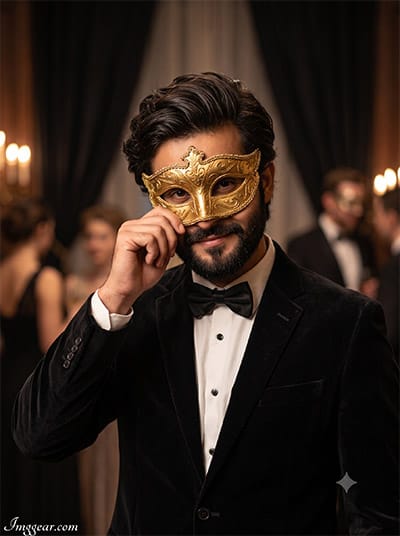
Venetian Masquerade Looks with Gemini Halloween Photo Prompts for Men
Wearing an ornate gold mask in a lavish ballroom setting, this sharp tuxedo edit demonstrates how Gemini brings high-end mysterious elegance to your seasonal posts. Drop your creation in the comments!
PROMPT
{
“prompt_id”: 9,
“theme”: “Phantom Masquerade”,
“identity_preservation”: {
“face_matching”: “100% identical to reference image, no face change”,
“no_alterations”: [
“no reshaping”,
“no morphing”,
“no beautification”,
“no stylization of facial features”
],
“mandatory_preservation”: “exact original facial proportions, contours, natural skin details, overall likeness”
},
“realism”: {
“camera”: “Shot on professional DSLR, 85mm lens, shallow depth of field”,
“lighting”: “Natural cinematic lighting, soft shadows, no artificial CGI look”,
“retouch”: “High-end professional retouching, skin texture preserved, magazine-quality finish”,
“authenticity”: “Must look like a real photograph taken by a professional photographer, not AI-generated or fake looking”
},
“style”: “Elegant gothic masquerade portrait”,
“background”: “Candlelit ballroom with dark curtains”,
“pose”: “One hand adjusting mask, elegant posture”,
“expression”: “Mysterious half-smile”,
“location”: “Vintage masquerade ballroom”,
“dress”: “Black velvet suit, ornate golden phantom mask, bow tie”,
“watermark”: {
“text”: “Imggear.com”,
“placement”: “Bottom-left corner, seamlessly blended with background, no box/background behind text”,
“font_style”: “Petit Formal Script, thin elegant cursive strokes, minimal premium handwritten-signature look”,
“color”: “#FFFFFF soft white with slight transparency (approx 70% opacity)”,
“letter_spacing”: “1px”
},
“aspect_ratio”: “3:4”
}
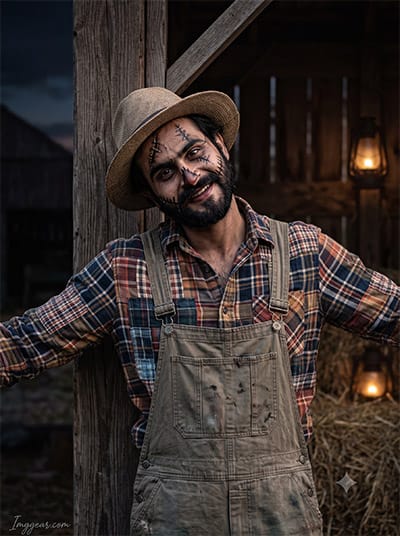
Rustic Scarecrow Costumes via Gemini Halloween Photo Prompts for Men
Featuring stitched makeup details, plaid flannel, and overalls set by a rustic barn, this creepy scarecrow photo proves how Gemini brings spooky character ideas to life. Tap here to copy the prompt!
PROMPT
{
“prompt_id”: 10,
“theme”: “Haunted Scarecrow”,
“identity_preservation”: {
“face_matching”: “100% identical to reference image, no face change”,
“no_alterations”: [
“no reshaping”,
“no morphing”,
“no beautification”,
“no stylization of facial features”
],
“mandatory_preservation”: “exact original facial proportions, contours, natural skin details, overall likeness”
},
“realism”: {
“camera”: “Shot on professional DSLR, 85mm lens, shallow depth of field”,
“lighting”: “Natural cinematic lighting, soft shadows, no artificial CGI look”,
“retouch”: “High-end professional retouching, skin texture preserved, magazine-quality finish”,
“authenticity”: “Must look like a real photograph taken by a professional photographer, not AI-generated or fake looking”
},
“style”: “Rustic horror farmland portrait”,
“background”: “Old wooden barn with hay and dim lantern light”,
“pose”: “Leaning against wooden post, arms slightly spread”,
“expression”: “Eerie, tilted head, subtle unsettling smile”,
“location”: “Abandoned farm at dusk”,
“dress”: “Patchwork flannel shirt, straw-textured hat, worn overalls, stitched face paint”,
“watermark”: {
“text”: “Imggear.com”,
“placement”: “Bottom-left corner, seamlessly blended with background, no box/background behind text”,
“font_style”: “Petit Formal Script, thin elegant cursive strokes, minimal premium handwritten-signature look”,
“color”: “#FFFFFF soft white with slight transparency (approx 70% opacity)”,
“letter_spacing”: “1px”
},
“aspect_ratio”: “3:4”
}
💡 AI Photo Editing Pro Tips for Perfect Results
Keep Faces Consistent: If the AI changes the face, add this exact phrase to the very beginning of your prompt: “Preserve facial identity 100%, do not alter facial features or proportions.”
Reroll for Perfection: Run every prompt 2–3 times! The second or third generation is almost always sharper and packed with better details.
Get the DSLR Look: Want that beautiful, blurred background? Just add “f/1.8 shallow depth of field” to your prompt.
Control the Camera Shot: Tell the AI exactly what frame you want by adding terms like “Close-up portrait,” “Full-body shot,” or “Wide-angle view.”
Set the Vibe with Lighting: Lighting makes or breaks an AI image. Add “Cinematic lighting,” “Golden hour sunset,” or “Soft studio lighting” for a professional touch.
📐 Best Aspect Ratio: Use 3:4 Vertical for stunning, ready-to-post results on Instagram and Pinterest.