Struggling to create a realistic Independence Day portrait with an iconic national monument? Achieving a flawless 15 August Red Fort background AI photo editing result used to require hours in complex software. Fortunately, you can now generate cinematic, photorealistic patriotic photos in seconds using specialized Gemini AI and ChatGPT prompts. In this guide, you will access exact copy-paste prompts engineered to preserve 100% facial identity while delivering dramatic Red Fort backdrops, golden-hour lighting, and vibrant Tiranga details. Elevate your Independence Day social media presence today!
Patriotic 15 August Red Fort Background AI Photo Editing Ideas
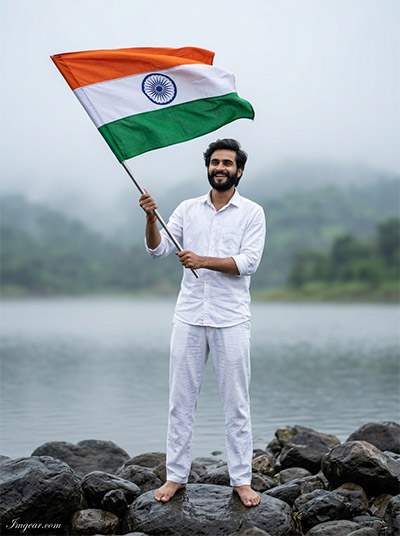
Transform this nature portrait into a symbolic scene with AI-generated Red Fort backgrounds for Independence Day. See how a simple flag edit makes an impactful statement for your August 15th creative photos and get inspired now.
PROMPT
{
“image_label”: “Imggear.com_1”,
“version”: “3.5”,
“aspect_ratio”: “3:4”,
“prompt”: “An ultra-realistic, photorealistic premium masterpiece, preserving the exact identity, facial proportions, bone structure, eye depth, sharp jawline, authentic facial characteristics, and skin micro-textures (visible pores, fine lines) of the subject in the uploaded personal reference photo without alteration. The facial lighting must seamlessly fuse with the ambient scene highlights and cast realistic shadows, allowing the subject to naturally integrate with the environment’s lighting, shadows, depth, atmospheric perspective, and optical characteristics while preserving the subject’s true identity without alteration, seamlessly integrating the subject into this cinematic outdoor portrait, while maintaining complete identity consistency throughout the image. The subject is an 18-year-old male with a slim build, standing barefoot on dark river rocks holding a waving Indian flag on a pole, smiling joyfully. He wears a plain white button-up shirt and relaxed white trousers. Set against a misty lake, blurred green hills, and a foggy sky. Captured using a full-frame professional mirrorless camera with an 85mm f/1.4 prime lens in RAW format, featuring hyper-detailed edge sharpness, extreme high-definition micro-details on skin and fabric, natural optical rendering, and premium creamy bokeh. Soft overcast lighting with PBR skin micro-contrast. In the bottom-left corner, a minimal cursive watermark \”Imggear.com\” is rendered in Petit Formal Script font, soft white (#ffffff) with slight transparency.”,
“negative_prompt”: “(plastic skin, waxy skin, CGI rendering, AI beauty filter look, porcelain skin, over-smoothed skin, airbrushed skin, synthetic textures, doll-like face, uncanny valley, artificial symmetry), (deformed face, distorted facial features, asymmetrical eyes, bad anatomy, bad proportions, extra limbs, extra fingers, missing fingers, malformed hands, mutated hands), (unnatural lighting, flat lighting, harsh direct sunlight, blown-out highlights, crushed shadows, oversaturated colors, neon colors, unrealistic color grading, HDR look, overexposed, underexposed), (blurry, out of focus, low resolution, pixelated, jpeg artifacts, grainy noise, motion blur, soft focus), (dry land, dusty ground, indoor background, wrong environment, mismatched background), (clothing logos, brand marks, trademarked patterns, text overlays, random watermark placement, duplicate watermark, extra signature), (cartoon style, illustration, painting, 3D render, anime, stylized art, digital art look), (identity mismatch, face swap artifacts, inconsistent facial features, altered bone structure, changed eye color, different face shape), (footwear, shoes, urban background)”
}
How to Edit August 15 Independence Day Flag Photos with AI
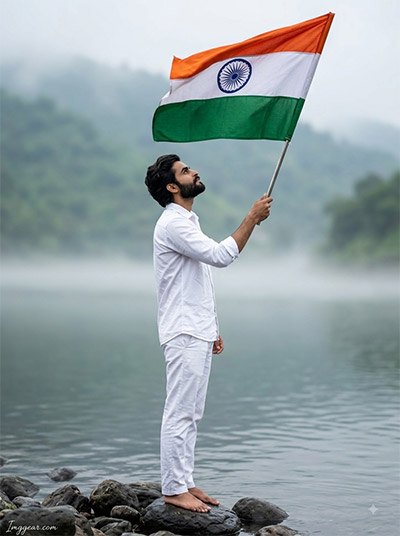
Generate powerful side-profile shots holding the tricolor against misty landscapes using simple prompts. Learn how replacing backdrops with iconic heritage monuments completely elevates your festive edits. Which backdrop style will you try first?
PROMPT
{
“image_label”: “Imggear.com_2”,
“version”: “3.5”,
“aspect_ratio”: “3:4”,
“prompt”: “An ultra-realistic, photorealistic premium masterpiece, preserving the exact identity, facial proportions, bone structure, eye depth, sharp jawline, authentic facial characteristics, and skin micro-textures (visible pores, fine lines) of the subject in the uploaded personal reference photo without alteration. The facial lighting must seamlessly fuse with the ambient scene highlights and cast realistic shadows, allowing the subject to naturally integrate with the environment’s lighting, shadows, depth, atmospheric perspective, and optical characteristics while preserving the subject’s true identity without alteration, seamlessly integrating the subject into this cinematic outdoor scene, while maintaining complete identity consistency throughout the image. The subject is an 18-year-old male with a slim build, posed in side profile on dark river rocks gazing upward at a waving Indian flag held high in his right hand. He wears a plain white collared shirt, white pants, and is barefoot. Set against a serene misty lake and soft blurred hills under overcast skies. Captured using a full-frame professional mirrorless camera with an 85mm f/1.4 prime lens in RAW format, featuring hyper-detailed edge sharpness, extreme high-definition micro-details on skin and fabric, natural optical rendering, and premium creamy bokeh. Diffused daylight with subtle edge highlights. In the bottom-left corner, a minimal cursive watermark \”Imggear.com\” is rendered in Petit Formal Script font, soft white (#ffffff) with slight transparency.”,
“negative_prompt”: “(plastic skin, waxy skin, CGI rendering, AI beauty filter look, porcelain skin, over-smoothed skin, airbrushed skin, synthetic textures, doll-like face, uncanny valley, artificial symmetry), (deformed face, distorted facial features, asymmetrical eyes, bad anatomy, bad proportions, extra limbs, extra fingers, missing fingers, malformed hands, mutated hands), (unnatural lighting, flat lighting, harsh direct sunlight, blown-out highlights, crushed shadows, oversaturated colors, neon colors, unrealistic color grading, HDR look, overexposed, underexposed), (blurry, out of focus, low resolution, pixelated, jpeg artifacts, grainy noise, motion blur, soft focus), (dry land, dusty ground, indoor background, wrong environment, mismatched background), (clothing logos, brand marks, trademarked patterns, text overlays, random watermark placement, duplicate watermark, extra signature), (cartoon style, illustration, painting, 3D render, anime, stylized art, digital art look), (identity mismatch, face swap artifacts, inconsistent facial features, altered bone structure, changed eye color, different face shape), (shoes, urban buildings, night lighting)”
}
Create Indian Flag Face Paint Edits for 15 August Prompts
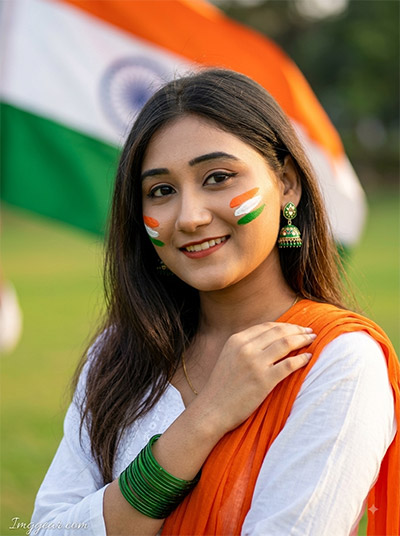
Elevate festive portraits with soft lighting, tricolor face art, and vivid saffron attire. AI photo generation makes swapping outdoor scenes with historic national landmarks quick and realistic. Grab the exact prompt now and upgrade your profile pic today.
PROMPT
{
“image_label”: “Imggear.com_3”,
“version”: “3.5”,
“aspect_ratio”: “3:4”,
“prompt”: “An ultra-realistic, photorealistic premium masterpiece, preserving the exact identity, facial proportions, bone structure, eye depth, sharp jawline, authentic facial characteristics, and skin micro-textures (visible pores, fine lines) of the subject in the uploaded personal reference photo without alteration. The facial lighting must seamlessly fuse with the ambient scene highlights and cast realistic shadows, allowing the subject to naturally integrate with the environment’s lighting, shadows, depth, atmospheric perspective, and optical characteristics while preserving the subject’s true identity without alteration, seamlessly integrating the subject into this dramatic portrait, while maintaining complete identity consistency throughout the image. The subject is a 24-year-old female with a slender build, smiling in a medium close-up portrait with tricolor cheek paint. She wears a white traditional top, vibrant orange dupatta, green glass bangles, and traditional green earrings. Set in an open green lawn with a blurred Indian flag in the background. Captured using a full-frame professional mirrorless camera with an 85mm f/1.4 prime lens in RAW format, featuring hyper-detailed edge sharpness, extreme high-definition micro-details on skin and fabric, natural optical rendering, and premium creamy bokeh. Soft warm natural light with realistic skin micro-textures. In the bottom-left corner, a minimal cursive watermark \”Imggear.com\” is rendered in Petit Formal Script font, soft white (#ffffff) with slight transparency.”,
“negative_prompt”: “(plastic skin, waxy skin, CGI rendering, AI beauty filter look, porcelain skin, over-smoothed skin, airbrushed skin, synthetic textures, doll-like face, uncanny valley, artificial symmetry), (deformed face, distorted facial features, asymmetrical eyes, bad anatomy, bad proportions, extra limbs, extra fingers, missing fingers, malformed hands, mutated hands), (unnatural lighting, flat lighting, harsh direct sunlight, blown-out highlights, crushed shadows, oversaturated colors, neon colors, unrealistic color grading, HDR look, overexposed, underexposed), (blurry, out of focus, low resolution, pixelated, jpeg artifacts, grainy noise, motion blur, soft focus), (dry land, dusty ground, indoor background, wrong environment, mismatched background), (clothing logos, brand marks, trademarked patterns, text overlays, random watermark placement, duplicate watermark, extra signature), (cartoon style, illustration, painting, 3D render, anime, stylized art, digital art look), (identity mismatch, face swap artifacts, inconsistent facial features, altered bone structure, changed eye color, different face shape), (western clothing, dark gloomy setting)”
}
Indian Independence Day Red Fort Photo Editing Prompt
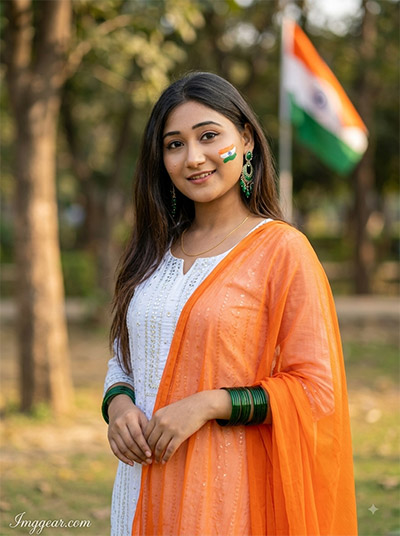
Bring out authentic festive vibes by combining traditional white attire, saffron dupatta, and subtle face paint art. Prompt-driven generative techniques make swapped historical backdrops look remarkably natural. Drop a comment below with your favorite style!
PROMPT
{
“image_label”: “Imggear.com_4”,
“version”: “3.5”,
“aspect_ratio”: “3:4”,
“prompt”: “An ultra-realistic, photorealistic premium masterpiece, preserving the exact identity, facial proportions, bone structure, eye depth, sharp jawline, authentic facial characteristics, and skin micro-textures (visible pores, fine lines) of the subject in the uploaded personal reference photo without alteration. The facial lighting must seamlessly fuse with the ambient scene highlights and cast realistic shadows, allowing the subject to naturally integrate with the environment’s lighting, shadows, depth, atmospheric perspective, and optical characteristics while preserving the subject’s true identity without alteration, seamlessly integrating the subject into this warm editorial portrait, while maintaining complete identity consistency throughout the image. The subject is a 23-year-old female with a slender frame, smiling gently with tricolor flag art on her cheek. She wears an elegant white kurti with an orange translucent saree dupatta, dark green bangles, and green dangling earrings. Outdoor park environment with trees and a flying flag in soft bokeh. Captured using a full-frame professional mirrorless camera with an 85mm f/1.4 prime lens in RAW format, featuring hyper-detailed edge sharpness, extreme high-definition micro-details on skin and fabric, natural optical rendering, and premium creamy bokeh. Warm natural daylight with gentle highlights. In the bottom-left corner, a minimal cursive watermark \”Imggear.com\” is rendered in Petit Formal Script font, soft white (#ffffff) with slight transparency.”,
“negative_prompt”: “(plastic skin, waxy skin, CGI rendering, AI beauty filter look, porcelain skin, over-smoothed skin, airbrushed skin, synthetic textures, doll-like face, uncanny valley, artificial symmetry), (deformed face, distorted facial features, asymmetrical eyes, bad anatomy, bad proportions, extra limbs, extra fingers, missing fingers, malformed hands, mutated hands), (unnatural lighting, flat lighting, harsh direct sunlight, blown-out highlights, crushed shadows, oversaturated colors, neon colors, unrealistic color grading, HDR look, overexposed, underexposed), (blurry, out of focus, low resolution, pixelated, jpeg artifacts, grainy noise, motion blur, soft focus), (dry land, dusty ground, indoor background, wrong environment, mismatched background), (clothing logos, brand marks, trademarked patterns, text overlays, random watermark placement, duplicate watermark, extra signature), (cartoon style, illustration, painting, 3D render, anime, stylized art, digital art look), (identity mismatch, face swap artifacts, inconsistent facial features, altered bone structure, changed eye color, different face shape), (night lighting, indoor room, casual jeans)”
}
Best Independence Day Photo Editing Prompts for 15 August
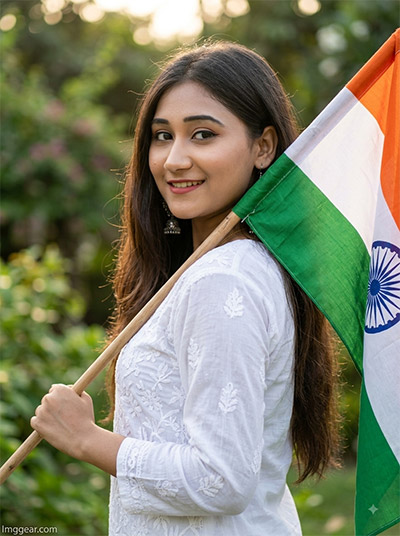
Frame stunning outdoor portraits featuring an Indian flag held over the shoulder in white ethnic wear. Modern generative tools let you swap golden-hour foliage for iconic national monuments effortlessly. Give this prompt a try right away!
PROMPT
{
“image_label”: “Imggear.com_5”,
“version”: “3.5”,
“aspect_ratio”: “3:4”,
“prompt”: “An ultra-realistic, photorealistic premium masterpiece, preserving the exact identity, facial proportions, bone structure, eye depth, sharp jawline, authentic facial characteristics, and skin micro-textures (visible pores, fine lines) of the subject in the uploaded personal reference photo without alteration. The facial lighting must seamlessly fuse with the ambient scene highlights and cast realistic shadows, allowing the subject to naturally integrate with the environment’s lighting, shadows, depth, atmospheric perspective, and optical characteristics while preserving the subject’s true identity without alteration, seamlessly integrating the subject into this elegant outdoor portrait, while maintaining complete identity consistency throughout the image. The subject is a 24-year-old female with a slender build, looking over her shoulder with a friendly smile while holding an Indian flag on a wooden pole. She wears a white embroidered chikankari tunic and silver jhumka earrings. Set in a lush outdoor garden surrounded by foliage. Captured using a full-frame professional mirrorless camera with an 85mm f/1.4 prime lens in RAW format, featuring hyper-detailed edge sharpness, extreme high-definition micro-details on skin and fabric, natural optical rendering, and premium creamy bokeh. Soft backlight with natural skin translucency. In the bottom-left corner, a minimal cursive watermark \”Imggear.com\” is rendered in Petit Formal Script font, soft white (#ffffff) with slight transparency.”,
“negative_prompt”: “(plastic skin, waxy skin, CGI rendering, AI beauty filter look, porcelain skin, over-smoothed skin, airbrushed skin, synthetic textures, doll-like face, uncanny valley, artificial symmetry), (deformed face, distorted facial features, asymmetrical eyes, bad anatomy, bad proportions, extra limbs, extra fingers, missing fingers, malformed hands, mutated hands), (unnatural lighting, flat lighting, harsh direct sunlight, blown-out highlights, crushed shadows, oversaturated colors, neon colors, unrealistic color grading, HDR look, overexposed, underexposed), (blurry, out of focus, low resolution, pixelated, jpeg artifacts, grainy noise, motion blur, soft focus), (dry land, dusty ground, indoor background, wrong environment, mismatched background), (clothing logos, brand marks, trademarked patterns, text overlays, random watermark placement, duplicate watermark, extra signature), (cartoon style, illustration, painting, 3D render, anime, stylized art, digital art look), (identity mismatch, face swap artifacts, inconsistent facial features, altered bone structure, changed eye color, different face shape), (urban cityscape, dark studio setting)”
}
Independence Day Photo Editing with Red Fort AI Background
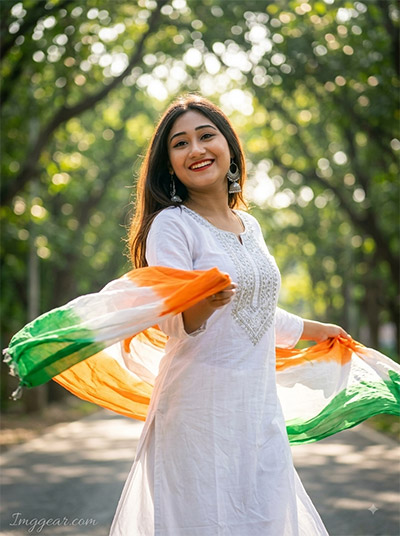
Capture joyful motion and flowing tricolor scarves in bright white kurti attire. Smart AI prompts allow you to seamlessly replace lush park trails with iconic historic monuments in seconds. Ready to test this prompt yourself?
PROMPT
{
“image_label”: “Imggear.com_6”,
“version”: “3.5”,
“aspect_ratio”: “3:4”,
“prompt”: “An ultra-realistic, photorealistic premium masterpiece, preserving the exact identity, facial proportions, bone structure, eye depth, sharp jawline, authentic facial characteristics, and skin micro-textures (visible pores, fine lines) of the subject in the uploaded personal reference photo without alteration. The facial lighting must seamlessly fuse with the ambient scene highlights and cast realistic shadows, allowing the subject to naturally integrate with the environment’s lighting, shadows, depth, atmospheric perspective, and optical characteristics while preserving the subject’s true identity without alteration, seamlessly integrating the subject into this dynamic outdoor scene, while maintaining complete identity consistency throughout the image. The subject is a 24-year-old female with a slim build, captured mid-spin holding a flowing tricolor scarf with a joyful open smile. She wears a traditional white embroidered kurti and silver earrings. Set on a tree-canopied road with dappled sunlight bokeh. Captured using a full-frame professional mirrorless camera with an 85mm f/1.4 prime lens in RAW format, featuring hyper-detailed edge sharpness, extreme high-definition micro-details on skin and fabric, natural optical rendering, and premium creamy bokeh. Vibrant backlighting with rich tonal contrast. In the bottom-left corner, a minimal cursive watermark \”Imggear.com\” is rendered in Petit Formal Script font, soft white (#ffffff) with slight transparency.”,
“negative_prompt”: “(plastic skin, waxy skin, CGI rendering, AI beauty filter look, porcelain skin, over-smoothed skin, airbrushed skin, synthetic textures, doll-like face, uncanny valley, artificial symmetry), (deformed face, distorted facial features, asymmetrical eyes, bad anatomy, bad proportions, extra limbs, extra fingers, missing fingers, malformed hands, mutated hands), (unnatural lighting, flat lighting, harsh direct sunlight, blown-out highlights, crushed shadows, oversaturated colors, neon colors, unrealistic color grading, HDR look, overexposed, underexposed), (blurry, out of focus, low resolution, pixelated, jpeg artifacts, grainy noise, motion blur, soft focus), (dry land, dusty ground, indoor background, wrong environment, mismatched background), (clothing logos, brand marks, trademarked patterns, text overlays, random watermark placement, duplicate watermark, extra signature), (cartoon style, illustration, painting, 3D render, anime, stylized art, digital art look), (identity mismatch, face swap artifacts, inconsistent facial features, altered bone structure, changed eye color, different face shape), (stiff pose, indoor corridor, gloomy light)”
}
Red Fort 15 August Background Photo Editing Prompt Ideas
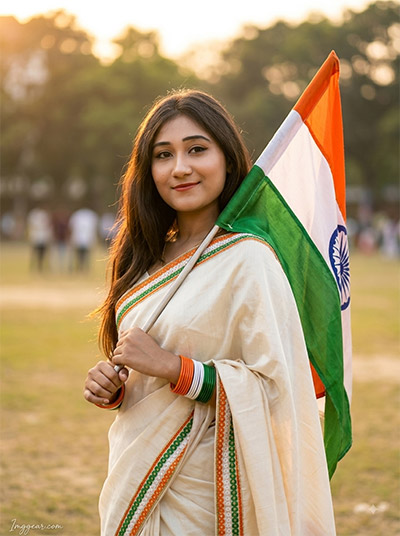
Golden hour backlighting highlights this traditional white saree look paired with tricolor bangles and flag. Prompt generation techniques smoothly swap the grassy field for historic monument scenery. Check out the exact text prompt inside to create yours!
PROMPT
{
“image_label”: “Imggear.com_7”,
“version”: “3.5”,
“aspect_ratio”: “3:4”,
“prompt”: “An ultra-realistic, photorealistic premium masterpiece, preserving the exact identity, facial proportions, bone structure, eye depth, sharp jawline, authentic facial characteristics, and skin micro-textures (visible pores, fine lines) of the subject in the uploaded personal reference photo without alteration. The facial lighting must seamlessly fuse with the ambient scene highlights and cast realistic shadows, allowing the subject to naturally integrate with the environment’s lighting, shadows, depth, atmospheric perspective, and optical characteristics while preserving the subject’s true identity without alteration, seamlessly integrating the subject into this cinematic patriotic portrait, while maintaining complete identity consistency throughout the image. The subject is a 27-year-old female with a slender frame, holding an Indian national flag over her shoulder with a confident, serene expression. She wears an off-white silk saree with embroidered tricolor borders and tricolor bangles. Located in an open event field under late afternoon sunlight. Captured using a full-frame professional mirrorless camera with an 85mm f/1.4 prime lens in RAW format, featuring hyper-detailed edge sharpness, extreme high-definition micro-details on skin and fabric, natural optical rendering, and premium creamy bokeh. Warm golden hour daylight with delicate rim lighting. In the bottom-left corner, a minimal cursive watermark \”Imggear.com\” is rendered in Petit Formal Script font, soft white (#ffffff) with slight transparency.”,
“negative_prompt”: “(plastic skin, waxy skin, CGI rendering, AI beauty filter look, porcelain skin, over-smoothed skin, airbrushed skin, synthetic textures, doll-like face, uncanny valley, artificial symmetry), (deformed face, distorted facial features, asymmetrical eyes, bad anatomy, bad proportions, extra limbs, extra fingers, missing fingers, malformed hands, mutated hands), (unnatural lighting, flat lighting, harsh direct sunlight, blown-out highlights, crushed shadows, oversaturated colors, neon colors, unrealistic color grading, HDR look, overexposed, underexposed), (blurry, out of focus, low resolution, pixelated, jpeg artifacts, grainy noise, motion blur, soft focus), (dry land, dusty ground, indoor background, wrong environment, mismatched background), (clothing logos, brand marks, trademarked patterns, text overlays, random watermark placement, duplicate watermark, extra signature), (cartoon style, illustration, painting, 3D render, anime, stylized art, digital art look), (identity mismatch, face swap artifacts, inconsistent facial features, altered bone structure, changed eye color, different face shape), (western casual clothing, dark night background)”
}
Sunset August 15 Independence Day AI Photo Editing Prompt
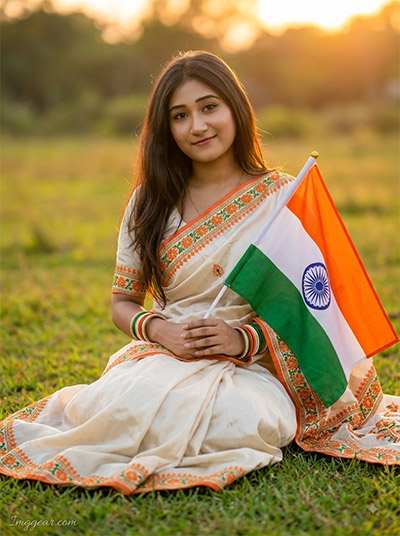
Warm golden sunbeams illuminate this elegant seated posture in an embroidered saree with a small tricolor flag. Smart generative tools let you replace the field setting with landmark historical backdrops instantly. Want to recreate this look?
PROMPT
{
“image_label”: “Imggear.com_8”,
“version”: “3.5”,
“aspect_ratio”: “3:4”,
“prompt”: “An ultra-realistic, photorealistic premium masterpiece, preserving the exact identity, facial proportions, bone structure, eye depth, sharp jawline, authentic facial characteristics, and skin micro-textures (visible pores, fine lines) of the subject in the uploaded personal reference photo without alteration. The facial lighting must seamlessly fuse with the ambient scene highlights and cast realistic shadows, allowing the subject to naturally integrate with the environment’s lighting, shadows, depth, atmospheric perspective, and optical characteristics while preserving the subject’s true identity without alteration, seamlessly integrating the subject into this warm golden-hour portrait, while maintaining complete identity consistency throughout the image. The subject is a 27-year-old female with a slender frame, sitting gracefully on an open lawn holding an Indian flag across her lap with a soft smile. She wears an off-white silk saree with orange and green embroidered borders and matching bangles. Outdoor field setting bathed in soft sunset light. Captured using a full-frame professional mirrorless camera with an 85mm f/1.4 prime lens in RAW format, featuring hyper-detailed edge sharpness, extreme high-definition micro-details on skin and fabric, natural optical rendering, and premium creamy bokeh. Golden hour lighting creating a warm rim glow and rich color tones. In the bottom-left corner, a minimal cursive watermark \”Imggear.com\” is rendered in Petit Formal Script font, soft white (#ffffff) with slight transparency.”,
“negative_prompt”: “(plastic skin, waxy skin, CGI rendering, AI beauty filter look, porcelain skin, over-smoothed skin, airbrushed skin, synthetic textures, doll-like face, uncanny valley, artificial symmetry), (deformed face, distorted facial features, asymmetrical eyes, bad anatomy, bad proportions, extra limbs, extra fingers, missing fingers, malformed hands, mutated hands), (unnatural lighting, flat lighting, harsh direct sunlight, blown-out highlights, crushed shadows, oversaturated colors, neon colors, unrealistic color grading, HDR look, overexposed, underexposed), (blurry, out of focus, low resolution, pixelated, jpeg artifacts, grainy noise, motion blur, soft focus), (dry land, dusty ground, indoor background, wrong environment, mismatched background), (clothing logos, brand marks, trademarked patterns, text overlays, random watermark placement, duplicate watermark, extra signature), (cartoon style, illustration, painting, 3D render, anime, stylized art, digital art look), (identity mismatch, face swap artifacts, inconsistent facial features, altered bone structure, changed eye color, different face shape), (standing posture, indoor studio, dark shadow)”
}
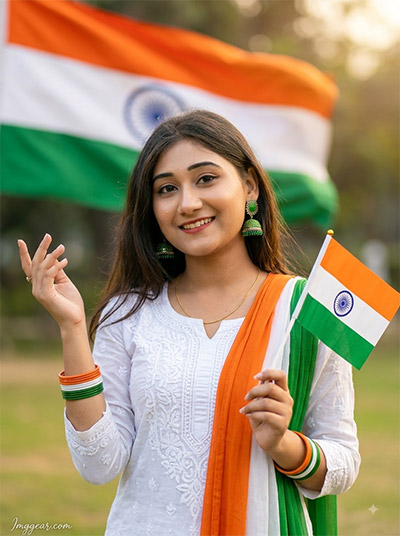
Edit Patriotic August 15 Photos with Red Fort Background AI
Craft vibrant patriotic portraits featuring a white embroidered kurta, hand-held flag, and matching tricolor accessories. Creative AI image manipulation replaces garden scenes with imposing national monument backdrops in one click. Explore the prompt here!
PROMPT
{
“image_label”: “Imggear.com_1”,
“version”: “3.5”,
“aspect_ratio”: “3:4”,
“prompt”: “An ultra-realistic, photorealistic premium masterpiece, preserving the exact identity, facial proportions, bone structure, eye depth, sharp jawline, authentic facial characteristics, and skin micro-textures (visible pores, fine lines) of the subject in the uploaded personal reference photo without alteration. The facial lighting must seamlessly fuse with the ambient scene highlights and cast realistic shadows, allowing the subject to naturally integrate with the environment’s lighting, shadows, depth, atmospheric perspective, and optical characteristics while preserving the subject’s true identity without alteration, seamlessly integrating the subject into this dramatic portrait, while maintaining complete identity consistency throughout the image. A female in her early 20s with a slim build and medium shoulder width, smiling warmly while holding a mini Indian tricolor flag in her right hand with her left hand raised gently. She wears a traditional white embroidered kurti with a saffron, white, and green dupatta draped over her left shoulder, accented with green jhumka earrings and tricolor bangles. Set outdoors with a softly blurred park background featuring a large waving Indian national flag under warm daylight. Captured on a full-frame professional mirrorless camera with an 85mm f/1.4 prime lens in RAW format, featuring hyper-detailed edge sharpness, extreme high-definition micro-details on skin and fabric, natural optical rendering, and premium creamy bokeh. Minimal soft white cursive signature watermark reading \”Imggear.com\” in Petit Formal Script at the bottom-left corner with slight transparency.”,
“negative_prompt”: “(plastic skin, waxy skin, CGI rendering, AI beauty filter look, porcelain skin, over-smoothed skin, airbrushed skin, synthetic textures, doll-like face, uncanny valley, artificial symmetry), (deformed face, distorted facial features, asymmetrical eyes, bad anatomy, bad proportions, extra limbs, extra fingers, missing fingers, malformed hands, mutated hands), (unnatural lighting, flat lighting, harsh direct sunlight, blown-out highlights, crushed shadows, oversaturated colors, neon colors, unrealistic color grading, HDR look, overexposed, underexposed), (blurry, out of focus, low resolution, pixelated, jpeg artifacts, grainy noise, motion blur, soft focus), (dry land, dusty ground, indoor background, wrong environment, mismatched background), (clothing logos, brand marks, trademarked patterns, text overlays, random watermark placement, duplicate watermark, extra signature), (cartoon style, illustration, painting, 3D render, anime, stylized art, digital art look), (identity mismatch, face swap artifacts, inconsistent facial features, altered bone structure, changed eye color, different face shape), hair description, distorted flag features, malformed fingers.”
}
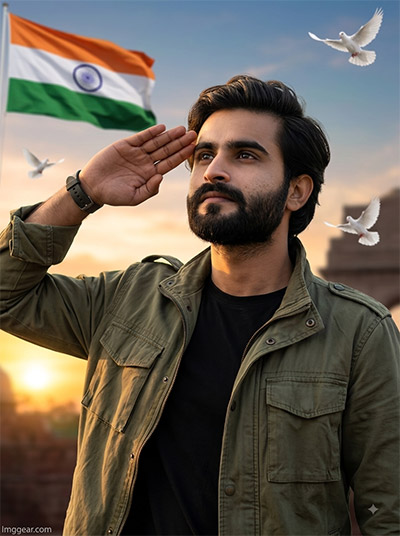
Saluting Flag 15 August Red Fort Background AI Photo Editing
Design heroic patriotic portraits wearing a military-style olive jacket, featuring a proud salute, flying white doves, and glowing dusk skies. AI photo editing makes adding historical monument backgrounds seamless. Copy the prompt to build yours!
PROMPT
{
“image_label”: “Imggear.com_2”,
“version”: “3.5”,
“aspect_ratio”: “3:4”,
“prompt”: “An ultra-realistic, photorealistic premium masterpiece, preserving the exact identity, facial proportions, bone structure, eye depth, sharp jawline, authentic facial characteristics, and skin micro-textures (visible pores, fine lines) of the subject in the uploaded personal reference photo without alteration. The facial lighting must seamlessly fuse with the ambient scene highlights and cast realistic shadows, allowing the subject to naturally integrate with the environment’s lighting, shadows, depth, atmospheric perspective, and optical characteristics while preserving the subject’s true identity without alteration, seamlessly integrating the subject into this cinematic scene, while maintaining complete identity consistency throughout the image. A male in his early 20s with an athletic, slim-toned build and broad shoulders, performing a sharp hand salute to his temple with a solemn patriotic expression looking upward. He wears an olive green utility jacket over a black t-shirt with a dark watch. Set against a sunset sky with a waving Indian flag, flying white doves, and a subtle monument outline. Captured on a full-frame professional mirrorless camera with an 85mm f/1.4 prime lens in RAW format, featuring hyper-detailed edge sharpness, extreme high-definition micro-details on skin and fabric, natural optical rendering, and premium creamy bokeh. Minimal soft white signature watermark reading \”Imggear.com\” in Petit Formal Script at bottom-left corner.”,
“negative_prompt”: “(plastic skin, waxy skin, CGI rendering, AI beauty filter look, porcelain skin, over-smoothed skin, airbrushed skin, synthetic textures, doll-like face, uncanny valley, artificial symmetry), (deformed face, distorted facial features, asymmetrical eyes, bad anatomy, bad proportions, extra limbs, extra fingers, missing fingers, malformed hands, mutated hands), (unnatural lighting, flat lighting, harsh direct sunlight, blown-out highlights, crushed shadows, oversaturated colors, neon colors, unrealistic color grading, HDR look, overexposed, underexposed), (blurry, out of focus, low resolution, pixelated, jpeg artifacts, grainy noise, motion blur, soft focus), (dry land, dusty ground, indoor background, wrong environment, mismatched background), (clothing logos, brand marks, trademarked patterns, text overlays, random watermark placement, duplicate watermark, extra signature), (cartoon style, illustration, painting, 3D render, anime, stylized art, digital art look), (identity mismatch, face swap artifacts, inconsistent facial features, altered bone structure, changed eye color, different face shape), hair description, improper hand salute, distorted fingers.”
}
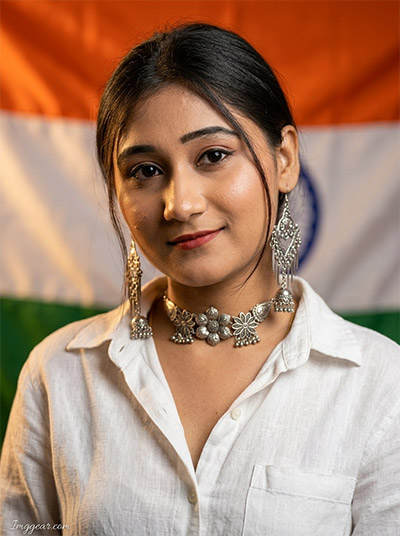
Create Stunning 15 August Flag AI Background Photos
Enhance close-up studio portraits wearing silver oxidized jewelry and crisp white shirts with vibrant Indian flag backdrops. AI image generation helps you effortlessly integrate historic red fort aesthetics into your festive edits. Give it a shot now!
PROMPT
{
“image_label”: “Imggear.com_3”,
“version”: “3.5”,
“aspect_ratio”: “3:4”,
“prompt”: “An ultra-realistic, photorealistic premium masterpiece, preserving the exact identity, facial proportions, bone structure, eye depth, sharp jawline, authentic facial characteristics, and skin micro-textures (visible pores, fine lines) of the subject in the uploaded personal reference photo without alteration. The facial lighting must seamlessly fuse with the ambient scene highlights and cast realistic shadows, allowing the subject to naturally integrate with the environment’s lighting, shadows, depth, atmospheric perspective, and optical characteristics while preserving the subject’s true identity without alteration, seamlessly integrating the subject into this dramatic portrait, while maintaining complete identity consistency throughout the image. A female in her early 20s with a slender build, head slightly tilted with a subtle smile looking into the camera. She wears an unbuttoned white linen casual shirt with silver oxidized jhumka earrings. Background features a softly draped Indian tricolor flag illuminated by warm directional studio lighting. Captured on a full-frame professional mirrorless camera with an 85mm f/1.4 prime lens in RAW format, featuring hyper-detailed edge sharpness, extreme high-definition micro-details on skin and fabric, natural optical rendering, and premium creamy bokeh. Minimal soft white signature watermark reading \”Imggear.com\” in Petit Formal Script at bottom-left corner with slight transparency.”,
“negative_prompt”: “(plastic skin, waxy skin, CGI rendering, AI beauty filter look, porcelain skin, over-smoothed skin, airbrushed skin, synthetic textures, doll-like face, uncanny valley, artificial symmetry), (deformed face, distorted facial features, asymmetrical eyes, bad anatomy, bad proportions, extra limbs, extra fingers, missing fingers, malformed hands, mutated hands), (unnatural lighting, flat lighting, harsh direct sunlight, blown-out highlights, crushed shadows, oversaturated colors, neon colors, unrealistic color grading, HDR look, overexposed, underexposed), (blurry, out of focus, low resolution, pixelated, jpeg artifacts, grainy noise, motion blur, soft focus), (dry land, dusty ground, indoor background, wrong environment, mismatched background), (clothing logos, brand marks, trademarked patterns, text overlays, random watermark placement, duplicate watermark, extra signature), (cartoon style, illustration, painting, 3D render, anime, stylized art, digital art look), (identity mismatch, face swap artifacts, inconsistent facial features, altered bone structure, changed eye color, different face shape), hair description, harsh flash shadow, blown highlights.”
}
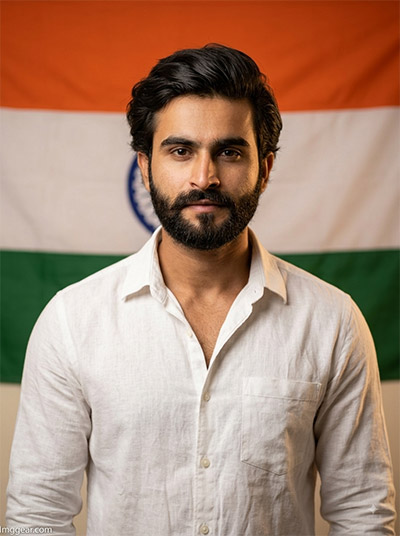
Indian Flag Backlit 15 August AI Photo Editing Tutorial
Craft bold masculine portraits featuring a clean white linen shirt and well-groomed beard against a blurred tricolor canvas. Smart AI photo editing tools let you place iconic heritage landmarks behind you seamlessly. Are you ready to test this creative prompt?
PROMPT
{
“image_label”: “Imggear.com_4”,
“version”: “3.5”,
“aspect_ratio”: “3:4”,
“prompt”: “An ultra-realistic, photorealistic premium masterpiece, preserving the exact identity, facial proportions, bone structure, eye depth, sharp jawline, authentic facial characteristics, and skin micro-textures (visible pores, fine lines) of the subject in the uploaded personal reference photo without alteration. The facial lighting must seamlessly fuse with the ambient scene highlights and cast realistic shadows, allowing the subject to naturally integrate with the environment’s lighting, shadows, depth, atmospheric perspective, and optical characteristics while preserving the subject’s true identity without alteration, seamlessly integrating the subject into this dramatic portrait, while maintaining complete identity consistency throughout the image. A male in his early 20s with a muscular athletic build and broad shoulders, looking calmly and intensely into the camera. He wears a clean white linen open-collar shirt. Behind him, the Indian national flag hangs flat as a backdrop under warm balanced studio lighting. Captured on a full-frame professional mirrorless camera with an 85mm f/1.4 prime lens in RAW format, featuring hyper-detailed edge sharpness, extreme high-definition micro-details on skin and fabric, natural optical rendering, and premium creamy bokeh. Minimal soft white signature watermark reading \”Imggear.com\” in Petit Formal Script at bottom-left corner with slight transparency.”,
“negative_prompt”: “(plastic skin, waxy skin, CGI rendering, AI beauty filter look, porcelain skin, over-smoothed skin, airbrushed skin, synthetic textures, doll-like face, uncanny valley, artificial symmetry), (deformed face, distorted facial features, asymmetrical eyes, bad anatomy, bad proportions, extra limbs, extra fingers, missing fingers, malformed hands, mutated hands), (unnatural lighting, flat lighting, harsh direct sunlight, blown-out highlights, crushed shadows, oversaturated colors, neon colors, unrealistic color grading, HDR look, overexposed, underexposed), (blurry, out of focus, low resolution, pixelated, jpeg artifacts, grainy noise, motion blur, soft focus), (dry land, dusty ground, indoor background, wrong environment, mismatched background), (clothing logos, brand marks, trademarked patterns, text overlays, random watermark placement, duplicate watermark, extra signature), (cartoon style, illustration, painting, 3D render, anime, stylized art, digital art look), (identity mismatch, face swap artifacts, inconsistent facial features, altered bone structure, changed eye color, different face shape), hair description, unnatural facial symmetry, harsh key light.”
}
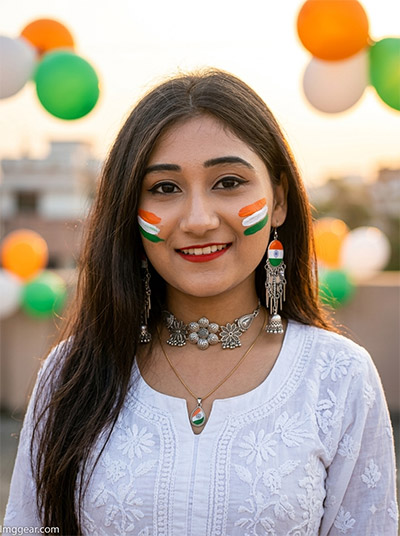
Festive 15 August Red Fort Background AI Photo Editing Guide
Highlight playful cheek paintings, silver ethnic jewelry, and colorful festive balloons floating in a rooftop glow. AI-driven editing lets you substitute urban backgrounds with historic red fort landscapes seamlessly. Grab the free prompt and start editing!
PROMPT
{
“image_label”: “Imggear.com_5”,
“version”: “3.5”,
“aspect_ratio”: “3:4”,
“prompt”: “An ultra-realistic, photorealistic premium masterpiece, preserving the exact identity, facial proportions, bone structure, eye depth, sharp jawline, authentic facial characteristics, and skin micro-textures (visible pores, fine lines) of the subject in the uploaded personal reference photo without alteration. The facial lighting must seamlessly fuse with the ambient scene highlights and cast realistic shadows, allowing the subject to naturally integrate with the environment’s lighting, shadows, depth, atmospheric perspective, and optical characteristics while preserving the subject’s true identity without alteration, seamlessly integrating the subject into this festive portrait, while maintaining complete identity consistency throughout the image. A female in her late teens with a slim build, smiling sweetly facing the camera with painted tricolor flag stripes on both cheeks. She wears a white embroidered chikan kurti with draped saffron and green dupatta layers, tricolor earrings, and a pendant necklace. Outdoor rooftop setting decorated with festive tricolor balloons under golden sunset light. Captured on a full-frame professional mirrorless camera with an 85mm f/1.4 prime lens in RAW format, featuring hyper-detailed edge sharpness, extreme high-definition micro-details on skin and fabric, natural optical rendering, and premium creamy bokeh. Minimal soft white signature watermark reading \”Imggear.com\” in Petit Formal Script at bottom-left corner with slight transparency.”,
“negative_prompt”: “(plastic skin, waxy skin, CGI rendering, AI beauty filter look, porcelain skin, over-smoothed skin, airbrushed skin, synthetic textures, doll-like face, uncanny valley, artificial symmetry), (deformed face, distorted facial features, asymmetrical eyes, bad anatomy, bad proportions, extra limbs, extra fingers, missing fingers, malformed hands, mutated hands), (unnatural lighting, flat lighting, harsh direct sunlight, blown-out highlights, crushed shadows, oversaturated colors, neon colors, unrealistic color grading, HDR look, overexposed, underexposed), (blurry, out of focus, low resolution, pixelated, jpeg artifacts, grainy noise, motion blur, soft focus), (dry land, dusty ground, indoor background, wrong environment, mismatched background), (clothing logos, brand marks, trademarked patterns, text overlays, random watermark placement, duplicate watermark, extra signature), (cartoon style, illustration, painting, 3D render, anime, stylized art, digital art look), (identity mismatch, face swap artifacts, inconsistent facial features, altered bone structure, changed eye color, different face shape), hair description, smudged cheek paint, unnatural lens flare.”
}
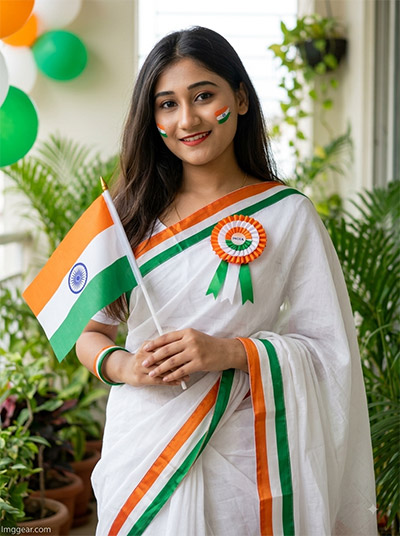
15 August AI Photo Editing Prompts for Indian Flag Saree Look
Showcase a refined indoor balcony scene with a white tricolor saree, patriotic rosette badge, and potted greens. Modern generative tools help you replace balcony views with national monument backdrops effortlessly. Save this prompt for your next post!
PROMPT
{
“image_label”: “Imggear.com_6”,
“version”: “3.5”,
“aspect_ratio”: “3:4”,
“prompt”: “An ultra-realistic, photorealistic premium masterpiece, preserving the exact identity, facial proportions, bone structure, eye depth, sharp jawline, authentic facial characteristics, and skin micro-textures (visible pores, fine lines) of the subject in the uploaded personal reference photo without alteration. The facial lighting must seamlessly fuse with the ambient scene highlights and cast realistic shadows, allowing the subject to naturally integrate with the environment’s lighting, shadows, depth, atmospheric perspective, and optical characteristics while preserving the subject’s true identity without alteration, seamlessly integrating the subject into this traditional festive portrait, while maintaining complete identity consistency throughout the image. A female in her late teens with a slender build, standing in a three-quarter pose holding a small Indian flag pole with both hands at her waist. She wears a white saree with a tricolor silk border, a pinned tricolor rosette badge, and cheek flag paint accents. Indoor patio setting with green plants and balloons under soft ambient daylight. Captured on a full-frame professional mirrorless camera with an 85mm f/1.4 prime lens in RAW format, featuring hyper-detailed edge sharpness, extreme high-definition micro-details on skin and fabric, natural optical rendering, and premium creamy bokeh. Minimal soft white signature watermark reading \”Imggear.com\” in Petit Formal Script at bottom-left corner with slight transparency.”,
“negative_prompt”: “(plastic skin, waxy skin, CGI rendering, AI beauty filter look, porcelain skin, over-smoothed skin, airbrushed skin, synthetic textures, doll-like face, uncanny valley, artificial symmetry), (deformed face, distorted facial features, asymmetrical eyes, bad anatomy, bad proportions, extra limbs, extra fingers, missing fingers, malformed hands, mutated hands), (unnatural lighting, flat lighting, harsh direct sunlight, blown-out highlights, crushed shadows, oversaturated colors, neon colors, unrealistic color grading, HDR look, overexposed, underexposed), (blurry, out of focus, low resolution, pixelated, jpeg artifacts, grainy noise, motion blur, soft focus), (dry land, dusty ground, indoor background, wrong environment, mismatched background), (clothing logos, brand marks, trademarked patterns, text overlays, random watermark placement, duplicate watermark, extra signature), (cartoon style, illustration, painting, 3D render, anime, stylized art, digital art look), (identity mismatch, face swap artifacts, inconsistent facial features, altered bone structure, changed eye color, different face shape), hair description, warped saree drape, malformed hands on flag pole.”
}
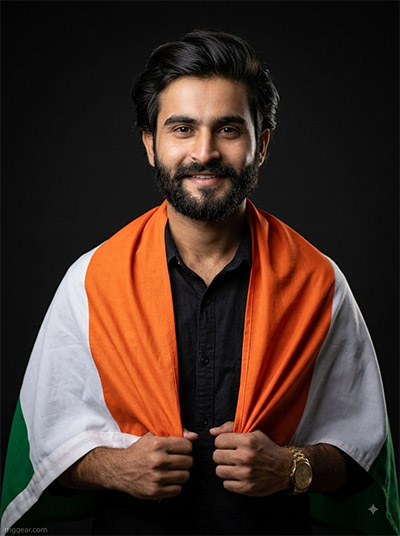
Moody Dark Studio 15 August Flag AI Photo Editing Prompts
Contrast a dark studio setting with a draped Indian tricolor flag and black shirt outfit. Advanced AI photo editing software lets you turn solid dark backdrops into grand architectural views instantly. What do you think of this cinematic lighting style?
PROMPT
{
“image_label”: “Imggear.com_7”,
“version”: “3.5”,
“aspect_ratio”: “3:4”,
“prompt”: “An ultra-realistic, photorealistic premium masterpiece, preserving the exact identity, facial proportions, bone structure, eye depth, sharp jawline, authentic facial characteristics, and skin micro-textures (visible pores, fine lines) of the subject in the uploaded personal reference photo without alteration. The facial lighting must seamlessly fuse with the ambient scene highlights and cast realistic shadows, allowing the subject to naturally integrate with the environment’s lighting, shadows, depth, atmospheric perspective, and optical characteristics while preserving the subject’s true identity without alteration, seamlessly integrating the subject into this dramatic portrait, while maintaining complete identity consistency throughout the image. A male in his early 20s with a lean athletic build and broad shoulders, smiling gently with the Indian national flag draped over his shoulders and held in hand. He wears a black casual button-down shirt with a gold wristwatch. Set against a dark low-key studio background with subtle rim lighting contouring his silhouette. Captured on a full-frame professional mirrorless camera with an 85mm f/1.4 prime lens in RAW format, featuring hyper-detailed edge sharpness, extreme high-definition micro-details on skin and fabric, natural optical rendering, and premium creamy bokeh. Minimal soft white signature watermark reading \”Imggear.com\” in Petit Formal Script at bottom-left corner with slight transparency.”,
“negative_prompt”: “(plastic skin, waxy skin, CGI rendering, AI beauty filter look, porcelain skin, over-smoothed skin, airbrushed skin, synthetic textures, doll-like face, uncanny valley, artificial symmetry), (deformed face, distorted facial features, asymmetrical eyes, bad anatomy, bad proportions, extra limbs, extra fingers, missing fingers, malformed hands, mutated hands), (unnatural lighting, flat lighting, harsh direct sunlight, blown-out highlights, crushed shadows, oversaturated colors, neon colors, unrealistic color grading, HDR look, overexposed, underexposed), (blurry, out of focus, low resolution, pixelated, jpeg artifacts, grainy noise, motion blur, soft focus), (dry land, dusty ground, indoor background, wrong environment, mismatched background), (clothing logos, brand marks, trademarked patterns, text overlays, random watermark placement, duplicate watermark, extra signature), (cartoon style, illustration, painting, 3D render, anime, stylized art, digital art look), (identity mismatch, face swap artifacts, inconsistent facial features, altered bone structure, changed eye color, different face shape), hair description, crushed shadow detail, harsh direct flash.”
}
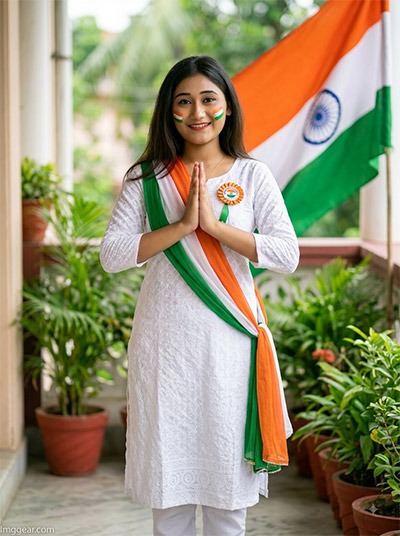
Namaste Pose 15 August Red Fort Background AI Photo Editing
Capture respect and tradition with a folded hands greeting, embroidered chikankari suit, and tricolor sash. Modern generative photo tools easily turn veranda settings into glorious heritage monument scenes. Want to make your own version right away?
PROMPT
{
“image_label”: “Imggear.com_8”,
“version”: “3.5”,
“aspect_ratio”: “3:4”,
“prompt”: “An ultra-realistic, photorealistic premium masterpiece, preserving the exact identity, facial proportions, bone structure, eye depth, sharp jawline, authentic facial characteristics, and skin micro-textures (visible pores, fine lines) of the subject in the uploaded personal reference photo without alteration. The facial lighting must seamlessly fuse with the ambient scene highlights and cast realistic shadows, allowing the subject to naturally integrate with the environment’s lighting, shadows, depth, atmospheric perspective, and optical characteristics while preserving the subject’s true identity without alteration, seamlessly integrating the subject into this traditional portrait, while maintaining complete identity consistency throughout the image. A female in her late teens with a slender build, standing in a traditional Namaste gesture with palms pressed together, smiling warmly with tricolor cheek paint. She wears a white patterned long kurti, white pants, a tricolor dupatta draped diagonally across her torso, and a rosette badge. Veranda setting with potted green plants and a background flag under soft even daylight. Captured on a full-frame professional mirrorless camera with an 85mm f/1.4 prime lens in RAW format, featuring hyper-detailed edge sharpness, extreme high-definition micro-details on skin and fabric, natural optical rendering, and premium creamy bokeh. Minimal soft white signature watermark reading \”Imggear.com\” in Petit Formal Script at bottom-left corner with slight transparency.”,
“negative_prompt”: “(plastic skin, waxy skin, CGI rendering, AI beauty filter look, porcelain skin, over-smoothed skin, airbrushed skin, synthetic textures, doll-like face, uncanny valley, artificial symmetry), (deformed face, distorted facial features, asymmetrical eyes, bad anatomy, bad proportions, extra limbs, extra fingers, missing fingers, malformed hands, mutated hands), (unnatural lighting, flat lighting, harsh direct sunlight, blown-out highlights, crushed shadows, oversaturated colors, neon colors, unrealistic color grading, HDR look, overexposed, underexposed), (blurry, out of focus, low resolution, pixelated, jpeg artifacts, grainy noise, motion blur, soft focus), (dry land, dusty ground, indoor background, wrong environment, mismatched background), (clothing logos, brand marks, trademarked patterns, text overlays, random watermark placement, duplicate watermark, extra signature), (cartoon style, illustration, painting, 3D render, anime, stylized art, digital art look), (identity mismatch, face swap artifacts, inconsistent facial features, altered bone structure, changed eye color, different face shape), hair description, malformed hand gesture, improper body alignment.”
}
💡 AI Photo Editing Pro Tips for Perfect Results
Keep Faces Consistent: If the AI changes the face, add this exact phrase to the very beginning of your prompt: “Preserve facial identity 100%, do not alter facial features or proportions.”
Reroll for Perfection: Run every prompt 2–3 times! The second or third generation is almost always sharper and packed with better details.
Get the DSLR Look: Want that beautiful, blurred background? Just add “f/1.8 shallow depth of field” to your prompt.
Control the Camera Shot: Tell the AI exactly what frame you want by adding terms like “Close-up portrait,” “Full-body shot,” or “Wide-angle view.”
Set the Vibe with Lighting: Lighting makes or breaks an AI image. Add “Cinematic lighting,” “Golden hour sunset,” or “Soft studio lighting” for a professional touch.
📐 Best Aspect Ratio: Use 3:4 Vertical for stunning, ready-to-post results on Instagram and Pinterest.