Creating realistic festive images shouldn’t take hours of manual editing. If you want to transform your photos with high-quality Janmashtami AI Photo Editing Prompts With Krishna, you’re in the right place. By pairing your portrait with Gemini AI or ChatGPT, you can instantly generate stunning 3D art, Dahi Handi themes, and aesthetic Krishna portraits without complex graphic design skills. Below, you’ll find copy-paste prompts designed to get perfect lighting, accurate facial features, and viral-ready results every time.
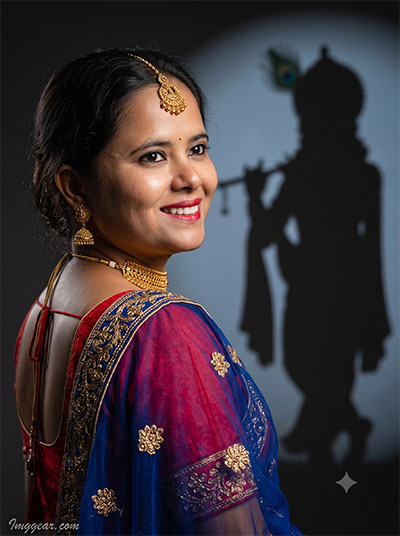
Transform Festive Photos Using Janmashtami AI Prompts with Krishna Shadow
Craft breathtaking festive portraits featuring a subtle Lord Krishna shadow backdrop. This custom prompt blends traditional Indian wear with artistic studio lighting effortlessly. Ready to recreate this viral festive look on your own photos?
PROMPT
{
“image_label”: “Imggear.com_1”,
“version”: “3.5”,
“aspect_ratio”: “3:4”,
“prompt”: “An ultra-realistic, photorealistic premium masterpiece, preserving the exact identity, facial proportions, bone structure, eye depth, sharp jawline, authentic facial characteristics, and skin micro-textures (visible pores, fine lines) of the subject in the uploaded personal reference photo without alteration. The facial lighting must seamlessly fuse with the ambient scene highlights and cast realistic shadows, allowing the subject to naturally integrate with the environment’s lighting, shadows, depth, atmospheric perspective, and optical characteristics while preserving the subject’s true identity without alteration, seamlessly integrating the subject into this dramatic cinematic scene, while maintaining complete identity consistency throughout the image. Render the subject with premium true-to-life human skin using PBR, preserving authentic skin pores, fine skin grain, natural melanin transitions, facial micro-contrast, subtle oil diffusion, organic facial imperfections, and realistic skin translucency. Female, apparent age 22, slender body type, narrow shoulder width, delicate physical build. Captured using a full-frame professional mirrorless camera with an 85mm f/1.4 prime lens in RAW format. Photorealistic high-fidelity sharpness (Optimized for professional 8K upscaling using Physically Based Rendering (PBR), realistic skin pores, fine skin grain, sub-surface scattering (SSS), realistic micro skin displacement, pore-level facial detail, physically accurate material rendering, cinematic global illumination, natural lens rendering, true optical sharpness, professional RAW camera image fidelity, realistic sensor characteristics, and natural filmic tone mapping), hyper-detailed edge sharpness, extreme high-definition micro-details on skin and fabric, natural optical rendering, and premium creamy bokeh. Gobo spotlight, rim lighting, soft diffused shadows. Premium editorial-grade color grading — warm highlights, rich mid-tones, natural skin tones — with enhanced micro-contrast and clarity, vivid natural color saturation, deep punchy shadows, bright clean highlights, and strong tonal contrast. Subject stands in profile, looking over shoulder. Wearing a premium custom luxury traditional Indian garment: red blouse and blue sheer drape with gold embroidery. Adorned with gold maang tikka, jhumka earrings, and choker. Background features a dark wall with a sharply defined projected shadow of a deity holding a flute and wearing a peacock feather. Watermark: ‘Imggear.com’ positioned in the bottom-left corner, using Petit Formal Script with thin elegant cursive strokes, in soft white (#ffffff) with slight transparency, appearing as a minimal premium handwritten signature seamlessly blended with no background.”,
“negative_prompt”: “(plastic skin, waxy skin, CGI rendering, AI beauty filter look, porcelain skin, over-smoothed skin, airbrushed skin, synthetic textures, doll-like face, uncanny valley, artificial symmetry), (deformed face, distorted facial features, asymmetrical eyes, bad anatomy, bad proportions, extra limbs, extra fingers, missing fingers, malformed hands, mutated hands), (unnatural lighting, flat lighting, harsh direct sunlight, blown-out highlights, crushed shadows, oversaturated colors, neon colors, unrealistic color grading, HDR look, overexposed, underexposed), (blurry, out of focus, low resolution, pixelated, jpeg artifacts, grainy noise, motion blur, soft focus), (dry land, dusty ground, indoor background, wrong environment, mismatched background), (clothing logos, brand marks, trademarked patterns, text overlays, random watermark placement, duplicate watermark, extra signature), (cartoon style, illustration, painting, 3D render, anime, stylized art, digital art look), (identity mismatch, face swap artifacts, inconsistent facial features, altered bone structure, changed eye color, different face shape), (modern casual clothing, western wear, missing jewelry, incorrect shadow shape, multiple shadows, brightly lit background).”
}
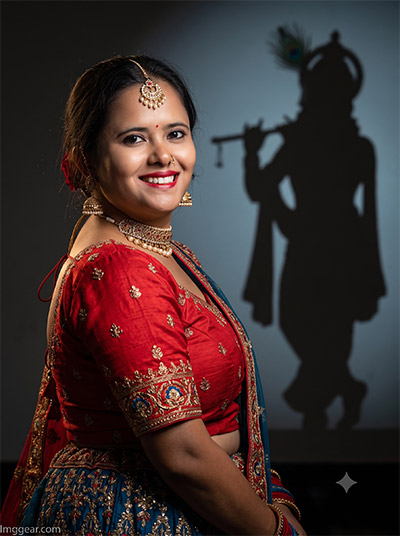
Create Stunning Festive Edits with Krishna AI Prompts for Janmashtami
Elevate your festival portraits by adding a dramatic silhouette of Lord Krishna in the background. This prompt captures rich embroidered traditional attire paired with warm lighting. Grab the exact text now and try it out yourself.
PROMPT
{
“image_label”: “Imggear.com_2”,
“version”: “3.5”,
“aspect_ratio”: “3:4”,
“prompt”: “An ultra-realistic, photorealistic premium masterpiece, preserving the exact identity, facial proportions, bone structure, eye depth, sharp jawline, authentic facial characteristics, and skin micro-textures (visible pores, fine lines) of the subject in the uploaded personal reference photo without alteration. The facial lighting must seamlessly fuse with the ambient scene highlights and cast realistic shadows, allowing the subject to naturally integrate with the environment’s lighting, shadows, depth, atmospheric perspective, and optical characteristics while preserving the subject’s true identity without alteration, seamlessly integrating the subject into this dramatic cinematic scene, while maintaining complete identity consistency throughout the image. Render the subject with premium true-to-life human skin using PBR, preserving authentic skin pores, fine skin grain, natural melanin transitions, facial micro-contrast, subtle oil diffusion, organic facial imperfections, and realistic skin translucency. Female, apparent age 22, slender body type, narrow shoulder width, delicate physical build. Captured using a full-frame professional mirrorless camera with an 85mm f/1.4 prime lens in RAW format. Photorealistic high-fidelity sharpness (Optimized for professional 8K upscaling using Physically Based Rendering (PBR), realistic skin pores, fine skin grain, sub-surface scattering (SSS), realistic micro skin displacement, pore-level facial detail, physically accurate material rendering, cinematic global illumination, natural lens rendering, true optical sharpness, professional RAW camera image fidelity, realistic sensor characteristics, and natural filmic tone mapping), hyper-detailed edge sharpness, extreme high-definition micro-details on skin and fabric, natural optical rendering, and premium creamy bokeh. Gobo spotlight, rim lighting, soft diffused shadows. Premium editorial-grade color grading — warm highlights, rich mid-tones, natural skin tones — with enhanced micro-contrast and clarity, vivid natural color saturation, deep punchy shadows, bright clean highlights, and strong tonal contrast. Subject faces forward, angled slightly, looking off-camera right. Wearing a premium custom luxury traditional Indian garment: red blouse and blue skirt with heavy metallic embroidery. Adorned with maang tikka, jhumka earrings, choker, and nose ring. Background is a dark wall casting a silhouette shadow of a deity with a flute and peacock feather. Watermark: ‘Imggear.com’ positioned in the bottom-left corner, using Petit Formal Script with thin elegant cursive strokes, in soft white (#ffffff) with slight transparency, appearing as a minimal premium handwritten signature seamlessly blended with no background.”,
“negative_prompt”: “(plastic skin, waxy skin, CGI rendering, AI beauty filter look, porcelain skin, over-smoothed skin, airbrushed skin, synthetic textures, doll-like face, uncanny valley, artificial symmetry), (deformed face, distorted facial features, asymmetrical eyes, bad anatomy, bad proportions, extra limbs, extra fingers, missing fingers, malformed hands, mutated hands), (unnatural lighting, flat lighting, harsh direct sunlight, blown-out highlights, crushed shadows, oversaturated colors, neon colors, unrealistic color grading, HDR look, overexposed, underexposed), (blurry, out of focus, low resolution, pixelated, jpeg artifacts, grainy noise, motion blur, soft focus), (dry land, dusty ground, indoor background, wrong environment, mismatched background), (clothing logos, brand marks, trademarked patterns, text overlays, random watermark placement, duplicate watermark, extra signature), (cartoon style, illustration, painting, 3D render, anime, stylized art, digital art look), (identity mismatch, face swap artifacts, inconsistent facial features, altered bone structure, changed eye color, different face shape), (modern casual clothing, western wear, missing jewelry, incorrect shadow shape, multiple shadows, brightly lit background).”
}
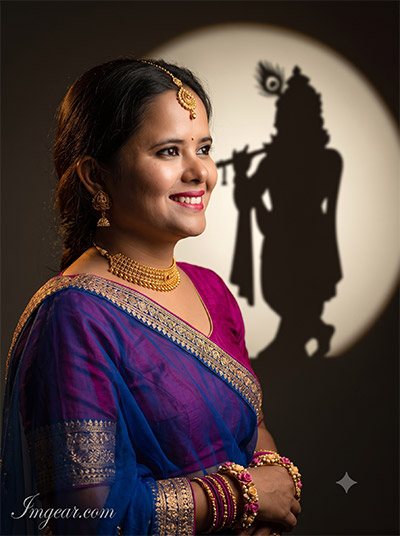
Janmashtami Special AI Prompts for Aesthetic Krishna Shadow Portraits
Illuminate your festive photos with a warm circular spotlight behind a flute-playing Lord Krishna silhouette. Highlight traditional saree details and elegant jewelry using simple prompt tweaks. Wondering how to recreate this aesthetic look?
PROMPT
{
“image_label”: “Imggear.com_3”,
“version”: “3.5”,
“aspect_ratio”: “3:4”,
“prompt”: “An ultra-realistic, photorealistic premium masterpiece, preserving the exact identity, facial proportions, bone structure, eye depth, sharp jawline, authentic facial characteristics, and skin micro-textures (visible pores, fine lines) of the subject in the uploaded personal reference photo without alteration. The facial lighting must seamlessly fuse with the ambient scene highlights and cast realistic shadows, allowing the subject to naturally integrate with the environment’s lighting, shadows, depth, atmospheric perspective, and optical characteristics while preserving the subject’s true identity without alteration, seamlessly integrating the subject into this dramatic cinematic scene, while maintaining complete identity consistency throughout the image. Render the subject with premium true-to-life human skin using PBR, preserving authentic skin pores, fine skin grain, natural melanin transitions, facial micro-contrast, subtle oil diffusion, organic facial imperfections, and realistic skin translucency. Female, apparent age 22, slender body type, narrow shoulder width, delicate physical build. Captured using a full-frame professional mirrorless camera with an 85mm f/1.4 prime lens in RAW format. Photorealistic high-fidelity sharpness (Optimized for professional 8K upscaling using Physically Based Rendering (PBR), realistic skin pores, fine skin grain, sub-surface scattering (SSS), realistic micro skin displacement, pore-level facial detail, physically accurate material rendering, cinematic global illumination, natural lens rendering, true optical sharpness, professional RAW camera image fidelity, realistic sensor characteristics, and natural filmic tone mapping), hyper-detailed edge sharpness, extreme high-definition micro-details on skin and fabric, natural optical rendering, and premium creamy bokeh. Gobo spotlight, rim lighting, soft diffused shadows. Premium editorial-grade color grading — warm highlights, rich mid-tones, natural skin tones — with enhanced micro-contrast and clarity, vivid natural color saturation, deep punchy shadows, bright clean highlights, and strong tonal contrast. Subject in profile, looking right. Wearing a premium custom luxury garment: magenta blouse and blue sheer drape with gold borders. Adorned with maang tikka, jhumka earrings, choker, and floral bangles. Background features a dark wall illuminated by a circular gobo spotlight casting a deity silhouette shadow with a flute and peacock feather. Watermark: ‘Imggear.com’ positioned in the bottom-left corner, using Petit Formal Script with thin elegant cursive strokes, in soft white (#ffffff) with slight transparency, appearing as a minimal premium handwritten signature seamlessly blended with no background.”,
“negative_prompt”: “(plastic skin, waxy skin, CGI rendering, AI beauty filter look, porcelain skin, over-smoothed skin, airbrushed skin, synthetic textures, doll-like face, uncanny valley, artificial symmetry), (deformed face, distorted facial features, asymmetrical eyes, bad anatomy, bad proportions, extra limbs, extra fingers, missing fingers, malformed hands, mutated hands), (unnatural lighting, flat lighting, harsh direct sunlight, blown-out highlights, crushed shadows, oversaturated colors, neon colors, unrealistic color grading, HDR look, overexposed, underexposed), (blurry, out of focus, low resolution, pixelated, jpeg artifacts, grainy noise, motion blur, soft focus), (dry land, dusty ground, indoor background, wrong environment, mismatched background), (clothing logos, brand marks, trademarked patterns, text overlays, random watermark placement, duplicate watermark, extra signature), (cartoon style, illustration, painting, 3D render, anime, stylized art, digital art look), (identity mismatch, face swap artifacts, inconsistent facial features, altered bone structure, changed eye color, different face shape), (modern casual clothing, western wear, missing jewelry, incorrect shadow shape, multiple shadows, brightly lit background).”
}
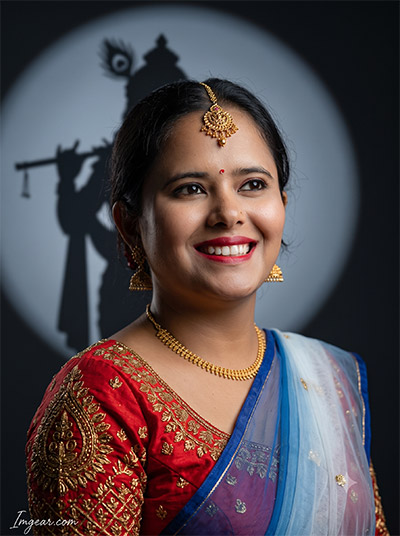
Master Janmashtami Photo Editing with AI Krishna Silhouette Prompts
Center your festival portrait inside a cool spotlight frame while projecting a detailed Lord Krishna shadow behind you. This style balances ornate gold jewelry with cinematic studio contrast. Copy the exact prompt now and upgrade your profile picture!
PROMPT
{
“image_label”: “Imggear.com_4”,
“version”: “3.5”,
“aspect_ratio”: “3:4”,
“prompt”: “An ultra-realistic, photorealistic premium masterpiece, preserving the exact identity, facial proportions, bone structure, eye depth, sharp jawline, authentic facial characteristics, and skin micro-textures (visible pores, fine lines) of the subject in the uploaded personal reference photo without alteration. The facial lighting must seamlessly fuse with the ambient scene highlights and cast realistic shadows, allowing the subject to naturally integrate with the environment’s lighting, shadows, depth, atmospheric perspective, and optical characteristics while preserving the subject’s true identity without alteration, seamlessly integrating the subject into this dramatic cinematic scene, while maintaining complete identity consistency throughout the image. Render the subject with premium true-to-life human skin using PBR, preserving authentic skin pores, fine skin grain, natural melanin transitions, facial micro-contrast, subtle oil diffusion, organic facial imperfections, and realistic skin translucency. Female, apparent age 22, slender body type, narrow shoulder width, delicate physical build. Captured using a full-frame professional mirrorless camera with an 85mm f/1.4 prime lens in RAW format. Photorealistic high-fidelity sharpness (Optimized for professional 8K upscaling using Physically Based Rendering (PBR), realistic skin pores, fine skin grain, sub-surface scattering (SSS), realistic micro skin displacement, pore-level facial detail, physically accurate material rendering, cinematic global illumination, natural lens rendering, true optical sharpness, professional RAW camera image fidelity, realistic sensor characteristics, and natural filmic tone mapping), hyper-detailed edge sharpness, extreme high-definition micro-details on skin and fabric, natural optical rendering, and premium creamy bokeh. Gobo spotlight, rim lighting, soft diffused shadows. Premium editorial-grade color grading — warm highlights, rich mid-tones, natural skin tones — with enhanced micro-contrast and clarity, vivid natural color saturation, deep punchy shadows, bright clean highlights, and strong tonal contrast. Subject angled right, looking off-camera. Wearing a premium custom luxury garment: gold embroidered blouse and sheer white and blue drape. Adorned with maang tikka, jhumka earrings, and a bindi. Background features a dark wall with a circular gobo spotlight projecting a deity silhouette with a flute and peacock feather. Watermark: ‘Imggear.com’ positioned in the bottom-left corner, using Petit Formal Script with thin elegant cursive strokes, in soft white (#ffffff) with slight transparency, appearing as a minimal premium handwritten signature seamlessly blended with no background.”,
“negative_prompt”: “(plastic skin, waxy skin, CGI rendering, AI beauty filter look, porcelain skin, over-smoothed skin, airbrushed skin, synthetic textures, doll-like face, uncanny valley, artificial symmetry), (deformed face, distorted facial features, asymmetrical eyes, bad anatomy, bad proportions, extra limbs, extra fingers, missing fingers, malformed hands, mutated hands), (unnatural lighting, flat lighting, harsh direct sunlight, blown-out highlights, crushed shadows, oversaturated colors, neon colors, unrealistic color grading, HDR look, overexposed, underexposed), (blurry, out of focus, low resolution, pixelated, jpeg artifacts, grainy noise, motion blur, soft focus), (dry land, dusty ground, indoor background, wrong environment, mismatched background), (clothing logos, brand marks, trademarked patterns, text overlays, random watermark placement, duplicate watermark, extra signature), (cartoon style, illustration, painting, 3D render, anime, stylized art, digital art look), (identity mismatch, face swap artifacts, inconsistent facial features, altered bone structure, changed eye color, different face shape), (modern casual clothing, western wear, missing jewelry, incorrect shadow shape, multiple shadows, brightly lit background).”
}
💡 AI Photo Editing Pro Tips for Perfect Results
Keep Faces Consistent: If the AI changes the face, add this exact phrase to the very beginning of your prompt: “Preserve facial identity 100%, do not alter facial features or proportions.”
Reroll for Perfection: Run every prompt 2–3 times! The second or third generation is almost always sharper and packed with better details.
Get the DSLR Look: Want that beautiful, blurred background? Just add “f/1.8 shallow depth of field” to your prompt.
Control the Camera Shot: Tell the AI exactly what frame you want by adding terms like “Close-up portrait,” “Full-body shot,” or “Wide-angle view.”
Set the Vibe with Lighting: Lighting makes or breaks an AI image. Add “Cinematic lighting,” “Golden hour sunset,” or “Soft studio lighting” for a professional touch.
📐 Best Aspect Ratio: Use 3:4 Vertical for stunning, ready-to-post results on Instagram and Pinterest.