Creating viral Independence Day photos shouldn’t require hours of complex photoshop skills. If you want high-quality patriotic visuals, using the right 15 August AI Photo Editing Prompts For Gemini AI & ChatGPT makes all the difference. In this guide, we provide the best copy-paste text prompts designed to turn simple descriptions into stunning 3D realistic pictures using Gemini AI and ChatGPT effortlessly.
Generate 15 August AI Photo Editing Ideas with Gemini & ChatGPT
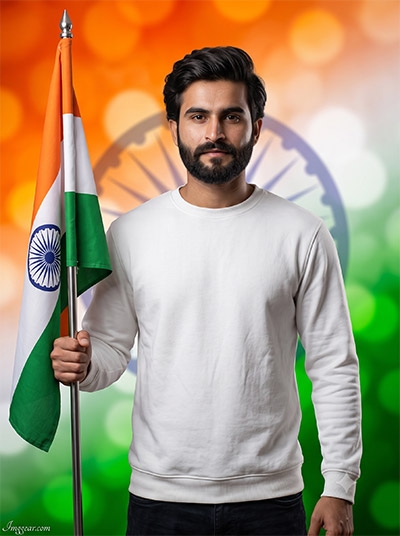
Craft patriotic 15 August portraits holding the Indian tricolor flag using simple Gemini & ChatGPT prompt ideas. Transform your holiday photos instantly with rich tricolor bokeh background lighting. Try generating your custom portrait now!
PROMPT
{
“image_label”: “Imggear.com_1”,
“version”: “3.5”,
“aspect_ratio”: “3:4”,
“prompt”: “An ultra-realistic, photorealistic premium masterpiece, preserving the exact identity, facial proportions, bone structure, eye depth, sharp jawline, authentic facial characteristics, and skin micro-textures (visible pores, fine lines) of the subject in the uploaded personal reference photo without alteration. The facial lighting must seamlessly fuse with the ambient scene highlights and cast realistic shadows, allowing the subject to naturally integrate with the environment’s lighting, shadows, depth, atmospheric perspective, and optical characteristics while preserving the subject’s true identity without alteration, seamlessly integrating the subject into this dramatic portrait, while maintaining complete identity consistency throughout the image. A male in his early 20s with a athletic build and broad shoulders stands facing forward wearing a plain white crewneck long-sleeved sweatshirt and dark trousers. He holds a metallic flagpole vertically with his left hand, displaying the Indian national flag. Captured using a full-frame professional mirrorless camera with an 85mm f/1.4 prime lens in RAW format, featuring hyper-detailed edge sharpness, extreme high-definition micro-details on skin and fabric, natural optical rendering, and premium creamy bokeh. Studio lighting provides soft diffused illumination and balanced shadows. The background is a vibrant tri-color orange, white, and green abstract bokeh backdrop featuring a subtle Ashoka Chakra pattern. Minimal signature text ‘Imggear.com’ in bottom-left corner, thin elegant Petit Formal Script font, soft white (#ffffff) with slight transparency.”,
“negative_prompt”: “(plastic skin, waxy skin, CGI rendering, AI beauty filter look, porcelain skin, over-smoothed skin, airbrushed skin, synthetic textures, doll-like face, uncanny valley, artificial symmetry), (deformed face, distorted facial features, asymmetrical eyes, bad anatomy, bad proportions, extra limbs, extra fingers, missing fingers, malformed hands, mutated hands), (unnatural lighting, flat lighting, harsh direct sunlight, blown-out highlights, crushed shadows, oversaturated colors, neon colors, unrealistic color grading, HDR look, overexposed, underexposed), (blurry, out of focus, low resolution, pixelated, jpeg artifacts, grainy noise, motion blur, soft focus), (dry land, dusty ground, indoor background, wrong environment, mismatched background), (clothing logos, brand marks, trademarked patterns, text overlays, random watermark placement, duplicate watermark, extra signature), (cartoon style, illustration, painting, 3D render, anime, stylized art, digital art look), (identity mismatch, face swap artifacts, inconsistent facial features, altered bone structure, changed eye color, different face shape), (harsh flash glare, misshapen flag wheel, distorted metal pole)”
}
Patriotic Independence Day AI Photo Prompts for Gemini & ChatGPT
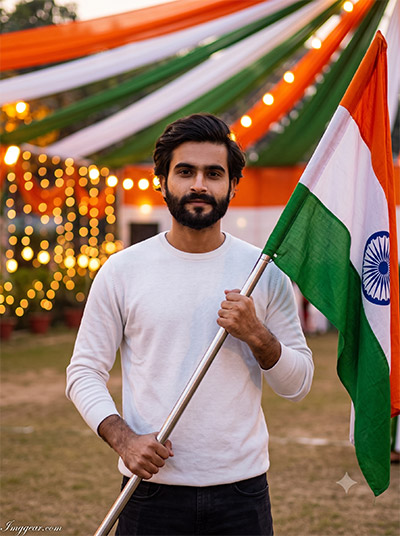
Capture festive outdoor vibes with tricolor canopy decorations and warm string lights using Gemini & ChatGPT text prompts. Perfect for recreating this realistic Indian flag portrait style effortlessly. Which design will you try first?
PROMPT
{
“image_label”: “Imggear.com_2”,
“version”: “3.5”,
“aspect_ratio”: “3:4”,
“prompt”: “An ultra-realistic, photorealistic premium masterpiece, preserving the exact identity, facial proportions, bone structure, eye depth, sharp jawline, authentic facial characteristics, and skin micro-textures (visible pores, fine lines) of the subject in the uploaded personal reference photo without alteration. The facial lighting must seamlessly fuse with the ambient scene highlights and cast realistic shadows, allowing the subject to naturally integrate with the environment’s lighting, shadows, depth, atmospheric perspective, and optical characteristics while preserving the subject’s true identity without alteration, seamlessly integrating the subject into this cinematic scene, while maintaining complete identity consistency throughout the image. A male in his early 20s with an athletic physical build stands outdoors at an event ground wearing a plain white long-sleeved sweater and dark trousers. He holds a silver metallic flagpole diagonally across his body with both hands, mounting the Indian national flag. Captured using a full-frame professional mirrorless camera with an 85mm f/1.4 prime lens in RAW format, featuring hyper-detailed edge sharpness, extreme high-definition micro-details on skin and fabric, natural optical rendering, and premium creamy bokeh. Warm ambient evening light illuminates the scene with soft highlights. The background features draped saffron, white, and green fabric overhead with glowing warm string light bokeh. Minimal signature text ‘Imggear.com’ in bottom-left corner, thin elegant Petit Formal Script font, soft white (#ffffff) with slight transparency.”,
“negative_prompt”: “(plastic skin, waxy skin, CGI rendering, AI beauty filter look, porcelain skin, over-smoothed skin, airbrushed skin, synthetic textures, doll-like face, uncanny valley, artificial symmetry), (deformed face, distorted facial features, asymmetrical eyes, bad anatomy, bad proportions, extra limbs, extra fingers, missing fingers, malformed hands, mutated hands), (unnatural lighting, flat lighting, harsh direct sunlight, blown-out highlights, crushed shadows, oversaturated colors, neon colors, unrealistic color grading, HDR look, overexposed, underexposed), (blurry, out of focus, low resolution, pixelated, jpeg artifacts, grainy noise, motion blur, soft focus), (dry land, dusty ground, indoor background, wrong environment, mismatched background), (clothing logos, brand marks, trademarked patterns, text overlays, random watermark placement, duplicate watermark, extra signature), (cartoon style, illustration, painting, 3D render, anime, stylized art, digital art look), (identity mismatch, face swap artifacts, inconsistent facial features, altered bone structure, changed eye color, different face shape), (crowded background, distorted tent structures, harsh shadow patches)”
}
Gemini & ChatGPT 15 August Coastal Portrait Prompts
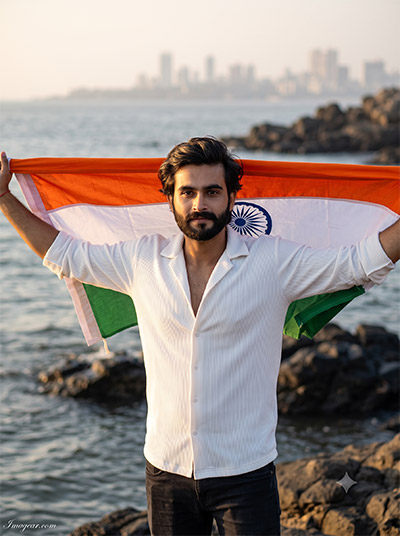
Bring cinematic seaside energy to your national day pictures using tailored Gemini & ChatGPT image prompts. Recreate this stunning coastal background holding the Indian national flag draped across your shoulders. Grab the prompt now and create yours!
PROMPT
{
“image_label”: “Imggear.com_3”,
“version”: “3.5”,
“aspect_ratio”: “3:4”,
“prompt”: “An ultra-realistic, photorealistic premium masterpiece, preserving the exact identity, facial proportions, bone structure, eye depth, sharp jawline, authentic facial characteristics, and skin micro-textures (visible pores, fine lines) of the subject in the uploaded personal reference photo without alteration. The facial lighting must seamlessly fuse with the ambient scene highlights and cast realistic shadows, allowing the subject to naturally integrate with the environment’s lighting, shadows, depth, atmospheric perspective, and optical characteristics while preserving the subject’s true identity without alteration, seamlessly integrating the subject into this cinematic scene, while maintaining complete identity consistency throughout the image. A male in his early 20s with a lean athletic build stands outdoors on coastal rocks wearing a white ribbed open-collar button-up shirt and dark pants. His arms are extended holding a large Indian national flag stretched horizontally behind his shoulders. Captured using a full-frame professional mirrorless camera with an 85mm f/1.4 prime lens in RAW format, featuring hyper-detailed edge sharpness, extreme high-definition micro-details on skin and fabric, natural optical rendering, and premium creamy bokeh. Low golden hour sunlight creates warm direct highlights and edge lighting. The setting features ocean water, dark rocks, and a hazy distant city skyline. Minimal signature text ‘Imggear.com’ in bottom-left corner, thin elegant Petit Formal Script font, soft white (#ffffff) with slight transparency.”,
“negative_prompt”: “(plastic skin, waxy skin, CGI rendering, AI beauty filter look, porcelain skin, over-smoothed skin, airbrushed skin, synthetic textures, doll-like face, uncanny valley, artificial symmetry), (deformed face, distorted facial features, asymmetrical eyes, bad anatomy, bad proportions, extra limbs, extra fingers, missing fingers, malformed hands, mutated hands), (unnatural lighting, flat lighting, harsh direct sunlight, blown-out highlights, crushed shadows, oversaturated colors, neon colors, unrealistic color grading, HDR look, overexposed, underexposed), (blurry, out of focus, low resolution, pixelated, grainy noise, motion blur, soft focus), (dry land, dusty ground, indoor background, wrong environment, mismatched background), (clothing logos, brand marks, trademarked patterns, text overlays, random watermark placement, duplicate watermark, extra signature), (cartoon style, illustration, painting, 3D render, anime, stylized art, digital art look), (identity mismatch, face swap artifacts, inconsistent facial features, altered bone structure, changed eye color, different face shape), (blown out water, harsh shadows, unnatural flag distortion)”
}
Create Oceanfront Flag Edits using Gemini & ChatGPT Prompts
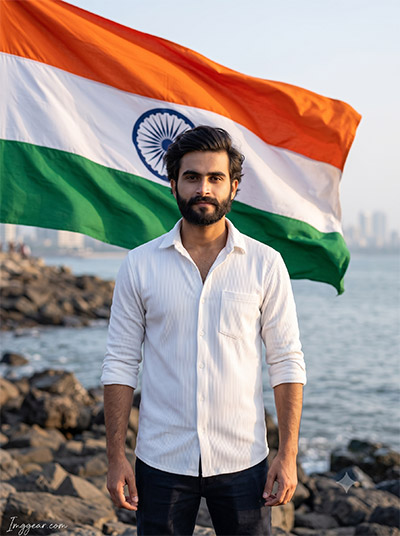
Design a dramatic marine promenade shot with a massive fluttering tricolor blowing behind you via Gemini & ChatGPT text commands. This realistic natural sunlight look elevates any profile picture. Tap below to steal the exact prompt details!
PROMPT
{
“image_label”: “Imggear.com_4”,
“version”: “3.5”,
“aspect_ratio”: “3:4”,
“prompt”: “An ultra-realistic, photorealistic premium masterpiece, preserving the exact identity, facial proportions, bone structure, eye depth, sharp jawline, authentic facial characteristics, and skin micro-textures (visible pores, fine lines) of the subject in the uploaded personal reference photo without alteration. The facial lighting must seamlessly fuse with the ambient scene highlights and cast realistic shadows, allowing the subject to naturally integrate with the environment’s lighting, shadows, depth, atmospheric perspective, and optical characteristics while preserving the subject’s true identity without alteration, seamlessly integrating the subject into this dramatic portrait, while maintaining complete identity consistency throughout the image. A male in his early 20s with an athletic physical build stands facing forward on a rocky waterfront wearing a white ribbed button-down shirt with rolled sleeves and dark trousers. Behind him, a large Indian national flag billows dramatically in the wind. Captured using a full-frame professional mirrorless camera with an 85mm f/1.4 prime lens in RAW format, featuring hyper-detailed edge sharpness, extreme high-definition micro-details on skin and fabric, natural optical rendering, and premium creamy bokeh. Soft late afternoon natural sunlight illuminates the subject with subtle directional shadows. The environment consists of shoreline rocks, calm ocean water, and a blurred distant urban skyline. Minimal signature text ‘Imggear.com’ in bottom-left corner, thin elegant Petit Formal Script font, soft white (#ffffff) with slight transparency.”,
“negative_prompt”: “(plastic skin, waxy skin, CGI rendering, AI beauty filter look, porcelain skin, over-smoothed skin, airbrushed skin, synthetic textures, doll-like face, uncanny valley, artificial symmetry), (deformed face, distorted facial features, asymmetrical eyes, bad anatomy, bad proportions, extra limbs, extra fingers, missing fingers, malformed hands, mutated hands), (unnatural lighting, flat lighting, harsh direct sunlight, blown-out highlights, crushed shadows, oversaturated colors, neon colors, unrealistic color grading, HDR look, overexposed, underexposed), (blurry, out of focus, low resolution, pixelated, jpeg artifacts, grainy noise, motion blur, soft focus), (dry land, dusty ground, indoor background, wrong environment, mismatched background), (clothing logos, brand marks, trademarked patterns, text overlays, random watermark placement, duplicate watermark, extra signature), (cartoon style, illustration, painting, 3D render, anime, stylized art, digital art look), (identity mismatch, face swap artifacts, inconsistent facial features, altered bone structure, changed eye color, different face shape), (unnatural fabric movement, cropped flag edges, harsh shadow lines)”
}
💡 AI Photo Editing Pro Tips for Perfect Results
Keep Faces Consistent: If the AI changes the face, add this exact phrase to the very beginning of your prompt: “Preserve facial identity 100%, do not alter facial features or proportions.”
Reroll for Perfection: Run every prompt 2–3 times! The second or third generation is almost always sharper and packed with better details.
Get the DSLR Look: Want that beautiful, blurred background? Just add “f/1.8 shallow depth of field” to your prompt.
Control the Camera Shot: Tell the AI exactly what frame you want by adding terms like “Close-up portrait,” “Full-body shot,” or “Wide-angle view.”
Set the Vibe with Lighting: Lighting makes or breaks an AI image. Add “Cinematic lighting,” “Golden hour sunset,” or “Soft studio lighting” for a professional touch.
📐 Best Aspect Ratio: Use 3:4 Vertical for stunning, ready-to-post results on Instagram and Pinterest.