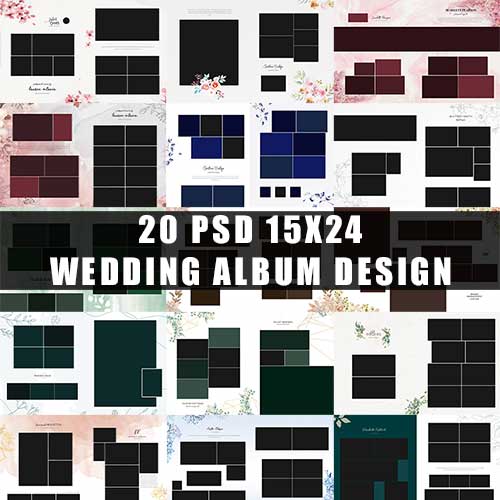

Boho & Watercolor Floral Wedding Album Design | Luxury 15×24 DM PSD Sheets
Elevate your wedding photography with this premium collection of Boho and Watercolor Floral Wedding Album Designs. Specifically crafted for professional photographers and graphic designers, these 15×24 DM (Double Page) PSD sheets offer a perfect blend of modern bohemian aesthetics and timeless watercolor elegance.
Whether you are designing a high-end bridal book or a minimalist Karizma album, these templates provide the luxury and flexibility needed to create a stunning visual story.
Detailed Product Description
This digital toolkit is designed to save you hours of manual layout work while delivering a high-end, “boutique” look. Each sheet features delicate, hand-painted floral elements and earthy boho textures that frame your images without overpowering them.
Premium Quality: Designed in high-resolution (300 DPI) to ensure crisp, sharp prints for large-format wedding albums.
Fully Customizable: Every element—from the watercolor florals to the geometric frames—is placed on a separate layer. You can move, resize, or remove decor to fit your specific photo needs.
Luxury 15×24 Dimensions: The standard DM size allows for seamless panoramic spreads, perfect for cinematic shots and wide-angle bridal portraits.
Modern Typography: Includes elegant font placeholders that complement the boho-chic aesthetic.
How To Use Section
Creating your luxury wedding album is simple and efficient with these templates. Follow these steps to get started:
Open the PSD File: Launch Adobe Photoshop and open the specific DM sheet you wish to edit.
Import Your Photos: Drag and drop your high-resolution wedding images into the Photoshop workspace.
Place Images in Frames: Position your photo layer directly above the designated “Image Placeholder” or “Shape” layer. Right-click your photo layer and select “Create Clipping Mask” to snap it perfectly into the frame.
Adjust Layout: Use the Move Tool (V) to resize or reposition your photos within the masks.
Edit Text & Colors: Select the Type Tool (T) to customize names, dates, or quotes. You can also adjust the opacity of the watercolor florals for a more subtle look.
Save for Print: Once satisfied, go to File > Save As and choose JPEG or TIFF format at maximum quality for printing.


Reviews
There are no reviews yet.