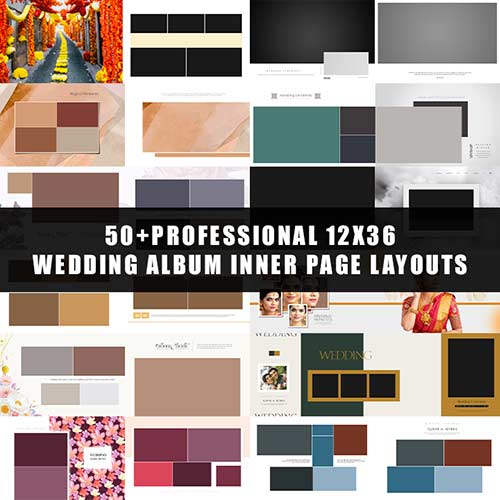

Elevate your wedding album post-production with our Premium 12×36 Wedding Album Inner Page Layouts. Specifically designed for professional photographers and album designers, this collection features high-end, modern templates that drastically reduce your workflow time while maintaining a luxury aesthetic.
Whether you are creating a Karizma, Canvera, or Flush Mount album, these PSD files provide the perfect balance of creative flair and clean design. Every sheet is crafted with precision to ensure your clients’ memories are displayed in a cinematic, timeless format.
✨ Key Product Highlights:
Fully Editable PSDs: Complete control over every layer. Move, resize, or change elements without losing quality.
High-Resolution Output: Created at 300 DPI for crisp, sharp, and professional-grade printing.
Smart Object Integration: Easily drag and drop your photos into the frames using Photoshop Smart Objects.
Modern Layouts: Includes a variety of styles, from minimalist white-space designs to vibrant, traditional Indian wedding themes.
Universal Compatibility: Works seamlessly with Adobe Photoshop CS6, CC, and all later versions.
📦 What’s Inside the Pack?
12×36 Landscape Sheets: Perfectly sized for standard large-format wedding albums.
Diverse Templates: Includes layouts for Engagements, Mehendi, Haldi, Weddings, and Receptions.
Organized Layers: Clearly labeled folders and layers for a frustration-free editing experience.
🚀 Why Choose Our Templates?
Save hours of manual designing. Our layouts are “Ready-to-Print,” meaning you only need to insert your photos, adjust the color grading if desired, and export. Perfect for high-volume studios looking to deliver premium quality under tight deadlines.
Technical Specifications:
Format: PSD (Adobe Photoshop)
Size: 12×36 Inches
Resolution: 300 DPI (CMYK/RGB)
License: Commercial Use (For your photography/design clients)
How to Use:
Open the PSD file in Adobe Photoshop.
Double-click the Smart Object layer to add your photo.
Adjust the positioning and save.
Your professional album sheet is ready for the lab!

Reviews
There are no reviews yet.