Generating realistic, ultra-detailed divine portraits often leads to disappointing, distorted visual results. If you are looking for a high-quality Radha Krishna Prompt for Gemini AI that renders perfect facial details, traditional attire, and glowing lighting, you are in the right place. By using our tested text prompts in Gemini AI or ChatGPT, you can instantly create stunning, 8K viral photorealistic portraits without touching complex photo editing software. Simply copy, paste, and watch your divine artwork come to life in seconds.
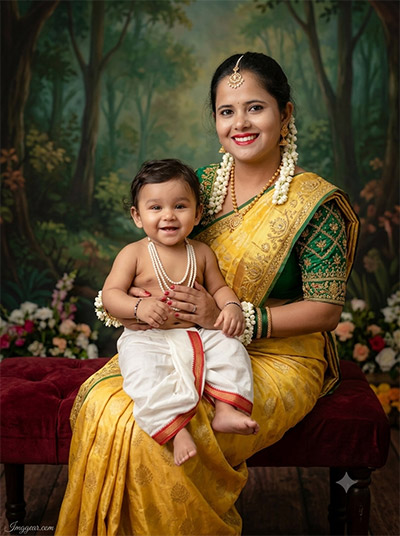
Create Divine Yashoda and Little Krishna Portraits with Gemini AI
Transform your mother-child photos into classic devotional masterpieces using this complete Radha Krishna Prompt for Gemini AI tutorial. Give this styling a shot for your next family photo edit!
PROMPT
{
“image_label”: “Imggear.com_1”,
“version”: “3.5”,
“aspect_ratio”: “3:4”,
“prompt”: “An ultra-realistic, photorealistic premium masterpiece, preserving the exact identity, facial proportions, bone structure, eye depth, sharp jawline, authentic facial characteristics, and skin micro-textures (visible pores, fine lines) of the subject in the uploaded personal reference photo without alteration. The facial lighting must seamlessly fuse with the ambient scene highlights and cast realistic shadows, allowing the subject to naturally integrate with the environment’s lighting, shadows, depth, atmospheric perspective, and optical characteristics while preserving the subject’s true identity without alteration, seamlessly integrating the subject into this dramatic portrait, while maintaining complete identity consistency throughout the image. Slender female in her early 20s with delicate build, sitting gracefully on a dark red velvet upholstered bench holding an infant boy on her lap. She wears a yellow silk saree with gold embroidery, an emerald green embroidered blouse, and white floral ornaments including maang tikka and earrings. The baby wears a white dhoti with red trim and pearl necklaces. Background features a painted forest backdrop with floral floor arrangements. Captured on a full-frame mirrorless camera with an 85mm f/1.4 lens in RAW format, featuring hyper-detailed edge sharpness, extreme high-definition micro-details on skin and fabric, natural optical rendering, and premium creamy bokeh. Warm studio lighting creates deep shadows and natural skin translucency. Includes a minimal watermark \”Imggear.com\” in Petit Formal Script, thin elegant cursive strokes, soft white (#ffffff) with slight transparency in the bottom-left corner.”,
“negative_prompt”: “(plastic skin, waxy skin, CGI rendering, AI beauty filter look, porcelain skin, over-smoothed skin, airbrushed skin, synthetic textures, doll-like face, uncanny valley, artificial symmetry), (deformed face, distorted facial features, asymmetrical eyes, bad anatomy, bad proportions, extra limbs, extra fingers, missing fingers, malformed hands, mutated hands), (unnatural lighting, flat lighting, harsh direct sunlight, blown-out highlights, crushed shadows, oversaturated colors, neon colors, unrealistic color grading, HDR look, overexposed, underexposed), (blurry, out of focus, low resolution, pixelated, jpeg artifacts, grainy noise, motion blur, soft focus), (dry land, dusty ground, indoor background, wrong environment, mismatched background), (clothing logos, brand marks, trademarked patterns, text overlays, random watermark placement, duplicate watermark, extra signature), (cartoon style, illustration, painting, 3D render, anime, stylized art, digital art look), (identity mismatch, face swap artifacts, inconsistent facial features, altered bone structure, changed eye color, different face shape), (modern Western clothing, plain background, harsh flash shadows, plastic props)”
}
Gemini AI Prompt Secrets for Vibrant Little Krishna Edits
Capture heart-melting joy with this festive Radha Krishna Prompt for Gemini AI guide. Learn how we generated this colorful mother and baby celebration image. Drop a comment below to share your results!
PROMPT
{
“image_label”: “Imggear.com_2”,
“version”: “3.5”,
“aspect_ratio”: “3:4”,
“prompt”: “An ultra-realistic, photorealistic premium masterpiece, preserving the exact identity, facial proportions, bone structure, eye depth, sharp jawline, authentic facial characteristics, and skin micro-textures (visible pores, fine lines) of the subject in the uploaded personal reference photo without alteration. The facial lighting must seamlessly fuse with the ambient scene highlights and cast realistic shadows, allowing the subject to naturally integrate with the environment’s lighting, shadows, depth, atmospheric perspective, and optical characteristics while preserving the subject’s true identity without alteration, seamlessly integrating the subject into this dramatic portrait, while maintaining complete identity consistency throughout the image. Slender female in her early 20s with delicate build joyfully lifts an infant boy in her arms, looking upward at him with an ecstatic laugh. She wears a dark green gold-embroidered blouse, yellow silk saree drape, and white floral ornaments. The infant wears a colorful turban with a peacock feather, pearl wristbands, and a white dhoti. Set against a soft green leafy backdrop. Captured using a full-frame mirrorless camera with an 85mm f/1.4 lens in RAW format with hyper-detailed edge sharpness, extreme high-definition micro-details on skin and fabric, natural optical rendering, and premium creamy bokeh. Studio lights emphasize realistic skin translucency, warm highlights, and micro-contrast. Displays a minimal watermark \”Imggear.com\” in Petit Formal Script, soft white (#ffffff) with slight transparency in the bottom-left corner.”,
“negative_prompt”: “(plastic skin, waxy skin, CGI rendering, AI beauty filter look, porcelain skin, over-smoothed skin, airbrushed skin, synthetic textures, doll-like face, uncanny valley, artificial symmetry), (deformed face, distorted facial features, asymmetrical eyes, bad anatomy, bad proportions, extra limbs, extra fingers, missing fingers, malformed hands, mutated hands), (unnatural lighting, flat lighting, harsh direct sunlight, blown-out highlights, crushed shadows, oversaturated colors, neon colors, unrealistic color grading, HDR look, overexposed, underexposed), (blurry, out of focus, low resolution, pixelated, jpeg artifacts, grainy noise, motion blur, soft focus), (dry land, dusty ground, indoor background, wrong environment, mismatched background), (clothing logos, brand marks, trademarked patterns, text overlays, random watermark placement, duplicate watermark, extra signature), (cartoon style, illustration, painting, 3D render, anime, stylized art, digital art look), (identity mismatch, face swap artifacts, inconsistent facial features, altered bone structure, changed eye color, different face shape), (somber expression, modern apparel, missing turban feather, unnatural shadows)”
}
Traditional Wooden Cot Radha Krishna Prompt for Gemini AI Guide
Design warm studio-quality heritage photos featuring a smiling baby in a wooden bed. This Radha Krishna Prompt for Gemini AI setup breaks down every step to get rustic indoor lighting right. Want to see how it looks on your photos?
PROMPT
{
“image_label”: “Imggear.com_3”,
“version”: “3.5”,
“aspect_ratio”: “3:4”,
“prompt”: “An ultra-realistic, photorealistic premium masterpiece, preserving the exact identity, facial proportions, bone structure, eye depth, sharp jawline, authentic facial characteristics, and skin micro-textures (visible pores, fine lines) of the subject in the uploaded personal reference photo without alteration. The facial lighting must seamlessly fuse with the ambient scene highlights and cast realistic shadows, allowing the subject to naturally integrate with the environment’s lighting, shadows, depth, atmospheric perspective, and optical characteristics while preserving the subject’s true identity without alteration, seamlessly integrating the subject into this dramatic portrait, while maintaining complete identity consistency throughout the image. Slender female in her early 20s leaning down beside a small wooden cot where an infant boy sits, smiling brightly at the camera. She wears a yellow saree, green embroidered blouse, and white floral jewelry. The infant wears a peacock-feather turban, pearl necklaces, and a white dhoti. Background features a traditional Indian village set with carved wooden doors, clay pots, and wood plank flooring. Shot on a full-frame mirrorless camera with an 85mm f/1.4 lens in RAW format, delivering hyper-detailed edge sharpness, extreme high-definition micro-details on skin and fabric, natural optical rendering, and premium creamy bokeh. Warm ambient illumination highlights organic skin details. Includes a minimal watermark \”Imggear.com\” in Petit Formal Script, soft white (#ffffff) with slight transparency in the bottom-left corner.”,
“negative_prompt”: “(plastic skin, waxy skin, CGI rendering, AI beauty filter look, porcelain skin, over-smoothed skin, airbrushed skin, synthetic textures, doll-like face, uncanny valley, artificial symmetry), (deformed face, distorted facial features, asymmetrical eyes, bad anatomy, bad proportions, extra limbs, extra fingers, missing fingers, malformed hands, mutated hands), (unnatural lighting, flat lighting, harsh direct sunlight, blown-out highlights, crushed shadows, oversaturated colors, neon colors, unrealistic color grading, HDR look, overexposed, underexposed), (blurry, out of focus, low resolution, pixelated, jpeg artifacts, grainy noise, motion blur, soft focus), (dry land, dusty ground, indoor background, wrong environment, mismatched background), (clothing logos, brand marks, trademarked patterns, text overlays, random watermark placement, duplicate watermark, extra signature), (cartoon style, illustration, painting, 3D render, anime, stylized art, digital art look), (identity mismatch, face swap artifacts, inconsistent facial features, altered bone structure, changed eye color, different face shape), (modern furniture, plastic props, dark background, harsh flash)”
}
How to Master Mother and Child Edits with Gemini AI
Master close-up studio portraits featuring ornate floral jewelry and vibrant banana leaf backdrops. Our detailed Radha Krishna Prompt for Gemini AI makes recreating these affectionate moments effortless. Copy the formula today to start crafting yours!
PROMPT
{
“image_label”: “Imggear.com_4”,
“version”: “3.5”,
“aspect_ratio”: “3:4”,
“prompt”: “An ultra-realistic, photorealistic premium masterpiece, preserving the exact identity, facial proportions, bone structure, eye depth, sharp jawline, authentic facial characteristics, and skin micro-textures (visible pores, fine lines) of the subject in the uploaded personal reference photo without alteration. The facial lighting must seamlessly fuse with the ambient scene highlights and cast realistic shadows, allowing the subject to naturally integrate with the environment’s lighting, shadows, depth, atmospheric perspective, and optical characteristics while preserving the subject’s true identity without alteration, seamlessly integrating the subject into this dramatic portrait, while maintaining complete identity consistency throughout the image. Slender female in her early 20s holding an infant boy close, gently taking his hand while smiling warmly at him. She wears a yellow net saree over a dark green embroidered blouse, adorned with white floral ornaments and green bangles. The baby wears a decorated turban with a peacock feather, pearl ornaments, and a white dhoti. Set in a studio with a soft green leaf backdrop. Captured on a full-frame mirrorless camera with an 85mm f/1.4 lens in RAW format with hyper-detailed edge sharpness, extreme high-definition micro-details on skin and fabric, natural optical rendering, and premium creamy bokeh. Radiant studio lighting creates strong tonal contrast and vivid skin tones. Features a minimal watermark \”Imggear.com\” in Petit Formal Script, soft white (#ffffff) with slight transparency in the bottom-left corner.”,
“negative_prompt”: “(plastic skin, waxy skin, CGI rendering, AI beauty filter look, porcelain skin, over-smoothed skin, airbrushed skin, synthetic textures, doll-like face, uncanny valley, artificial symmetry), (deformed face, distorted facial features, asymmetrical eyes, bad anatomy, bad proportions, extra limbs, extra fingers, missing fingers, malformed hands, mutated hands), (unnatural lighting, flat lighting, harsh direct sunlight, blown-out highlights, crushed shadows, oversaturated colors, neon colors, unrealistic color grading, HDR look, overexposed, underexposed), (blurry, out of focus, low resolution, pixelated, jpeg artifacts, grainy noise, motion blur, soft focus), (dry land, dusty ground, indoor background, wrong environment, mismatched background), (clothing logos, brand marks, trademarked patterns, text overlays, random watermark placement, duplicate watermark, extra signature), (cartoon style, illustration, painting, 3D render, anime, stylized art, digital art look), (identity mismatch, face swap artifacts, inconsistent facial features, altered bone structure, changed eye color, different face shape), (distracted look, flat lighting, synthetic fabrics, overexposed areas)”
}
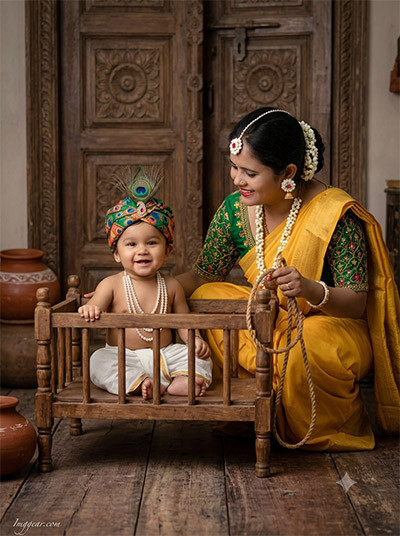
Craft Rustic Ethnic Portraits Using Radha Krishna Prompt for Gemini AI
Recreate this endearing scene of a mother holding a rope beside a carved wooden crib with our step-by-step Radha Krishna Prompt for Gemini AI tutorial. Save this post to try out the exact style settings!
PROMPT
{
“image_label”: “Imggear.com_5”,
“version”: “3.5”,
“aspect_ratio”: “3:4”,
“prompt”: “An ultra-realistic, photorealistic premium masterpiece, preserving the exact identity, facial proportions, bone structure, eye depth, sharp jawline, authentic facial characteristics, and skin micro-textures (visible pores, fine lines) of the subject in the uploaded personal reference photo without alteration. The facial lighting must seamlessly fuse with the ambient scene highlights and cast realistic shadows, allowing the subject to naturally integrate with the environment’s lighting, shadows, depth, atmospheric perspective, and optical characteristics while preserving the subject’s true identity without alteration, seamlessly integrating the subject into this dramatic portrait, while maintaining complete identity consistency throughout the image. Slender female in her early 20s crouching next to a rustic wooden crib, holding a butter churning rope while gazing lovingly at an infant boy seated in the crib. She wears a yellow saree, green embroidered blouse, and white floral jewelry. The baby wears a peacock-feather turban, pearl necklaces, and a white dhoti. Environment includes carved wooden doors, earthen pots, and wooden floorboards. Shot on a full-frame mirrorless camera with an 85mm f/1.4 lens in RAW format with hyper-detailed edge sharpness, extreme high-definition micro-details on skin and fabric, natural optical rendering, and premium creamy bokeh. Soft directional studio light provides realistic micro-contrast and skin grain. Minimal watermark \”Imggear.com\” in Petit Formal Script, soft white (#ffffff) with slight transparency in the bottom-left corner.”,
“negative_prompt”: “(plastic skin, waxy skin, CGI rendering, AI beauty filter look, porcelain skin, over-smoothed skin, airbrushed skin, synthetic textures, doll-like face, uncanny valley, artificial symmetry), (deformed face, distorted facial features, asymmetrical eyes, bad anatomy, bad proportions, extra limbs, extra fingers, missing fingers, malformed hands, mutated hands), (unnatural lighting, flat lighting, harsh direct sunlight, blown-out highlights, crushed shadows, oversaturated colors, neon colors, unrealistic color grading, HDR look, overexposed, underexposed), (blurry, out of focus, low resolution, pixelated, jpeg artifacts, grainy noise, motion blur, soft focus), (dry land, dusty ground, indoor background, wrong environment, mismatched background), (clothing logos, brand marks, trademarked patterns, text overlays, random watermark placement, duplicate watermark, extra signature), (cartoon style, illustration, painting, 3D render, anime, stylized art, digital art look), (identity mismatch, face swap artifacts, inconsistent facial features, altered bone structure, changed eye color, different face shape), (modern objects, plastic props, unnatural pose, harsh flash reflections)”
}
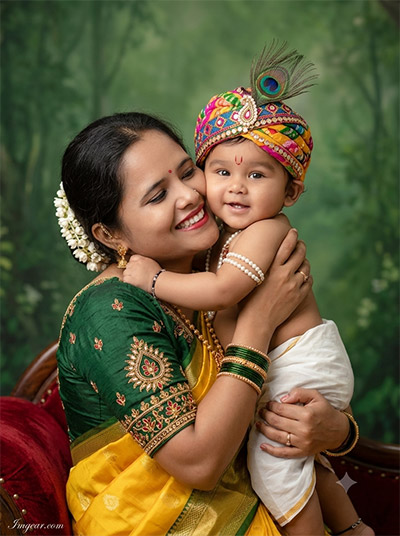
Heartwarming Mother and Baby Photos via Radha Krishna Prompt for Gemini AI
Discover how to generate tender, close-up portraits featuring a mother embracing her child with lush green backdrop lighting. This Radha Krishna Prompt for Gemini AI breakdown reveals the exact settings used. Check out the guide to remake it yourself!
PROMPT
{
“image_label”: “Imggear.com_6”,
“version”: “3.5”,
“aspect_ratio”: “3:4”,
“prompt”: “An ultra-realistic, photorealistic premium masterpiece, preserving the exact identity, facial proportions, bone structure, eye depth, sharp jawline, authentic facial characteristics, and skin micro-textures (visible pores, fine lines) of the subject in the uploaded personal reference photo without alteration. The facial lighting must seamlessly fuse with the ambient scene highlights and cast realistic shadows, allowing the subject to naturally integrate with the environment’s lighting, shadows, depth, atmospheric perspective, and optical characteristics while preserving the subject’s true identity without alteration, seamlessly integrating the subject into this dramatic portrait, while maintaining complete identity consistency throughout the image. Slender female in her early 20s pressing her cheek against an infant boy while holding him, smiling broadly. She wears a dark green embroidered blouse, yellow silk saree, and white floral ornaments. The baby looks toward the camera wearing a colorful decorated turban with a peacock feather, pearl armlets, and a white dhoti. Studio environment with a soft green forest backdrop and red velvet seat edge. Photographed on a full-frame mirrorless camera with an 85mm f/1.4 lens in RAW format, delivering hyper-detailed edge sharpness, extreme high-definition micro-details on skin and fabric, natural optical rendering, and premium creamy bokeh. Professional studio lighting ensures rich skin translucency and warm tones. Features a minimal watermark \”Imggear.com\” in Petit Formal Script, soft white (#ffffff) with slight transparency in the bottom-left corner.”,
“negative_prompt”: “(plastic skin, waxy skin, CGI rendering, AI beauty filter look, porcelain skin, over-smoothed skin, airbrushed skin, synthetic textures, doll-like face, uncanny valley, artificial symmetry), (deformed face, distorted facial features, asymmetrical eyes, bad anatomy, bad proportions, extra limbs, extra fingers, missing fingers, malformed hands, mutated hands), (unnatural lighting, flat lighting, harsh direct sunlight, blown-out highlights, crushed shadows, oversaturated colors, neon colors, unrealistic color grading, HDR look, overexposed, underexposed), (blurry, out of focus, low resolution, pixelated, jpeg artifacts, grainy noise, motion blur, soft focus), (dry land, dusty ground, indoor background, wrong environment, mismatched background), (clothing logos, brand marks, trademarked patterns, text overlays, random watermark placement, duplicate watermark, extra signature), (cartoon style, illustration, painting, 3D render, anime, stylized art, digital art look), (identity mismatch, face swap artifacts, inconsistent facial features, altered bone structure, changed eye color, different face shape), (dull skin tone, harsh digital smoothing, altered face shape)”
}
💡 AI Photo Editing Pro Tips for Perfect Results
Keep Faces Consistent: If the AI changes the face, add this exact phrase to the very beginning of your prompt: “Preserve facial identity 100%, do not alter facial features or proportions.”
Reroll for Perfection: Run every prompt 2–3 times! The second or third generation is almost always sharper and packed with better details.
Get the DSLR Look: Want that beautiful, blurred background? Just add “f/1.8 shallow depth of field” to your prompt.
Control the Camera Shot: Tell the AI exactly what frame you want by adding terms like “Close-up portrait,” “Full-body shot,” or “Wide-angle view.”
Set the Vibe with Lighting: Lighting makes or breaks an AI image. Add “Cinematic lighting,” “Golden hour sunset,” or “Soft studio lighting” for a professional touch.
📐 Best Aspect Ratio: Use 3:4 Vertical for stunning, ready-to-post results on Instagram and Pinterest.