Finding realistic and aesthetic Independence Day AI photo editing prompts for girls can be frustrating when most AI generators create blurry or inaccurate images. You deserve eye-catching, culturally authentic 15 August portraits that stand out on social media. In this guide, we share tested copy-and-paste prompts optimized specifically for Gemini AI & ChatGPT. Whether you want a traditional tricolor saree portrait or a modern 3D aesthetic vibe, these free prompts deliver high-resolution, viral-ready photos in seconds.
Create Patriotic Indian Independence Day Photo Prompts for Girls
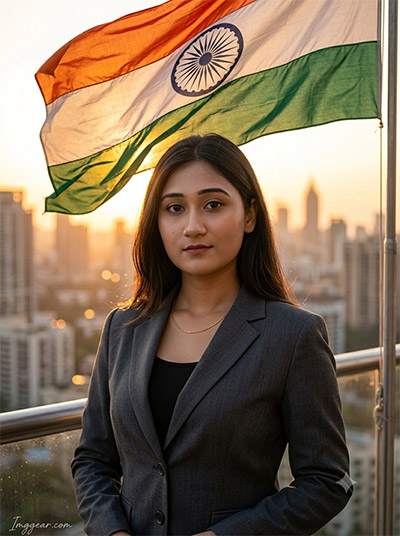
Celebrate 15th August with realistic sunset portraits featuring the tricolor flag and a sleek city skyline. Copy these prompts now to transform your profile picture.
PROMPT
{
“image_label”: “Imggear.com_1”,
“version”: “3.5”,
“aspect_ratio”: “3:4”,
“prompt”: “An ultra-realistic, photorealistic premium masterpiece, preserving the exact identity, facial proportions, bone structure, eye depth, sharp jawline, authentic facial characteristics, and skin micro-textures (visible pores, fine lines) of the subject in the uploaded personal reference photo without alteration. The facial lighting must seamlessly fuse with the ambient scene highlights and cast realistic shadows, allowing the subject to naturally integrate with the environment’s lighting, shadows, depth, atmospheric perspective, and optical characteristics while preserving the subject’s true identity without alteration, seamlessly integrating the subject into this cinematic sunset rooftop portrait, while maintaining complete identity consistency throughout the image. A young adult female, apparent age 25-30, elegant slender build, standing upright on a skyscraper balcony overlooking a vast urban city skyline during golden hour. She wears a premium charcoal grey structured business suit blazer over a black inner top, styled with a thin gold chain necklace. She looks directly at the camera with a calm, proud, and neutral expression. In the foreground, a large, softly back-lit Indian national flag waves dynamically across the frame. Shot on a professional mirrorless camera with an 85mm f/1.4 prime lens in RAW format, delivering hyper-detailed edge sharpness, extreme high-definition micro-details on skin and fabric, natural optical rendering, and premium creamy bokeh. The lighting is warm golden hour sunset backlighting creating a delicate rim light on her shoulders. In the bottom-left corner, a minimal cursive signature-like watermark reads \”Imggear.com\” in a thin, soft white (#ffffff) with slight transparency, using Petit Formal Script elegant cursive strokes seamlessly blended with no background.”,
“negative_prompt”: “(plastic skin, waxy skin, CGI rendering, AI beauty filter look, porcelain skin, over-smoothed skin, airbrushed skin, synthetic textures, doll-like face, uncanny valley, artificial symmetry), (deformed face, distorted facial features, asymmetrical eyes, bad anatomy, bad proportions, extra limbs, extra fingers, missing fingers, malformed hands, mutated hands), (unnatural lighting, flat lighting, harsh direct sunlight, blown-out highlights, crushed shadows, oversaturated colors, neon colors, unrealistic color grading, HDR look, overexposed, underexposed), (blurry, out of focus, low resolution, pixelated, jpeg artifacts, grainy noise, motion blur, soft focus), (dry land, dusty ground, indoor background, beach background, ancient ruins background, wrong environment, mismatched background), (clothing logos, brand marks, trademarked patterns, text overlays, random watermark placement, duplicate watermark, extra signature), (cartoon style, illustration, painting, 3D render, anime, stylized art, digital art look), (identity mismatch, face swap artifacts, inconsistent facial features, altered bone structure, changed eye color, different face shape), hair, curly hair, bangs, hair bun, ponytail, bald, beard, mustache, facial hair”
}
Best 15th August AI Photo Prompts for Indian Traditional Girls
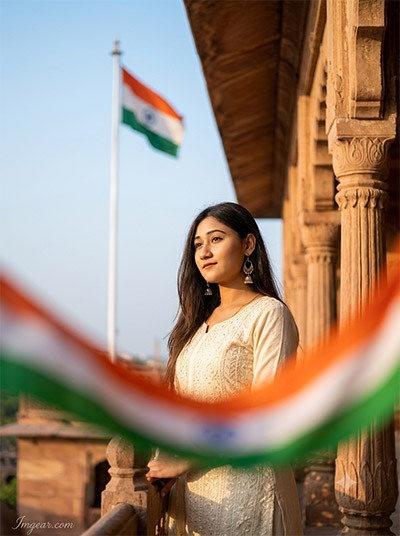
Give your portraits a royal heritage look this August 15th with elegant white kurti aesthetics and dramatic flag foregrounds. Want to generate your own stunning holiday photo in seconds?
PROMPT
{
“image_label”: “Imggear.com_2”,
“version”: “3.5”,
“aspect_ratio”: “3:4”,
“prompt”: “An ultra-realistic, photorealistic premium masterpiece, preserving the exact identity, facial proportions, bone structure, eye depth, sharp jawline, authentic facial characteristics, and skin micro-textures (visible pores, fine lines) of the subject in the uploaded personal reference photo without alteration. The facial lighting must seamlessly fuse with the ambient scene highlights and cast realistic shadows, allowing the subject to naturally integrate with the environment’s lighting, shadows, depth, atmospheric perspective, and optical characteristics while preserving the subject’s true identity without alteration, seamlessly integrating the subject into this dramatic heritage architectural portrait, while maintaining complete identity consistency throughout the image. A young adult female, apparent age 25-30, elegant slender build, standing in a three-quarter pose along an ancient stone balcony, looking away slightly to the side with a serene, reflective gaze. She wears a premium custom traditional cream-colored embroidered kurti salwar suit, accessorized with hanging jhumka earrings. In the background, a large Indian national flag waves from a tall white flagpole under a clear pale blue sky, while a heavily blurred tricolor sweep arches across the extreme foreground. Captured on a professional mirrorless camera with an 85mm f/1.4 prime lens in RAW format, ensuring hyper-detailed edge sharpness, extreme high-definition micro-details on skin and fabric, natural optical rendering, and premium creamy bokeh. The setting is a majestic sandstone fort with hand-carved pillars, lit by warm, soft afternoon sunlight casting delicate highlights. In the bottom-left corner, a minimal cursive signature-like watermark reads \”Imggear.com\” in a thin, soft white (#ffffff) with slight transparency, using Petit Formal Script elegant cursive strokes seamlessly blended with no background.”,
“negative_prompt”: “(plastic skin, waxy skin, CGI rendering, AI beauty filter look, porcelain skin, over-smoothed skin, airbrushed skin, synthetic textures, doll-like face, uncanny valley, artificial symmetry), (deformed face, distorted facial features, asymmetrical eyes, bad anatomy, bad proportions, extra limbs, extra fingers, missing fingers, malformed hands, mutated hands), (unnatural lighting, flat lighting, harsh direct sunlight, blown-out highlights, crushed shadows, oversaturated colors, neon colors, unrealistic color grading, HDR look, overexposed, underexposed), (blurry, out of focus, low resolution, pixelated, jpeg artifacts, grainy noise, motion blur, soft focus), (dry land, dusty ground, indoor background, beach background, modern office background, wrong environment, mismatched background), (clothing logos, brand marks, trademarked patterns, text overlays, random watermark placement, duplicate watermark, extra signature), (cartoon style, illustration, painting, 3D render, anime, stylized art, digital art look), (identity mismatch, face swap artifacts, inconsistent facial features, altered bone structure, changed eye color, different face shape), hair, curly hair, bangs, hair bun, ponytail, bald, beard, mustache, facial hair”
}
Indian Flag Beach Saree AI Photo Editing Concepts for Women
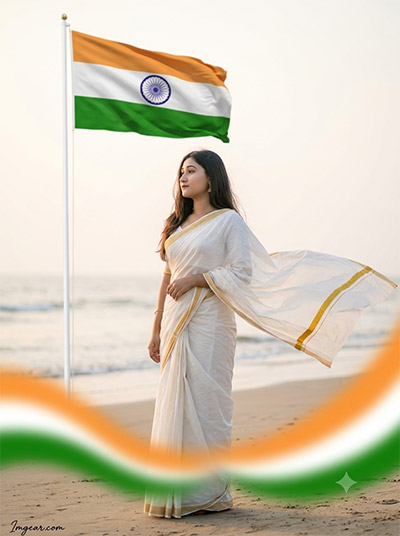
Capture serene coastal vibes this national holiday with a traditional white saree, flowing breeze, and majestic beachside flag setup. Drop your thoughts in the comments if you love this look.
PROMPT
{
“image_label”: “Imggear.com_3”,
“version”: “3.5”,
“aspect_ratio”: “3:4”,
“prompt”: “An ultra-realistic, photorealistic premium masterpiece, preserving the exact identity, facial proportions, bone structure, eye depth, sharp jawline, authentic facial characteristics, and skin micro-textures (visible pores, fine lines) of the subject in the uploaded personal reference photo without alteration. The facial lighting must seamlessly fuse with the ambient scene highlights and cast realistic shadows, allowing the subject to naturally integrate with the environment’s lighting, shadows, depth, atmospheric perspective, and optical characteristics while preserving the subject’s true identity without alteration, seamlessly integrating the subject into this cinematic coastal sunset portrait, while maintaining complete identity consistency throughout the image. A young adult female, apparent age 25-30, elegant slender build, standing gracefully on a sandy beach coastline, her body angled slightly away while her head is turned to look out toward the ocean with a serene, introspective expression. She is draped in a traditional white custom luxury cotton saree featuring a thin golden zari border, with the pallu blowing dynamically in the sea breeze. In the background, a large Indian national flag waves on a tall white flagpole, with a blurred tricolor sweep arching softly in the lower foreground. Shot on a professional mirrorless camera with an 85mm f/1.4 prime lens in RAW format, displaying hyper-detailed edge sharpness, extreme high-definition micro-details on skin and fabric, natural optical rendering, and premium creamy bokeh. The scene is illuminated by soft, diffused late-afternoon golden hour sunlight. In the bottom-left corner, a minimal cursive signature-like watermark reads \”Imggear.com\” in a thin, soft white (#ffffff) with slight transparency, using Petit Formal Script elegant cursive strokes seamlessly blended with no background.”,
“negative_prompt”: “(plastic skin, waxy skin, CGI rendering, AI beauty filter look, porcelain skin, over-smoothed skin, airbrushed skin, synthetic textures, doll-like face, uncanny valley, artificial symmetry), (deformed face, distorted facial features, asymmetrical eyes, bad anatomy, bad proportions, extra limbs, extra fingers, missing fingers, malformed hands, mutated hands), (unnatural lighting, flat lighting, harsh direct sunlight, blown-out highlights, crushed shadows, oversaturated colors, neon colors, unrealistic color grading, HDR look, overexposed, underexposed), (blurry, out of focus, low resolution, pixelated, jpeg artifacts, grainy noise, motion blur, soft focus), (dry land, dusty ground, indoor background, city skyline background, ancient ruins background, wrong environment, mismatched background), (clothing logos, brand marks, trademarked patterns, text overlays, random watermark placement, duplicate watermark, extra signature), (cartoon style, illustration, painting, 3D render, anime, stylized art, digital art look), (identity mismatch, face swap artifacts, inconsistent facial features, altered bone structure, changed eye color, different face shape), hair, curly hair, bangs, hair bun, ponytail, bald, beard, mustache, facial hair”
}
Rooftop Independence Day Flag Portrait Prompts for Young Women
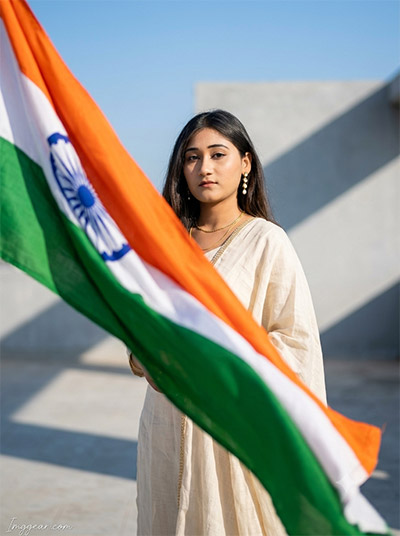
Bright outdoor lighting paired with an off-white traditional outfit creates an effortless patriotic aesthetic on any terrace. Try out this exact prompt today before the national holiday arrives!
PROMPT
{
“image_label”: “Imggear.com_4”,
“version”: “3.5”,
“aspect_ratio”: “3:4”,
“prompt”: “An ultra-realistic, photorealistic premium masterpiece, preserving the exact identity, facial proportions, bone structure, eye depth, sharp jawline, authentic facial characteristics, and skin micro-textures (visible pores, fine lines) of the subject in the uploaded personal reference photo without alteration. The facial lighting must seamlessly fuse with the ambient scene highlights and cast realistic shadows, allowing the subject to naturally integrate with the environment’s lighting, shadows, depth, atmospheric perspective, and optical characteristics while preserving the subject’s true identity without alteration, seamlessly integrating the subject into this minimalist modern architectural portrait, while maintaining complete identity consistency throughout the image. A young adult female, apparent age 25-30, elegant slender build with a poised posture, standing upright and looking forward with a calm, dignified, and solemn expression. She wears a simple, premium custom luxury linen salwar suit in a natural cream color, accessorized with a thin gold chain necklace and small drop earrings. A massive Indian national flag waves dynamically and is draped diagonally across the frame from top-left to bottom-right, framing her body in soft focus. Shot on a professional mirrorless camera with an 85mm f/1.4 prime lens in RAW format, featuring hyper-detailed edge sharpness, extreme high-definition micro-details on skin and fabric, natural optical rendering, and premium creamy bokeh. The background is a minimalist modern concrete terrace under a clear blue sky, casting crisp, sharp geometric shadows. In the bottom-left corner, a minimal cursive signature-like watermark reads \”Imggear.com\” in a thin, soft white (#ffffff) with slight transparency, using Petit Formal Script elegant cursive strokes seamlessly blended with no background.”,
“negative_prompt”: “(plastic skin, waxy skin, CGI rendering, AI beauty filter look, porcelain skin, over-smoothed skin, airbrushed skin, synthetic textures, doll-like face, uncanny valley, artificial symmetry), (deformed face, distorted facial features, asymmetrical eyes, bad anatomy, bad proportions, extra limbs, extra fingers, missing fingers, malformed hands, mutated hands), (unnatural lighting, flat lighting, harsh direct sunlight, blown-out highlights, crushed shadows, oversaturated colors, neon colors, unrealistic color grading, HDR look, overexposed, underexposed), (blurry, out of focus, low resolution, pixelated, jpeg artifacts, grainy noise, motion blur, soft focus), (dry land, dusty ground, indoor background, beach background, ancient ruins background, wrong environment, mismatched background), (clothing logos, brand marks, trademarked patterns, text overlays, random watermark placement, duplicate watermark, extra signature), (cartoon style, illustration, painting, 3D render, anime, stylized art, digital art look), (identity mismatch, face swap artifacts, inconsistent facial features, altered bone structure, changed eye color, different face shape), hair, curly hair, bangs, hair bun, ponytail, bald, beard, mustache, facial hair”
}
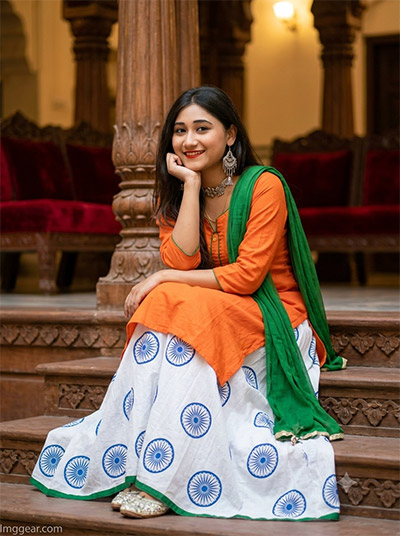
August 15 Traditional Outfit AI Image Editing Prompts For Girls
Showcase authentic festive style in an orange kurta and Ashoka Chakra skirt set indoors on classic wooden stairs. Ready to design your personalized viral holiday look?
PROMPT
{
“image_label”: “Imggear.com_5”,
“version”: “3.5”,
“aspect_ratio”: “3:4”,
“prompt”: “An ultra-realistic, photorealistic premium masterpiece, preserving the exact identity, facial proportions, bone structure, eye depth, sharp jawline, authentic facial characteristics, and skin micro-textures (visible pores, fine lines) of the subject in the uploaded personal reference photo without alteration. The facial lighting must seamlessly fuse with the ambient scene highlights and cast realistic shadows, allowing the subject to naturally integrate with the environment’s lighting, shadows, depth, atmospheric perspective, and optical characteristics while preserving the subject’s true identity without alteration, seamlessly integrating the subject into this warm indoor cultural portrait, while maintaining complete identity consistency throughout the image. A young female, apparent age 16-19, slender build, sitting relaxed on decorative carved wooden interior steps, leaning her chin comfortably on her right hand with a bright, happy, and cheerful smile. She wears a festive traditional tricolor outfit featuring a custom luxury saffron-orange long-sleeved kurti, a white flared lehenga skirt printed with the blue circular wheel chakra emblem, and a rich green dupatta draped over her shoulder. Shot on a professional mirrorless camera with an 85mm f/1.4 prime lens in RAW format, featuring hyper-detailed edge sharpness, extreme high-definition micro-details on skin and fabric, natural optical rendering, and premium creamy bokeh. The scene is a warm, rich indoor heritage palace courtyard filled with intricate wooden columns and red velvet seating in soft focus. The lighting is warm, diffused indoor ambient light casting gentle highlights and soft shadows. In the bottom-left corner, a minimal cursive signature-like watermark reads \”Imggear.com\” in a thin, soft white (#ffffff) with slight transparency, using Petit Formal Script elegant cursive strokes seamlessly blended with no background.”,
“negative_prompt”: “(plastic skin, waxy skin, CGI rendering, AI beauty filter look, porcelain skin, over-smoothed skin, airbrushed skin, synthetic textures, doll-like face, uncanny valley, artificial symmetry), (deformed face, distorted facial features, asymmetrical eyes, bad anatomy, bad proportions, extra limbs, extra fingers, missing fingers, malformed hands, mutated hands), (unnatural lighting, flat lighting, harsh direct sunlight, blown-out highlights, crushed shadows, oversaturated colors, neon colors, unrealistic color grading, HDR look, overexposed, underexposed), (blurry, out of focus, low resolution, pixelated, jpeg artifacts, grainy noise, motion blur, soft focus), (dry land, dusty ground, beach background, modern office background, wrong environment, mismatched background), (clothing logos, brand marks, trademarked patterns, text overlays, random watermark placement, duplicate watermark, extra signature), (cartoon style, illustration, painting, 3D render, anime, stylized art, digital art look), (identity mismatch, face swap artifacts, inconsistent facial features, altered bone structure, changed eye color, different face shape), hair, curly hair, bangs, hair bun, ponytail, bald, beard, mustache, facial hair”
}
💡 AI Photo Editing Pro Tips for Perfect Results
Keep Faces Consistent: If the AI changes the face, add this exact phrase to the very beginning of your prompt: “Preserve facial identity 100%, do not alter facial features or proportions.”
Reroll for Perfection: Run every prompt 2–3 times! The second or third generation is almost always sharper and packed with better details.
Get the DSLR Look: Want that beautiful, blurred background? Just add “f/1.8 shallow depth of field” to your prompt.
Control the Camera Shot: Tell the AI exactly what frame you want by adding terms like “Close-up portrait,” “Full-body shot,” or “Wide-angle view.”
Set the Vibe with Lighting: Lighting makes or breaks an AI image. Add “Cinematic lighting,” “Golden hour sunset,” or “Soft studio lighting” for a professional touch.
📐 Best Aspect Ratio: Use 3:4 Vertical for stunning, ready-to-post results on Instagram and Pinterest.